sketchucation logo sketchucation
    • Login
    Oops, your profile's looking a bit empty! To help us tailor your experience, please fill in key details like your SketchUp version, skill level, operating system, and more. Update and save your info on your profile page today!
    ⚠️ Important | Libfredo 15.6b introduces important bugfixes for Fredo's Extensions Update

    [wish] infinite orbit/pan

    Scheduled Pinned Locked Moved SketchUp Feature Requests
    sketchup
    15 Posts 8 Posters 4.0k Views 8 Watching
    Loading More Posts
    • Oldest to Newest
    • Newest to Oldest
    • Most Votes
    Reply
    • Reply as topic
    Log in to reply
    This topic has been deleted. Only users with topic management privileges can see it.
    • eidam655E Offline
      eidam655
      last edited by

      bump?

      I'm using SketchUp 2017, V-Ray 3.4

      1 Reply Last reply Reply Quote 0
      • jeff hammondJ Offline
        jeff hammond
        last edited by

        hmm.. i'm not quite sure what exactly the function you're seeking but the rhino comparison has me baffled.. in certain ways, sketchup's camera is a lot better than rhino's camera..

        but, what do you need to do? recover when lost in space? if so, try Camera-> Zoom Extents or if you have an object selected, right click-> Zoom Selected.

        (i use shift-Z for zoom extents but it's a custom shortcut i use. the default sketchup shortcut on mac is cmmd-[ so i'd imagine there's something similar on windows)


        i guess one way which rhino may be better for working in large models with objects far away from other objects is that the camera can be set to where it's target stays put on any given object regardless of what else appears on screen.. but the problem is, the camera target won't readjust to other objects and you have to manually move it.

        all situations considered, the benefits of that don't outweigh the negatives and you end up adjusting the camera way more often in rhino than in sketchup.

        dotdotdot

        1 Reply Last reply Reply Quote 0
        • KrisidiousK Offline
          Krisidious
          last edited by

          there is a built in spin function in Sketchup... But I've noticed my new SpaceMouse Pro has infinite rotate and pan.

          By: Kristoff Rand
          Home DesignerUnique House Plans

          1 Reply Last reply Reply Quote 0
          • A Offline
            Aerilius
            last edited by

            When the cursor reaches outside of the SketchUp 3d drawing area, its position is inaccessible for plugins (the cursor appears to stop at the border). If that is essential to your idea, it might be not possible.

            Or do you think of auto-panning/orbiting near the window border?

            1 Reply Last reply Reply Quote 0
            • Rich O BrienR Offline
              Rich O Brien Moderator
              last edited by

              I think he a referring to Blenders continuous scrolling method where the cursors exits left and enters right or vice versa.

              Download the free D'oh Book for SketchUp πŸ“–

              1 Reply Last reply Reply Quote 0
              • eidam655E Offline
                eidam655
                last edited by

                pretty much what Rich O Brien said.

                gif:
                http://i.imgur.com/kxzrqtM.gif

                ad: 'crazy sketchup zoom' - as i said, i've gotten used to it. the only problem is that it's annoying when i'm working in a large model, trying to edit a detail, when camera starts clipping with the zoom and with the next scroll i get zoomed out of existence, or when i'm trying to orbit around that tiny detail and grab something that's already clipped...

                but there's a handy icon for that, with the magnifying glass and the backwards arrow πŸ˜„

                I'm using SketchUp 2017, V-Ray 3.4

                1 Reply Last reply Reply Quote 0
                • jeff hammondJ Offline
                  jeff hammond
                  last edited by

                  @eidam655 said:

                  gif:

                  heh.. i've never seen that before in rhino (i use mac and there are a view things which aren't hooked up).. rhino for mac's view prefs are this right now:
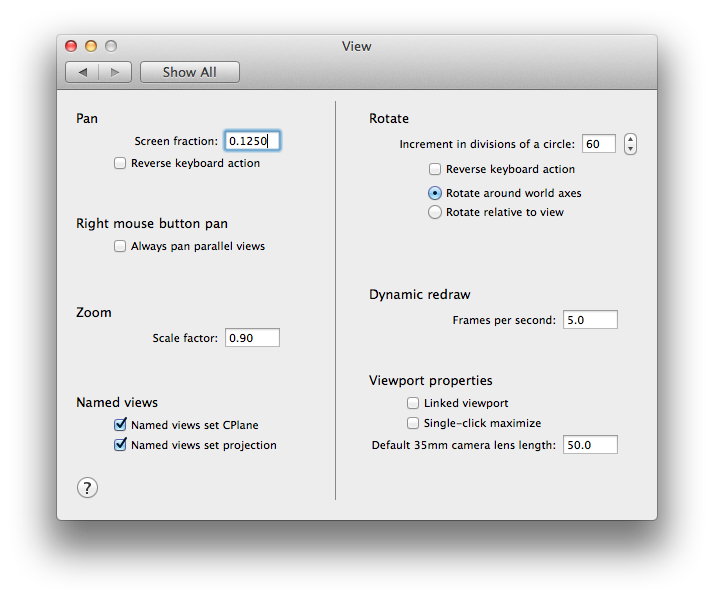

                  Screen Shot 2014-05-06 at 4.24.47 PM.png

                  dotdotdot

                  1 Reply Last reply Reply Quote 0
                  • jiminy-billy-bobJ Offline
                    jiminy-billy-bob
                    last edited by

                    (I'm on it, I think it's doable in ruby)

                    25% off Skatter for SketchUcation Premium Members

                    1 Reply Last reply Reply Quote 0
                    • D Offline
                      driven
                      last edited by

                      @jiminy-billy-bob said:

                      (I'm on it, I think it's doable in ruby)

                      Win32 or ruby?

                      chuck me a PM if win32 and maybe it could be 'cross platform' instead...

                      learn from the mistakes of others, you may not live long enough to make them all yourself...

                      1 Reply Last reply Reply Quote 0
                      • jiminy-billy-bobJ Offline
                        jiminy-billy-bob
                        last edited by

                        @driven said:

                        @jiminy-billy-bob said:

                        (I'm on it, I think it's doable in ruby)

                        Win32 or ruby?

                        chuck me a PM if win32 and maybe it could be 'cross platform' instead...

                        I'll get in touch with you soon. Thanks for offering your help πŸ˜‰

                        Here is a small video showing how it works:
                        [screenr:13bbuhuy]7FgN[/screenr:13bbuhuy]

                        25% off Skatter for SketchUcation Premium Members

                        1 Reply Last reply Reply Quote 0
                        • JQLJ Offline
                          JQL
                          last edited by

                          LOL Jiminy

                          www.casca.pt
                          Visit us on facebook!

                          1 Reply Last reply Reply Quote 0
                          • eidam655E Offline
                            eidam655
                            last edited by

                            @jiminy-billy-bob said:

                            Here is a small video showing how it works:

                            amazing!!! πŸ‘ πŸ‘

                            will this be SU 2014+ only or will it work with SU8 as well? O:-)

                            I'm using SketchUp 2017, V-Ray 3.4

                            1 Reply Last reply Reply Quote 0
                            • KrisidiousK Offline
                              Krisidious
                              last edited by

                              Very nice Jiminy...

                              By: Kristoff Rand
                              Home DesignerUnique House Plans

                              1 Reply Last reply Reply Quote 0
                              • jiminy-billy-bobJ Offline
                                jiminy-billy-bob
                                last edited by

                                Here you go guys: http://sketchucation.com/forums/viewtopic.php?f=323%26amp;t=57638

                                25% off Skatter for SketchUcation Premium Members

                                1 Reply Last reply Reply Quote 0
                                • 1 / 1
                                • First post
                                  Last post
                                Buy SketchPlus
                                Buy SUbD
                                Buy WrapR
                                Buy eBook
                                Buy Modelur
                                Buy Vertex Tools
                                Buy SketchCuisine
                                Buy FormFonts

                                Advertisement




