sketchucation logo sketchucation
    • Login
    Oops, your profile's looking a bit empty! To help us tailor your experience, please fill in key details like your SketchUp version, skill level, operating system, and more. Update and save your info on your profile page today!
    ⚠️ Update | Sketchucation Tools 5.0.8 released with licensing improvements and bugfixes Download

    Large Tools horizontal

    Scheduled Pinned Locked Moved Newbie Forum
    sketchup
    12 Posts 5 Posters 3.3k Views 5 Watching
    Loading More Posts
    • Oldest to Newest
    • Newest to Oldest
    • Most Votes
    Reply
    • Reply as topic
    Log in to reply
    This topic has been deleted. Only users with topic management privileges can see it.
    • G
      GraemeDunne
      last edited by

      It only gives me the selection arrow. No cursor arrow.

      1 Reply Last reply
      Reply Quote 0
      • cottyC
        cotty
        last edited by

        Massimos hints as a Screencast...

        my SketchUp gallery

        1 Reply Last reply
        Reply Quote 0
        • G
          GraemeDunne
          last edited by

          I see the screencast, but I am talking about the standard large tool set, not the BZ or any plugin toolsets. The standard large tool set that comes with Sketch is vertical. My cursor does not change to make it horizontal. How do I do this?

          1 Reply Last reply
          Reply Quote 0
          • TIGT
            TIG Moderator
            last edited by

            @graemedunne said:

            I see the screencast, but I am talking about the standard large tool set, not the BZ or any plugin toolsets. The standard large tool set that comes with Sketch is vertical. My cursor does not change to make it horizontal. How do I do this?
            It doesn't matter which toolbar we are looking at - the 'Large Toolset' toolbar behaves in exactly the same way as in the screencast...
            Of course you must have un-docked any toolbar from the its current bar location [e.g. the side-bar] before trying to change its proportions, but once you have done that then you ought to be able to grab any edge of it and move it to re-proportion its shape... Then you can re-dock in in a top/bottom bar as desired...

            TIG

            1 Reply Last reply
            Reply Quote 0
            • G
              GraemeDunne
              last edited by

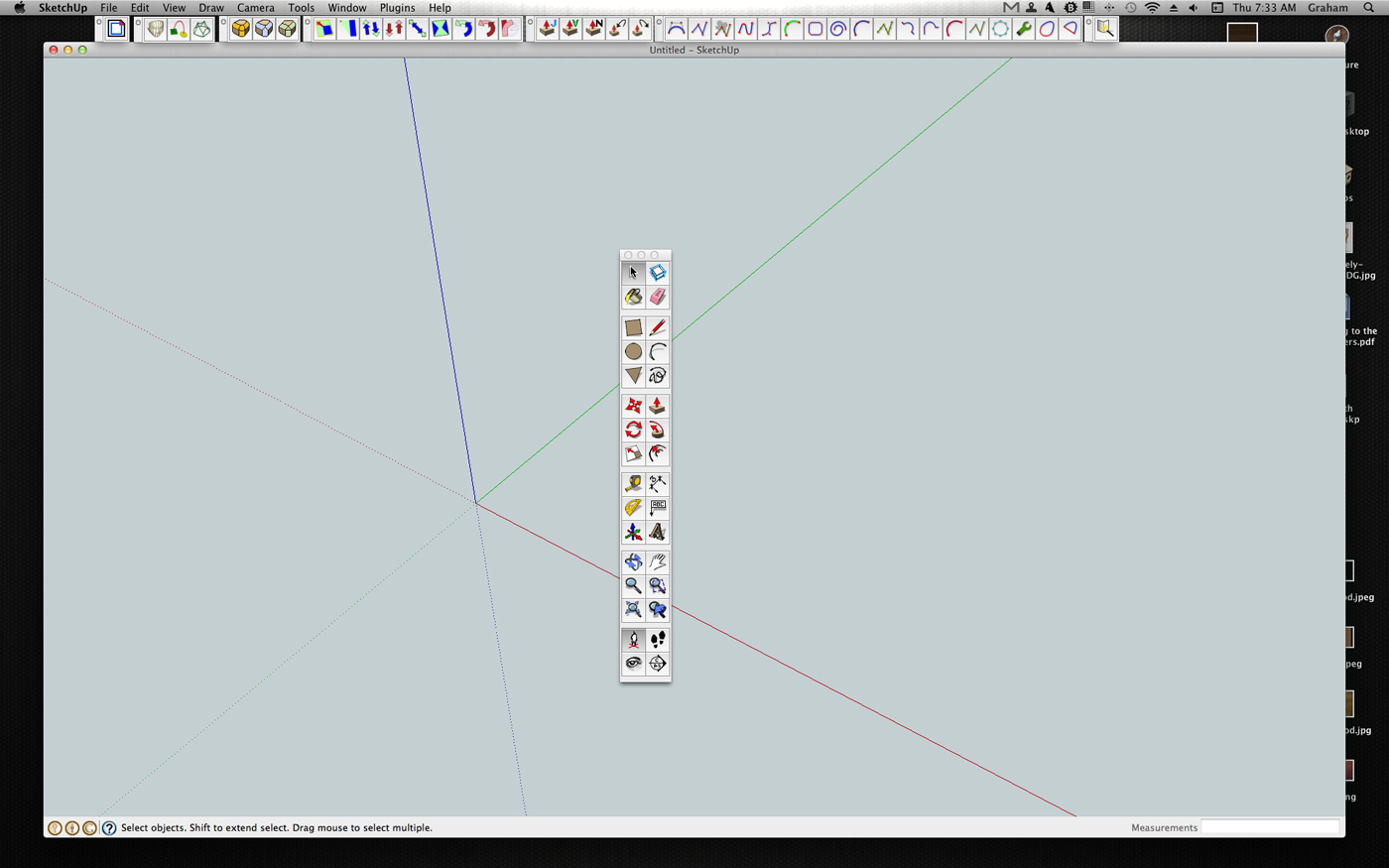
              I have tried docking/undocking. I have moved it all over. It will not go horizontal no matter where I try to grab it from. It just stays vertical. I want it to be horizontal like the other tool bars. Please see screenshot. Do I have a defective copy of Sketch? Is there a plugin for managing tool bars?

              Screen-Shot-2013-04-18-at-7.33.59-AM.jpg

              1 Reply Last reply
              Reply Quote 0
              • TIGT
                TIG Moderator
                last edited by

                In the absence of your details in your profile ! from the screenshot we can now see you are on a MAC...
                All examples so far have been on PC !
                However, the MAC ought to work the same way... πŸ˜•
                I have contacted some MAC aficionados for ideas...

                TIG

                1 Reply Last reply
                Reply Quote 0
                • G
                  GraemeDunne
                  last edited by

                  Ah the age old Mac/PC problem. I suspected as much.

                  1 Reply Last reply
                  Reply Quote 0
                  • Dave RD
                    Dave R
                    last edited by

                    I don't think you can change the orientation of the Large Toolset on Mac. I've never tried too hard because That is close to the default locations for the same tools on PC which I use, too. One thing I do on my Mac is keep the drawing window slightly smaller than the screen so the toolbars are outside the drawing space.

                    Etaoin Shrdlu

                    %

                    (THERE'S NO PLACE LIKE)

                    G28 X0.0 Y0.0 Z0.0

                    M30

                    %

                    1 Reply Last reply
                    Reply Quote 0
                    • G
                      GraemeDunne
                      last edited by

                      Could this be a plugin for the Mac? TIG you are a plugin master...

                      1 Reply Last reply
                      Reply Quote 0
                      • Dave RD
                        Dave R
                        last edited by

                        There is a custom toolbar plugin that might work for you. Look under Jim Foltz in the Plugins directory.


                        Etaoin Shrdlu

                        %

                        (THERE'S NO PLACE LIKE)

                        G28 X0.0 Y0.0 Z0.0

                        M30

                        %

                        1 Reply Last reply
                        Reply Quote 0

                        Hello! It looks like you're interested in this conversation, but you don't have an account yet.

                        Getting fed up of having to scroll through the same posts each visit? When you register for an account, you'll always come back to exactly where you were before, and choose to be notified of new replies (either via email, or push notification). You'll also be able to save bookmarks and upvote posts to show your appreciation to other community members.

                        With your input, this post could be even better πŸ’—

                        Register Login
                        • 1 / 1
                        • First post
                          Last post
                        Buy SketchPlus
                        Buy SUbD
                        Buy WrapR
                        Buy eBook
                        Buy Modelur
                        Buy Vertex Tools
                        Buy SketchCuisine
                        Buy FormFonts

                        Advertisement
