sketchucation logo sketchucation
    • Login
    Oops, your profile's looking a bit empty! To help us tailor your experience, please fill in key details like your SketchUp version, skill level, operating system, and more. Update and save your info on your profile page today!
    ⚠️ Important | Libfredo 15.6b introduces important bugfixes for Fredo's Extensions Update

    [Plugin] Transformation Inspector

    Scheduled Pinned Locked Moved Plugins
    15 Posts 9 Posters 18.4k Views 9 Watching
    Loading More Posts
    • Oldest to Newest
    • Newest to Oldest
    • Most Votes
    Reply
    • Reply as topic
    Log in to reply
    This topic has been deleted. Only users with topic management privileges can see it.
    • pilouP Offline
      pilou
      last edited by

      Does this works for any volumes ? Cylinders etc.. 😳

      Frenchy Pilou
      Is beautiful that please without concept!
      My Little site :)

      1 Reply Last reply Reply Quote 0
      • Rich O BrienR Offline
        Rich O Brien Moderator
        last edited by

        πŸ‘

        Go get some beer πŸ˜‰

        Download the free D'oh Book for SketchUp πŸ“–

        1 Reply Last reply Reply Quote 0
        • thomthomT Offline
          thomthom
          last edited by

          @unknownuser said:

          Does this works for any volumes ? Cylinders etc.. 😳

          It works on Groups and Components - doesn't care for the content.

          @unknownuser said:

          Go get some beer πŸ˜‰

          πŸ‘ πŸ‘
          Will do! πŸ˜„ And I promise there will be a new toy for you soon*!

          *soon being relative to infinite time.

          Thomas Thomassen β€” SketchUp Monkey & Coding addict
          List of my plugins and link to the CookieWare fund

          1 Reply Last reply Reply Quote 0
          • Rich O BrienR Offline
            Rich O Brien Moderator
            last edited by

            Enjoy

            Download the free D'oh Book for SketchUp πŸ“–

            1 Reply Last reply Reply Quote 0
            • TIGT Offline
              TIG Moderator
              last edited by

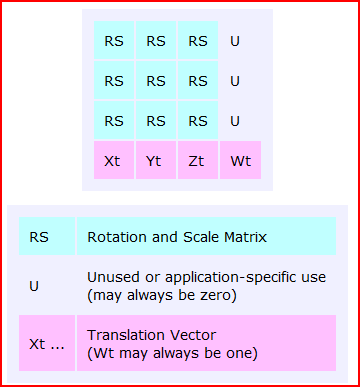
              It would be more 'intuitive' if there was some guidance about which bits of the transformation matrix did what, and how they interact [especially rotation/scaling/handing] etc
              http://www.martinrinehart.com/models/tutorial/tutorial_t.html

              ###
              trans=trans.to_a
              
                      scalex=Math.sqrt(trans[0]**2+trans[1]**2+trans[2]**2)
                      scaley=Math.sqrt(trans[4]**2+trans[5]**2+trans[6]**2)
                      scalez=Math.sqrt(trans[8]**2+trans[9]**2+trans[10]**2)
                               
                      scale=scalex
                      scale=scaley if scaley>scale
                      scale=scalez if scalez>scale
              
                      puts "         <pos>#{trans[12]} #{trans[13]} #{trans[14]}</pos>\n"
                      puts "         <scale>#{scale}</scale>\n"   
                      puts "         <rotation>\n"
                      puts "            <matrix>\n"
                      puts "               #{trans[0]/scalex} #{trans[4]/scaley} #{trans[8]/scalez} #{trans[1]/scalex} #{trans[5]/scaley} #{trans[9]/scalez} #{trans[2]/scalex} #{trans[6]/scaley} #{trans[10]/scalez}\n"
                      puts "            </matrix>\n"
                      puts "         </rotation>\n"


              Capture.PNG

              TIG

              1 Reply Last reply Reply Quote 0
              • thomthomT Offline
                thomthom
                last edited by

                Yea - that is my plan as well. And I want to be able to create matrices from the Geom::Transformation helper methods so one can visualize what they do.

                I started adding tooltips for scaling and translation - but the rotation turned out to be more complex so I put it on hold until I better understood what it did - as RS for the whole 3x3 matrix felt a bit too generic.

                Thomas Thomassen β€” SketchUp Monkey & Coding addict
                List of my plugins and link to the CookieWare fund

                1 Reply Last reply Reply Quote 0
                • PixeroP Offline
                  Pixero
                  last edited by

                  This is great! πŸ‘

                  Actually I have though for some time to do a port of one of my MentalRay plugins that does pretty much the same.
                  Now I don't have to.

                  What I would like is a more user friendly GUI.
                  Something like this:

                  Translate  X  Y  Z
                  Rotate     X  Y  Z
                  Scale      X  Y  Z
                  Shear      X  Y  Z
                  
                  Rotate Order  (dropdown with; 1; XYZ, 2; YZX, 3; ZXY, 4; XZY, 5; YXZ, 6; ZYX
                  Rotate Axis   X  Y  Z
                  
                  World Rotate Pivot   X  Y  Z
                  World Scale Pivot    X  Y  Z
                  

                  Edit: I just realised that you can easily go back to a undeformed state simply by doing a negative transform of the applied one.
                  Thats even better...

                  1 Reply Last reply Reply Quote 0
                  • F Offline
                    function
                    last edited by

                    Thanks TT - I'd grown so used to the Maya channel box that I was making dyna-components that do this - cept I had to make one for every object! 😒 This is so useful.
                    I'd love to see units incorporated and that slick java UI you do. Some sort of mini-icon for the rows might be helpful, too.

                    this is the maya channel box

                    http://i.imgur.com/wTUhE.png

                    1 Reply Last reply Reply Quote 0
                    • M Offline
                      mattao
                      last edited by

                      I'd like a contextual to "reset" a component position.

                      I'd like to be sure my component origin is truly at a 0.0.0 position.

                      Transformation inspector is able to help me to do this ( and it's very efficient and I thank you )

                      By the way I can mount complex scene using External sketchup files as reference, and thanks to you they are perfectly well located in the main scene.

                      Could you help me get a right click substitute for transformation inspector.

                      I'd like to select a component and right click to :
                      TransfoMenu -> reset position
                      TransfoMenu -> reset scale
                      TransfoMenu -> reset rotation
                      TransfoMenu -> reset all

                      thanks

                      1 Reply Last reply Reply Quote 0
                      • Bob JamesB Offline
                        Bob James
                        last edited by

                        Off Subject

                        @thomthom said:

                        And I promise there will be a new toy for you soon*!

                        Speaking of "new toy", what ever happened to the gizmo for Vertex Tools? πŸ˜’

                        i7-4930K 3.4Ghz, 2x GTX780 6GB, 32GB DDR3-1600 ECC, OCZ Vertex 4 500GB, WD Black 3TB, 32TB NAS, 4x 27" Monitors, SpaceMouse Pro, X-keys XK-60

                        1 Reply Last reply Reply Quote 0
                        • thomthomT Offline
                          thomthom
                          last edited by

                          @bob james said:

                          Speaking of "new toy", what ever happened to the gizmo for Vertex Tools? πŸ˜’

                          Summer happened. 😞 And life in general. Sorry it's taking so long.

                          Thomas Thomassen β€” SketchUp Monkey & Coding addict
                          List of my plugins and link to the CookieWare fund

                          1 Reply Last reply Reply Quote 0
                          • thomthomT Offline
                            thomthom
                            last edited by

                            @mattao said:

                            I'd like to select a component and right click to :
                            TransfoMenu -> reset position
                            TransfoMenu -> reset scale
                            TransfoMenu -> reset rotation
                            TransfoMenu -> reset all

                            Reset position would place it at 0,0,0?
                            Reset rotation would align it to the axis of the parent context?

                            Thomas Thomassen β€” SketchUp Monkey & Coding addict
                            List of my plugins and link to the CookieWare fund

                            1 Reply Last reply Reply Quote 0
                            • G Offline
                              glro
                              last edited by

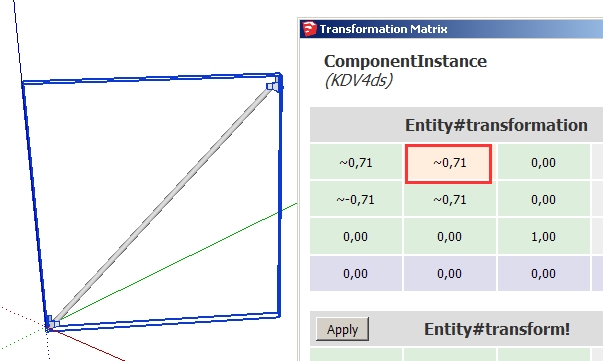
                              transf inspector outputi am trying to understand how the transformation matrix works, and i notice a difference between what is shown in the matrix using your plugin, and what is supposed to be shown refering to http://www.martinrinehart.com/models/tutorial/tutorial_t.html

                              i took a component, rotated it 45 degrees, and this is what "transformation inspector" shows

                              However, according to martinrinehart, i would expect the negative value to be first line second row

                              I am surely missing something; but can you explain the differrence?
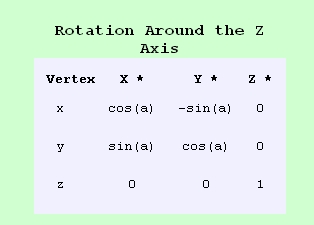

                              rotation matrix

                              1 Reply Last reply Reply Quote 0
                              • G Offline
                                glro
                                last edited by

                                i found the reason

                                404 Not Found

                                favicon

                                (www.ruthless.zathras.de)

                                seems that martinrinehart put the minus sign in the wrong place
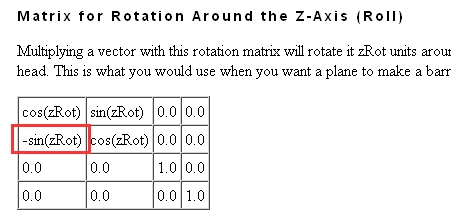

                                rot z

                                1 Reply Last reply Reply Quote 0
                                • 1 / 1
                                • First post
                                  Last post
                                Buy SketchPlus
                                Buy SUbD
                                Buy WrapR
                                Buy eBook
                                Buy Modelur
                                Buy Vertex Tools
                                Buy SketchCuisine
                                Buy FormFonts

                                Advertisement