sketchucation logo sketchucation
    • Login
    Oops, your profile's looking a bit empty! To help us tailor your experience, please fill in key details like your SketchUp version, skill level, operating system, and more. Update and save your info on your profile page today!
    ⚠️ Important | Libfredo 15.6b introduces important bugfixes for Fredo's Extensions Update

    [Plugin] On Screen Rolling Reel v1.1

    Scheduled Pinned Locked Moved Plugins
    16 Posts 11 Posters 12.2k Views 11 Watching
    Loading More Posts
    • Oldest to Newest
    • Newest to Oldest
    • Most Votes
    Reply
    • Reply as topic
    Log in to reply
    This topic has been deleted. Only users with topic management privileges can see it.
    • Rich O BrienR Offline
      Rich O Brien Moderator
      last edited by

      TIG's to blame again for this. It's great for training SketchUp though πŸ‘

      Download the free D'oh Book for SketchUp πŸ“–

      1 Reply Last reply Reply Quote 0
      • boofredlayB Offline
        boofredlay
        last edited by

        Nice one.

        http://www.coroflot.com/boofredlay

        1 Reply Last reply Reply Quote 0
        • thomthomT Offline
          thomthom
          last edited by

          πŸ‘ πŸ‘

          Thomas Thomassen β€” SketchUp Monkey & Coding addict
          List of my plugins and link to the CookieWare fund

          1 Reply Last reply Reply Quote 0
          • massimoM Offline
            massimo Moderator
            last edited by

            So Rich I see that your pupil TIG is learning fast... πŸ‘

            1 Reply Last reply Reply Quote 0
            • Rich O BrienR Offline
              Rich O Brien Moderator
              last edited by

              I can be very persuasive πŸ˜’

              Download the free D'oh Book for SketchUp πŸ“–

              1 Reply Last reply Reply Quote 0
              • HumpmetwiceH Offline
                Humpmetwice
                last edited by

                Thanks! Been waiting for this since I seen it used in one of your videos.

                1 Reply Last reply Reply Quote 0
                • F Offline
                  Fletch
                  last edited by

                  Very nice, Thank you, TIG and Rich! πŸ‘

                  Fletch
                  Twilight Render Cross-platform Plugin for SketchUp on PC or Mac

                  1 Reply Last reply Reply Quote 0
                  • P Offline
                    Panga
                    last edited by

                    @unknownuser said:

                    [flash=800,600:15898dhh]http://www.youtube.com/v/4cE8X2FM3eQ[/flash:15898dhh]

                    It places a piece of screen-text in the top left corner of the screen.

                    It lists the last 5 Tools used and their short-cut keys [if any]
                    e.g. Select 'Space' , Line 'L' , Move 'M'

                    [You can alter the length of the list by changing the '5' in Line#52 below]

                    The most recent Tool is the last in the list.
                    Plugins etc get listed as 'Plugin...'
                    If you erase the screen-text it reappears when you next use another Tool.
                    It is 'off' at the startup - you can toggle it on/off with the Plugins menu item 'On Screen Rolling Reel Toggle'...

                    Donations:
                    by PayPal to info @ revitrev.org


                    Version:
                    1.0 20110419 First Release.
                    1.1 20110420 On/Off Plugins menu toggle added

                    [attachment=0:15898dhh]<!-- ia0 -->OnScreenRollingReel.rbz<!-- ia0 -->[/attachment:15898dhh]

                    Thanks a lot for this plugin Rich ! I have a little question about the video you post, at some times in the videos, we can see the three axes appears on the mouse position, how do you make that happen ? Is that a script or something else ? I'm interested by this one.

                    Regards.

                    1 Reply Last reply Reply Quote 0
                    • Rich O BrienR Offline
                      Rich O Brien Moderator
                      last edited by

                      Windows > Preferences > Drawing > Display Crosshairs πŸ‘

                      Download the free D'oh Book for SketchUp πŸ“–

                      1 Reply Last reply Reply Quote 0
                      • P Offline
                        Panga
                        last edited by

                        Damn...so much time spend on SU and I completely forgot this one 😲 !! Thanks

                        1 Reply Last reply Reply Quote 0
                        • D Offline
                          d12dozr
                          last edited by

                          Just downloaded this -- thanks Rich and TIG!

                          3D Printing with SketchUp Book
                          http://goo.gl/f7ooYh

                          1 Reply Last reply Reply Quote 0
                          • cottyC Offline
                            cotty
                            last edited by

                            @unknownuser said:

                            It lists the last 5 Tools used and their short-cut keys [if any]
                            e.g. Select 'Space' , Line 'L' , Move 'M'

                            Thank you for this nice plugin. The mentioned display of the respective short-cuts doesn't work for me, is there a known reason for this behaviour?
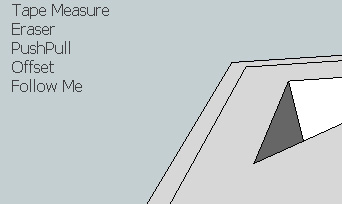
                            forum_onscreen.jpg

                            my SketchUp gallery

                            1 Reply Last reply Reply Quote 0
                            • B Offline
                              barsaglini
                              last edited by

                              does not work on new versions?
                              There is another plugin for video lessons?

                              1 Reply Last reply Reply Quote 0
                              • Dave RD Offline
                                Dave R
                                last edited by

                                It works just fine in SU2013. How did you install it?

                                Etaoin Shrdlu

                                %

                                (THERE'S NO PLACE LIKE)

                                G28 X0.0 Y0.0 Z0.0

                                M30

                                %

                                1 Reply Last reply Reply Quote 0
                                • B Offline
                                  barsaglini
                                  last edited by

                                  I do again, and now works fine =D thks

                                  1 Reply Last reply Reply Quote 0
                                  • 1 / 1
                                  • First post
                                    Last post
                                  Buy SketchPlus
                                  Buy SUbD
                                  Buy WrapR
                                  Buy eBook
                                  Buy Modelur
                                  Buy Vertex Tools
                                  Buy SketchCuisine
                                  Buy FormFonts

                                  Advertisement






