[Plugin] BezierSpline - v2.2a - 22 Apr 21
-
@unknownuser said:
Thank you so much for this fantastic plugin Fredo6. Is there a way to tweak the snap? I'm a little heavy handed with the mouse - it's very easy for the cursor to fall off the line, or to move a line segment instead of a point when editing polylines.
The script relies on the regular Sketchup inferences. So if there is a way to tweak it, then it should be valid for BezierSpline too.
Fredo
-
Thanks for the quick reply Fredo6. It's not in any options that I can see. Perhaps it's something a Ruby script can do. But a cursory search for such a script lead nowhere.
-
Thank you so much for this fantastic plugin Fredo6. Is there a way to tweak the snap? I'm a little heavy handed with the mouse - it's very easy for the cursor to fall off the line, or to move a line segment instead of a point when editing.
-
Mac user here...
The CadFather tools disappeared, I had them working, but after installing the spheretool.rb it they when missing...
-
Dominant XYZ with available?
-
Bump! New version available... http://forums.sketchucation.com/viewtopic.php?p=100509#p100509
-
Thanks Fredo for the new version!

-
hank you Fredo for the update - very usefull tool made moreso

-
I wanted to say thank you for this awesome plugin. The update seems to be working very well.
-
small update on icons
-
@cadfather said:
small update on icons
Could you post it as a Zip file, so that I can integrate it to the distribution of the plugin. I am going to make a small upgrade tonight or tomorrow to fix a problem of toolbar status on Mac.
Thanks very much. Your artistic talent is of greate help.
Fredo
-
-
Thabks Didier, just saw Fredo's post
-
UPGRADE BezierSpline 1.4 - 24 Aug 10
see main post for download.This release of 24 Aug 10is actually a small update to the version 1.4 of 16 Aug 10.
- Fix a bug for state of the toolbar on Mac
- added a menu to check for updates on Sketchucation
- Integrated updated icons by CadFather
BezierSpline 1.4 – 16 Aug 10 is an important upgrade and it is advised to install it:
- Several bugs fixed, among which some majors
- integration of all extensions
- Transformation of curves based on sharing control points (video in main post)
-
..Mercy!
-
i've been using this ruby more and more lately and i'm super relieved to be getting away from using radii for everything..
the main thing stuck in the back of my head and preventing me from learning even more about these types of curves is that i can't really figure out what's happening with them.. more to the point, i can't figure out a way to draw one full scale on-site without using plotted points and/or templates cut via CNC machines..
this example was drawn using Classic Bezier curve.. basically, i started off with the 3'x11' rectangle then placed the 4 control points shown with the red numbers..
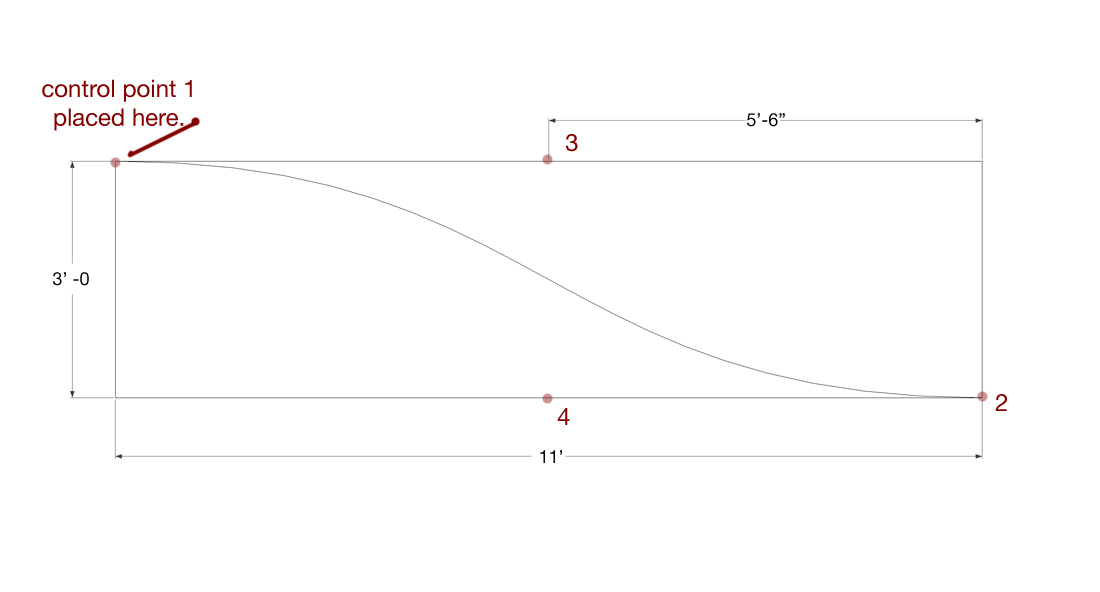
does anyone know of any practical way to reproduce that line on a job site? or, any decent sources online where i can learn about these types of curves as they apply to a construction minded person (as opposed to a college minded person)
-
i haven't really found anything yet but here are a few visuals from wiki that are helping me wrap my head around what's going on..


[and i guess those example are different than the one in my post above this.. these are B-splines if i'm understanding the differences correctly]
-
These are regular Bezier curves (which are a particular case of BSplines).
Fredo
PS: on my long list of things to evolve is precisely a tool to draw splines with control of tangents.
-
Jeff, I've wondered about reproducing curves like that, too. Clearly a flexible batten would be useful but I wonder about setting points 3 and 4, then. Just some free thinking here. If you made the batten to the exact length of the curve and fastened the ends in place, could you push or pull the batten to the desired shape?
Another thought that would get you pretty close and may be more practical anyway is to do what boat builders do when lofting a boat. They identify points through which the curve passes at regular intervals along the length (stations in boat builders' terms) and offsets from a reference line (buttocks vertically or half-breadths horizontally since you only loft half a boat.) small nails are driven in at the points and a batten is sprung round the nails. Sight from low at one end of the batten to check to see if the curve is fair.
-
hi Dave,
yes, good ideas there. the one about cutting the batten to length and fastening the ends would probably be the best for me.. i could then plot 3-4 points throughout the curve and get it within a 1/4 or so (which is the greatest tolerance i'd be comfortable with).. still, it sounds a whole lot better than plotting 20-30 points along the line (which i've done in the past and it's not too much fun
 )
)with some of the more complex builds, i'll often use a curved template to hang other curved templates on in order to form the complex surfaces. (and on a few occassions, it's been 3-fold).. if the curve is the base curve then i want it to be pretty damn accurate or else the mistakes are going to multiply rather quickly throughout the build.
i'm also sort of warming up to the idea of using a large scale printer which i can basically draw all the lines on a huge sheet of paper that i'll need throughout the build.. i could then use some contact spray and put the lines directly on the material and cut that way..
have you ever tried anything like that?[edit] well then there's the case of sketchup being sketchup and not drawing exact curves.. as long as i draw with the vertices in the right place then i can build accurately from a .skp but in this case where i'm thinking about using an entire curved line, i'm basically back to the plotting idea and/or redrawing in rhino(which would sort of defeat the purpose of using sketchup)..








Hello! It looks like you're interested in this conversation, but you don't have an account yet.
Getting fed up of having to scroll through the same posts each visit? When you register for an account, you'll always come back to exactly where you were before, and choose to be notified of new replies (either via email, or push notification). You'll also be able to save bookmarks and upvote posts to show your appreciation to other community members.
With your input, this post could be even better 💗
Register Login


Advertisement