[Plugin] Pivot Around Axis
-
Overview
Quickly wrote a tool to rotate components around their axis.Access
Tools -> Pivot around Axis
(Supports ThomThom's Menu)Usage
- Select an Component
- Activate the tool
- Click an axis and drag up/down to rotate about that axis

-
Awesome, Thomas! Simple to use and extremely useful for positioning. (Thinking positionable figures and lego.)
-
I'm not happy about the controls, up and down. I want the position of the cursor in 3D space to affect the rotation.
But it's one for later, this one was a quicky. -
Thomas, Nice. Having wrote a very limited "point a component" plugin (limited to pointing the zaxis), I am amazed at what you consider a "quickie". Thanks!!!
-
Thanks Thom

Very useful
At this rate you turn into.........

-
So add a move, & scale function and you will have an universal manipulator

No possible to adapt the mouse movement after the axe clicked with the arrow keys?
-
Yeah--what Pilou says--universal manipulator.
-
I started that plugin once, but ended stopping because I don't like to use the universal tool. Is that something that people all really want? Thom is on his way there with this one!
Chris
-
-
@unknownuser said:
So add a move, & scale function and you will have an universal manipulator
This plugin does that: http://forums.sketchucation.com/viewtopic.php?f=323&t=20346
But it does not default to the component axis unfortunately. (which was what I needed)@unknownuser said:
No possible to adapt the mouse movement after the axe clicked with the arrow keys?
Good idea.
@bagatelo said:
Why we cannot enter number for rotation by keyboard?
Another good idea.
I might just come back to this plugin and improve it. Though currently VertexEdit is my top priority. This pivot plugin was one I needed at the office.
@chris fullmer said:
I started that plugin once, but ended stopping because I don't like to use the universal tool. Is that something that people all really want?
Me for instance.
 I like universal gizmos. They are present in many 3d modelling packages.
But the object of this plugin was to manipulate components while anchored to their axis, something I really miss in SU. -
I wanted to test what happened if I tried to pivot a 2d cutout component...
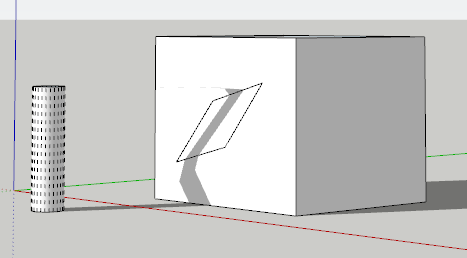
SU just accepted it. And the face it was stuck to appeared to deform as well, without any edges appearing.
But of course when you run Fix Problems:
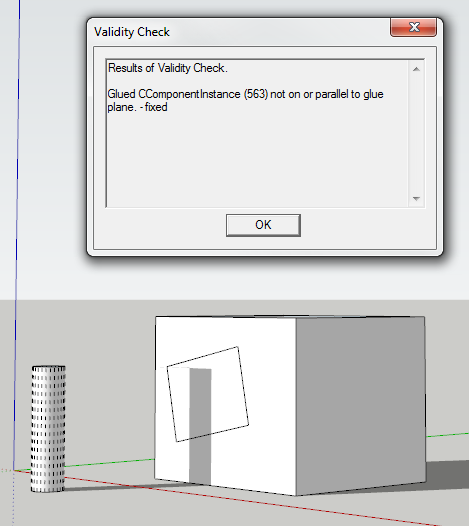
-
Nice work, mate.
All those cookies, you might seriously consider a dental plan coverage. -
@snowflake said:
Nice work, mate.
All those cookies, you might seriously consider a dental plan coverage.No need! This book is all I need:

Besides, virtual cookies are low on sugar.

-
It's just very natural to want to enter the exact angle in the VCB after rotating the component.
-
Yup. I added a couple of things today, like being able to rotate groups. And click on other instances to adjust another object without existing the tool. Will hook up the VCB shortly.
-
It'S pity it Can not enter values
-
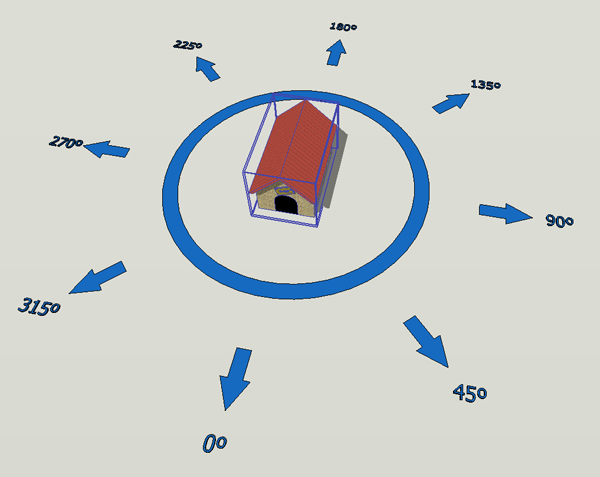
I was thinking about a new possibility for this tool. It would be like this: we selected the object, we activated the tool, and they appear in the screen a circular menu around the object with possibilities of we can rotate the object in predefine angles , as for instance, in 45 degrees. In the image example, only the dog house is geometry, the rest is the menu. For rotate the object, we chose desired arrow.
-
Have you installed "ThomThom's Menu" ? If you did - then the location is different than the default
Toolsmenu. -
I new to installing plug-ins to sketchup. I've installed your script into the plugins folder but nothing is showing up in the tools menu after restarting sketchup. I'm using SU 7.1.
-
Thank-you -- fits a need I've had perfectly.
Best,
Jason.








Hello! It looks like you're interested in this conversation, but you don't have an account yet.
Getting fed up of having to scroll through the same posts each visit? When you register for an account, you'll always come back to exactly where you were before, and choose to be notified of new replies (either via email, or push notification). You'll also be able to save bookmarks and upvote posts to show your appreciation to other community members.
With your input, this post could be even better 💗
Register Login


Advertisement