sketchucation logo sketchucation
    • Login
    Oops, your profile's looking a bit empty! To help us tailor your experience, please fill in key details like your SketchUp version, skill level, operating system, and more. Update and save your info on your profile page today!
    Mac User? | Join the Rayscaper Beta for Mac Learn More

    [Plugin] Pivot Around Axis

    Scheduled Pinned Locked Moved Plugins
    32 Posts 15 Posters 29.3k Views 15 Watching
    Loading More Posts
    • Oldest to Newest
    • Newest to Oldest
    • Most Votes
    Reply
    • Reply as topic
    Log in to reply
    This topic has been deleted. Only users with topic management privileges can see it.
    • thomthomT
      thomthom
      last edited by thomthom

      Overview
      Quickly wrote a tool to rotate components around their axis.

      Access
      Tools -> Pivot around Axis
      (Supports ThomThom's Menu)

      Usage

      • Select an Component
      • Activate the tool
      • Click an axis and drag up/down to rotate about that axis

      404 Not Found

      favicon

      (sketchucation.com)


      Cookieware.png

      Thomas Thomassen — SketchUp Monkey & Coding addict
      List of my plugins and link to the CookieWare fund

      1 Reply Last reply
      Reply Quote 0
      • J
        Jim
        last edited by

        Awesome, Thomas! Simple to use and extremely useful for positioning. (Thinking positionable figures and lego.)

        Hi

        1 Reply Last reply
        Reply Quote 0
        • thomthomT
          thomthom
          last edited by

          I'm not happy about the controls, up and down. I want the position of the cursor in 3D space to affect the rotation.
          But it's one for later, this one was a quicky.

          Thomas Thomassen — SketchUp Monkey & Coding addict
          List of my plugins and link to the CookieWare fund

          1 Reply Last reply
          Reply Quote 0
          • honoluludesktopH
            honoluludesktop
            last edited by

            Thomas, Nice. Having wrote a very limited "point a component" plugin (limited to pointing the zaxis), I am amazed at what you consider a "quickie". Thanks!!!

            1 Reply Last reply
            Reply Quote 0
            • Rich O BrienR
              Rich O Brien Moderator
              last edited by

              Thanks Thom 👍

              Very useful

              At this rate you turn into.........

              http://brokenman.files.wordpress.com/2008/07/cookiemonster.jpg

              Download the free D'oh Book for SketchUp 📖

              1 Reply Last reply
              Reply Quote 0
              • pilouP
                pilou
                last edited by

                So add a move, & scale function and you will have an universal manipulator 😉 👍

                No possible to adapt the mouse movement after the axe clicked with the arrow keys?

                Frenchy Pilou
                Is beautiful that please without concept!
                My Little site :)

                1 Reply Last reply
                Reply Quote 0
                • mitcorbM
                  mitcorb
                  last edited by

                  Yeah--what Pilou says--universal manipulator.

                  I take the slow, deliberate approach in my aimless wandering.

                  1 Reply Last reply
                  Reply Quote 0
                  • Chris FullmerC
                    Chris Fullmer
                    last edited by

                    I started that plugin once, but ended stopping because I don't like to use the universal tool. Is that something that people all really want? Thom is on his way there with this one!

                    Chris

                    Lately you've been tan, suspicious for the winter.
                    All my Plugins I've written

                    1 Reply Last reply
                    Reply Quote 0
                    • bagateloB
                      bagatelo
                      last edited by

                      Why we cannot enter number for rotation by keyboard?
                      The files above make me very happy too, because I set
                      keyboard keys... but "Pivot Around Axis" may be useful.


                      rot1.rb


                      rot45.rb

                      While the cat's away, the mice will play

                      1 Reply Last reply
                      Reply Quote 0
                      • thomthomT
                        thomthom
                        last edited by

                        @unknownuser said:

                        So add a move, & scale function and you will have an universal manipulator 😉 👍

                        This plugin does that: http://forums.sketchucation.com/viewtopic.php?f=323&t=20346
                        But it does not default to the component axis unfortunately. (which was what I needed)

                        @unknownuser said:

                        No possible to adapt the mouse movement after the axe clicked with the arrow keys?

                        Good idea.

                        @bagatelo said:

                        Why we cannot enter number for rotation by keyboard?

                        Another good idea.

                        I might just come back to this plugin and improve it. Though currently VertexEdit is my top priority. This pivot plugin was one I needed at the office.

                        @chris fullmer said:

                        I started that plugin once, but ended stopping because I don't like to use the universal tool. Is that something that people all really want?

                        Me for instance. 😄 I like universal gizmos. They are present in many 3d modelling packages.
                        But the object of this plugin was to manipulate components while anchored to their axis, something I really miss in SU.

                        Thomas Thomassen — SketchUp Monkey & Coding addict
                        List of my plugins and link to the CookieWare fund

                        1 Reply Last reply
                        Reply Quote 0
                        • thomthomT
                          thomthom
                          last edited by

                          I wanted to test what happened if I tried to pivot a 2d cutout component...
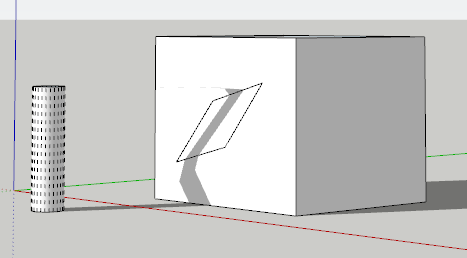
                          pivot2d.png

                          SU just accepted it. And the face it was stuck to appeared to deform as well, without any edges appearing.

                          But of course when you run Fix Problems: 😉
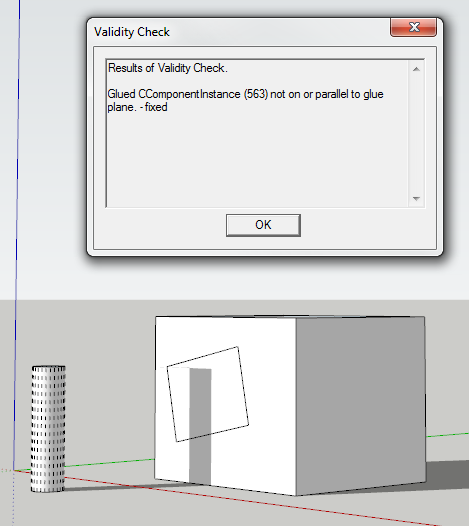
                          pivotfix.png

                          Thomas Thomassen — SketchUp Monkey & Coding addict
                          List of my plugins and link to the CookieWare fund

                          1 Reply Last reply
                          Reply Quote 0
                          • S
                            snowflake
                            last edited by

                            Nice work, mate.
                            All those cookies, you might seriously consider a dental plan coverage.

                            1 Reply Last reply
                            Reply Quote 0
                            • thomthomT
                              thomthom
                              last edited by

                              @snowflake said:

                              Nice work, mate.
                              All those cookies, you might seriously consider a dental plan coverage.

                              No need! This book is all I need:
                              http://ecx.images-amazon.com/images/I/51ysLwPesOL._SS500_.jpg

                              Besides, virtual cookies are low on sugar. 😞

                              Thomas Thomassen — SketchUp Monkey & Coding addict
                              List of my plugins and link to the CookieWare fund

                              1 Reply Last reply
                              Reply Quote 0
                              • J
                                Jim
                                last edited by

                                It's just very natural to want to enter the exact angle in the VCB after rotating the component.

                                Hi

                                1 Reply Last reply
                                Reply Quote 0
                                • thomthomT
                                  thomthom
                                  last edited by

                                  Yup. I added a couple of things today, like being able to rotate groups. And click on other instances to adjust another object without existing the tool. Will hook up the VCB shortly.

                                  Thomas Thomassen — SketchUp Monkey & Coding addict
                                  List of my plugins and link to the CookieWare fund

                                  1 Reply Last reply
                                  Reply Quote 0
                                  • H
                                    hsjzyangbin
                                    last edited by

                                    It'S pity it Can not enter values

                                    1 Reply Last reply
                                    Reply Quote 0
                                    • bagateloB
                                      bagatelo
                                      last edited by

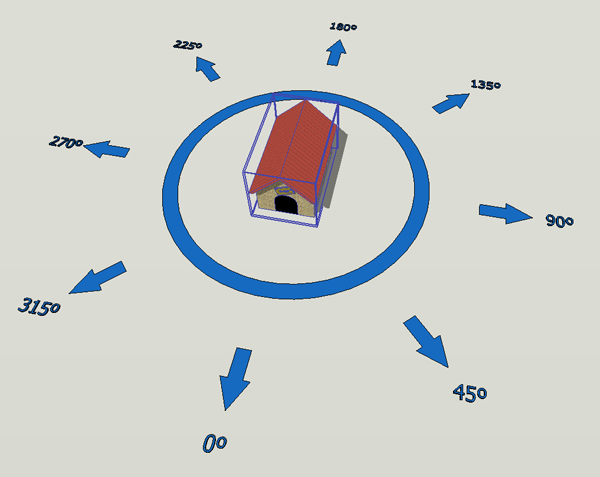
                                      I was thinking about a new possibility for this tool. It would be like this: we selected the object, we activated the tool, and they appear in the screen a circular menu around the object with possibilities of we can rotate the object in predefine angles , as for instance, in 45 degrees. In the image example, only the dog house is geometry, the rest is the menu. For rotate the object, we chose desired arrow.

                                      circulos.jpg

                                      While the cat's away, the mice will play

                                      1 Reply Last reply
                                      Reply Quote 0
                                      • thomthomT
                                        thomthom
                                        last edited by

                                        Have you installed "ThomThom's Menu" ? If you did - then the location is different than the default Tools menu.

                                        Thomas Thomassen — SketchUp Monkey & Coding addict
                                        List of my plugins and link to the CookieWare fund

                                        1 Reply Last reply
                                        Reply Quote 0
                                        • A
                                          alfort
                                          last edited by

                                          I new to installing plug-ins to sketchup. I've installed your script into the plugins folder but nothing is showing up in the tools menu after restarting sketchup. I'm using SU 7.1.

                                          1 Reply Last reply
                                          Reply Quote 0
                                          • jason_marantoJ
                                            jason_maranto
                                            last edited by

                                            Thank-you -- fits a need I've had perfectly.

                                            Best,
                                            Jason.

                                            I create video tutorial series about several 2D & 3D graphics programs.

                                            1 Reply Last reply
                                            Reply Quote 0

                                            Hello! It looks like you're interested in this conversation, but you don't have an account yet.

                                            Getting fed up of having to scroll through the same posts each visit? When you register for an account, you'll always come back to exactly where you were before, and choose to be notified of new replies (either via email, or push notification). You'll also be able to save bookmarks and upvote posts to show your appreciation to other community members.

                                            With your input, this post could be even better 💗

                                            Register Login
                                            • 1
                                            • 2
                                            • 1 / 2
                                            • First post
                                              Last post
                                            Buy SketchPlus
                                            Buy SUbD
                                            Buy WrapR
                                            Buy eBook
                                            Buy Modelur
                                            Buy Vertex Tools
                                            Buy SketchCuisine
                                            Buy FormFonts

                                            Advertisement