sketchucation logo sketchucation
    • Login
    1. Home
    2. sdmitch
    3. Posts
    Oops, your profile's looking a bit empty! To help us tailor your experience, please fill in key details like your SketchUp version, skill level, operating system, and more. Update and save your info on your profile page today!
    ⚠️ Important | Libfredo 15.6b introduces important bugfixes for Fredo's Extensions Update
    Offline
    • Profile
    • Following 0
    • Followers 4
    • Topics 54
    • Posts 1,483
    • Groups 2

    Posts

    Recent Best Controversial
    • RE: [Plugin] Bolt Maker (Final Update 7-Feb-2012)

      @jim said:

      Sam, I'm getting this error when trying to bolt through the same instance:

      @unknownuser said:

      Error: #<NoMethodError: undefined method distance' for nil:NilClass> C:/Plugins/bolt maker.rb:205:in drill_hole'
      C:/Plugins/bolt maker.rb:148:in `onLButtonDown'

      Because of the nature of components, how could you possibly drill a single hole through the two copies. There is only one situation where that is possible and that is if two instances are stacked and orientated exactly the same. Otherwise, at best you get a bolt on one end and an empty hole on the other.

      posted in Plugins
      sdmitchS
      sdmitch
    • RE: [Plugin] Bolt Maker (Final Update 7-Feb-2012)

      As I see it, the problem with making the nut and bolt set a component is that you would have to create one for every conceivable diameter and length which wouldn't be any different than creating them as groups. I also see no advantage in requiring 2 additional points to define length and direction. Drilling the hole through the components would be impossible if direction is not perpendicular to the faces. The head of the bolt is always on the first component so the order of selection determines direction.

      posted in Plugins
      sdmitchS
      sdmitch
    • RE: [Plugin] Follow Me Helix (Updated 06-Jan-2012)

      Jon, After further testing, it looks like my last "improvement" wasn't an improvement at all so I have re-posted the privious version. I haven't been able to eliminate the "kinks" yet but it is still something that I am thinking about and have a few more ideas to try.

      posted in Plugins
      sdmitchS
      sdmitch
    • RE: [Plugin] Component Array (Updated 27-Mar-2014)

      @earthmover said:

      Thanks Sam! You came through as always. πŸ‘ πŸ‘ It would be great to see this developed even further. Perhaps adding functionality for choosing up to three different components and randomly distributing them in the array. Perhaps also an option to randomize scale. Being that this started as a vegetation plugin, those things would make it great for mass plantings. It's a nice simplified version of component spray.

      I already did that, at least partially, it's called RandomComponentReplacement.

      posted in Plugins
      sdmitchS
      sdmitch
    • RE: [Plugin] Component Array (Updated 27-Mar-2014)

      TIG, thanks for the tip. I had worked it out a different way but I think I like your method better.

      posted in Plugins
      sdmitchS
      sdmitch
    • RE: [REQ] Component array formerly Triangular array

      Well I don't know all that exists. I simply see a request and try to offer a solution. If Chris has a plugin that does this then it is no doubt better than mine I would suggest you use it.

      posted in Plugins
      sdmitchS
      sdmitch
    • RE: [Plugin] Follow Me Helix (Updated 06-Jan-2012)

      @jdadesignstudio said:

      Hmm...still having issues. Take a look at the images below-the line and arc both had the same parameters plugged into the helix plugin. I also tried changing the number of segments in the arc (to change the length of the segments) anywhere from 2 segments up to 92 segments. It seems where 2 line segments intersect, it creates a crooked piece...Let me know what you think.
      Thanks,
      Jon

      Yes that happens because the linear increment starts on one segment and ends on the next one.
      Again, the linear increment you are using is to long for the curve you are trying to follow. Sometimes the curve and what you want just doesn't work.

      posted in Plugins
      sdmitchS
      sdmitch
    • RE: [Plugin] Component Array (Updated 27-Mar-2014)

      @unknownuser said:

      Is there any reason the component selection window includes groups? Lots of components include sub-groups and that makes the list quite lengthy. Would it make more sense to only include components? Maybe you have a reason including groups that I'm missing.

      No your not missing anything. The API model.definitions is suppose to only return components but apparently not. So far I haven't figured out how to filter the groups out.

      I doubt if there is a way to distinguish between a sub-component and the component containing it. The best I can do for now is suggest you know the name of the component you want and type the first letter. That will allow you to step through the list to find it.

      Oh no it isn't, I've just figured it out. Thanks for the question.

      posted in Plugins
      sdmitchS
      sdmitch
    • RE: [REQ] Component array formerly Triangular array

      @unknownuser said:

      One plugin to rule them all.
      'Array plugin' which has the Triangular, Rectangular, and Rectangular on 45deg (or defineable angle) arrays.
      Possible?

      Sure.

      http://forums.sketchucation.com/viewtopic.php?f=323&t=40244

      posted in Plugins
      sdmitchS
      sdmitch
    • RE: [REQ] Component array formerly Triangular array

      @justo said:

      :sketchstatic:

      Would I be painful if I was to ask if the angle could be selectable so it could be set for 45deg and 0 deg, just so all the arrays are in one spot? (Im looking at the script and dont understand any of it to try to do it myself)

      Thanks everyone for your input!

      Added angle input and 3d capability so face can be tilted.

      @unknownuser said:

      so all the arrays are in one spot?
      Not sure what you mean.

      Plugin can be found at
      http://forums.sketchucation.com/viewtopic.php?f=323&t=40244

      posted in Plugins
      sdmitchS
      sdmitch
    • RE: [REQ] Component array formerly Triangular array

      justo, try this plugin, I think it will do what you want.

      Plugin can be found at
      http://forums.sketchucation.com/viewtopic.php?f=323&t=40244


      results tor Triangular Array.rb

      posted in Plugins
      sdmitchS
      sdmitch
    • [Plugin] Component Array (Updated 27-Mar-2014)

      Made SU2014 compatible

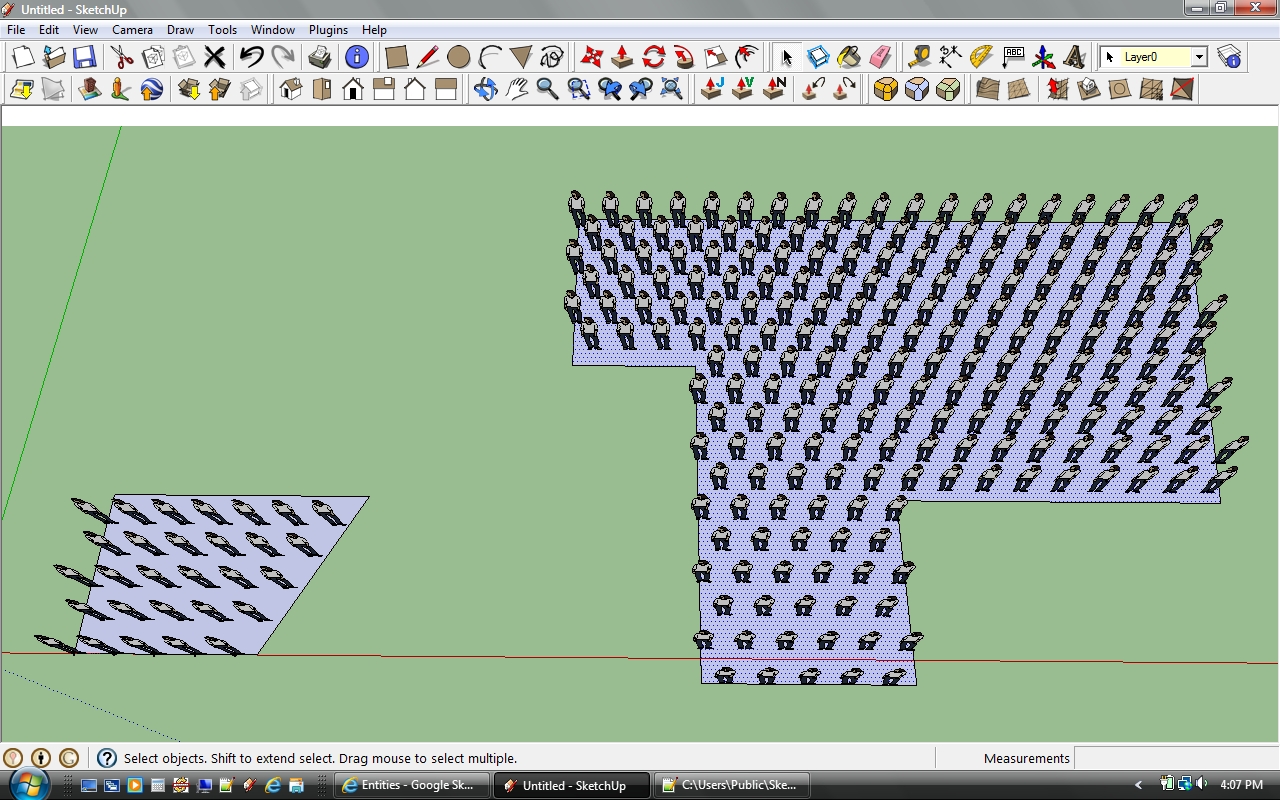
      Generates a component array on selected face. Input consist of the component to place, the XY spacing, the rotation angle of the grid, if the grid is to be rectangular or triangular, and if components are to be placed vertically or perpendicular to the face.

      The point of origin for the grid is placed well outside the face to allow for any rotation of the face itself. A component is placed at each grid point that falls on the face. Depending on the origin of the component, the first component placed in each row my be inside the face boundary and the last component placed may extend outside the face boundary.

      Please get the latest version from the PluginStore http://sketchucation.com/pluginstore?pln=Component_Array

      posted in Plugins
      sdmitchS
      sdmitch
    • RE: [REQ] Component array formerly Triangular array

      Justin, If you have a 1m X 2m component then,pt0.offset!(xa,interval) and pt0.offset!(ya,interval*2) or add a seperate input for the Y interval.

      Jolran, I assume you want the option to place the components perpendicular to the face?

      TIG, done.

      Chris, will do.

      posted in Plugins
      sdmitchS
      sdmitch
    • RE: [Plugin] Follow Me Helix (Updated 06-Jan-2012)

      @jdadesignstudio said:

      Not sure if im missing something obvious, but mine are coming out very choppy...:

      It is usually a function of the linear increment entered and the length of the segments in the path. The increment entered is to long in comparison with the segments of the path in your case.

      posted in Plugins
      sdmitchS
      sdmitch
    • RE: [Plugin] Bolt Maker (Final Update 7-Feb-2012)

      Jim, Thanks for the info. That is something I never tested because I assumed the components would be unique since "drilling" a hole in one would effect them all.

      posted in Plugins
      sdmitchS
      sdmitch
    • RE: [Plugin] Bolt Maker (Final Update 7-Feb-2012)

      @unknownuser said:

      I also love this plugin but while using it, it messes up the hole some how. See image to see whats happening.

      Thanks Kurt

      I've never seen that problem before? How often does it occur? At what diameter?

      posted in Plugins
      sdmitchS
      sdmitch
    • RE: [Plugin] Bolt Maker (Final Update 7-Feb-2012)

      @jonorman said:

      :berserk:

      Dang that is sweet, just like the one i`m used to at work...

      couple of questions. can the bolt be made more "realistic" ?? Is the bolt made by the script or can it pick one from a folder or a "bolt inventory" ??

      Bug: the bolt has reversed faces..

      Again a million thank you for this script.... β˜€

      More "realistic"? In what way?
      The bolt is totally made by script.
      Reversed faces. Is that a significant problem?

      posted in Plugins
      sdmitchS
      sdmitch
    • [Plugin] Bolt Maker (Final Update 7-Feb-2012)

      In response to http://forums.sketchucation.com/viewtopic.php?f=323%26amp;t=39998

      Bolt Maker XII the final edition.

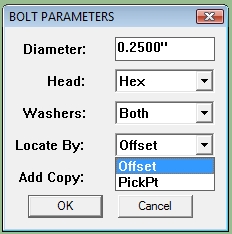
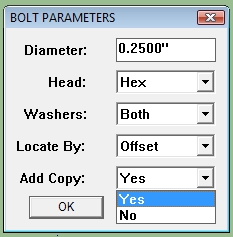
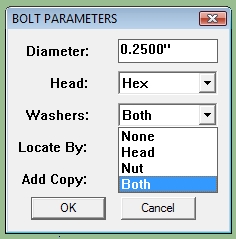
      Enter the diameter of the bolt, pick a head type(Hex or Cap), pick washer locations(none,head,nut,both)
      choose locating method(Offset,PickPt), and indicate if mutiple copies will be placed. The locate by Offset now accepts any two edges of the face to define the offset. The only requirement is that the offsets intersect on the face. The bolts are initial created as a group but is converted to a component before placement. The head type,diameter,length, and washer configuration is used to name the component thus allowing the rapid placement of multiple instances of the same bolt component.
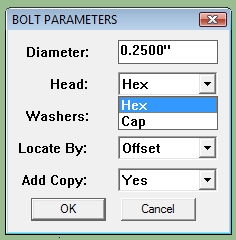
      boltmaker2.jpgboltmaker3.jpgboltmaker4.jpgboltmaker5.jpg

      After clicking OK to set the bolt parameters, you can keyin a fixed length for the bolt if you are bolting one piece to another where a nut is not required.

      The entities to be bolted together no longer have to be groups or components. Almost any shape can be used, I-beam, channel, pipe. The only reqirement is that the drill holes fall intirely inside the faces. Partial holes are not permited.

      Go to the Plugin Store for latest version.

      posted in Plugins
      sdmitchS
      sdmitch
    • RE: REQ: BOLT CREATOR

      jonorman, well it is no where near as fancy as the bolt creator pictured in last post but it beats nothing. Check out my feable attempt in [Plugin] Bolt Maker.

      posted in Plugins
      sdmitchS
      sdmitch
    • RE: One shot plugin

      @solo said:

      sdmitch,

      I've been wishing for something like this for SU, I'm wondering if you could look at it, ponder it, and maybe even if it's a huge endeavor consider making it either free or commercially.

      http://www.thebest3d.com/archipelis/

      Your estimation of my abilities are far from reality. I'm still a novice. Something like archipelis is way beyond me.

      posted in Plugins
      sdmitchS
      sdmitch
    • 1
    • 2
    • 66
    • 67
    • 68
    • 69
    • 70
    • 74
    • 75
    • 68 / 75