They have tutorials on how to do it.
Oops, your profile's looking a bit empty! To help us tailor your experience, please fill in key details like your SketchUp version, skill level, operating system, and more. Update and save your info on your profile page today!
Urasik Extensions | Lots of new extensions to check out Learn More
 Offline
Posts
-
RE: Interiors, VR and more...
@jo-ke said:
Very nice.
Is that the current version of pano2VR?
Maybe I should update....
Thanks, yes it's the latest version.
I made the hotspot icons though.
The default ones were to obvious and I wanted something that didn't interfere too much. -
RE: Interiors, VR and more...
Thanks. I think the animation processing took less than an hour for the whole 4 minutes.
-
RE: Interiors, VR and more...
As a follow up, here is a link to a VR presentation of the apartment:
https://whiteclients.se/angelholmshem/saftstationen/And one of the exterior renders.
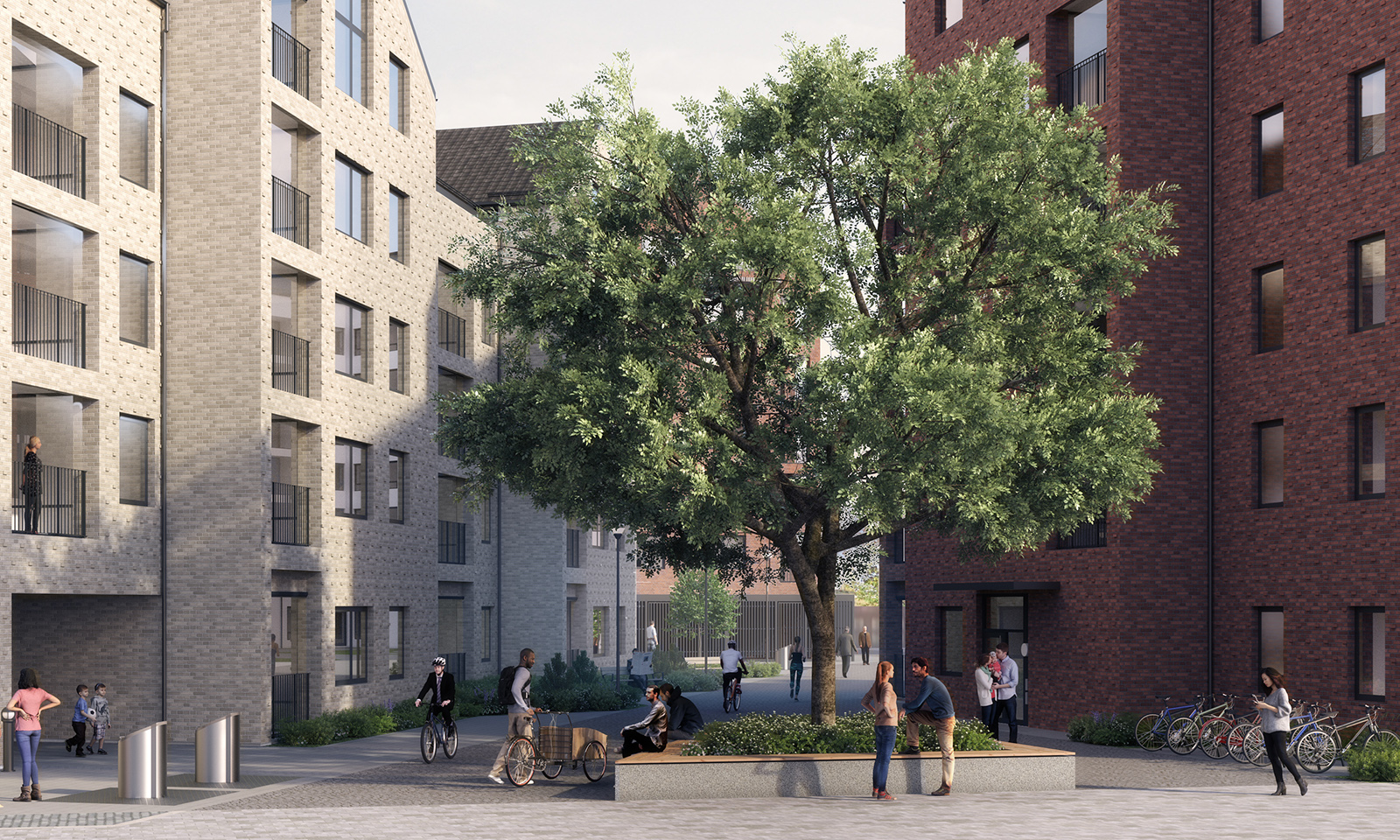
And here is a video presenting the project. (made with Enscape).
I can't embed the video but here is a link.
http://player.vimeo.com/video/321706799 -
RE: 3pt Window Dresser
v1.1
Released a small update with random placement of the plant. Thanks for the idea juju. -
RE: 3pt Window Dresser
Not in this first version.
I have ideas for more than one plant, blinds and even lamps and perhaps low poly objects but I wanted to finish v1.
I have been using image planes for this for some time but doing it by hand.
I just wanted something that was faster. -
3pt Window Dresser
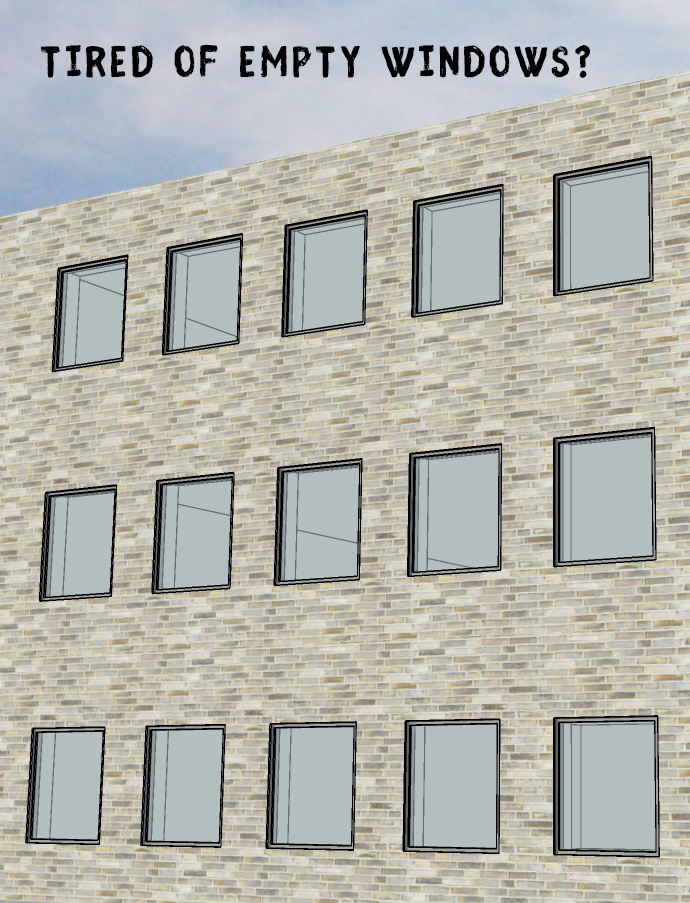
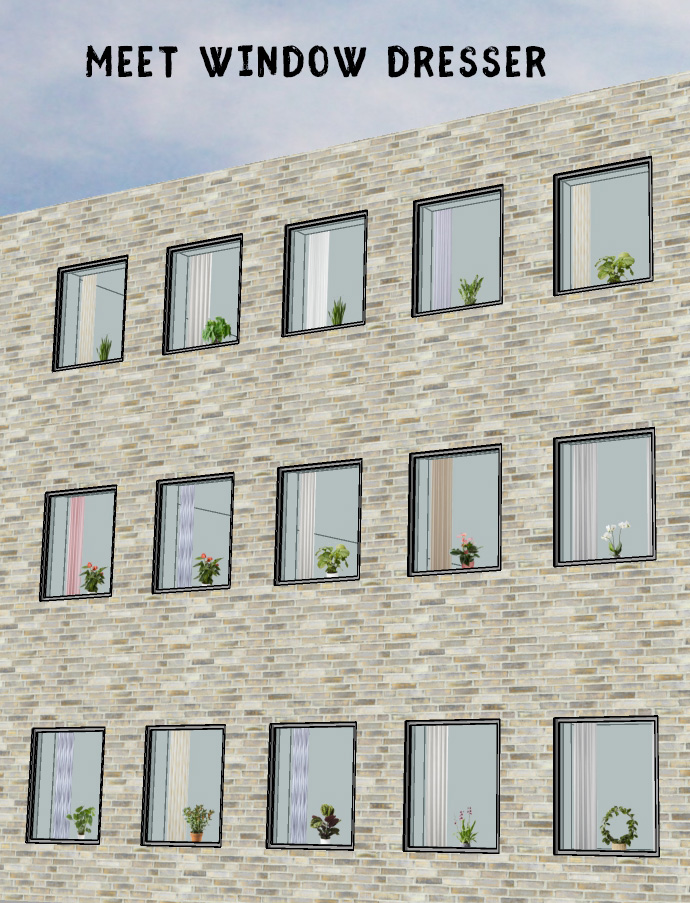
Choose your wall thickness (in mm) and click: top left, top right and bottom right corner to create curtains and a plant for your window.
The curtains color and width are randomly chosen from 12 different materials. The plants are randomly chosen from 17 different plants.
If you don't like the result you can either delete it and create another one or right click on the selected component and choose Dynamic Component > Component options.The curtains and plants are simple image planes meant to easily liven up you exterior shots and will probably not look as good for a close up.
This extension works well with my 3pt Window plugin.Available in the plugin store.
-
RE: Sorting Plugins in Menu
@TIG
Would it be possible with a script to create a sortable custom plugins menu in a floating window/toolbar? -
RE: Imported .dwg converted from Revit
I think Thomthom has a script that removed materials from groups, components and edges.
-
RE: SketchUp 2019 updates
Well...the most annoying thing is that they are trying to force us to go into subscription.
And hiding away the permanent license where barely anyone can see it. -
RE: SU 8 PRO VRS SU 2018 PRO
@mike amos said:
Getting hold of v8 might just be a problem. Nice idea though.
https://forums.sketchup.com/t/sketchup-pro-8-installer-download/43749/3
-
RE: Inputbox issues
Solved it this way so I never have to pass the @@depth value to the DC.
@@depth_inch = @@depth*0.0393700787 -
RE: Inputbox issues
This works but next time the value is in inches.
@@wdepth = 400.0 unless @@depth

# Dialog box
prompts = ["Depth"]
values = [@@depth]
results = inputbox(prompts, values, "Settings")

return if not results
@@depth = results[0]
@@depth*=0.0393700787
In the last line I turn the mm value into inch so it will be correct in the DC but I need to multiply that value by 2.54 to get it back to mm for the prompt the next time.
Where and how to do that? -
RE: Inputbox issues
I do it exactly like that and I still get this error:
Error; #<ArgumentError; comparison of Length with nil failed>
c;/users/jan/appdata/roaming/sketchup/sketchup 2019/sketchup/plugins/su_dynamiccomponents/ruby/dcclass_v1.rbe;3220;in `=='
c;/users/jan/appdata/roaming/sketchup/sketchup 2019/sketchup/plugins/su_dynamiccomponents/ruby/dcclass_v1.rbe;3220;in `get_cascading_attribute'
c;/users/jan/appdata/roaming/sketchup/sketchup 2019/sketchup/plugins/su_dynamiccomponents/ruby/dcclass_v1.rbe;3327;in `get_attribute_value'
c;/users/jan/appdata/roaming/sketchup/sketchup 2019/sketchup/plugins/su_dynamiccomponents/ruby/dcclass_v1.rbe;4283;in `parse_reference'
c;/users/jan/appdata/roaming/sketchup/sketchup 2019/sketchup/plugins/su_dynamiccomponents/ruby/dcclass_v1.rbe;4809;in `parse_subformula'
c;/users/jan/appdata/roaming/sketchup/sketchup 2019/sketchup/plugins/su_dynamiccomponents/ruby/dcclass_v1.rbe;5088;in `block in parse_subformula'
c;/users/jan/appdata/roaming/sketchup/sketchup 2019/sketchup/plugins/su_dynamiccomponents/ruby/dcclass_v1.rbe;5085;in `each'
c;/users/jan/appdata/roaming/sketchup/sketchup 2019/sketchup/plugins/su_dynamiccomponents/ruby/dcclass_v1.rbe;5085;in `parse_subformula'
c;/users/jan/appdata/roaming/sketchup/sketchup 2019/sketchup/plugins/su_dynamiccomponents/ruby/dcclass_v1.rbe;5070;in `block in parse_subformula'
c;/users/jan/appdata/roaming/sketchup/sketchup 2019/sketchup/plugins/su_dynamiccomponents/ruby/dcclass_v1.rbe;5067;in `each'
c;/users/jan/appdata/roaming/sketchup/sketchup 2019/sketchup/plugins/su_dynamiccomponents/ruby/dcclass_v1.rbe;5067;in `parse_subformula'
c;/users/jan/appdata/roaming/sketchup/sketchup 2019/sketchup/plugins/su_dynamiccomponents/ruby/dcclass_v1.rbe;4743;in `parse_formula'
c;/users/jan/appdata/roaming/sketchup/sketchup 2019/sketchup/plugins/su_dynamiccomponents/ruby/dcclass_v1.rbe;4483;in `get_formula_result'
c;/users/jan/appdata/roaming/sketchup/sketchup 2019/sketchup/plugins/su_dynamiccomponents/ruby/dcclass_v1.rbe;486;in `redraw'
c;/users/jan/appdata/roaming/sketchup/sketchup 2019/sketchup/plugins/su_dynamiccomponents/ruby/dcclass_v1.rbe;921;in `block in redraw'
c;/users/jan/appdata/roaming/sketchup/sketchup 2019/sketchup/plugins/su_dynamiccomponents/ruby/dcclass_v1.rbe;916;in `each'
c;/users/jan/appdata/roaming/sketchup/sketchup 2019/sketchup/plugins/su_dynamiccomponents/ruby/dcclass_v1.rbe;916;in `redraw'
c;/users/jan/appdata/roaming/sketchup/sketchup 2019/sketchup/plugins/su_dynamiccomponents/ruby/dcclass_v1.rbe;921;in `block in redraw'
c;/users/jan/appdata/roaming/sketchup/sketchup 2019/sketchup/plugins/su_dynamiccomponents/ruby/dcclass_v1.rbe;916;in `each'
c;/users/jan/appdata/roaming/sketchup/sketchup 2019/sketchup/plugins/su_dynamiccomponents/ruby/dcclass_v1.rbe;916;in `redraw'
...
Edit: Ok, I'll try that.
-
RE: Inputbox issues
Your right. It passed the value to puts at least.
But now I'm getting: Error: #<ArgumentError: comparison of Length with nil failed>I'm trying to set an attribute of a DC from this Input box and I guess DC's don't like the .mm thing. Is there any other way of getting the correct lenght as a plain number? From tests that works but it gets translated to inches when returned so it screws up the Input box value the next time it is opened.
-
RE: Inputbox issues
Ah, makes sense. I should have tried that. I just thought that it was like this:
results = inputbox prompts[0], values[1], "Settings"[2] -
Inputbox issues
I have a simple inputbox but I'm getting errors later in the plugin complaining @@depth to be an array so I tried adding a [1] but it doesn't seem to work.
@@depth = 400.mm unless @@depth

# Dialog box
prompts = ["Depth"]
values = [@@depth]
results = inputbox prompts, values, "Settings"

return if not results
@@depth = results[1] #Tried to solve the array error with this.
#The Error goes away but the value isn't passed on.
I tried with a:
puts @@depth
but nothing is visible in the console.
Any ideas how to solve this? -
RE: [Q] Setting DC attributes randomly from ruby script
For anyone interested I managed to solve it by myself.
I had to set the attributes on the definition and transverse down one step like this:cdef.entities.first.set_attribute("dynamic_attributes", "A", a_rand) -
RE: [Q] Setting DC attributes randomly from ruby script
I've tried with this but it doesn't seem to work either. I'm not getting any errors in the console though.
Right after this I redraw the DC but it still has the default attributes set.
Any ideas what to do?a_array = ["a1", "a2", "a3", "a4", "a5"] b_array = ["b1", "b2", "b3", "b4", "b5"] a_rand = a_array.sample b_rand = b_array.sample cinst.set_attribute("dynamic_attributes", "A", a_rand) cinst.set_attribute("dynamic_attributes", "B", b_rand) cinst.set_attribute("dynamic_attributes", "C", rand(300..500)) #Redraw to update the DC dcs = $dc_observers.get_latest_class dcs.redraw_with_undo(cinst) -
[Q] Setting DC attributes randomly from ruby script
I'm trying to randomly within a range set attributes but don't know how to get it to work.
The attributes A and B should randomly set a value from a dropdown list of strings like a1, a2... b1, b2... in the DC.
The attibute CWidth should be set randomly between a min and max value. Integers will do fine.cinst.set_attribute("dynamic_attributes", "A", "a1") #rand(1..11) cinst.set_attribute("dynamic_attributes", "B", "b1") #rand(1..5) cinst.set_attribute("dynamic_attributes", "CWidth", rand(300..500))