Beaux débuts du Regis

Mais les arches sont arrondies et non brisées!
Et l'épaisseur sans doute un peu plus épaisse 
remarquez le bidouillage métallique pour empêcher le bazar de tourner 
 Offline
Beaux débuts du Regis
Mais les arches sont arrondies et non brisées!
Et l'épaisseur sans doute un peu plus épaisse
remarquez le bidouillage métallique pour empêcher le bazar de tourner
Seems you must make an automotive poster with all that! 
works fine for me with the free Mediaplayer Classic
The krosoft Player is null 
prendre l'icône "Rectangle"
Dessiner un rectangle quelconque
taper au clavier numérique 153,310 (suivant les échelles en cours cm, m ...)
prendre l'icône "Push/Pull" (Pousser/Tirer en français? )
Cliquer la surface intérieure du rectangle et "monter" à la souris d'une distance quelconque
entrer au clavier 0.5 (suivant les échelles en cours cm, m ...)
Voilà
Ps les distances entrées au clavier s'affichent en bas à droite dans la petite fenêtre!
on n'est pas obliger de cliquer dedans pour introduire les données comme montré au-dessus
Ce que tu veux faire ne s'appelle pas un rectangle mais un parallepidède ! (une boîte à chaussures)
Un rectangle est par définition sans épaisseur
Il y a je crois un autre petit tracas, (en dehors des accents) je ne me rappelle plus lequel
mais il est résolu si l'on place à l'export comme à l'import les fichiers à traiter dans le dossier Models de Kerky!
@unknownuser said:
Was this a 1 day offer..??
Absolutly not!
Here for explanations
maybe against the 299 $ for V-Ray plug you can try the 35$ of 3Dlight plug
and carreful
@unknownuser said:
"The other good news is that bugs were plaguing vray for truespace have also been fixed. However, it should be mentioned that this isn't a full-blown vray, like what you may be used to in max for example. It has the features, but not the options. It still has the lush vray look."
About nurbs there are some free plugs for add power to it 
Some more easy and confortable now
And now Proprer animation by Morisdov
Permit mix scenes and movements of objects!
Else I remember of something!
That can works for you!
Normally that is free!
That should be suffisent for shematic animations!
You can make research on the forum with "antics" in the search engine box
I don't know if someone use it here?
@unknownuser said:
the only "traditional" way would be to make copies of the rotated components on different layers and make them visible%invisible on different scenes
That is sufficent as "documentation" but you will see that is a nightmare to make with a big project!
@unknownuser said:
that you could also animate the sun movement
An another solution will be rendering the traditional Su animation (as said by Gaieus) in Kerkythea ;
So you will have a very nice video (but surely very consuming machine time rendering)
Ok so that was just for the drawing
For animation Sketchyphysics can make the trick!
It's a very versatile plug for anything!
You can put any sort of Joints (rotate, motor etc)on any blocks, groups, nodes of elements etc...
Load this file for example
The only default (till now) is that you can't use in the same time the "Animation Scene" of SU
But as you can move normally all the SU screen with the mouse(+wheel, zoom rotate etc...) you can record the screen with prog like Camstasia
But of course a little training is necessary
Of course look the section Sketchyphysics
@alan with what all that must be rotating? SketchyPhysics? Scene? ...or is just for the drawing?
this is awesome, Tom! Really love the last for me..
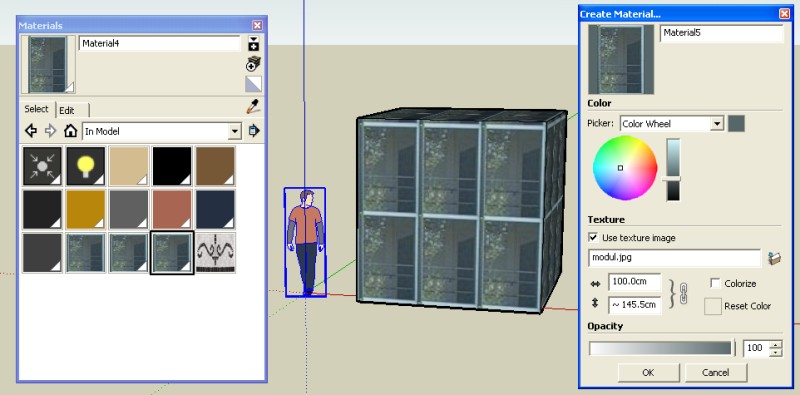
Why not named the material image door1 for one precise surface, door2 for another one etc...
so you will have any regulates for any surfaces
Another trick will apply the all projected photo on a plan surface then push any wished surface
And last I don't understand the problem, as you can paint any isolated surface with any material 
@unknownuser said:
by the way is there a limiter so the objects don't go flying for infinity
As soon as object are not over a solid floor they fly toward a limit bottom down
If you want to stop it place some blocks on the limit of "univers"
Load this model and have fun

