sketchucation logo sketchucation
    • Login
    1. Home
    2. Panga
    3. Posts
    Oops, your profile's looking a bit empty! To help us tailor your experience, please fill in key details like your SketchUp version, skill level, operating system, and more. Update and save your info on your profile page today!
    Urasik Extensions | Lots of new extensions to check out Learn More
    P
    Offline
    • Profile
    • Following 0
    • Followers 0
    • Topics 22
    • Posts 363
    • Groups 1

    Posts

    Recent Best Controversial
    • RE: GIMP

      @unknownuser said:

      Hi Panga and thanks for the tip! I downloaded it and I like it (although unfortunately it does not save this state of the window on exit - YET? - so I always have to set it and adjust the width of some toolbars every time I load Gimp)

      Yes Gaieus, It's a known bug in windows version. But even with that, I do not regret Photoshop at all...What a pity the gimp dev team did not make this single window feature sooner !! And Now I've got my perfect couple of software for working : Gimp and Inkscape (another awesome application). I think that future version of Gimp'll have vector support, including ability to open SVG files from Inkscape !

      Cheers.

      posted in Corner Bar
      P
      Panga
    • RE: [Plugin] Guide Tools (1.3.0) β€” 21 October 2010

      Just wanted to add a big thanks for this plugin which saved me today !! 😍

      posted in Plugins
      P
      Panga
    • RE: GIMP

      Hi,

      With the last dev version, GIMP 2.7.1, There's an option that enable "single window mode"...no more floating pannels...I definitly gave up PS for this version of Gimp.

      http://sourceforge.net/projects/gimp-win/files/GIMP%20%2B%20GTK%2B%20%28development%20rel.%29/GIMP%202.7.1/gimp-2.7.1-setup.exe/download

      Cheers.

      posted in Corner Bar
      P
      Panga
    • RE: SketchUp 8 = SLOOOOW (Solved)

      πŸ˜„

      posted in SketchUp Discussions
      P
      Panga
    • RE: SketchUp 8 = SLOOOOW (Solved)

      Ok, in fact I had also the Renderin plugin installed. Removed it and the problem's gone. My apologies to Google team for putting responsability on SU8 😳

      posted in SketchUp Discussions
      P
      Panga
    • RE: SketchUp 8 = SLOOOOW (Solved)

      Hi Earthmover,

      I have the same problem on my office computer but do not have render(in) plugin installed. I hope it's another plugin of mine that causes the problem...I'll continue to search for it.

      posted in SketchUp Discussions
      P
      Panga
    • RE: SketchUp 8 = SLOOOOW (Solved)

      I'll also have to remove one by one my plugins in order to see which one cause the problem. I'll give feedback soon.

      posted in SketchUp Discussions
      P
      Panga
    • RE: SketchUp 8 = SLOOOOW (Solved)

      I have the same issue on selection in SU 8, much slower than 7.1...Boring.

      EDIT : Sorry, I was wrong, SO MUCH SLOWER....please Google correct this !! More than five minutes to select all faces and edges of a terrain made with the sandbox. !!! where 7.1 did it in 10 seconds.... (60670 entities).

      EDIT : My configuration : HP Z600 workstation, Bi-Xeon, 8gb ram, quadro fx 1800, last nvidia driver.

      posted in SketchUp Discussions
      P
      Panga
    • RE: Thanks PlugIn and Tool Developers

      +1

      posted in Plugins
      P
      Panga
    • RE: [Plugin] xLine2Line

      Thanks Tig.

      posted in Plugins
      P
      Panga
    • RE: [Plugin] Raytracer

      Thanks Thomthom, I'll try it. Hope you can find a way to make it work under SU8 later.

      EDIT :

      Hi Thomthom,

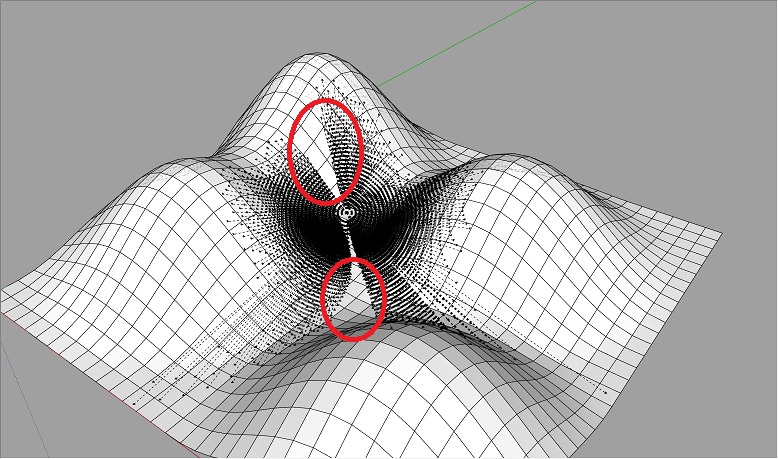
      I made a Test under SU8, and it Works pretty well. Until now, I test it with a max of 10 000 rays, and it takes about 15 seconds to calculate, so It's pretty fast. The only thing is it seems that some directions are ignored by rays, see on the picture below :

      Test-raytracer.png

      Whatever, It's already a really good tool for me. I'm thinking of other options, but I'll do some tests before talking about...See u and thanks again.

      posted in Plugins
      P
      Panga
    • RE: [Plugin] Raytracer

      Whatever if someone helped you or not, you were the one looking for the solution...so you found it ! πŸ˜›

      posted in Plugins
      P
      Panga
    • RE: [Plugin] Raytracer

      I had no doubt about that !! πŸ˜‰

      posted in Plugins
      P
      Panga
    • RE: [Plugin] Raytracer

      My knowledge in maths are very limited...so I'll not be able to help you on that. Anyway, thanks for giving it a try !! πŸ˜‰

      posted in Plugins
      P
      Panga
    • RE: [Plugin] Raytracer

      @unknownuser said:

      I didn't mean to put an actual sphere in the model, just how one would determine which of the infinite possible directions the rays should be shot. What I meant by the sphere was they the ray's be evenly distributed based on how many rays one shoot.

      Yes I understood you. And controlling the number of segments/faces of the "virtual sphere" could help to have more or less rays. Whatever you can do for that, thanks in advance.

      EDIT : In fact, what could be really nice is a "sun" or a omnilight that I could place wherever I want in my SU model, and with shadows activated I could see the illuminated parts of my models and the dark ones...

      posted in Plugins
      P
      Panga
    • RE: [Plugin] Raytracer

      @unknownuser said:

      YEs, can draw them a guidelines, yes. But how many points of origins are we talking about?

      For my specific usage, there's two possibilities and the first one of them could be already fanstastic:

      1. From one point at time
      2. From one complex object (component or group)

      @unknownuser said:

      There'd a huge amount of CLines. Would there be a limit to how far they reached? Would it be ok to draw only the rays that hit something?
      Do the rays need to ignore other geometry other than the target group/component?

      Yes, Yes and Yes. In fact I only need to evaluate "covisibility". So I could select a point on my model (or a complex object) and the plugin draw a certain number of rays only where there's intersections with the model, or with a specific component/group if it's easier to implement/calculate.

      @unknownuser said:

      So, would it be like sub-dividing a sphere and shoot a ray for every segment?

      This could be a good solution with a sphere that surrounds the whole model.

      Thanks for your answer.

      Regards.

      posted in Plugins
      P
      Panga
    • RE: [Plugin] Raytracer

      Thomthom,

      Thanks again for this plugin, but can I suggest you another function for this script. I need to make a raytrace from on point in every direction in order to see where rays intersect a terrain for example. I know that could generates a lot of rays and calculation, but It would be nice to have this function with maybe an option where we can choose the number of rays like : 1 to 10 rays / 10 o 100 rays / 100 to 1 000 rays. If it's possible, the rays should be drawn as guidelines, and a guide point could be automatically drawn on each intersection with the rest of the model.

      I don't know if you can do that...just and idea for my workflow that can be helpfull for others maybe.

      Thanks.

      posted in Plugins
      P
      Panga
    • RE: Google is Listening!

      @unknownuser said:

      Carolyn,

      I want to apologize to you beforehand if my reply is going to sound a bit blunt, but reading these forums daily and most recently the response to Eight I feel something needs to be said. I realize I am not the best person to point this out given I started this website to support this product 5 years ago come September 9th, but as a supporter you need to be honest too.

      I don't know how to say this in a 'nice' way but this morning when I saw this post by what appeared to be from a Google staff member, I could not believe it. People filled out Google's questionnaire, about what features are highest on their wish list some time ago. Almost none of the features that were on that list have made it into version 8. Now it may have been the case that when that list was concluded, that there was already a feature freeze for Eight, but come on, any modern day 3D application has 64 Bit support and most certainly supports more than 4 Gb of memory.

      I don't understand Google. And I am speaking directly to them, certainly not the @Last core group that is still present to this day. In the days of @Last Software, if several people had the same feature request, the development team would deliver. Google says it listens, but can you honestly say this is the case?

      It's hard for me to say this, given I have always backed every release since version 4. I was there when Pro users were slamming the Six release, defending it to the end. I was there when Seven came out and the same thing happened all over again. Even though I felt those two releases had good feature sets, I could not entirely disagree with the dismay of some Pro users.

      Now Eight has come along and I just can't do the same anymore. Quite frankly speaking I find this post an insult for all of those people that voted in the aforementioned questionnaire. I can't speak for other people, but I can imagine if you have filled out that questionnaire last year you must feel like a complete idiot right now. You can not post something like that, then a year or so later release a product which has almost none of the features included. And when Google responds to the 64 Bit question with "What's the use of it?", you know just how well it listens.

      I am not in the business of grilling the SketchUp people. I love you guys to death. After the two last releases I really believed you guys would have learned some key things about this community, about your customers. I am sorry to say that this is not the case and I honestly fear the worst. I can't speak for others, but I for one am not going to fill out another questionnaire or similar. Google already has all the answers it needs. Asking for the same thing twice is just silly.

      +1...and I'll answer the same thing as Coen...take a look at the SU8 whishlist, and you'll get your answers. That's all. And Good luck for your new work Carolyn.

      posted in SketchUp Discussions
      P
      Panga
    • RE: SketchUP 8

      @unknownuser said:

      Sad for who?

      Maybe for the community which relies on its users !

      posted in SketchUp Discussions
      P
      Panga
    • RE: SketchUP 8

      @unknownuser said:

      Did they really not include the Solar North Toolbar in the Free version? Is it maybe just not enabled in the Preferences > Extensions dialog?

      Did not test the free version, but if it's real, It's worth than I thought...how to make a release by google :

      1. Turn one of existing ruby script in a new tool (solid tool)
      2. Add a option to an existing tool (push pull), give it a new number...but still far from what ruby scripts does.
      3. Remove some options from the free version, to "satisfy" pro users and get on free users nerves...

      I'm not ignoring the opengl improvements that're already welcome...but this relase is a bug fix one...And another thing : thoses fabulous dynamic components of previous release, which could be with a little imagination a good support for animating objects, not a word on it ? not any improvements for them ?

      posted in SketchUp Discussions
      P
      Panga
    • 1 / 1