sketchucation logo sketchucation
    • Login
    1. Home
    2. matthew.robert
    Oops, your profile's looking a bit empty! To help us tailor your experience, please fill in key details like your SketchUp version, skill level, operating system, and more. Update and save your info on your profile page today!
    Urasik Extensions | Lots of new extensions to check out Learn More
    M
    Offline
    • Profile
    • Following 0
    • Followers 0
    • Topics 15
    • Posts 64
    • Groups 1

    matthew.robert

    @matthew.robert

    10
    Reputation
    1
    Profile views
    64
    Posts
    0
    Followers
    0
    Following
    Joined
    Last Online

    matthew.robert Unfollow Follow
    registered-users

    Latest posts made by matthew.robert

    • RE: [Plugin] BezierSpline - v2.2a - 22 Apr 21

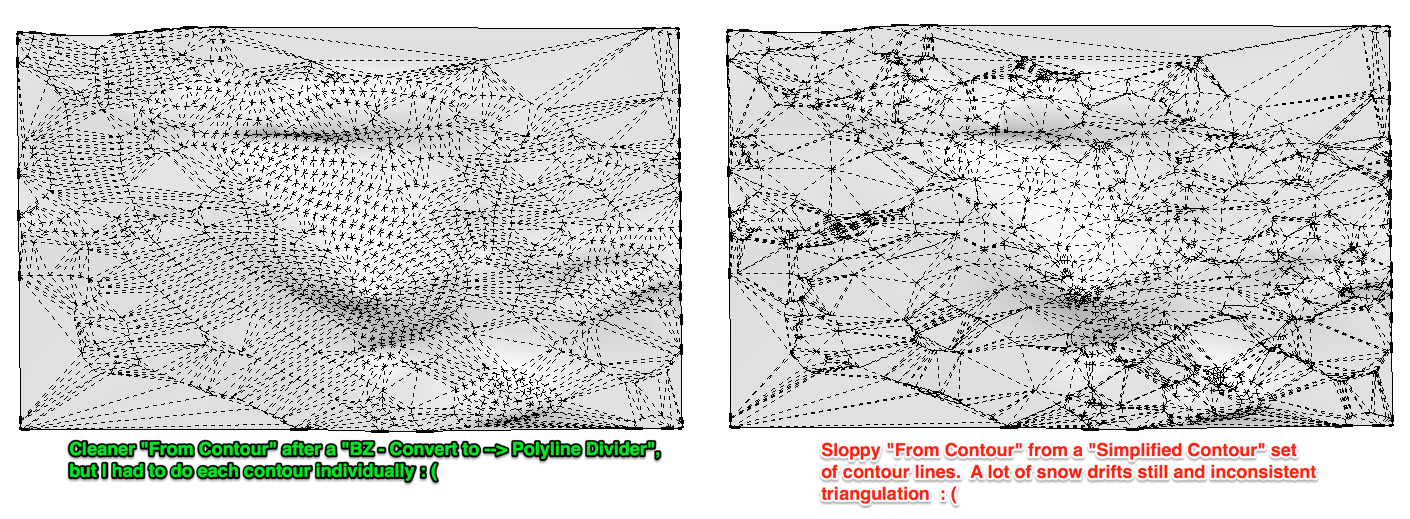
      Is there any way to convert multiple welded lines (contours for example) to segmented lines with set segment lengths? I have used Bezier Spline in the past to get better "From Contour" results by converting contour lines one at a time to lines made with consistent segment lengths. This works considerably better than the "simplify contours" plugin that still creates snow drifts all over the place.
      sfq.png

      EDIT, kinda related... here is a video I created showing how to use the Polyfit LISP (from polyface.de) in Autocad to ultimately get a more efficient model to do a From Contour in SketchUp.

      http://youtu.be/6bQtJhDn_lc?t=3m40s
      (Easier to see in HD directly on Youtube, also jump to the 3:40 mark to see the polyfit part.)

      I've done a similar thing using BezierSpline with the Polyline Divider option, but I need to weld and apply the tool to each contour line rather than all at once with the Polyfit LISP.

      -- matt
      posted in Plugins
      M
      matthew.robert
    • A plugin that would make "3d text" tool output hide edges?

      Hey all.

      I know there are functionally similar type questions here and here. But I am going to ask anyway...

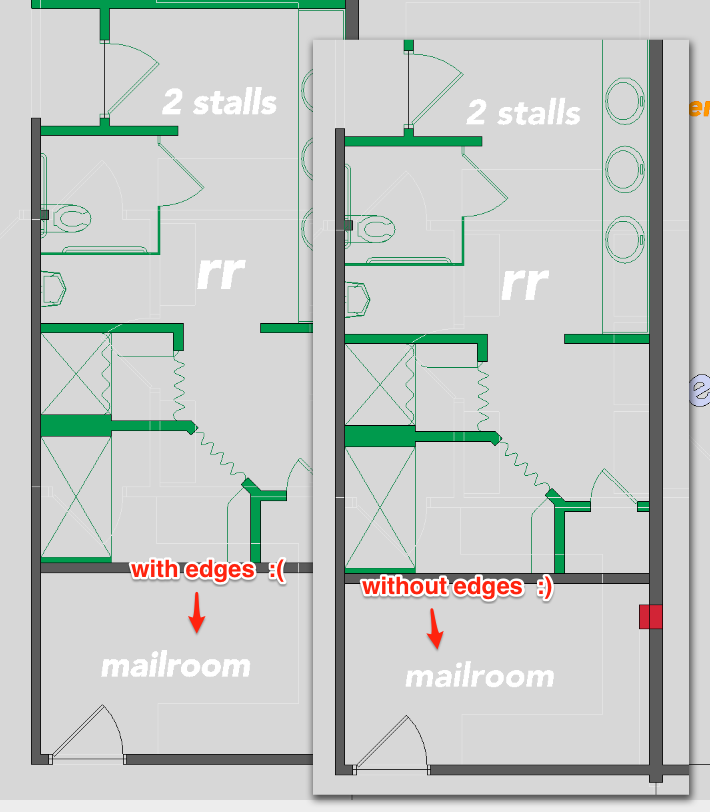
      Does any plugin exist or would it be feasible to have one written that would automatically make any output from the "3d text" tool to have edges hidden? I know how to do this on a per-group basis, but I really need it to be automatic and exclusive to the component created from the tool. I don't actually create 3d text, I am primarily using it for some quick space planning documents.

      http://sketchucation.com/forums/download/file.php?mode=view&id=110544&sid=919cca0546b3e81af71f86ee048ef71e

      -- mc


      my_example.png

      posted in SketchUp Discussions sketchup
      M
      matthew.robert
    • RE: [Plugin] MoleculeImporter (1.3.3) – updated 8.10.2017

      @danyhkim said:

      Is there any possibility of a protein structural renderer that would calculate sheets and helices, kind of like RasMol does?

      Aerilius, I am probably asking the same thing as DanYHKim, but is it possible to model the pink and yellow things in the attached graphic? I downloaded the .pdb file from rcsb.org, and then exported the file to MOL v3000. That worked fine to model the molecular structure... which I am guessing is by design, but I am trying to find a way to simply model the other stuff.
      pinknyellow.png

      posted in Plugins
      M
      matthew.robert
    • RE: Sketchup Mac opens Photoshop when placing a model

      I have been battling this issue for over a year. It is frustrating as F.

      posted in SketchUp Discussions
      M
      matthew.robert
    • Apple Magic Mouse and SketchUp?

      Anyone get a chance to try the new Apple mouse with SketchUp? I am wondering how/if the middle "button" works.

      posted in Hardware
      M
      matthew.robert
    • RE: Importing jpeg comes out all black!

      I have had images show up as all black in other applications if they are saved as CMYK.

      posted in SketchUp Discussions
      M
      matthew.robert
    • RE: A quick Question

      I think my problem is related to this discussion.

      I have three children items and I would like only one to be shown at a time. I thought I could do this:

      Parent
      randthing=randbetween(1,3)

      Child1
      hidden=if(parent!randthing=1,0,1)
      Child2
      hidden=if(parent!randthing=2,0,1)
      Child3
      hidden=if(parent!randthing=3,0,1)

      But it looks as if each child refires its own value for randthing, making the hidden value not mutually exclusive as I would like.

      I could have sworn that I successfully did this before. Not sure if there was a hack or not, but if anyone has any ideas it would be appreciated.

      I am getting some crazy ideas to concatenate a string and the random value and then stripping out the value once again... just to keep it from changing.

      FRUSTRATION EDIT

      I thought I could outsmart the problem by doing this:

      Parent
      randthing=randbetween(1,3)
      randhack="x"&randthing

      Child1
      hidden=if(parent!randthing="x1",0,1)
      Child2
      hidden=if(parent!randthing="x2",0,1)
      Child3
      hidden=if(parent!randthing="x3",0,1)

      But that failed too. It looks like the randbetween() function gets re-fired no matter how far back or indirectly it is linked. Cripes.

      posted in Dynamic Components
      M
      matthew.robert
    • RE: DCs in metric?

      I found out from the source that the issue is by design. It has to do for when there are imperial and metric components mixed together under one parent shell. It had to be one or the other, and imperial won.

      So to answer my question and anyone else who stumbles across this...

      If your DC is in metric and you want to use this common trick to snap to increments

      =largest(100,round(current("LenX")/100)*100)
      

      You will need to apply an "inch to cm" multiplier of 2.54 to the current() function to avoid general screwiness when scaling.

      =largest(100,round((current("LenX")*2.54)/100)*100)
      
      posted in Dynamic Components
      M
      matthew.robert
    • RE: DCs in metric?

      @chris fullmer said:

      Did you set the DC itself to metric by clicking on the ruler icon?

      Hi Chris, yeah did that. I thought the issue might have had something do do with starting with inches and then switching over or possibly having some other nested piece that was in inches... but ruled those out as well by starting from scratch with all the metric in place. If any Googlers are reading this, I tested this in 7.0.10248 for Mac and 10247 on PC.

      posted in Dynamic Components
      M
      matthew.robert
    • DCs in metric?

      I am moderately versed in DC authoring, but I am trying some authoring in metric for the first time and am having issues.

      I think I have narrowed the problem down to a current() function. First off, I have my default units set to metric (which starts the Comp. Attributes in cm) I have my LenX snapping to increments of 100 (cm) with this formula:

      =largest(100,round(current("LenX")/100)*100)
      

      The largest function is being used to keep the value from hitting zero and causing other issues.

      With this function, I was getting unexpected results when scaling. I created a custom attribute called "currenttest" and set this in its field:

      =current("LenX")
      

      Surprisingly, when the formula in LenX resulted in a value like 100, the value for currenttest would equal the inch equivalent, which in this case is 39.37. If that is the case I can see why my scaling is getting erratic.

      So my questions are: Is this a bug isolated to the current() function? Do all functions result in inch equivalent? I'll do some testing on that myself. And finally, has anyone else had issues authoring DCs in metric?

      For the time being, I guess I will just add a cm multiplier to apply to the current() function and any others I happen to have metric/imperial issues with.

      Matt

      posted in Dynamic Components sketchup
      M
      matthew.robert