Is there a way to ....
-
When drawing, for example, a rectangle, lock one dimension and then type in the other manually?
In this shoddy example:
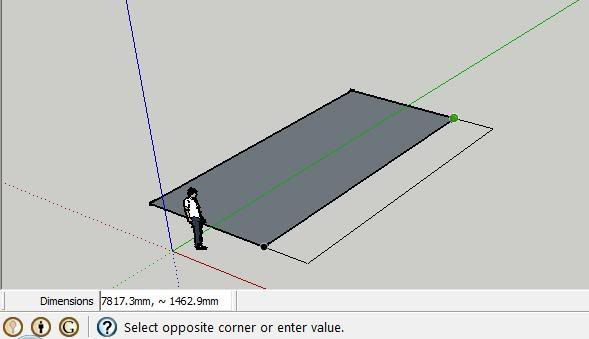
Would there be any way of 'locking' 7817.3mm dimension (the one that froms the other rectangle) and then dictating the other dimension manually by typing, as it's too tricky to simply line up at 300mm exactly with the mouse.
I know I can simply draw two 300mm lines out from the existing rectangle and do it that way, but just curious if there is a way to do it like the above?
Thanks!
-
You can type both dimensions of the rectangle like 7817.3,300 (or vice versa - depending on orientation) and it will perfectly line up. There is no way to "lock" one direction however.
OR you can use the scale tool afterwards.
Note that with certain language settings in the OS - like mine - the value would be 7817,3;300 (but in Eburacum, you need to type the above)
-
Make a rectangle with the required width BUT with any height.
Select it and Scale using a units suffix... Pick a handle to pull the height out in the direction required and type in the desired dimension WITH A UNITS SUFFIX so SUp takes it as a dimension rather than a number...E.g. Make a Rectangle and type 6666,6666 in the VCB to make a fixed width of 6666mm and a temporary equal height; then Select it and Scale, pull the height's handle and type 9999mm in the VCB [or 9.999m or 32.8' etc] the height will become 9999mm... remember that IF you miss off the units suffix then it'll Scale 9999 longer, which you DON'T want !
You can change a dimension of anything using Scale and adding a dimension unit suffix to the number so as to make it a fixed dimension rather than a proportion of the existing size...

Alternatively get used to using 'guide-lines' and offset them or existing edges as desired and snap to them...

-
Brilliant advice, thanks.



Hello! It looks like you're interested in this conversation, but you don't have an account yet.
Getting fed up of having to scroll through the same posts each visit? When you register for an account, you'll always come back to exactly where you were before, and choose to be notified of new replies (either via email, or push notification). You'll also be able to save bookmarks and upvote posts to show your appreciation to other community members.
With your input, this post could be even better 💗
Register Login


Advertisement