sketchucation logo sketchucation
    • Login
    1. Home
    2. L i am
    3. Posts
    Oops, your profile's looking a bit empty! To help us tailor your experience, please fill in key details like your SketchUp version, skill level, operating system, and more. Update and save your info on your profile page today!
    πŸ”Œ Easy Offset | Offset selected faces in SketchUp in positive and negative offsets. Download
    L
    Offline
    • Profile
    • Following 1
    • Followers 1
    • Topics 389
    • Posts 2,275
    • Groups 1

    Posts

    Recent Best Controversial
    • RE: SketchUp 2019 release

      @rv1974 said:

      @pbacot said:

      I wonder if another difference in the interface is the ease of drawing in dimension. Haven't done much in Blender yet, but from comments I gather it is not as straightforward to draw dimension-ally as you want to do in architecture.

      My eyes are bleeding when I see Blender archviz tutorials. They use raster blueprints as reference, move mesh subobjects without exact input, just eyeballing. The lack of fast and exact input on the fly is my biggest concern.

      I wondered about that myself but keyboard entry is do-able in blender and apparently 2.80 also has an improved tape measure.
      I think that it is metric units only.

      posted in SketchUp Discussions
      L
      L i am
    • RE: A more paintely plugin?

      @rogalxxx said:

      my try with su and fotosketcher.
      As a vray 3.6 user I got screwed by chaosgrop and now I can use my old su18 with vray or my new 2019 without it. I have a subscription plan until dec 2020.
      Can't really sell my 3.6 without paying for license transfer fee which is 100E.
      Either way, I'm ditching vray. Clients don't really appreciate the photorealism and the amount of work put into it. So I'm sticking with su+fotosketcher for now and starting experiment with blender,

      Hi hows the experimentation with blender going? I have exported a sketchup model (Colada.Dae into blender, worked perfectly including textures, nice! was feeling good........then thought I would give Evee a go............tumbleweed...............watched youtube tutorials........tumbleweed...... 🀒
      Was designed for smarter heads than mine I think.

      Could you perhaps give me a link to the tree you used in your drawing? They were what I was looking for.

      Oh for what it is worth, I found that putting in false construction lines and mixing in the "Fineliner pen" style made it look a lot more "sketchy"

      Cheers

      posted in SketchUp Discussions
      L
      L i am
    • RE: Roof with curved hips

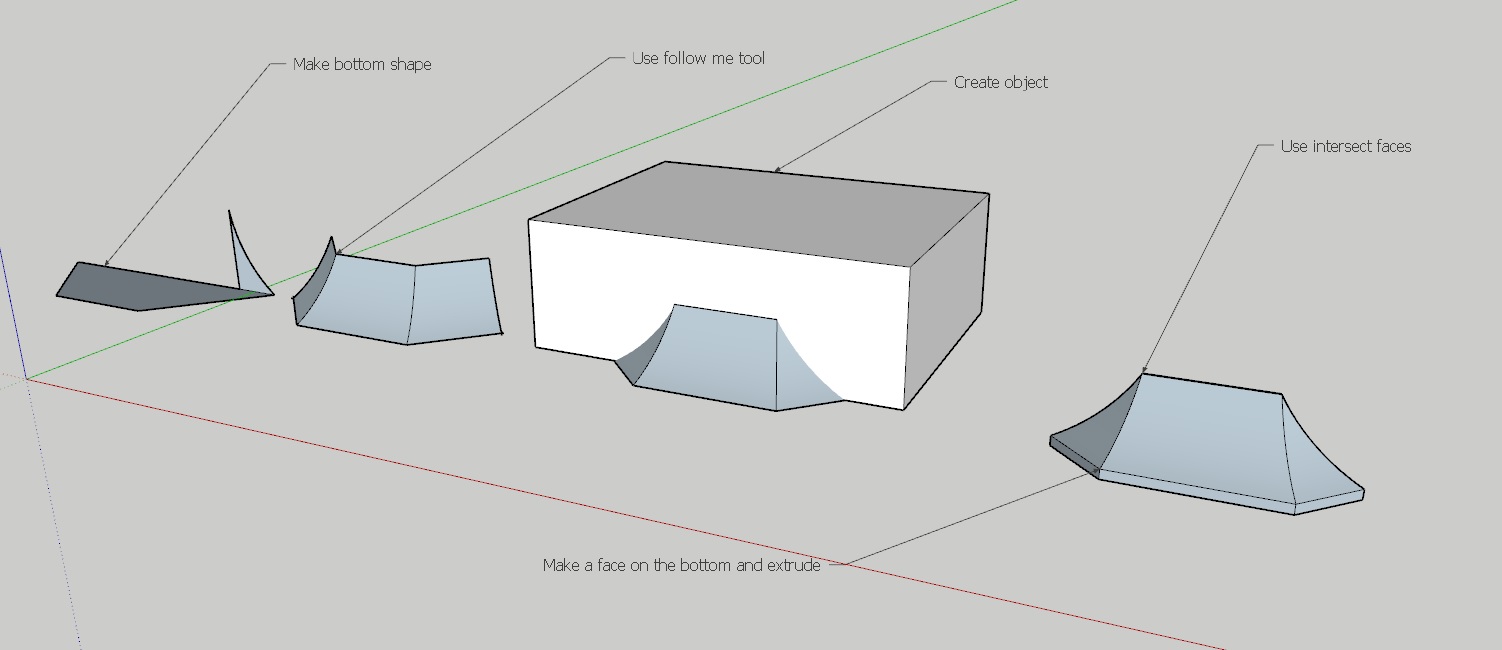
      iii.jpgIf you are just trying to model the outside surface there are a couple of ways, by using "follow me" or "From contours" what is shown in the attachement is using the follow me tool. If you are trying to build a model of the timber construction you could build it using the outside form as your template. And again using the "intersect faces" tool, lot of work though.
      posted in SketchUp Discussions
      L
      L i am
    • RE: A more paintely plugin?

      20.jpgHi Dave, thanks for your advice. Was busy today so will download Paint.net soon. Have attached an image which updates the previous. Changes are subtle but it is kinda is working for me

      Cheers

      posted in SketchUp Discussions
      L
      L i am
    • RE: A Thread for Fine Design

      Hi, it may seem dodgy to post your own design, but am responding to the ecological tangent. Please check out this animatiion (2007) I had to design an ECO-toilet for remote locations and vandle proof and would capture, store and deliver rainwater for hygene. Got the price down to around 25k down from the existing cost similar facility of 220K. I did the story board and one of my lecturers did the rest. If you watch the it is bit, actually, quite slow.

      posted in Corner Bar
      L
      L i am
    • RE: Embossed text

      That is Exactly what I was After, thank you πŸ‘

      posted in SketchUp Discussions
      L
      L i am
    • Embossed text

      Hi, I am trying to emboss text (negitively) so like a tombstone. I am going through the only way I know ( make 3d text force it into the suface. explode, blah blah) which is tedious as I have about 300 words to do. Is there another more efficient way?

      Cheers

      posted in SketchUp Discussions sketchup
      L
      L i am
    • RE: A more paintely plugin?

      Thanks again Dave I have used paint.net bafore so should be easy with your tute πŸ‘

      posted in SketchUp Discussions
      L
      L i am
    • RE: A more paintely plugin?

      Thanks Dave I will try that. Pardon my ignorance though, as I have very little experience in post processing. Do you mean in photoshop or similar?

      posted in SketchUp Discussions
      L
      L i am
    • RE: Model steam engine

      Hi nice work πŸ‘ I agree though that the engine should be the hero and perhaps some close ups as well? Perhaps even if it was driving something "meccano" Perhaps and/also some meccano parts washers/nuts bolts ect. I had one of those steam enines as a child:) I would leave the lamp out.

      posted in Gallery
      L
      L i am
    • RE: A more paintely plugin?

      [attachment=1:35s1g9ns]<!-- ia1 -->Sketchy Reduced.jpg<!-- ia1 -->[/attachment:35s1g9ns]Hi thanks guys, for all the suggestions. I had a look and in the end had a play with Fotosketch. I did some line dither in SU styles (Fineline Pen) and then added it to Fotosketch and applied " oil painting 6" The result is not exactly what I was looking for however I can happily live with it for now.


      UUUUUUUUUU.jpg

      posted in SketchUp Discussions
      L
      L i am
    • A more paintely plugin?

      rrrrrrrr.pngHi all, I am trying to diversify my output styles. I have attached a style I would like to try. I am not happy with standard sketchup styles partially because the look "sketchupy" Also I am still trying to get my head around photoshop so that is out of the question for the time being.
      I have attached an image I would like to emulate or at least be closer to that loose painterly style. Does anyone have any suggestions of a program that may assist?

      Thanks.

      posted in SketchUp Discussions sketchup
      L
      L i am
    • RE: My New Digs

      Hi Tuna, that appeals to somthing very primal within me πŸ‘

      posted in Gallery
      L
      L i am
    • RE: Spacex 9 video

      I think what would have made it even more interesting, is , if apart from the altitude and speed monitor,s Elon's and the Senior Engineers heart rate and blood pressure telemetry were also broadcast in real time;)

      posted in Corner Bar
      L
      L i am
    • Spacex 9 video

      Hi all for those who have not seen it the link is the official Spacex 9 operation. Elon and his engineers are legends. Very infofmative and cool πŸ‘ πŸ‘

      posted in Corner Bar
      L
      L i am
    • RE: Jack it Up

      Amazing and as I said before the knurling is unbelievably good, as is the redndering πŸ‘ πŸ‘

      posted in Woodworking
      L
      L i am
    • RE: Metro Residence

      I think "mission accomplished" Looks livable and has completly captured the aesthetic and vernacular πŸ‘ πŸ‘ πŸ‘ πŸ‘

      posted in Gallery
      L
      L i am
    • RE: Life is Just a Bowl of Cherries....

      Amazing, and agreed the attention to detail is superb πŸ‘ πŸ‘ Were the cheries placed individually?

      posted in Gallery
      L
      L i am
    • RE: Courtyard garden.

      Hi Mike I think the wall texture is just too big. I think if you reduce the size (a lot) It will be OK, by reducing the texture size say to 10 percent at least, of what it is now?

      posted in Gallery
      L
      L i am
    • RE: &quot;We've Stopped Updating Sketchup Make&quot;

      Fair enough.

      posted in SketchUp Discussions
      L
      L i am
    • 1 / 1