sketchucation logo sketchucation
    • Login
    1. Home
    2. jason_maranto
    3. Posts
    Oops, your profile's looking a bit empty! To help us tailor your experience, please fill in key details like your SketchUp version, skill level, operating system, and more. Update and save your info on your profile page today!
    Urasik Extensions | Lots of new extensions to check out Learn More
    Offline
    • Profile
    • Following 0
    • Followers 0
    • Topics 21
    • Posts 1,011
    • Groups 1

    Posts

    Recent Best Controversial
    • RE: FREE Maxwell Render for Sketchup (free version).

      The problem with IES materials is there are so many possible IES files you can choose from that it would be hard to even begin to build a collection that would be moderately comprehensive.

      That said, here is a small sample set of Erco IES MXM files -- these are made from the sample IES files that come shipped with the Maxwell Render Suite... they really have no purpose other than to show how Maxwell handles IES files.

      Obviously the more ideal solution is to have the embedded emitter character type support IES file linking so you can use whatever IES file from whichever lighting manufacturer you need to work with for your particular project... hopefully this will be feasible to do.

      Make sure to apply these to a small sphere or your results may not look right.

      Edit: I guess you'd need the IES files too 😳
      http://dl.dropbox.com/u/41250852/ies.zip

      These ies files will need to reside at C:\Program Files\Next Limit\Maxwell 2\ies*collection name* therefor I'm not sure the MXM's will work on a mac.

      Best,
      Jason.

      posted in Extensions & Applications Discussions
      jason_marantoJ
      jason_maranto
    • RE: FREE Maxwell Render for Sketchup (free version).

      There is a library I've created/updated for the RAL color system: http://en.wikipedia.org/wiki/RAL_(color_space_system)

      It contains 2014 MXM materials -- There are 11 categories:

      1. Anodized Aluminum1. Car Paint1. Diffuse1. Glass1. Glossy Metallic Plastic1. Painted Wall1. Satin1. Shiny Plastic1. SSS Plastic1. Tiles1. Velvet

      Each category contains the same 183 colors.

      These MXM files should be unzipped to reside in the following folder on your system (create this folder structure if it does not already exist):
      C:\Program Files\Next Limit\Maxwell 2\materials database\mxm files\RAL Libraries* category name*

      My bandwidth is limited so please only download these if you will use them.

      Here is a dropbox link for the MXM files:
      http://dl.dropbox.com/u/41250852/RAL%20Libraries.zip

      I have also created the SketchUp Material Libraries that are linked to these MXM's so you can simply apply the SketchUp materials as you would any normal SketchUp Material and it will automatically render as the matching MXM. These should be installed into your Sketchup Materials folder as per normal.

      Here is the dropbox link for the SketchUp material files:
      http://dl.dropbox.com/u/41250852/Maxwell%20RAL%20Libraries.zip

      I hope this will help the new users get going with Maxwell for SketchUp more quickly.

      Edit: I've posted the standard material "simball" renders for these RAL libraries here so you can get an idea of what the materials will look like:

      https://picasaweb.google.com/halflifecomics/MaxwellMaterials?authuser=0&feat=directlink

      Best,
      Jason.

      posted in Extensions & Applications Discussions
      jason_marantoJ
      jason_maranto
    • RE: FREE Maxwell Render for Sketchup (free version).

      One thing I kinda glossed over a bit in the videos is the embedded character type materials have full support for a Diffuse map as well as Normal, Bump or Displacement mapping (for any character type).

      The parameters that are available are the same as what is in any MXM so in that respect you can recreate(and thereby edit) alot of those MXM materials by just using the maps.

      Materials is a really complex topic and one I could(and have already) fill several hours of video tutorials talking about... so I just sidestepped the issue in these introductory videos because the time I had would not allow for going any deeper.

      Here's a cool trick: The embedded material types will fully support clip mapping (opacity masking) if you use a PNG image with transparency... kinda obvious, but still very cool.

      Best,
      Jason.

      posted in Extensions & Applications Discussions
      jason_marantoJ
      jason_maranto
    • RE: FREE Maxwell Render for Sketchup (free version).

      @slimdog said:

      I have a question about the MXM that you posted above(thank you for posting these material for use newbies).I have downloaded them and dropped the materials into the materials folder in sketchup.Do these materials need to be linked to the specific path to the MXM's? I am on a Mac and not sure where to put the MXM_diffuse_RAL folder?

      They are linked to a specific path already -- my experience has been that you can point the MXM reference to the new location and it will find all of them from that point on... however I inherently don't trust automatic fixes like that so I prefer to use the original absolute paths to minimize the chance for issues πŸ€“

      You should be fine placing them wherever you like and re-pointing the MXM material link to any of them which should then automatically find the rest of them (hopefully that will work on Mac like it did on my PC).

      I'll definately be keeping an eye out for new Maxwell renders in the near future πŸ˜„

      Best,
      Jason.

      posted in Extensions & Applications Discussions
      jason_marantoJ
      jason_maranto
    • RE: FREE Maxwell Render for Sketchup (free version).

      @surfingalien said:

      I will try your suggestion asap, just to be sure I've been clear enough: I don't mean a stone wall with normal/displacement maps but "real" micro-displacement (or kind of, don't know the correct terms in MR as I'm a new user) like this one:
      http://resources.maxwellrender.com/search.php#page=1&mode=1&id=4658&search=carpet&v1=0&v2=0&tipo=

      Yes, those are exactly the types of displacement effects you will want to avoid unless you truly need it -- the render times will be unreal, even if you subdivide the surface.

      @surfingalien said:

      finally, one last question (sorry, I have registered to the MR forum but I'm still waiting for the admin to unlock my account for posting): when I try to register my copy of Maxwell I get this error:

      http://dl.dropbox.com/u/2029627/Schermata 2011-11-11 a 16.45.45.jpg

      I had a quick look at the knowledgebase/FAQ section but the only thing I found is about admin privilege (which I own -
      I'm on Mac OSX 10.6.8). any idea about it?

      I've seen a similar error before when they were having server issues with the licensing server -- but I'm not sure if that is the issue here or some other Mac specific issue. This would definitely be a question for JD as he is the man with the answers and solutions. You might try to PM him here to get his attention, since I doubt he sees this thread often (He develops and maintains several of the plugins for Maxwell and tends to primarily look for user issues on that forum).

      Best,
      Jason.

      posted in Extensions & Applications Discussions
      jason_marantoJ
      jason_maranto
    • RE: FREE Maxwell Render for Sketchup (free version).

      I believe it is 5GB per file per day, which works out to about 33 downloads before they block the file.

      I'm not sure why you would not be able to register on the forum, but once you successfully get a user name make sure to follow the instructions in this thread: http://www.maxwellrender.com/forum/viewtopic.php?f=97&t=32637

      Personally I like the simple almost abstract renders in the same way I enjoy abstract paintings and sculpture... I seem to be obsessed with dielectric materials, which is not a good thing as they take the longest to render clear 😒

      Best,
      Jason.

      posted in Extensions & Applications Discussions
      jason_marantoJ
      jason_maranto
    • RE: FREE Maxwell Render for Sketchup (free version).

      @unknownuser said:

      it's been said quite a few times already but i think maxwell really hit the sweet spot here as far as rendering apps go.. it's a similar situation to google making sketchup free ..
      (though i imagine the difference between maxwell free & pro is much more noticeable than the difference between su free and pro πŸ˜„ )

      Actually I think that analogy is very appropriate -- if you consider SketchUp Pro as including Layout, Style Builder, Dynamic Components, Solid Tools, Advanced Camera Tools and better export options of models (as well as C++ API).

      You may never want or need any of those features/tools, and for you regular SketchUp (free) may do everything you want -- but once you have SketchUp Pro the possibilities are greatly expanded as to what is possible.

      Best,
      Jason.

      posted in Extensions & Applications Discussions
      jason_marantoJ
      jason_maranto
    • RE: FREE Maxwell Render for Sketchup (free version).

      @valerostudio said:

      Any way of changing the units to inches? I noticed its all in metric.

      You can work in any units you prefer within SketchUp, but Maxwell only thinks in Metric... I just got used to working in metric for the sake of simplicity.

      Best,
      Jason.

      posted in Extensions & Applications Discussions
      jason_marantoJ
      jason_maranto
    • RE: FREE Maxwell Render for Sketchup (free version).

      @surfingalien said:

      P.S.: I will post it on the MR forums as well but... is there a way to use displacement-base materials from the MXM repo like grass/fur etc.? I'm getting really weird results regardless of the "mapping" and I don't know if there's some settings I can tweak (of course not the MXM itself, I know...) -thanks!

      I would use any displacement based material with care -- but particularly MXM's since you do not have the ability to edit them to suit your needs.

      Bear in mind that all MXM's you can download have the image files external to the material -- so you can very easily use and edit those images to create your own "embedded character" type materials within Sketchup, thus bypassing MXM's.

      My best advice for any displacement material is to test it out on a 1m x 1m plane (with a "cubic" UV override for MXM's) -- if it looks good and renders fairly quick then you are safe, but many times displacement can slow your render down to a crawl... and pretessellated displacement can quickly run SketchUp out of memory (due to ram usage).

      You can speed up the rendering of displacement by subdividing the surface -- for instance if you take the 1m x 1m plane and divide it by 4 (into 16 .25m x .25m sections) you will see a dramatic speedup in render time. The goal is to have evenly sized and spaced quads -- A nice plugin to use for managing quads is http://forums.sketchucation.com/viewtopic.php?p=348501#p348501

      Best,
      Jason.

      posted in Extensions & Applications Discussions
      jason_marantoJ
      jason_maranto
    • RE: FREE Maxwell Render for Sketchup (free version).

      The image that SketchUp will use from the MXM file (which can contain dozens of images) is chosen by the MXM creator within the MXED application or Maxwell Studio at the time of creation. Since we do not have the ability to edit the MXM directly within the Maxwell for Sketchup plugin we can only accept the original creators choice (for better or worse).

      The lack of render channels is created partially by the use of FIRE as the main engine (which does not have that capability, and also by the fact that unlike the stand-alone plugin which exports the MXS file outside of SketchUps process, the Maxwell for Sketchup plugin only renders within Sketchup's process (which as you may know is limited to 32-bits, with large address aware enabled for 64-bit systems).

      In my opinion the 32-bit nature of Sketchup is the most limiting thing for this plugin and should that change (SketchUp supporting full 64-bit) then I imagine quite alot of render engines may change they way they do things.

      As far as marketing strategy, I think of this new plugin mostly as a gift from Next Limit to SketchUp users -- they already had an excellent plugin workflow in place with the full Maxwell Render Suite, which is well worth the money IMO... Especially if you use more than one 3D application for your work (I love Maxwell Studio and all software plugins are included free of charge).

      When it became possible to support the free version of SketchUp via a Ruby based scene exporter, along with the inclusion of the FIRE "realtime" engine development I think it simply opened new possibilities to share what Maxwell is capable of with a broader audience.

      Also worth considering is none of the 12 other softwares that is supported by Maxwell has either a free or $95 option -- everybody else only has the option of the full Maxwell Render Suite... so this is a completely new venture for them, and if they did not place restrictions on the functionality they would likely alienate some of the existing user base.

      Best,
      Jason.

      posted in Extensions & Applications Discussions
      jason_marantoJ
      jason_maranto
    • RE: FREE Maxwell Render for Sketchup (free version).

      I can't answer the first question, but I can say that Next Limit tends to play it "close to vest" when it comes to a development roadmap... they hardly ever reveal anything until it is already out.

      For instance, nobody knew about the development of this version of the plugin at all until it was released.

      Best,
      Jason.

      posted in Extensions & Applications Discussions
      jason_marantoJ
      jason_maranto
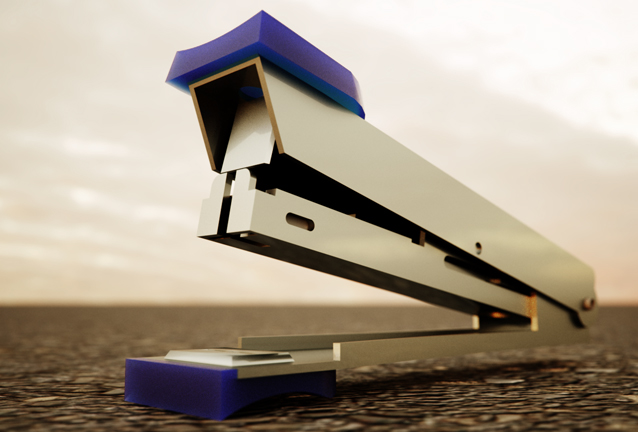
    • RE: Stapler

      Maxwell Render and a bit of post work.

      stapler.jpg

      Best,
      Jason.

      posted in Gallery
      jason_marantoJ
      jason_maranto
    • RE: FREE Maxwell Render for Sketchup (free version).

      In Maxwell for Sketchup you have emitter materials applied to geometry and this can be in the form of a standard Emitter character or a HDR Image character... There is also the option to use IES files if you have access to MXM's with IES data.

      Perhaps IES files may be added to the emitter character types in the future however they would also need to be applied to geometry (in this case a small sphere).

      Here are some older videos for the Sketchup Plugin (for the full Maxwell Render Suite) which do show some work with emitters to give you an idea of how they work: http://www.youtube.com/playlist?list=PL18849D7126B7A0FF

      Best,
      Jason.

      posted in Extensions & Applications Discussions
      jason_marantoJ
      jason_maranto
    • RE: FREE Maxwell Render for Sketchup (free version).

      They have posted the videos to the main "Maxwell for Sketchup" page on the Maxwell website and I edited the first post of the thread to reflect that.

      I only had an hour to cover what I thought were the most important and fundamental elements of using the plugin -- obviously there is alot about what can be done that I didn't have the time to get into. When I do my full 8-hour training courses for VTC I tend to have much more time to dive into the details and really take a look at everything.

      Best,
      Jason.

      posted in Extensions & Applications Discussions
      jason_marantoJ
      jason_maranto
    • RE: FREE Maxwell Render for Sketchup (free version).

      Here are the tutorial videos:

      [flash=960,720:19nnda4m]http://www.youtube.com/v/2wLTy9ee0yc?rel=0&hd=1[/flash:19nnda4m]
      http://www.youtube.com/watch?v=2wLTy9ee0yc

      [flash=960,720:19nnda4m]http://www.youtube.com/v/7qTZrc_S1cA?rel=0&hd=1[/flash:19nnda4m]
      http://www.youtube.com/watch?v=7qTZrc_S1cA

      [flash=960,720:19nnda4m]http://www.youtube.com/v/G0KysCcgm-o?rel=0&hd=1[/flash:19nnda4m]
      http://www.youtube.com/watch?v=G0KysCcgm-o

      [flash=960,720:19nnda4m]http://www.youtube.com/v/xE10FApp4Mo?rel=0&hd=1[/flash:19nnda4m]
      http://www.youtube.com/watch?v=xE10FApp4Mo

      [flash=960,720:19nnda4m]http://www.youtube.com/v/DVBWXcevE2k?rel=0&hd=1[/flash:19nnda4m]
      http://www.youtube.com/watch?v=DVBWXcevE2k

      [flash=960,720:19nnda4m]http://www.youtube.com/v/8yM3tUOEzvU?rel=0&hd=1[/flash:19nnda4m]
      http://www.youtube.com/watch?v=8yM3tUOEzvU

      [flash=960,720:19nnda4m]http://www.youtube.com/v/GKQMAScRxuk?rel=0&hd=1[/flash:19nnda4m]
      http://www.youtube.com/watch?v=GKQMAScRxuk

      [flash=960,720:19nnda4m]http://www.youtube.com/v/2N1uzZvOw_U?rel=0&hd=1[/flash:19nnda4m]
      http://www.youtube.com/watch?v=2N1uzZvOw_U

      Best,
      Jason.

      posted in Extensions & Applications Discussions
      jason_marantoJ
      jason_maranto
    • RE: Sketchup/Maxwell question?

      If you don't mind sharing the model, I'm sure the plugin author would like to use it to figure out what the issue might be -- but for feedback from him you'll have best results posting here: http://www.maxwellrender.com/forum/viewforum.php?f=107

      Best,
      Jason.

      posted in SketchUp Discussions
      jason_marantoJ
      jason_maranto
    • RE: FREE Maxwell Render for Sketchup (free version).

      Yes, the newest free update for Maxwell (2.6) was released on the same day as this new free SketchUp plugin.

      There's quite alot to love about the full Maxwell Render Suite and I'm a big fan, but I didn't mention it because I figured this new free plugin was the big news for most non-Maxwell users.

      The main support forum for Maxwell is at: http://www.maxwellrender.com/forum/index.php

      There is a SketchUp subforum where JD deals with bugs (specific to the plugin) and takes feature requests. The forum is readable by anybody, but you will only have posting privileges if you hold a Maxwell license (either the $95 "pro" version of the new plugin or the full Maxwell Render Suite).

      The information for how to unlock posting priveledges is in this thread: http://www.maxwellrender.com/forum/viewtopic.php?f=97&t=32637

      Best,
      Jason.

      posted in Extensions & Applications Discussions
      jason_marantoJ
      jason_maranto
    • RE: Some of my works

      As always you have my admiration β˜€

      Best,
      Jason.

      posted in Gallery
      jason_marantoJ
      jason_maranto
    • RE: FREE Maxwell Render for Sketchup (free version).

      Edit: Opps, My bad... sorry. (see JD's correct explanation below)

      Best,
      Jason.

      posted in Extensions & Applications Discussions
      jason_marantoJ
      jason_maranto
    • RE: FREE Maxwell Render for Sketchup (free version).

      Yep, the $95 version is capable of output up to 1920 pixels -- but the free version is limited to 800 pixels. The idea being this limit is perfectly usable for people looking to just put Sketchup renders on the web, but for professional production you would want to move up to the $95 license (or the full Maxwell Render Suite which has unlimited resolution and many advanced features).

      This is certainly only intended to be something that will give regular Sketchup users who are looking into rendering a excellent free option to use while they hone their skills and see if it is really their "thing"... I would find it hard to believe somebody selling their renders would want to limit themselves in any way since it will impact their ability to compete.

      I started out years ago with the free version of IDX renditioner and this plugin has many times more power... I wish something like this was available when I was learning.

      Best,
      Jason.

      posted in Extensions & Applications Discussions
      jason_marantoJ
      jason_maranto
    • 1 / 1