Well spotted Thom! I've gotten so used to this SU shortcoming that I hadn't noticed they'd finally fixed it! Thanks for that. 
Well spotted Thom! I've gotten so used to this SU shortcoming that I hadn't noticed they'd finally fixed it! Thanks for that.
...or you could apply a VRay Toon Material to those elements so lines do render.
.... and group and component definition boxes don't align to new axes, only to SU's original axes. 
Working with hundreds of lumber components shouldn't be any more troublesome than me applying correctly applied textures to thousands of groups in every model I work on. Reading your posts I'm picking up on what might be at the core of your problems with texture positioning: you never mention "groups", always "components".
I really wish Google would make this more obvious in their tutorials and literature: groups should be your default method of organizing geometry into separate elements which can be moved around independantly, not components. It doesn't help that when you install SU it has "Make Component" set up as a shortcut/hotkey- I'd get rid of this asap and replace it with "Make Group" (besides "Make Component" is in the right-click context menu so it's dead easy to access when you need it). "Components" are a special type of group which, as you know are created as instances of the same entity, so multiple instances can be edited simultaneously. In short, if you're creating 50 rafters which may all require further editing like bird's mouth cuts later, then making the first one into a component and then copy/arraying it at the correct centres would be the thing to do. If you're making the ridge board, i.e. a one-off element then just make it a group. Either way, you can always turn a group into a component at a later date so everything in a skp model should be grouped, but only special repeating elements should be made into components.
Although SU's UV mapping tool (right-click context menu Texture Position editor) is great, as you know it takes around a minute just to edit the UV mapping on the six faces of a 2 by 4, especially frustrating if all you want to do is change the grain from running across the timber to lengthwise. Quickest way is to explode the group, rotate it 90° vertically (which will align the texture correctly), regroup it again (which will "fix" the texture position) and now no matter where you move or rotate the group its texture and grain will be correct (unless you explode it again of course).
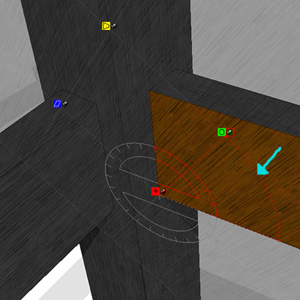
Re: SU's texture position editor, it took me a couple of tries before I realised how to keep the same scale that when using the green rotate pin. As soon as you start rotating the green pin you'll notice a circular construction line appear (the only time you'll see one in SU!  ) to which, if you follow it reasonably closely, the green pin will magnetically infer, allowing you to rotate as much as you like, but to keep the current texture scale- see attachment. I've desaturated the other faces so it's obvious which face is being edited.
Another (and AFAIK undocumented) tip is that SU's eye dropper material tool records UV mapping scale and rotation, not just the material type. So say you've already created your rafter component with the correct texture position, arrayed it 50 times, but now you need to make one trimmed rafter where a flue comes though. Rather than having to position the texture manually on the one-off, just use the eye dropper tool, click once on one of the existing rafters and then click on the new trimmed one- it'll copy the material with exactly the same scale and rotation. It even works on individual faces from the outside of groups and components- it's a real time saver for modelling timber structures.
As for SU's utter lack of UV mapping tools for organic and curved forms, don't even get me started- it really should've been addressed in SU7 IMO. 
@daniel said:
I also take exception to the notion that the U.S. is somehow involved in a conspiracy to cause another pandemic.
I'm pretty certain the implication was that the virus may have accidentally escaped into the environment after been extracted from the victim's remains rather than any accusation of deliberate release. If it was a conspiracy with the intention of shifting billions of dollars'/euros' worth of vaccine, I imagine pharmaceutical companies would be very unlikely to target a relatively poor country like Mexico.
Real- one of the bulbs is out behind the column, though that maybe a red herring. Something really weird is going on the right hand side though- there's been some very clumsy photoshop erasing or clone stamping on that waist high white counter- the floor and blue wall behind cut into it very oddly.
Real- Was sure it was CG at first as the glasses and candles look so oversaturated, but the shoe/vacuum cleaner marks on the carpet are (I hope!) too good to be CG.
Real- very tricky one as the handrail, brackets and floor looks very fake, but the burned out exterior looks very realistic and the movement joint in the concrete block wall is probably a detail too far for most CG modellers.
Fake- It's very good, but everything looks CG: too much noise, the cushions have no seams, the floor is too flat, the bump is too shallow on the wicker furniture.
Or was it a trick question? 
Wow, now that's a good render! Only real giveaways are like Stinkie sais, the bump map/reflection on the oil barrel, the reflection on the hub of the trailer wheel is a little too even and the lighting being a tiny bit too studio-like rather than exterior. Very impressive modelling, texturing, detailing and lighting. If you'd posted that among a few genuine photos and CGIs I doubt I'd be able to out it no matter how long I studied it.
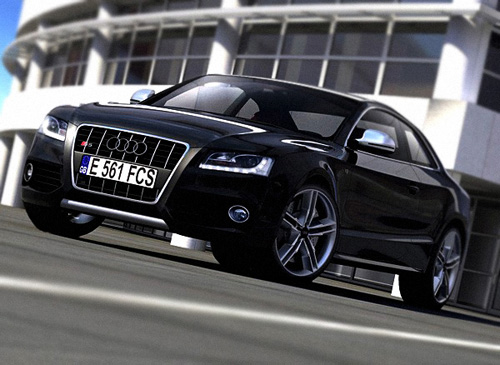
Not saying I could do better, as I probably couldn't, but there's loads of sure-fire giveaways that this is a CGI.
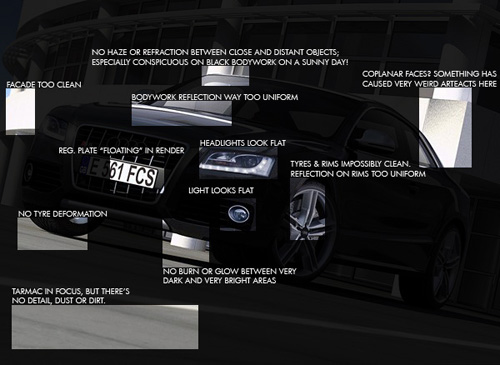
To correct most of those modelling and rendering shortcomings would take way more time than it'd be worth for a hobby render, but about 1 minute's photoshopping to adjust gamma, exposure, add a little deformation to the tyres and blur the background and foreground increased the realism considerably... I think. 
Brilliant. How someone managed to watch one of these awful informercials and see the comedic and musical value embedded in it is beyond me. I wouldn't buy the "Slap Chop", but I'd buy the music!
Yep, AFAIK "weight" mapping and "blend" mapping are just different terms for the same method so your impressive hard work should translate over to VRay (or any render prog) without any problems. In VRay you have two diffuse bitmaps which are overlaid so the first always has precedence/render priority over the second. A grayscale blend map is applied to the first diffuse map which, by making that diffuse layer more or less transparent, allows the second diffuse layer to show through instead or creates a blend of the two where the blend map is grey. I've used this method mostly for road surfaces where I want a high detail tiling texture like tarmac, but I need it to show wear and tear and dirt where water has run off. The actual bitmaps which render might only be 2000 x 2000 px, but the blend map may be up to 10000 x 10000 px to allow for control over the whole rendered surface.
I seriously admire your determination and single-mindedness in streamlining the whole modelling/rendering process. I spent a considerable amount of time stripping all my SU car components of their many various materials and replacing them with a distinct set- Car Chrome, Car Tyres, Car Black Plastic, Car Aluminium Rims, etc (all with corresponding saved VRay equivalents) so at least when I drop a bunch of cars into a scene I only have maybe 10 materials to import and all the cars are taken care of. I had a recent forum conversation with a VRay user who was complaining that he was having trouble keeping track of the materials in his skp/VRay file- it turned out he was dropping 3DW car components straight into his model. He had over 450 materials undoubtedly with random, completely meaningless names. I never once regretted spending a bit of my spare time to organise my components and material libraries- the time (and stress) savings are easily worth it. Having one material per car would be awesome
Keep us updated with your progress, if only to generate more marketing for your product!
Jackson
p.s. still dying to know how you apply the UV mapping to such organic forms in SU; lots of construction geometry and eye dropper/projected texturing?
Hi Richard,
Just a quick update to say I was wrong about VRay not supporting weight mapping- it's done via a blend map and two diffuse layers/materials, probably in just the same way as Maxwell.
Dying to see the fruits of your labours- that Audi pic is still a real teaser.
@richard said:
That is the beauty of them they are really light in SU yet will render really well. Well as long as you don't use them for close up!
That's the magic formula- I've been having pretty good success with extremely low-poly trees- simply a vertical png material plane (made from photographs) for the canopy and about 12 polys for a semi circular trunk- all set to face me. I've got 640 of them in one of my SU models and it still orbits pretty well on my average-spec laptop. VRay doesn't support png transparency, but I just make a clipmap for each tree type, load it in VRay and they render pretty well too, with nice soft shadows on the ground . It has saved me so much time not having to PS in trees to renders! Cars like yours would be very valuable for the same reasons- how are you planning to market them?
@richard said:
Not sure the same clip and weight mapping would work in Vray. I don't know my way around Vray so can't say! by the way these don't use any displacement just colour, weight and clip mapping.
AFAIK VRay doesn't support weight mapping so I'm not sure how I would go about blending materials- I suspect the easiest/only way would be to simply mark out the glass as separate geometry and just let all the other bodywork, bumpers, etc be shiny like the paintwork. Not fishing for a tutorial or trade secrets, but I'm very intrigued about how you make the maps. Do you unfold the geometry and then Photoshop the maps to fit? Surely you don't fix the UV mapping in SU?
I can't wait to see more examples- I've become a little obsessed with streamlining the workflow from SU to render progs, finding the balance between components that look good and work well in SU, but which also render well and IMO you have achieved that balance almost perfectly with this car!
Great work Matteo- soon appearing in a render near you!
Not a stupid question at all, but believe me- once you start using ruby scripts with SU, you won't be able to stop as they can increase SU's functionality many many times over.
Just save the .rb file to the "Plugins" folder in your Google SketchUp program files. The next time you open SU it will be accessible under the "Plugins" menu under the name "Remove C-G Materials".
I would've said that was way too new to be Scharoun- looks like something by Coop Himmelblau or Michael Wilford. Dizain- Is it in Berlin? We need clues!
Like the second one best- the first one looks "wrong".
Hmmm... good one Anssi- I don't recognise it. Not something by Odo of Metz is it?
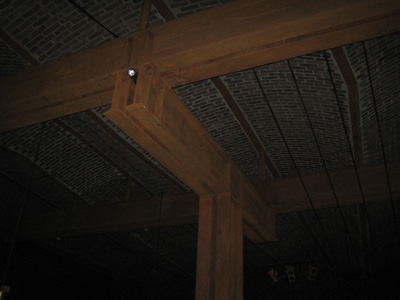
Anssi- St. Petri Church, Klippan, Sweden by Sigurd Lewerentz. Nice choice- it's easily one of the inspirational buildings I've visited. For anyone who wonders what all the fuss is about, this unassuming brick church manages to transcend modernism, but is so effortlessly rooted in tradition as to feel almost primeval; unlike so much contemporary architecture it defies photography (both through its subtlety and its incredibly dark interiors), but rewards visitors with an experience unlike any building I've yet experienced (though I hear Corb's Sainte-Marie de La Tourette is similarly moving).
My only vaguely in-focus interior shot; I must take my tripod the next time.