sketchucation logo sketchucation
    • Login
    1. Home
    2. i5963c
    3. Posts
    Oops, your profile's looking a bit empty! To help us tailor your experience, please fill in key details like your SketchUp version, skill level, operating system, and more. Update and save your info on your profile page today!
    ⚠️ Important | Libfredo 15.6b introduces important bugfixes for Fredo's Extensions Update
    I
    Offline
    • Profile
    • Following 0
    • Followers 0
    • Topics 5
    • Posts 32
    • Groups 1

    Posts

    Recent Best Controversial
    • RE: [Plugin] ClothWorks v1.8.0 - 28 Apr 2024

      Hi, I think so. I have version 4.3.1. Not sure if it's really the most recent version?

      I don't recall how I installed it. The SketchUcation store (and also this site) lacks indeed a bit of userfriendlyness in my view. Difficult to navigate as far as I'm able to do.

      By the way, I also have the Fredo6 bundle installed (via the SketchUcation store) and that works fine. I installed this bundle half a year ago (together with the most up-to-date version of the SketchUcation store at that time). The ClothWorks extension (that I acquired some days ago) dates from before this date, so I would assume that my actual SketchUcation store version must be compatible with the (older) ClothWorks extension?

      posted in Plugins
      I
      i5963c
    • RE: [Plugin] ClothWorks v1.8.0 - 28 Apr 2024

      I acquired a license for ClothWorks, and installed the plugin and activated the license as specified in the instructions.
      The plugin appears in the Sketchup menu (also with right click) and the icons are visible in the toolbar.
      However, a feature that is apparently linked to the paid license (i.e. 'compressing' the pins) doesn't work. I can only select the set of individual pins, but the Gizmo to manipulate the combined pins is never activated.
      I tried already to release the license, uninstall, exit and relaunch Sketchup, reinstall the plugin and re-activate the license. It all doesn't help...
      I have the plugin installed on 2 PC's (Windows 10 and 11). It doesn't work on both PC's (the license is valid for 3 devices, by the way).
      Any suggestions to fix this issue are highly appreciated. I bought this plugin basically to do some modelling of curtains, and without the feature to compress the pins, this plugin is quite useless to me.

      posted in Plugins
      I
      i5963c
    • RE: [Plugin] MatSim (Material Simulation) - v1.6a - 08 Oct 25

      Hello,

      Thanks for the quick reaction and update of the extension (also for TruePaint, which had a similar validity period issue, btw).

      However, I think there is a problem with the MatSim update.

      I installed it on my system, and noticed that it didn't work. When I click one of the two icons or use the equivalent menu options, nothing happens (i.e. the normal dialog boxes don't appear).
      When I activate the Ruby console, there is actually an error, as shown in the screenshot, included in the attached screenshot (Error: #<NameError: unintialized constant F6_MatSim::Bandeau::HTML>).
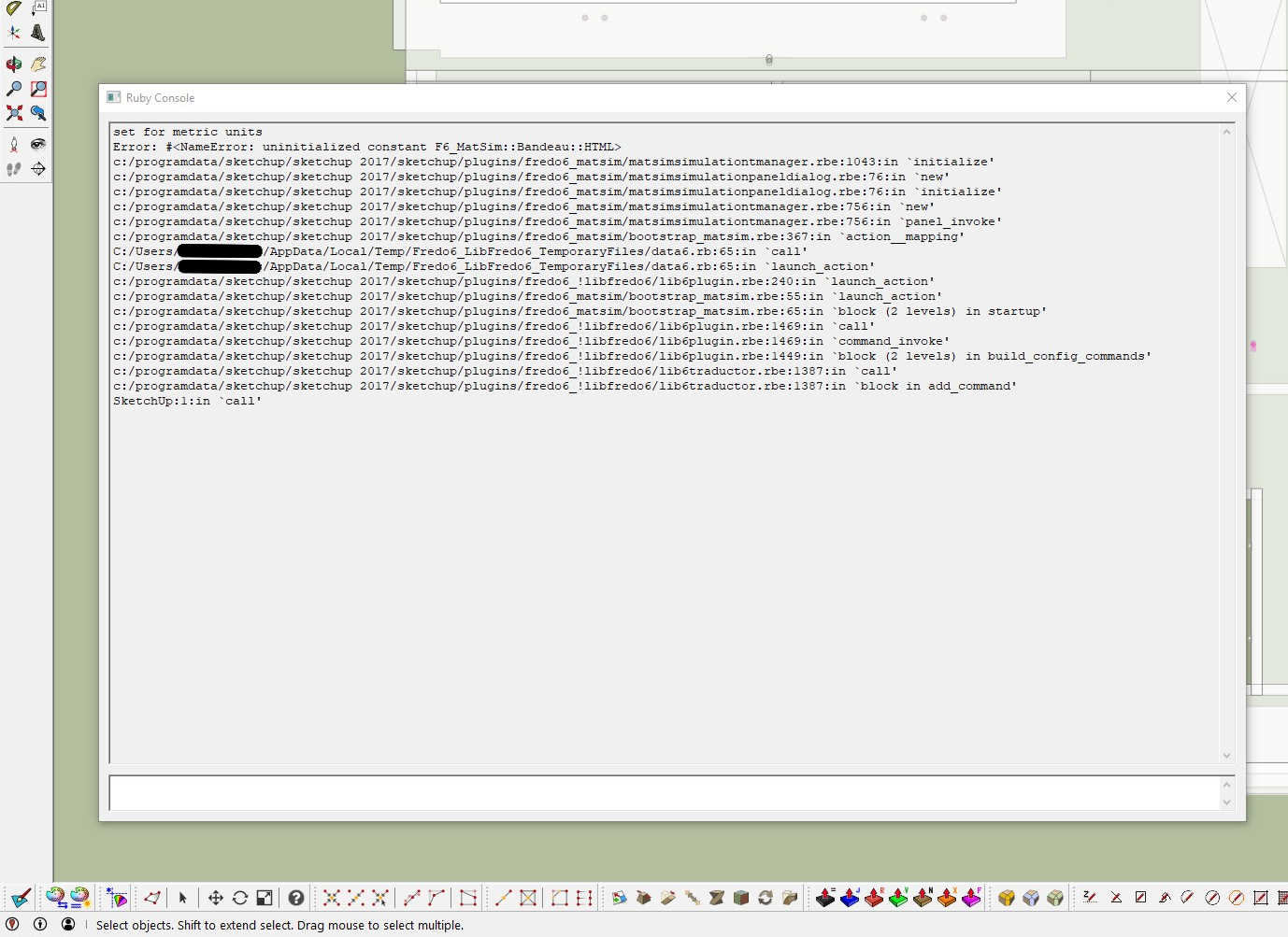
      SharedScreenshot MatSim error - crop.png

      This error occurs with a SketchUp model for which I applied the initial version of the MatSim plugin already before. I noticed that when I try to use the new version of the MatSim plugin on a new SketchUp model or on a model that hasn't already MatSim settings applied, the error initially doesn't appear, and asks whether you want to create a material simulation. However, afterwards, the error also happens for these files (i.e. actually nothing happens when clicking the buttons). For each click on a button, the same series of messages is added in the Ruby console.

      So, it looks like there is a problem with backward compatibility, so I'm stuck for the moment.

      In my current model, I rely heavily on the MatSim features (i.e. I applied different coloring schemes to emphasize different model components in different scenes). For the time being, I needed to manually select the appropriate simulation settings for the scenes, so the announced link between MatSim settings and scenes would be a big timesaver for my use case.
      However, now I even can't access the MatSim settings anymore, which makes my setup completely 'useless'.

      As a 'quick fix', can I therefore suggest to release an intermediate version that just includes the update for extending the validity period (unless of course if the root cause of the current problem can easily be fixed).

      Thanks a lot in advance.
      Kind regards.

      posted in Plugins
      I
      i5963c
    • RE: [Plugin] MatSim (Material Simulation) - v1.6a - 08 Oct 25

      Hello,

      I get an error message when I launch this plugin, indicating that the version has expired. The error message also refers to the homepage of a plugin that is even not installed on my system (MoveAlignMe).
      I have no clue what's happening...
      Thanks to let me know what needs to be done in order to be able to use the MatSim plugin again.
      Kind regards

      posted in Plugins
      I
      i5963c
    • RE: [Plugin] MatSim (Material Simulation) - v1.6a - 08 Oct 25

      @fredo6 said:

      @i5963c said:

      I tried to find out how I must link a simulation theme with a scene (the last message seems to imply that this should be possible). However, so far, I'm not able to do this. Can you please explain how this feature works?

      This feature is not included in the current version. I have however implemented it and it will go in a next release to be published soon. You will be able to assign simulation themes to any scenes.

      Hello, is there any indication on the expected release date of the feature that will allow to assign simulation themes to scenes?

      Many thanks.
      Kind regards.

      posted in Plugins
      I
      i5963c
    • RE: [Plugin] MatSim (Material Simulation) - v1.6a - 08 Oct 25

      @amckeag said:

      This extension is great! I'm really happy to see a way to temporarily apply materials, which helps keep a library of components/objects consistent across models.

      I'm curious if there are plans (or if it's even possible) to include a way to temporarily apply materials at the group or component level, instead of just the materials level?

      Hi, I just did a quick test of the functionality that you requested in your post. Actually, it looks to me that it is already possible to apply materials to groups/components as well as to faces. All these variations of material assignments will be temporarily changed when a different theme is selected via this plugin.
      As far as face materials are concerned, the plugin also differentiates front and back faces.

      My only desire w.r.t. this extension (see also my post above) is the ability to link themes with scenes, so that the simulations can receive a more 'permanent' status on a scene by scene basis. My main use case for this enhancement is the ability to distinguish between different reference materials for 2D elevations versus 3D views or renders.
      I understand that this feature is already implemented by Fredo, with an expected release on 'short notice'.

      posted in Plugins
      I
      i5963c
    • RE: [Plugin] MatSim (Material Simulation) - v1.6a - 08 Oct 25

      Hi, thanks a lot for your very quick reply!
      I'm looking forward to this next release...
      Kind regards

      posted in Plugins
      I
      i5963c
    • RE: [Plugin] MatSim (Material Simulation) - v1.6a - 08 Oct 25

      @fredo6 said:

      @chrisik said:

      Is it possible to link the themes with scenes?

      It should be possible to automatically display a Simulation theme when you switch to a scene.
      .

      Dear,

      I tried to find out how I must link a simulation theme with a scene (the last message seems to imply that this should be possible). However, so far, I'm not able to do this. Can you please explain how this feature works?

      Many thanks.
      Kind regards.

      posted in Plugins
      I
      i5963c
    • RE: Not possible to download extensions

      It seems to be up and running again...

      posted in Extensions & Applications Discussions
      I
      i5963c
    • RE: Not possible to download extensions

      As suggested in the reply message, I cleared my browser cache, I closed the browser, and I then tried again to download the SketchUcation plugin and the bought Fredo extensions. Unfortunately, the result is the same: it's not possible.

      When I try to download the SketchUcation ExtensionStore plugin, I get the following error:

      Forbidden
      You don't have permission to access /pluginrepo/rbz/SketchUcationTools.rbz on this server.

      When I try to download the Fredo extensions, I get similar error messages as described in my initial mail. So, I'm afraid that 'yesterday's problem' reappears today, and that it's not structurally solved...

      Kind regards.

      posted in Extensions & Applications Discussions
      I
      i5963c
    • Extension server unreachable when trying to download plugins

      Hello,

      Is the SketchUcation site for downloading extensions down?
      I saw a recent thread about server problems some days ago, with the message that the service was restored, but apparently, the problems have reappeared. At least, I can't download any extensions, including the Fredo bundle that I bought earlier today.
      Thanks to verify what's going on.

      Kind regards.

      posted in SketchUp Discussions
      I
      i5963c
    • Not possible to download extensions

      Hello,

      I just bought the license for the Fredo bundle. If I understand correctly, I also need to download the SketchUcation ExtensionStore plugin (v4.3.1). However, when I try to do so, it doesn't work, and I always get the following error message in my browser:

      /pluginrepo/rbz/

      /var/www/html/pluginrepo/rbz/SketchUcationTools.rbz
      File does not exist. Make sure you specified correct file name.

      Also the extensions that I just bought, can't be downloaded (similar error message, just a different rbz filename)

      Thanks to let me know how I can proceed.
      Kind regards.

      posted in Extensions & Applications Discussions
      I
      i5963c
    • 1
    • 2
    • 2 / 2