Great work majid! Wings is such a cool little program.
Oops, your profile's looking a bit empty! To help us tailor your experience, please fill in key details like your SketchUp version, skill level, operating system, and more. Update and save your info on your profile page today!
Check out Febhouse | New extensions for Shadow Analysis in SketchUp Download
G
Offline
Posts
-
RE: Wings 3D, Sketchup, Enscape 3d
-
RE: Curved monitor
I've been using a Dell curved U3818W for almost 2 years now and I love it!
-
RE: The best source to find Sketchup components
TIL (today I learned) Free3D, thanks.
-
RE: Mutual understanding through nature's beauty.
@majid said:
As M.L. King said: People fail to get along because they fear each other; they fear each other because they don't know each other; they don't know each other because they have not communicated with each other....
Peace and love.More truer words were never spoken! I'd love to visit Iran one day. Peace back to you Majid

-
RE: .shp file directly import into sketchup?
If you don't get an answer I have AutoCAD Map and can insert a .shp file and export to a dxf/dwg for you.
-
RE: Mutual understanding through nature's beauty.
Great topic Majid and I love your pictures and art work, thanks for sharing. I am very lucky that I live right next to the Appalachian Mountains in Western North Carolina. I can be on a trial/hike in 30-45 minutes. Here is one of my favorite spots that I've been to all of my life, Stone Mountain NC. Such a wonderful place to enjoy nature. Here's a pic of a tree on the summit.

-
RE: [New Plugin] Windows Builder
I'm probably doing something wrong but I can't get it to cut the opening. Do walls have to be grouped? I've tried both ways.
TIA -
Blender w/ Grid Modeler addon
Oh snap! Looking very SU like..sort of

https://gumroad.com/l/VthLyO -
RE: Name that plugin (once again...)
@matsuo_lano said:
Protrude is the one I was looking for, thanks! Now to find out it will work with SU2020...
Please let us know if you find a download link.
-
RE: Some of my artworks!
@majid said:
In reality, the place is really beautiful. It is named after abundance of black-billed magpie near this natural fountain. here is the location: https://goo.gl/maps/ibNoGVJpPDy3WonE8
Thanks for the link
I'd love to visit Iran one day. It looks to be a beautiful place filled with wonderful people. -
RE: No Drag and Drop Import in 2013?
Not doubting that Dave. I just don't believe that I've been "lucky" 100% of the time on every PC I've ever used or owned. I asked a while back on a Acad forum I help mod and no one there has had to right-click to install anything either. I believe that most of these issues are self-inflicted by the users. I've helped people with computer issues for years locally and it seems at times that they are purposely trying to muck stuff up
-
RE: No Drag and Drop Import in 2013?
@tig said:
Don't ask me 'Why?' - since I'll respond. 'Because it works!'
That's all I know...Perhaps the other apps' 'specialized-installers' call the correct processes...
Yeah that's a good a answer as any. Pretty much my answer for not having to do it. "Works and has ALWAYS worked on my end."
-
RE: No Drag and Drop Import in 2013?
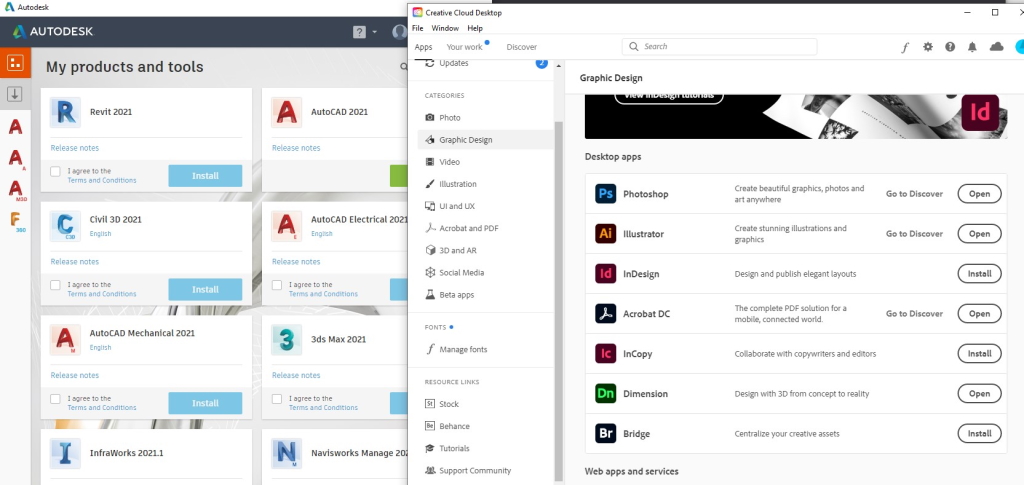
Literally nothing on my PC is installed this way nor has it needed to be. Nothing from Adobe Creative Cloud is installed this way nor is anything from AutoDesk installed this way. Both have desktop launchers that allow you to "click to install" apps that you have permission to install from your account. There is NO "right-click to install as admin" on ANY of their products. Every complex program on my PCs are either double-clicked to install or click to install and they ALL work as they should.
AutoCAD 2021, AutoCAD Arch 2021, AutoCAD Map 3D 2021, Fusion 360, SU 2019, SU 2018, Form-Z Free, Simlab Composer 10, Blender 2.90, current version of Adobe Dimension, Illustrator, Photoshop, Bluebeam, Twinmotion 2020 etc..
Not trying to start an argument just pointing this out.
-
RE: No Drag and Drop Import in 2013?
Working here at home today on SU Pro 19.3.253 Never got around to installing 2020 at home...lazy.
It does work correctly on my office PC running current version of 2020. -
RE: SU subscription
Probably means that you can skip a year and not pay NOR use SU for that year
-
RE: Sketchup 2019 ! FAILED TO SAVE DOCUMENT !
Huh, weird. I have the exact same setting except for the "Show Welcome Window". Should be default as I haven't changed it since I installed 2020. I'm sort of psycho about saving. I learned CAD back in '89 on DOS and I got into the habit of saving every little bit JUST. IN. CASE!
I mean like every few minutes I save the file. No matter if it's AutoCAD, SU, Blender, Form Z, Adobe..whatever. -
RE: Sketchup 2019 ! FAILED TO SAVE DOCUMENT !
So autosave just "went bad" out of the blue? It worked well before?