I had a copy of this way back when. Great little book.
Oops, your profile's looking a bit empty! To help us tailor your experience, please fill in key details like your SketchUp version, skill level, operating system, and more. Update and save your info on your profile page today!
Check out Febhouse | New extensions for Shadow Analysis in SketchUp Download
G
Offline
Posts
-
RE: Create 3D Like A Superhero !
-
RE: Sketchup always freezing
Point of reference: Home PC
Windows 10 Pro v 20H2
OS build: 19042.1052
Current SU version: 21.1.279
No issues -
RE: Going 2D
@majid said:
You are welcome, Sir. After posting my question, saw that you have described on the first page of this thread that you use an i-pad.
I have tried photoshop for digital painting and having a smooth and not jagged line in photoshop is a pain in the neck...ArtRage for the win

-
RE: Monitors
Joe, I'm using a curved Dell U3818DW and I see no change in how my images are shown on the screen or in how they compare printed out. Now this is NOT a cheap monitor ($1,000 and up) and will look better than a less expensive one. I'm running mine at 3840x1600 at 125% and everything looks great in SU, Acad, Adobe etc..
-
RE: Monitors
@mike amos said:
...The same size thing is unimportant if you use one for tools and secondary use like opening pdf etc ...
This. I use 2 different size monitors both at work and at home and it is no issues at all.
Joe, start your search here...
https://bensbargains.com/c/monitors/There is a good 34" AOC curved 2560x1080 at Office Depot for $200. Sure it's not 1440 or 4k but it has lots of screen space and might work better for you instead of 2 monitors.
Or the Acer 32" 2560x1440 at Best Buy for $200
-
RE: Apple Event April 20, 2021
@mike lucey said:
Of course a car can be upgraded and more so souped-up! But I think this route/option doesn't appeal to the average owner/driver. I imagine many average owners/drivers think their car becomes substandard once a newer model comes out.
That seems to be perception and/or marketing. Much like one "needs" a new iPhone when a new model comes out? "Are you getting it?"
@unknownuser said:
Most folks are lead along rather than think for themselves when it comes to consumables.
I agree with this. Sort of like sheep, one could say.
-
RE: PC spec recommendations?
Are you opposed to refurb units? My spare laptop at work, Asus N550J is still rolling right along. I don't use it as often as I did but it runs all my current CAD/3D software just fine.
It has a 4th gen i7-4710HQ, 16 gb ram, 512 ssd and a GTX 850M. It came with Windows 8.1 but it runs Win10 Pro just fine. Maybe something like that? Sure a refurb is always a gamble
Also like...
https://www.newegg.com/p/1TS-000A-0D7V7?quicklink=true
A Dell gaming laptop, 7th gen i5 and gtx 1060. It needs more ram and a bigger hard drive. I don't know what you have so those might be below what you have and need. -
RE: Trimble screwed up sketchup!
@bryan k said:
The price of 3D modeling programs is insane and Blender is.. well far too complicated.
If Form-Z free had a good plug-in community SU would have a serious competitor. Also BricsCAD Shape might one day get close to SU. I say this as a LONG time SU fan, back from v3. Competition is good for development and for the end users.
-
RE: Interactive 3D model viewing options
Seems to work well with DAE files from SU


-
RE: Interactive 3D model viewing options
Hey Dave, I've used it before but I can't recall what file type I used. I still have it installed so I'll check.
-
RE: Gone from Mac book pro to PC. underwhelmed!
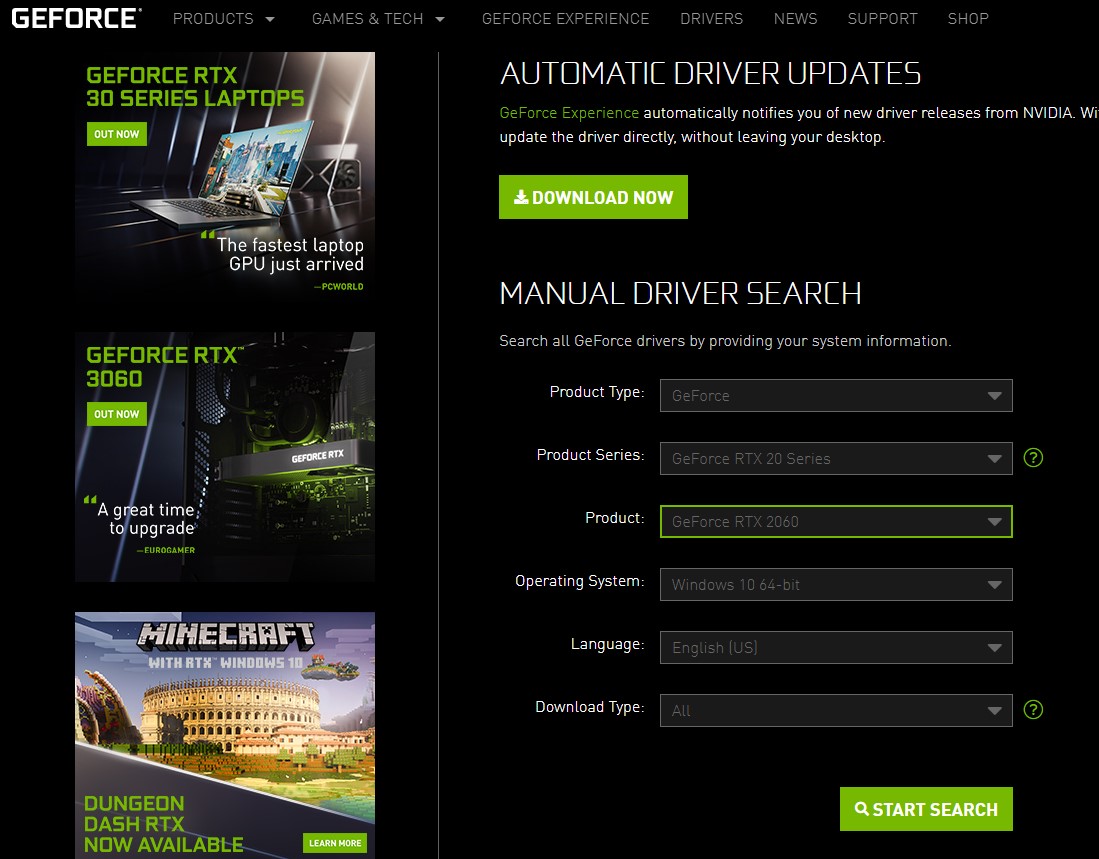
Hey Luke, go to nvidia.com and then click on drivers and then Geforce drivers. You can either do the big green "Download Now" button or select your product below that..
Save that file to your desktop and then double-click it to run it. Follow all the prompts and then restart.
Version 461.92 looks to be the current one for you.
-
RE: Work Flow question - determining scale without dimensions
@jman0war said:
Thanks.
I used to use BlueBeam Revu years ago, mostly for the one click PDF conversion and a few Markup tools.
Looks like they've added functionality.I only have the viewer but it's great to get dims off of PDFs. It'd be nice to be able to bring vector PDFs into SU (like I can in AutoCAD) but maybe one day.
Good luckGlenn
-
RE: Work Flow question - determining scale without dimensions
@jman0war said:
If someone sent you plans for a house in PDF, that included Front, Left, Right, Rear Elevations and a RoofPlan.
But there were no dimensions included at all and the only information you had to go on was a scale ruler sort of information under the elevation title that says:
FRONT VIEW
1/4" = 1'-0"
(one quarter inch equals one foot).The other Elevations are a different scale:
....You could always download and use the Bluebeam Revu trial. It allows you the measure PDFs. You can even set the scale or calibrate to a known distance. Once the trial is over you can continue to use it in "Vu" mode. It's a very slick tool.

-
RE: SU to DWG workflow?
I use both as well and I often use the AutoDesk SletchUp importer more than exporting dwgs from SketchUp. At times it's given me better results than exporting from SU.
-
RE: Wings 3D, Sketchup, Enscape 3d
Yeah I looked at Rocket 3F early on when it came out and it just didn't do it for me. Might try it again.
-
RE: Wings 3D, Sketchup, Enscape 3d
I can't wait to see where it's development goes.