Just delete the file.
Oops, your profile's looking a bit empty! To help us tailor your experience, please fill in key details like your SketchUp version, skill level, operating system, and more. Update and save your info on your profile page today!
Check out Febhouse | New extensions for Shadow Analysis in SketchUp Download
 F
Offline
F
Offline
Posts
-
RE: Error AOC with Round Corner Plugin
-
RE: Error AOC with Round Corner Plugin
Yes, I did. I deleted the Signature file, restarted Sketchup, downloaded the signature file, but the problem remain the same....
What do you mean by 'downloaded te signature file'?
Once you delete the signature file, the licensing system will recreate it automatically with the correct machine identifiers.
-
RE: [Plugin] FredoBend - v1.5a - 30 Jun 26
NEW RELEASE: FredoBend v1.2l - 10 Apr 26
Requirements
- LibFredo6: v15.9a or above
- Sketchup version: SU2017 and above
FredoBend 1.2l is a maintenance release including:
- Major bug fixing related to directions
Home Page of FredoBend for information and Download.
-
RE: [Plugin] FredoBend - v1.5a - 30 Jun 26
NEW RELEASE: FredoBend v1.2k - 09 Apr 26
Requirements
- LibFredo6: v15.9a or above
- Sketchup version: SU2017 and above
FredoBend 1.2k is a maintenance release including:
- Bug fixing related to replicas
Home Page of FredoBend for information and Download.
-
RE: FredoCorner merging separate faces
It would help to have a model and the topology of faces.
-
RE: LOTT Vignette Stripe usability issues
There are many problems with LOTT which may go beyond what the API can allow.
New versions of Sketchup break more and more things. on Windows and Mac.
I will probably dicontinue the plugin.
-
RE: [Plugin] FredoBend - v1.5a - 30 Jun 26
NEW RELEASE: FredoBend v1.2g - 01 Apr 26
Requirements
- LibFredo6: v15.9a or above
- Sketchup version: SU2017 and above
FredoBend 1.2g is a maintenance release including:
- Bug fixing for SU versions prior to SU2021.1
Home Page of FredoBend for information and Download.
-
RE: [Plugin] FredoBend - v1.5a - 30 Jun 26
Would you have the model, because I don't understand how the error can happen. Thanks
-
RE: [Plugin] FredoBend - v1.5a - 30 Jun 26
There is a new video on FredoBend by TheSketchupEssentials.
-
RE: TopoShaper does not work, after license purchase
You should select the group containing the guide points, not launch TopoShaper inside the group.
-
RE: FredoScale Compatibility issues with SU 2026
NO. This is a bug in SU2026 and there is no workaround.
-
RE: [Plugin] FredoBend - v1.5a - 30 Jun 26
I just ended the french translation of the LibFredo6 15.9a messages.
And FredoBend v1.2c too.
How to send you the result "LibFredo6_FR.lang" + "FredoBend_FR.lang" please?Many thanks. I am lazy to do it.
Just PM the .lang files to me on this forum.
For LibFredo6, this is useful.
For FredoBend, I did not make it translatable yet, until I finish the other features. So, the translation is uncomplete. -
RE: [Plugin] FredoBend - v1.5a - 30 Jun 26
NEW RELEASE: FredoBend v1.2d - 28 Mar 26
Requirements
- LibFredo6: v15.9a or above
- Sketchup version: SU2017 and above
FredoBend 1.2d is a maintenance release including:
- Bug fixing for SU2017
Home Page of FredoBend for information and Download.
-
RE: [Plugin] FredoBend - v1.5a - 30 Jun 26
NEW RELEASE: FredoBend v1.2c - 27 Mar 26
Requirements
- LibFredo6: v15.9a or above
- Sketchup version: SU2017 and above
FredoBend 1.2c is a maintenance release including:
- Bug fixing
- Evolution of the Save Original objects with 3 options and the capability to retrive the original object, even if it is not present in the model any longer.
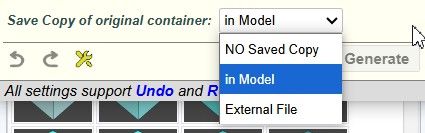
Home Page of FredoBend for information and Download.
-
RE: [Plugin] FredoBend - v1.5a - 30 Jun 26
Looks great Fredo. This is destructive one, isn't it? No way to edit afterwards
The bent object is of course new geometry.
However, as shown in the main video:
- the original object is untouched
- If you modify this original object, you can update the bent object in one click.
- you can also edit the bent object and change the bending parameters. If the original object has been modified, the new bent object will be updated.
- there is an option to save a copy of the original object to an external file. This is for the case where you delete the original object in the model, including its definition.
-
RE: [Plugin] FredoBend - v1.5a - 30 Jun 26
mx_constructtools
It looks like the plugin mx_constructtools is redefining a base method (Array#sum), which is not a good practice and is dangerous for other plugins. This is causing the error.
-
RE: [Plugin] FredoBend - v1.5a - 30 Jun 26
Plugins like Copy Along Curve just move and rotate the objects to position them along the curve. So, this is not really bending and it is another use case.
For FredoBend, it is possible to add an option where only the top container is modified, leaving the sub-container not deformed.
-
RE: [Plugin] FredoBend - v1.5a - 30 Jun 26
I also want to suggest that after using the plug-in, the components do not deform, bend in shape and retain their component properties
I don't understand what you mean.
The component / group property is kept. If you bend a component. the output is a component. Same for subcomponents.
However, all the content of the container is made unique, because bending is not a transformation but a creation of geometry. This has nothing to do with slicing.
-
RE: [Plugin] FredoBend - v1.5a - 30 Jun 26
With FredoBend v1.2b, you can normally keep the quad properties by turning off:
- Slicing
- remove coplanar edge
- soften edges
Here is a video showing the process.
Here is the test file. Tell me if this is OK.
-
RE: [Plugin] FredoBend - v1.5a - 30 Jun 26
the triangulating line that appears after using the plugin should become soft+smooth. Then the squares of the SubD work. Now the following is happening:
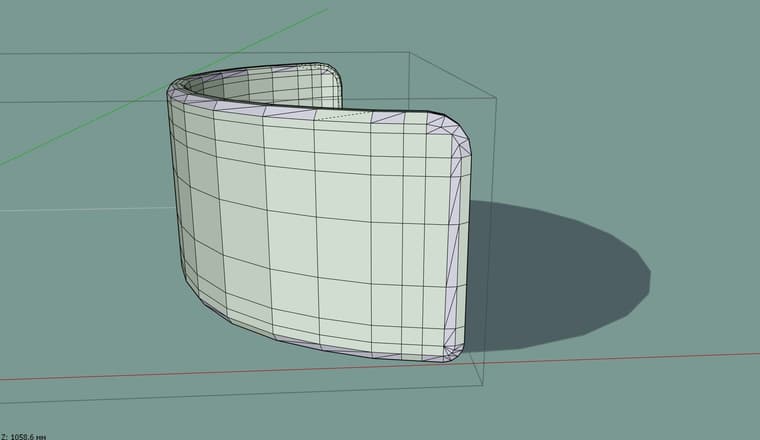
I am not sure it is possible to identfy and carry over the quad mesh, because of the slicing.
Could you send me a model and a curve so that I see what can be done. Thanks.