Awesome. Just playing around with it and had a great bit of fun. 
Now that I have a new toy, I suddenly have "writer's block" and can't figure out what to do with it. 
 E
Offline
E
Offline
Awesome. Just playing around with it and had a great bit of fun.
Now that I have a new toy, I suddenly have "writer's block" and can't figure out what to do with it.
Thanks.
Yep, that's it. $499 is a leeeetle over the top, you can find these for around $100 most of the time. They're just uncommon.
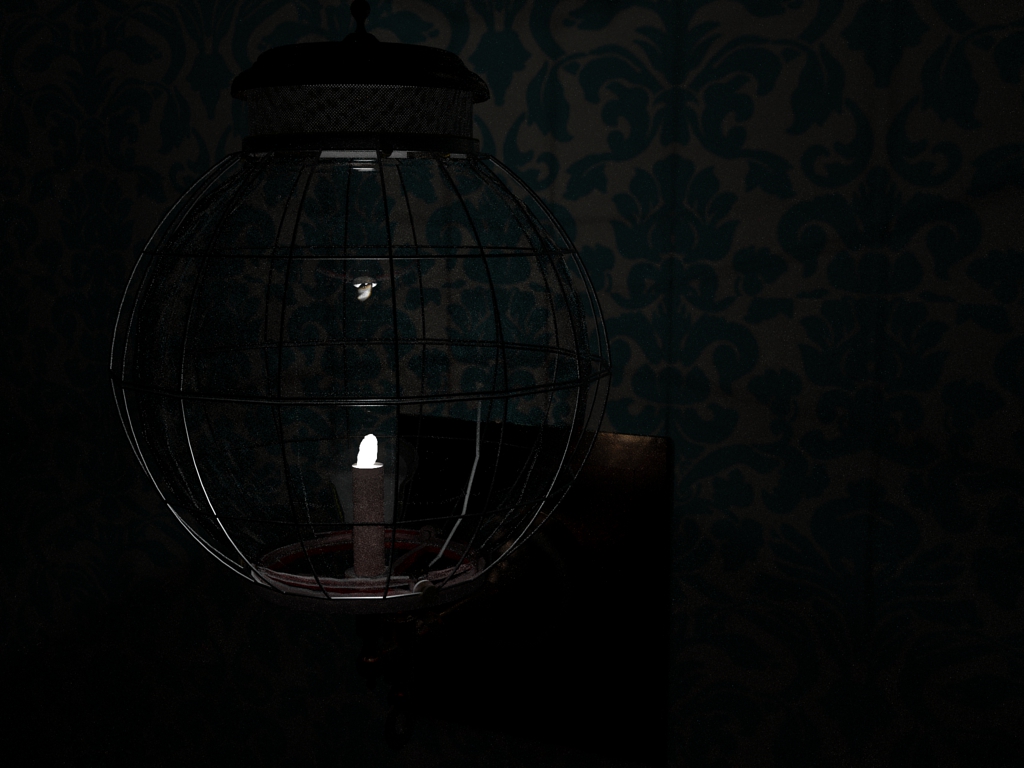
An antique lamp I've been fascinated with. I can never seem to find one intact or inexpensive enough to afford, so modeling it was the next best thing.
Feel free to use it wherever you want (except commercial use), all I as is that if you use it in a scene that you post it so I can see it used!
Note: I updated sketchup and it now tells me there are errors with the model that weren't there before, if I allow SU to correct them it starts deleting chunks of the model. If you get that message, ignore it.
[quote="Krisidious"]I pull and click or enter the distance and click but it never completes... allows me to choose again and again.
quote]
Have the same issue. No preview, though. It's a lathed globe shape, open at both ends. Haven't tried it on anything else yet.
Glad you figured it out, I was going to suggest Windex...
Wow. That is awesome. I have been wanting to do some more creative things with SU/Blender, this would really help out in the architectural and landscape department.
Thanks for sharing the find!
The video was given to ILM CGI experts, they pretty much took it apart and pointed out how it was fake. The producer of the video also admitted it was fake after the reporter contacted him to discuss the findings.
Nice, I remember those little motors. Nerve wracking to spring start if you didn't have one of the little electric starters.
You make it sound so simple. You're the Bob Ross of Sketchup.
Find where you installed Sketchup. Go to the Sketchup file on your drive, open it and look for the "Plugins" folder. Drop the weld.rb file in your Plugins folder. Restart sketchup if it was running. It will then be under "plugins".
You're off and running. Welcome to Sketchup and the forums!
Used to do Medieval recreation for fun, these chairs were popular. The 2 x 12 chair variant was very similar, and quite portable. Here's an example:

Heckuva deal for solid tools, dynamic components, LO, and export tools.
I have a similar CPU. The high frequency you hear may be from the north bridge or other controller, I used to hear a "squeaky" sound from my old PC when I had a high-poly scene.
That is a high core temperature, mine does not exceed 60C, even under all 6 cores being used to render a scene. Idle temp is 37-40C. That is with the stock cooler that came with the CPU.
I don't know if you built the computer yourself or what your level of experience is, but these are the things that should be checked:
Verify that the CPU cooler fan is plugged in and working, and that the CPU cooler is not clogged with dust or lint. You may need to carefully vacuum out the fins.
Verify that the computer case fans are working, clean and that you have enough fans to keep the air moving through the case.
Whatever render app you use, right click it and select "affinity" in the process manager. Reduce the number of cores being used - instead of "all processors" select every other one. This will slow down the render and the cores will still be used at 100%, but it will also reduce the overall thermal load and give the CPU cooler time to remove the heat.
Here's the technical part.
The CPU cooler may be inadequate, improperly installed, or the thermal paste (the material used between the CPU and the CPU cooler) may have been inadequately or improperly applied.
The CPU cooler should be inspected and verified that it is fully seated. It should not be leaning, twisted, or hanging at an odd angle. It should be sitting centered, square and flat on the CPU.
If the paste was poorly applied, the CPU cooler will need to be removed, the old paste carefully cleaned off the CPU and the cooler, new paste properly applied and the cooler reinstalled.
If the cooler is inadequate, it will need to be replaced. There are several good aftermarket coolers out there, but If your cooler looks like mine it should be adequate.
This is the cooler that came with my CPU:
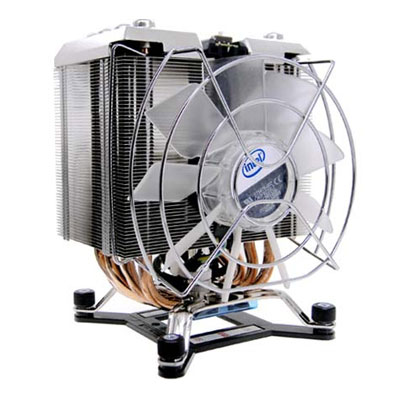
If yours is the smaller, flat type, it may be inadequate.
As far as the noise, I don't know of a cure. Keep an eye on your north bridge temperatures with some sort of monitoring software and make sure that it doesn't overheat.
Good luck, hope this helps.
@unknownuser said:
"Last week, President Obama signed into law the Federal Restricted Buildings and Grounds Improvement Act of 2011. This law permits Secret Service agents to designate any place they wish as a place where free speech, association and petition of the government are prohibited. And it permits the Secret Service to make these determinations based on the content of speech.
...
Up until now I have been more concerned with corporate manipulation of law in order to stifle criticism and free speech. This turn of events is surprising to me, it seems the US is following suit with many of the more tightly controlled countries seeking to "kettle" protests and keep them out of the public's(and the media's) eyes. What's next? make it near impossible to obtain a permit to protests at all? Oh wait, we're already doing that too...
I'm sure that this was done in the name of "Safety". In the last decade I've seen more freedoms, perceived and real, go swirling down the drain in the name of safety, and of all ironies, freedom too.
I am disgusted, especially seeing as this is coming from a liberal office, and they're the ones that are generally considered favorable to public protest and free speech.
Guess it's good I'm an independent. Apparently a man without a country, too.
@unknownuser said:
Thanks for the replies.
Can't try different ports, they are different connections (unless I am mistaken). Will take a photo when I get a chance.
I would not discount it overheating either, a month after I got this machine I had to return it for a new cooling system as it died on me. I will give it a good dusting out again, although I did that about 4 weeks ago.
Are you using a DVI and a VGA port? Many DVI monitors come with a VGA adapter or cable, check your box of computer junk.
What Khai said. Sounds like a problem with the video card as monitors don't affect the running of the PC generally. The obvious questions are whether or not your card is getting enough power and if your drivers are up to date; perhaps a heat issue, but just doing day-to-day things on a card generally doesn't create a heat problem.
Try switching ports for the monitors, try your "good" monitor in the port you had the bad one on and see what happens.