Well, there isn't much gain from that. Unless you use Maxwell Render, or other renderer that uses specific file exporting format. There is a Bool Tools plugin, also there are several plugins for import/export in other formats (dxf, obj... ).
Oops, your profile's looking a bit empty! To help us tailor your experience, please fill in key details like your SketchUp version, skill level, operating system, and more. Update and save your info on your profile page today!
Urasik Extensions | Lots of new extensions to check out Learn More
 Offline
Posts
-
RE: Money is Tight
-
RE: Save the Internet ... before its to late!
The measure for lowing the piracy is not censor. Indeed is not a simple problem, but the solution must be one adequate. Behind websites and cracked software are real human beings ! Those should be punished for their actions.
-
RE: Make unique texture for some faces at the same time
What do you mean by "wrong" faces? Can you post an example? Maybe you just have some reversed faces...
-
RE: Save the Internet ... before its to late!
But what happens if toxins paralyze the "synaptic pathways" ? I mean, if laws will force internet providers to block some addresses ? The only turnaround is a "underground internet network" ... something like black market. And that is not to be desired at all... So, best way is to not censor anything. It's like you would censor driving cars to avoid car accidents, because you always have a chance to kill someone in traffic.
-
RE: How to load component directly on specific layer?
@chedda said:
Select your layer or create a new one then paste it in from another window
Well, I was hoping that it can be done somehow automatically. I'll group the component's content and put it on a layer. It's about LOTS of components... and is very time consuming to manually select/create, and so on... And there is the risk to lost consistency. All models must have same layer structure.
Thanks all for clearing this out to me !
-
RE: How to load component directly on specific layer?
Not sure what you mean, TIG. Let me explain better:
I have furniture to load, that should be on "furniture" layer. Also, I have Light Fixtures to load, that should be in Fixtures layer. But, when I load them, all are loaded them on Layer 0.
As I understand, is to have everything on Layer0, but the content, inside the component to be on my custom layer. So the component itself will load on Layer 0, but also will load the content's layer ? -
How to load component directly on specific layer?
Hy! I made a component, I put it on a layer, then Saved As the component. When I inserted it from Component Browser, it loaded on my Current Layer (which was Layer 0). So, it seems that a saved component will not preserve the layer. BUT, the nested entities will be imported with their layers.
Question: is it possible to load a component on a specific layer, but without manually creating that layer and making it Current? I often load many components from my library I can't keep track of what layer is needed for each one.
If this is not possible with native sketchup resources, maybe a plugin that have an observer that watches on what layer the component is, then creates an Attribute Dictionary entry that contains the layer name. Then, when importing that component, it creates the layer and assign it? Possible?
 Better Ideas, anyone?
Thank you. -
RE: Re: Some Funny Pics.
@solo said:
(these folks are part of a small minority that use religion to scam the stupid)
But this is obviously illegal ... I'm shocked that they are allowed to perform on public television and nobody takes measures.
Is it religion a excuse for avoiding the law ? -
RE: Any Cinema 4D users here?
What's your motivation to learn C4D ? I'm asking to know what one could gain by learning it. There can be more people interested in working with it, but for them is just "another 3d app".
Thank you. -
RE: Re: Some Funny Pics.
I love the end !

Now I'm just waiting for somebody to call me and ask for my 1000 seed ... I have the weapons ready
-
RE: [Plugin] DXF_export v0.0.4 (2011-10-28)
@joergber
Why don't you simply use selected entities to build the dxf? Is more simpler for start... You can iterate trough all selected and check what are they. If there are edges only, use them to build a dxf. If there are also faces, add to dxf the edges that build that face.
Because selecting a face is simple by double clicking. Usually a tool that selects a face, will select only a planar face, not a curved one (like a cylinder). To select that, I think you have to take into consideration the edge smoothing angle. So, I'm guessing that double click on a smooth face is pretty fast to not require a select tool (for now, at least).Thanks for still working on it
-
RE: [Plugin] DXF_export v0.0.4 (2011-10-28)
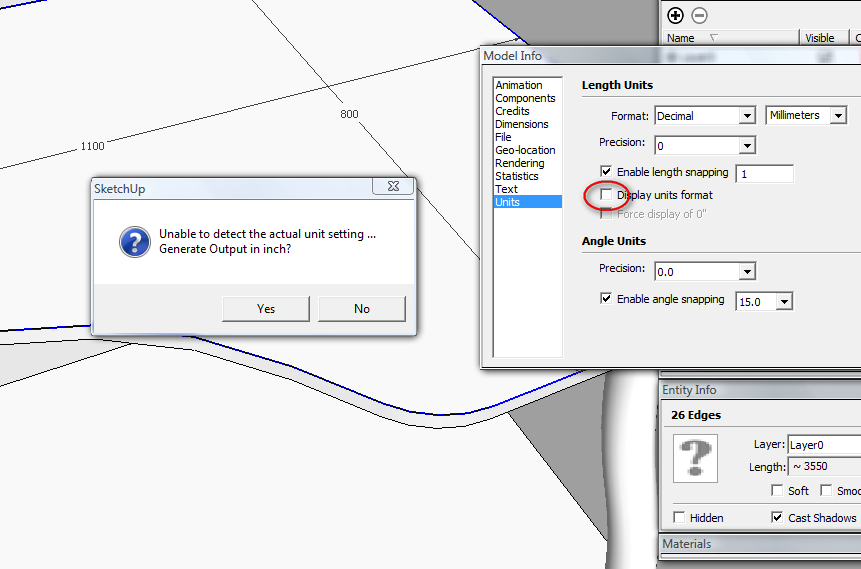
I just found a bug in the program. As seen in image below, the unit format is disabled (to not show it in dimension lines). But, the exporter doesn't recognize the units that I used and wants to export by default in inch. My suggestion: if there is a program limitation for this situation, to replace the YES/NO message box with a list box with all units available. So, if the exporter doesn't recognize the units, to let the user choose.
Another thing... I selected only the contour lines from a 3d object (the lines that formed one face), the exporter reported "one shape",but in DXF I had all lines exported of the solid. Is it possible to export ONLY what is selected? I mention that I was inside a component when I selected the outer shape of the face.
One more thing: it would be useful to have the possibility to export in XY plane for all 2D shapes, regardless they are oriented on a different plane.This is the most useful DXF exporter I ever used. Actually, is the only one that is helping me
Thank you.
-
RE: Stapler
@chocolate_fou said:
Nice..thanks for trying.. This is actually my first post here..I have other sketchup models. maybe I'll post them too and ask you again guys to render it..
Why don't you give it a try? There is Kerkythea (free), Twilight Render (full features, for learning is as "free" as possible), Maxwell Render free for sketchup
 ... So the possibilities are here !
 -
RE: [Plugin] FollowMe and keep (v0.04 update 20090210)
@destroyer1095 said:
ITS NOT WORKING FOR SKETCH UP 8!!!!!


is working ! read the previous post! I'm sure you used a path that was vertically aligned.
-
RE: Camera advice
What about Canon PowerShot SX 1 IS ? It's a very powerful camera at a very low price. Folding screen, 10Mpix, 20x optical zoom (and a good one, tested). Video recording at full HD and stereo.
-
RE: Battlestar Galactica Viper
OMG ! Really large model! and it doesn't seems too complex. Maybe there are large textures ? Or is just raw model?
-
RE: Battlestar Galactica Viper
The leading edge of the wings seems too flat... it will cause tremendous turbulence in a planet's atmosphere and i'm pretty sure it will crash and kill your pilot
 ... maybe you will round it a little
 -
RE: Stapler
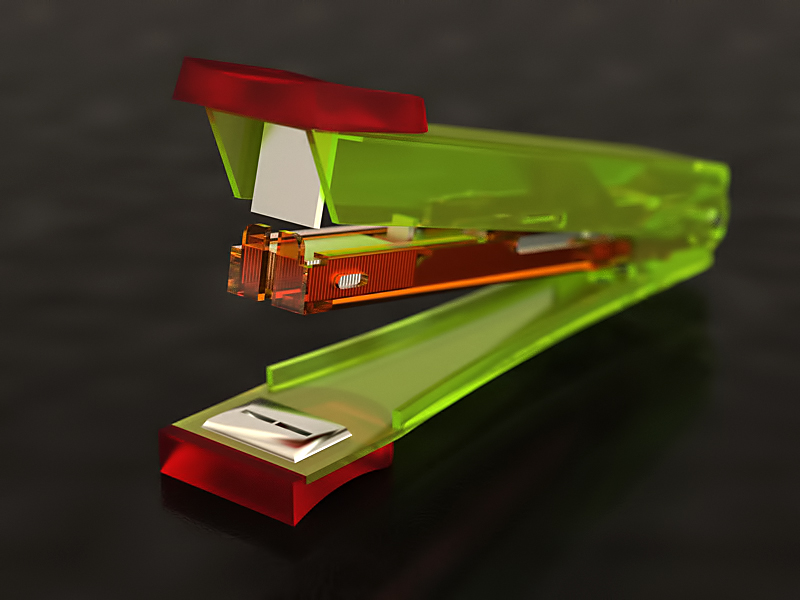
Quick render at work (don't tell my boss
). TwilightRender - easy10. Illuminated with HDR (room).
-
RE: [REQ] Component Instances: Unlock, edit, "relock"
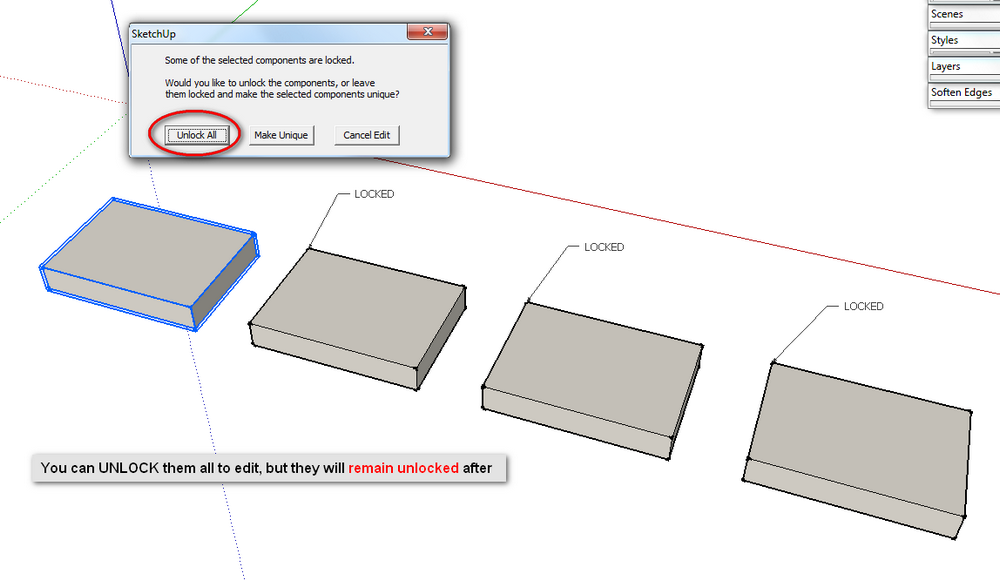
Well, It seems you can UNLOCK them all to edit, but they will remain unlocked. So, I think here is a request for something that will Lock Back everything after the editing has ended.
-
RE: Choosing a Graphics Card
I found this and I think it worth to be taken into consideration:
SketchUp's performance relies heavily the graphics card driver and it's ability to support OpenGL 1.5 or higher. Historically, people have seen problems with Intel based cards with SketchUp. We don't recommend using these graphics cards with SketchUp at this time.