sketchucation logo sketchucation
    • Login
    1. Home
    2. Daniel S
    3. Posts
    Oops, your profile's looking a bit empty! To help us tailor your experience, please fill in key details like your SketchUp version, skill level, operating system, and more. Update and save your info on your profile page today!
    šŸ”Œ Easy Offset | Offset selected faces in SketchUp in positive and negative offsets. Download
    D
    Offline
    • Profile
    • Following 0
    • Followers 0
    • Topics 18
    • Posts 339
    • Groups 1

    Posts

    Recent Best Controversial
    • RE: [Obsolete] FredoScale 1.0e (Free Scaling, Taper Scaling)

      Awesome!!!
      Thank you Fredo!!!

      I only have a problem when set the dimension in the dialog box by pressing TAB. It dosenĀ“t accept what I put.. just make a beep šŸ˜•
      I attach a video example of this.

      Daniel S


      a video of the problem (.wmv)

      posted in Developers' Forum
      D
      Daniel S
    • RE: How to make low-poly model in sketchup?

      Polyreducer šŸ˜‰

      Daniel S

      posted in SketchUp Discussions
      D
      Daniel S
    • RE: [Plugin][$] Tools On Surface - v2.6a - 01 Apr 24

      "you need to activate the script via the menu Windows->Preferences->Extension."
      link
      Daniel S

      posted in Plugins
      D
      Daniel S
    • RE: Prince IO Sketchup Game Demo

      Amazing game!!!
      Great work!!

      Thank you,
      Daniel S

      posted in Developers' Forum
      D
      Daniel S
    • RE: SP - OMNI Wheels Test

      Great SP model!! Thanks for sharing!!

      Daniel S

      posted in SketchyPhysics
      D
      Daniel S
    • RE: [Plugin][$] Tools On Surface - v2.6a - 01 Apr 24

      "you need to activate the script via the menu Windows->Preferences->Extension."

      Daniel S

      posted in Plugins
      D
      Daniel S
    • RE: [Plugin] Round Edge - v1.0 (by Bezier)

      Great Icons!

      A crazy ask: It is possible to make the plugin work in a future version with a variable radius along the edge? šŸ˜’

      Daniel S


      Variable RoundEdge Video.zip

      posted in Plugins
      D
      Daniel S
    • RE: Help on loading skin ruby

      This is the working version of skin that I have...
      Hope that works for you too.

      Daniel S


      Skin.zip

      posted in Developers' Forum
      D
      Daniel S
    • RE: [Req] Rippled surfaces

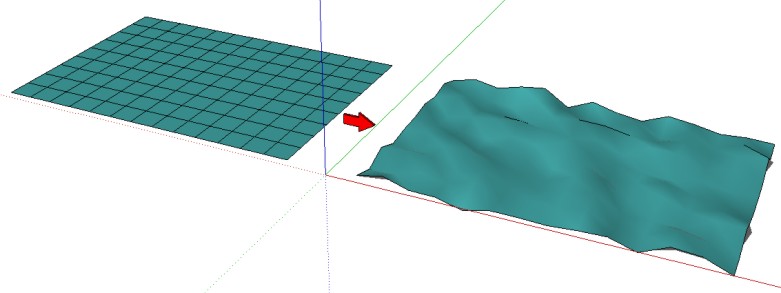
      Jim has a plugin called Randomize tin:

      Link Preview Image
      Plugin: Randomize TIN

      This plugn adds some (user specified) randomness to a Sandbox-created TIN. It adds a Randomize TIN option under the Plugins menu. Instal...

      favicon

      (sketchuptips.blogspot.com)

      That perhaps is useful for what are you looking for.

      Daniel S

      Randomize tin.jpg

      posted in Plugins
      D
      Daniel S
    • RE: [Plugin] follow me rotate

      Herodes:

      I think that you don“t install it well
      Put the three files in your plugin folder

      inputbox.rb
      FollowAndRotate_en.rbs
      FollowAndRotate_cn.rbs

      Perhaps this fix your problem.

      Daniel S

      posted in Plugins
      D
      Daniel S
    • RE: [Plugin] follow me rotate

      Solo...
      try with the ruby console open like in the video i attach here:
      http://www.sketchucation.com/forums/scf/viewtopic.php?f=180&t=12965&start=15#p94900
      And if it gives error send the error to wikii.
      For me is working now.

      Daniel S

      posted in Plugins
      D
      Daniel S
    • RE: [Plugin] follow me rotate

      Now works..
      thank you Wikii!!
      šŸ‘
      Solo...
      install the latest version, and under Plugins you will see "FollowAndRotate". Select first a curve and a face.

      Daniel S

      posted in Plugins
      D
      Daniel S
    • RE: [Plugin] follow me rotate

      Wikii
      I attach a video showing what i“m doing...
      still I get a error in the ruby console.

      Daniel S


      error video.zip

      posted in Plugins
      D
      Daniel S
    • RE: [Plugin] follow me rotate

      Wikii
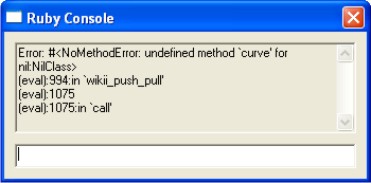
      I get a error on the ruby console
      I attach a image.

      Daniel S

      wikii.jpg

      posted in Plugins
      D
      Daniel S
    • RE: SketchyWiisics

      Look at this video with Internet Explorer:

      Daniel S
      PS: Great we have SketchyPhysics forum again.

      posted in SketchyPhysics
      D
      Daniel S
    • RE: [Plugin] GreyscaleMode

      Great!!! šŸ˜
      Thank you Jim!!!

      Daniel S

      posted in Plugins
      D
      Daniel S
    • RE: SketchyWiisics

      And here is other video showing SketchyPhysics with the Wiimote Whiteboard option:
      [flash=425,355:1k3yrd18]http://www.youtube.com/v/tOo4qjsVekc[/flash:1k3yrd18]
      It is display on a TV.
      http://www.youtube.com/watch?v=tOo4qjsVekc

      Daniel S

      posted in SketchyPhysics
      D
      Daniel S
    • SketchyWiisics

      I just upload this video:
      [flash=425,355:2aezo7cr]http://www.youtube.com/v/0HLHU4rHhFw[/flash:2aezo7cr]
      http://www.youtube.com/watch?v=0HLHU4rHhFw
      Is SketchyPhysics controlled with aWiimote
      It“s very difficult to make it work as joystick, but it“s really great.

      For more information and video about the Wiimote and Sketchup:
      http://www.sketchucation.com/forums/scf/viewtopic.php?f=180&t=11205&start=0&st=0&sk=t&sd=a

      Daniel S.

      posted in SketchyPhysics
      D
      Daniel S
    • RE: [Plugin][$] Tools On Surface - v2.6a - 01 Apr 24

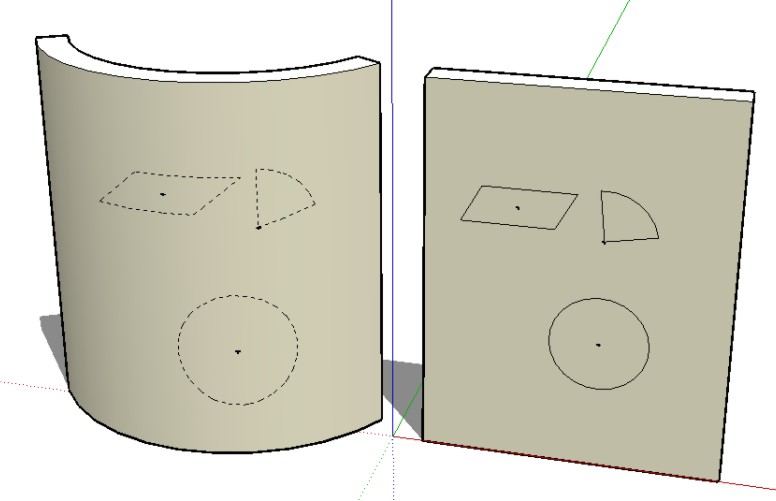
      I had the same problem of watkins. I think that the problem is because the contruction lines is working only for curved faces. If you want the construction lines of the tools on a planar face it dosen“t work.
      I attach a image to try to explain these. In the two faces I try to put tools with construction lines.

      Daniel S

      In two faces I try to make with construction lines

      posted in Plugins
      D
      Daniel S
    • RE: SketchUp + Wiimote + IR Pen

      Here I use the Wiimote to control SketchUp:

      [flash=425,355:29j0bxbb]http://www.youtube.com/v/-SmT_atskuk[/flash:29j0bxbb]
      http://www.youtube.com/watch?v=-SmT_atskuk

      You can zoom, orbit, pan, walk... you can make whatever you want because you can assign shortcuts to the Wiimote Buttons.
      In the video I show that you can change the scenes with the wiimote for making presenations too.
      For making this, I use the script from:
      http://www.alexschreyer.net/cad/when-wii-met-sketchup/ and I make some changes.

      Daniel S

      posted in Developers' Forum
      D
      Daniel S
    • 1 / 1