sketchucation logo sketchucation
    • Login
    1. Home
    2. chrisjk
    3. Posts
    Oops, your profile's looking a bit empty! To help us tailor your experience, please fill in key details like your SketchUp version, skill level, operating system, and more. Update and save your info on your profile page today!
    ⚠️ Important | Libfredo 15.6b introduces important bugfixes for Fredo's Extensions Update
    C
    Offline
    • Profile
    • Following 0
    • Followers 0
    • Topics 9
    • Posts 280
    • Groups 1

    Posts

    Recent Best Controversial
    • RE: Are You A SketchUp Guru?

      @dave r said:

      I don't know. I can't seem to go more than 6 hours without opening SketchUp. I opened it twice today before I left for work at 6 am. 😒

      Dave, yes you probably are a guru and I am one of your disciples but it's also plain that you are an addict! 😄

      posted in SketchUp Discussions
      C
      chrisjk
    • RE: [Plugin] TECLA 0.1

      This sounds very interesting but I use a Mac.. - looking forward to the OS X version!

      posted in Plugins
      C
      chrisjk
    • RE: [Plugin] Toggle Units

      What versions of Mac OSX are you running? I have Snow Leopard and the icons do show up for me. You might need to check View>Tool Palettes>Toggle Units to see them.

      posted in Plugins
      C
      chrisjk
    • RE: Design. Click. Build.

      Dave,

      Another disciple here! 👍

      posted in Woodworking
      C
      chrisjk
    • RE: Change Temporary Orbit Shortcut (Mac)

      Jeff,
      You are right, can't think why I couldn't make it work before. I somehow don't see myself using that key combo however, the MMB is so much second nature to me.

      posted in SketchUp Discussions
      C
      chrisjk
    • RE: Change Temporary Orbit Shortcut (Mac)

      Victor,
      You might try this http://plentycom.jp/en/steermouse/ I use it instead of the Logitech drivers/programs which I have always had problems with on a Mac.

      I am using a Logitech mouse however - fairy simple one with a few extra buttons but not too many.

      posted in SketchUp Discussions
      C
      chrisjk
    • RE: Change Temporary Orbit Shortcut (Mac)

      Jeff,
      I misunderstood too.

      But now I wonder if I should feel deprived - Ctrl-Cmd does nothing for me. The ony way I can invoke the temporary Orbit command is via the middle mouse button. However, since this is the only way I ever do it, I am not too worried!

      posted in SketchUp Discussions
      C
      chrisjk
    • RE: Change Temporary Orbit Shortcut (Mac)

      You can change shortcuts on the Mac as Gaieus shows. Just go to Sketchup Preferences in (SU) and then shortcuts.

      I have a Space Navigator and mainly use that for camera position but if not using that I always use my middle mouse button(wheel) for orbiting - any reason you don't use your mouse button?

      posted in SketchUp Discussions
      C
      chrisjk
    • RE: Paint Bucket Materials and Licensing Info have disappeared.

      It's a few years since I used windows but your uninstall might have have left some SU related files here and there plus entries in the registry. I suggest you clean the registry of anything that says Sketchup in its entry. If you rid your system of anything that SU installed/changed, then it should reinstall just fine.

      I used to use this utility - jv16 power tools - http://www.macecraft.com/ for any registry related stuff and it worked very well for me.

      I see you are on Vista. XP or Windows 7 might be better!

      posted in Newbie Forum
      C
      chrisjk
    • RE: Automatic orthographic view?

      There is a very handy $5 plugin by Jim Folz here http://sketchuptips.blogspot.com/2009/08/plugin-make-orthographic-views.html that makes ortho views of components. As a woodworker, I use it all the time to help in making shop drawings.

      posted in SketchUp Discussions
      C
      chrisjk
    • RE: SU upgrade to 8.0.4811 (Maintenance 1)

      Looks like a pretty big bunch of stuff has been fixed or improved.

      posted in SketchUp Discussions
      C
      chrisjk
    • RE: [Plugin] BezierSpline - v2.2a - 22 Apr 21

      You can constrain the movement in editing mode. On the Mac, click Alt (I think it's probably Ctrl in Windows) then the black box turns into an outline, hit the up arrow as you would with the Move tool and Hey Presto you are locked in the Z direction. Fredo links to a tutorial here http://www.aecbytes.com/tipsandtricks/2009/issue42-sketchup.html that explains that plus other stuff.

      posted in Plugins
      C
      chrisjk
    • RE: SU 7 vs SU 8. Any advantage to either?

      On the Mac, I can reassign those keys

      posted in SketchUp Discussions
      C
      chrisjk
    • RE: Curve an irregular shape around another irregular shape

      It is really hard to envisage what you want - perhaps something like the image below? A handdrawn sketch as mitcorb suggests,would help!

      Screen shot 2011-01-11 at 06.37.41.png

      posted in Newbie Forum
      C
      chrisjk
    • RE: SU 7 vs SU 8. Any advantage to either?

      Running 8 on a Mac I find the shortcuts listed in the usual place (O and H for Camera/Orbit and Camera/Pan). I normally only every use my middle mouse button however for this pair.

      posted in SketchUp Discussions
      C
      chrisjk
    • RE: Invitation to the SketchUcation collection

      David, I quite agree about the end purpose for such a model. I too would not wish to spend a lot of time modelling the feet for the sake of a nicer looking SU model. As I said in my first post, your model is at a stage where it could be used for building the piece.

      posted in Woodworking
      C
      chrisjk
    • RE: Invitation to the SketchUcation collection

      David,
      I think my approach would be to wrap a torus round a sphere, intersecting stuff as required to give me the necessary arc lengths, then to cheat a little (or a lot) and use the free training edition of this plugin ( http://www.tgi3d.com/index.php?Page=Download ) to thicken/thin the tube as required to make knuckles. I have not tried to give them any particular shape here - just illustrating the resizing possibilities of the plugin.
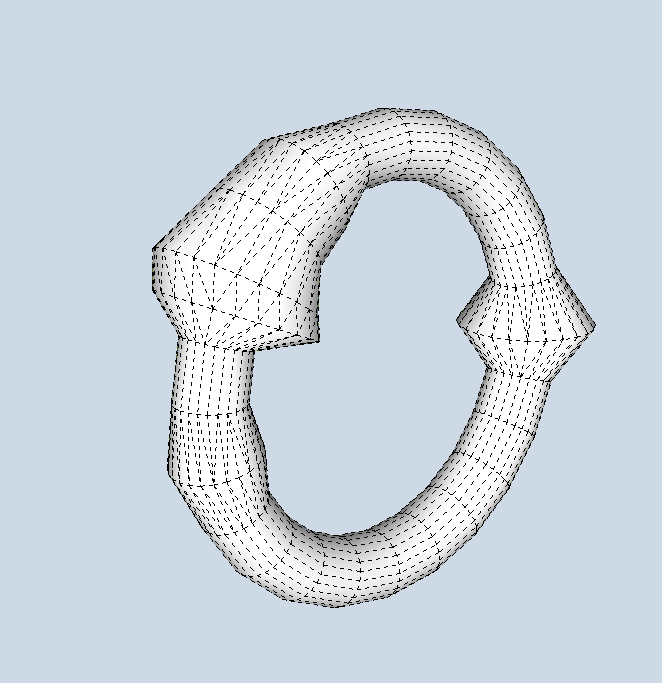
      Knuckles.png

      Other approaches might use Fredo's Tools on Surface to draw the lines for the talons directly on the ball, without cutting up a torus and then use pipe along path or tube along path to create the claws.

      Again, one could employ a method like the one below where I made a radial array of circles (no need for a full circular array of course, then used the MOVE tool on the cardinal points to resize a couple of the circles then used Fredo's Curviloft to skin them.
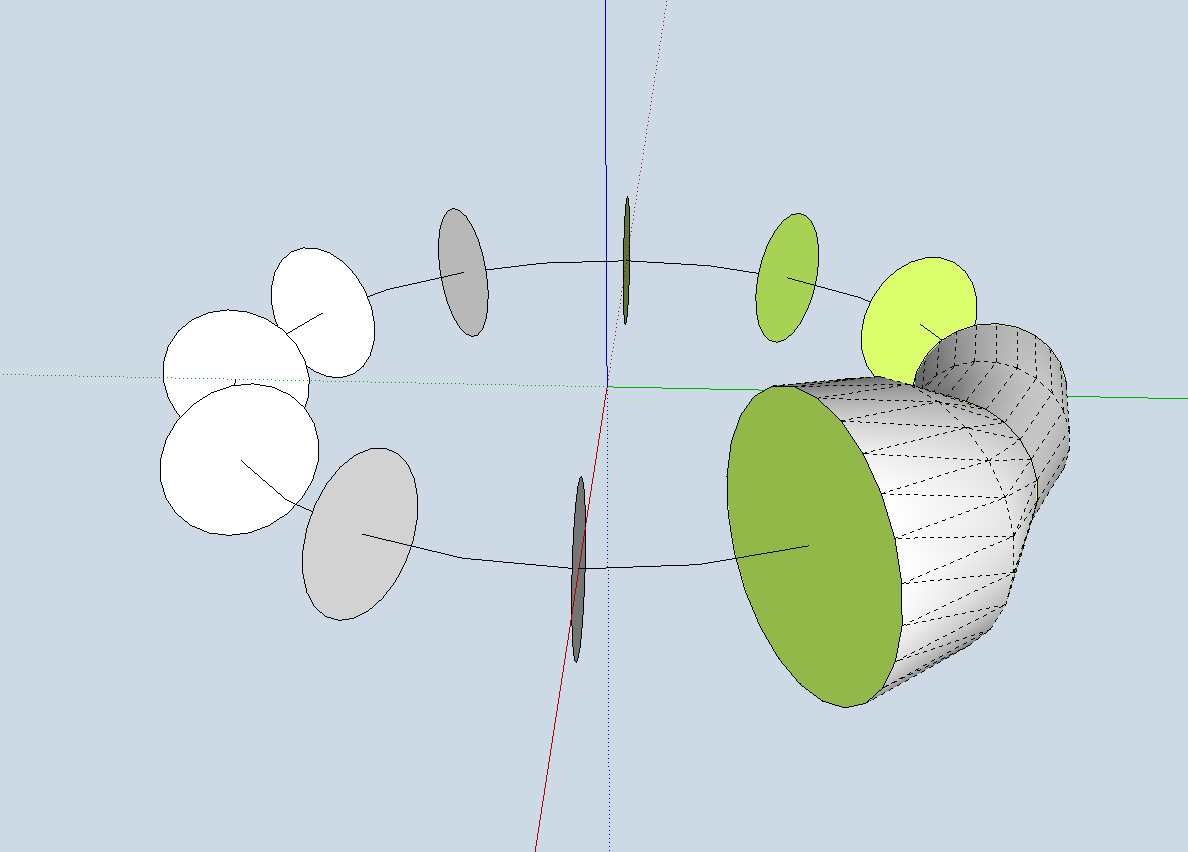
      Fredo way.png

      posted in Woodworking
      C
      chrisjk
    • RE: Awesome Duplicate Photo Finder

      Thomas,
      There is such a thing http://www.tineye.com/ it seems to be getting better too. I tried it when it first came out an it wasn't too good but it seems much better now - perhaps a function of the speed of spidering the web.

      posted in Extensions & Applications Discussions
      C
      chrisjk
    • RE: Invitation to the SketchUcation collection

      Seems like a very nice job with most of the joinery sufficiently detailed to build it from the model. There is the odd small face missing here and there but that doesn't amount to anything serious at all.

      I think the ball and claw feet could do with more work - the claws especially seem to lack definition (although not knowing this piece, they might be like that) but I am used to seeing knuckles on the talons which need to hug the balls more closely..

      posted in Woodworking
      C
      chrisjk
    • RE: Is it possible? To use plugins from USB stick

      Alex Schreyer's plugin loader works for me - at least for plugins on my hard disk

      http://www.alexschreyer.net/projects/plugin-loader-for-sketchup/

      posted in SketchUp Discussions
      C
      chrisjk
    • 1 / 1