Yes of course thanks.
No fun being dumb!
 C
Offline
C
Offline
Yes of course thanks.
No fun being dumb!
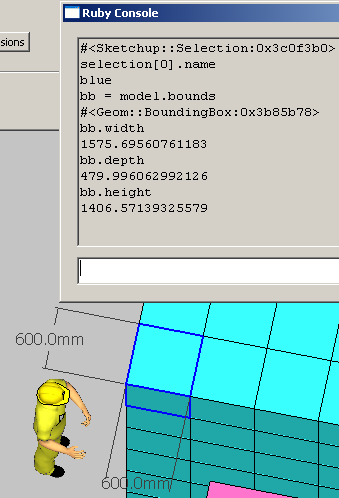
Why do the dimensions not match - what have I missed?
Thanks
So can I link this to my bounding box question, and your and Chris F's replies, viz:
Objects to be moved are selected; a draw tool is used to trace or slightly offset the bounding box points with colour set as you say here. So when another selection is made there would be two boxes, say one fake red one, and the normal blue one for the destination. Both would be cleared on "Store route" or something.
Your post just got me thinking out loud (TOL), but if there are any comments that would be good.
Thanks
So TIG it seems you made Stinkie's head gear as well ...

I hate to say this but if you really want to use a grid, it should overlay the model so that you can see where it intersects the models lines. As I said a grid is unnecessary here but you should bear it in mind for free-form designs when it would be almost essential.
Sorry.
@chris fullmer said:
You would need to create your own tool that draws to the screen. Then it could draw bounding boxes around your components. And you could specify any color you desire. I am out of mental gas for the day, but maybe tomorrow I could try to mock up a quick snippet that would show how its done.
Chris
Very kind - it's not urgent but I needed to know if it were possible. But of course if you find some time ...
@thomthom said:
You'd have to create your own tool.
So it can be done - with BoundingBox.new and Sketchup::Color.new - would that be going in the right direction?
@mmyoung said:
I was never able to get Matt666's PointTool.rb to work on my Mac. I opened it in a text editor and removed the "=begin" and "=end" lines at the beginning and placed a "#" at the beginning of each comment.
Now it runs on Mac.
This may be relevant here as well.
Is it possible to have different colour bounding boxes in the same scene - for example, move red selection to blue destination.
Thanks.
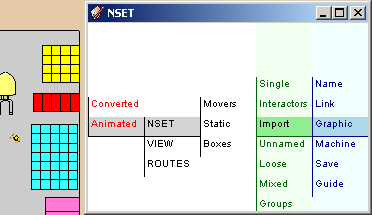
First I imported all the component and layer names in the model (revised skp attached); changed the layers into nset groupings; added some new groupings and entities to make a more easily manageable hierarchy and gave all components a unique number to allow nset/model interaction. I added a new aspect called ROUTES and its first route.
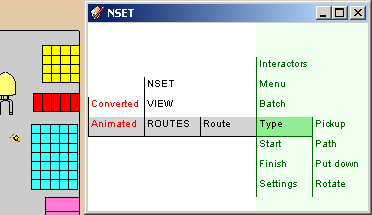
Now I am making the graphicAnimate device which will provide the data for the animation and run it when that code is ready. Here are some ideas for its tools:
Interactors - The nset in the white area has a simple purpose - to record, position and highlight selected names along a trail and present any new associated names. However, interactors extend their functionality, in this device to collect the needed selections.
Menu - Simply opens the full blue menu. (because four menus only take up the space of two).
Batch - Tells the interactor to collect single, blocks or multiple combinations of stacks and/or boxes. (similar to click, shift click, control click in file managers)
Type - Lift up, lift down, path, rotate.
Start and Finish - All xyz's, dimensions and rotations will be derived from the model components and nset settings. So if the first selection is a stack and the second the forklift the application will know what animation to perform - he says.
The animation is worked out directly in the model. (I need to add some testing options). There is also the question of conflict resolution - orbiting, zooming in ... later.
Maybe this stuff should be in its own topic?
Any C+C or new ideas would be helpful - think of it as a computer game rather than tedious coding - if needed there is more info and an animation diary in the Nameset notebook.
Thanks
@gaieus said:
Well, eventually anything could be zipped together (maybe with subfolders inside) so one could solve the problem with just one attachment,too. But it does not really matter after all so that seven looks nice.
Szívesen.
I think you agree that it is more friendly to separate at least Rubies to be extracted to the plug in folder. Perhaps I'm over-considerate ... but then so are you (mentor of D0me)
@gaieus said:
Chris - I have already set it to 7 - let me know if that is toomany and I will set it back to 3
Actually I don't know what it entails or endangers. I was just thinking a typical set for me might include skp's, rb's and png's. Each category could go into a zip so as to not inconvenience the recipient - hence three seems practical.
Köszönöm szépen anyway.
Here's yet another plugin related to this from 2006.
The introspection aspect is interesting but it seems to have some problems with XP.
I got that when I sent a PM. It is OK but I find only being able to post one attachment makes it additionally irritating.
One thing driven discovered was that if for some reason there is whitespace as here -
cmd = "fImportReturn('#{array}');"
@dlg.execute_script (cmd)

instead of

@dlg.execute_script(cmd)
it is OK on PCs but not Macs. This maybe of interest to coders who use this style (Jim).
Have you tried just using three scenes and Sketchup's built in controls. If not I am sure there are plenty of tutorials on Youtube and other such places. Other than that I don't think I can be much help.
Good luck! Post it when finished.
You can design the dialog any way you like except it will always have a titlebar and borders. My point was that if you can accept having a dialog you don't need to learn about tricky observers that would be required if you want to initiate action by clicking directly on parts of the model.