sketchucation logo sketchucation
    • Login
    1. Home
    2. CadFather
    3. Posts
    Oops, your profile's looking a bit empty! To help us tailor your experience, please fill in key details like your SketchUp version, skill level, operating system, and more. Update and save your info on your profile page today!
    ⚠️ Important | Libfredo 15.6b introduces important bugfixes for Fredo's Extensions Update
    Offline
    • Profile
    • Following 0
    • Followers 0
    • Topics 91
    • Posts 1,048
    • Groups 2

    Posts

    Recent Best Controversial
    • Power Toolbar (2.5) - fix for 2019
      • Update Feb 09 2019 (version 2.5)

      please report any issues

      2.5 = 2019 loading compatibility fix

      2.3 = fixed small bugs in the menu.

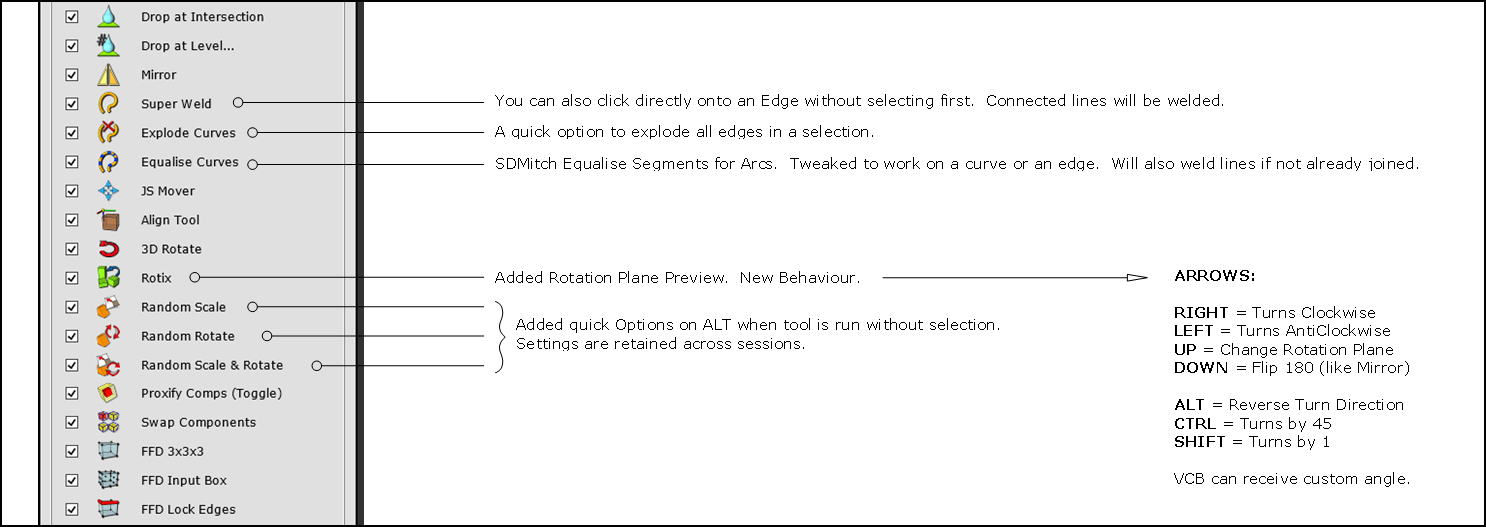
      Quick changes for 2.3:

      [attachment=2:2q4zlveq]<!-- ia2 -->2.3 updates.jpg<!-- ia2 -->[/attachment:2q4zlveq]

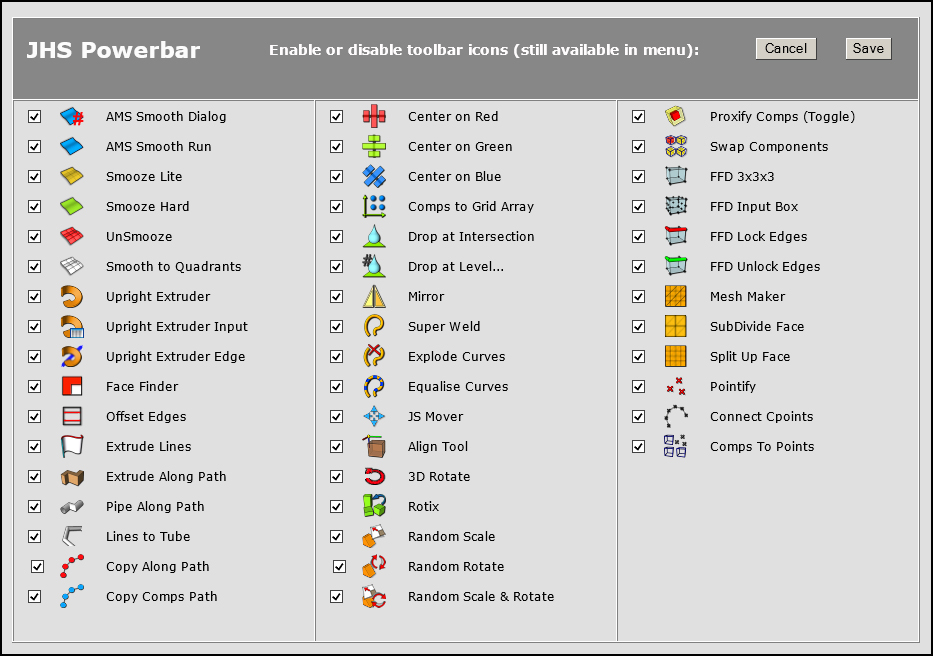
      [attachment=4:2q4zlveq]<!-- ia4 -->POWERBAR.jpg<!-- ia4 -->[/attachment:2q4zlveq]

      It's been a long time coming... but the new Powerbar version is ready (should work with v8 to 2015). Another post will follow 'soon' with more info, credits and tutorials (when i recover!) πŸ˜‰

      Some tools ended up quite different compared to when first posted - please check the status bar for some hints until i get the docs sorted.

      few key points:

      • I have no Mac. I believe it should work fine, but am not sure. Please report any findings.

      • The menu itself is under the Help section, this is due to traffic and it ties up with things to come.

      • The toolbar can be customised. From the menu you can choose your favourite icons and tools. By default they are all ON.

      [attachment=3:2q4zlveq]<!-- ia3 -->ICONS V2.2.jpg<!-- ia3 -->[/attachment:2q4zlveq]

      Of course this is possible only because of the masters and Super Thanks go the jedis round here who have created many of these jewels and shared them in the first place.

      Thinking to take advantage of the Christmas holidays. I sent a message to a few of them asking for their permission to use, include, tweak (indeed destroy!) some of their ruby gems and update this old but still much used tool. The response was a fab 'Yes'. (TIG, SDMitch, Rick Wilson, Thom Thom, Anton Synytsia, Julia Christina Eneroth, Dan Rathburn, Jim Foltz, Matt Noblet, Ithil, Didier Bur, Ian Sandstrom, Chris Phillips, TBD, and CadFather (aka Max Coppoletta).

      The many authors who generously contributed to this project are listed both on the plugin menus and in the Credits section of the plugin. Also waiting to hear from a couple more, regarding some additions i'd really like to include. (Didier, used a couple of yours from the old days, couldn't get in touch with you).

      One more thank i'd like to give: to my Mother, who while i spent the whole of the holidays working on this, fed me with the most incredible food... and to my Daughter, whose Christmas patience was simply inexhaustible.

      Here it is, Enjoy.

      fix for 2019 [attachment=0:2q4zlveq]<!-- ia0 -->Powerbar Fix for 2019.rbz<!-- ia0 -->[/attachment:2q4zlveq]

      2.3 [attachment=1:2q4zlveq]<!-- ia1 -->JHS POWERBAR 2015 (2.3).rbz<!-- ia1 -->[/attachment:2q4zlveq]

      2.1 [attachment=5:2q4zlveq]<!-- ia5 -->JHS POWERBAR 2015.rbz<!-- ia5 -->[/attachment:2q4zlveq]


      JHS POWERBAR 2015.rbz


      POWERBAR.jpg


      ICONS V2.2.jpg


      2.2 updates.jpg


      JHS POWERBAR 2015 (2.3).rbz


      Powerbar Fix for 2019.rbz

      posted in Plugins
      CadFatherC
      CadFather
    • RE: Check "if view?"

      Jim, that neat way, makes perfect sense..! πŸ˜„

      here's the follow up to the previous if anyone has any idea:

      working with this below, all good. but are there not controls for the 'look around' tool as well?
      (nothing in the api)

         def onKeyDown(key, repeat, flags, view)
      		case key
      		 when @upArrow  then  Sketchup.active_model.active_view.zoom 1.01
      		 when @downArrow  then  Sketchup.active_model.active_view.zoom 0.99
      		end
      

      what i'm trying to achieve is a plugin that will use the keyboard to incrementally spin and turn around the model or a selection. (will be out in 2019).

      posted in Plugins
      CadFatherC
      CadFather
    • RE: Check "if view?"

      thanks J, that's promising!

      EDIT: something's moving...! will report back πŸ˜†

      yes....just wonderful, all works great.

      Jim, are you trying to scare me? πŸ€“ 😲

      Thanks!

      posted in Plugins
      CadFatherC
      CadFather
    • Check "if view?"

      does anyone know if there is a way to check whether one is aligned to a standard view (current view)?

      tried various combinations, "if view=='ViewTop" etc. there seems to be nothing in the api.

      Thanks

      posted in Plugins
      CadFatherC
      CadFather
    • RE: CadFather's Icons [v1.0]

      mainly two ways:

      1 - use them instead of (replacing existing icons)
      2 - use when you make a menu in a plugin.

      usually, but not always, a part of the script that looks like this:
      cmd.small_icon = 'icon_16.png'
      cmd.large_icon = 'icon_24.png'

      posted in Plugins
      CadFatherC
      CadFather
    • RE: Key combinations

      Thanks Guys, i'll have a look at Jan's table. can't believe it's so messy working with the keyboard.

      posted in Developers' Forum
      CadFatherC
      CadFather
    • Key combinations

      does anyone know if you can use multiple acc keys? like CTRL+ALT

      i looked around and saw nothing, tried with && check but no results (the first key has priority)

      another 'sorry can't do'?

      posted in Developers' Forum
      CadFatherC
      CadFather
    • RE: OnKey_Downer!

      i guess one workaround is to make a webdialog tiny enough not to intrude 😲 but able to 'catch' the keystrokes repeating...

      posted in Developers' Forum
      CadFatherC
      CadFather
    • RE: Select all comps if contain name

      brilliant, does more than i asked! need to study it a bit now (tax return can wait...)

      Thanks πŸ‘

      posted in Plugins
      CadFatherC
      CadFather
    • RE: Select all comps if contain name

      Wow, super comprehensive, TIG - thank you.

      are you also saying that i should not be selecting comps inside other groups etc?

      suppose you wanted to swap an instance with another, across the whole model. are you risking bugsplats?

      posted in Plugins
      CadFatherC
      CadFather
    • Select all comps if contain name

      if this code gets all comps named 'arete'

      Sketchup.active_model.selection.add( Sketchup.active_model.definitions['Arete'].instances )
      

      how can i select ALL the comps that may contain it as well? (like Arete_1, Arete_2 etc)

      posted in Plugins
      CadFatherC
      CadFather
    • RE: Didier Bur site hacked

      😲

      posted in Plugins
      CadFatherC
      CadFather
    • RE: OnKey_Downer!

      πŸ˜’ goodness so many scripts could do with this 'basic' functionality.

      thanks for testing it - i should have done so, had only looked at the code 😞

      posted in Developers' Forum
      CadFatherC
      CadFather
    • RE: OnKey_Downer!

      thanks Driven, i know even a few camera moving scripts do it but just couldn't 'get' the code to tweak, so i thought i'd check for some kind of routine/snippet that could be integrated.

      this is what i was looking at: http://sketchucation.com/forums/viewtopic.php?f=180%26amp;t=24327#p239409

      posted in Developers' Forum
      CadFatherC
      CadFather
    • OnKey_Downer!

      read through some of the old posts but didn't find anything a one neuron coding master could actually use.

      Fredo6 pointed to a thru paint animation routine to achieve a Typematic effect. i looked through the code but i realise i'm not ready for a lobotomy yet.

      has no one worked this one out, can't we 'just' keep a button down and have it repeat?

      Looking at Pixero's JSmover, (which is a real gem) - i was hoping to add 2 features:

      1. repeat on key press
      2. make it follow a slope if on one. (perhaps combining some sort of drop to intersection procedure)

      dreamland i know, but really we have quite a few great plugins that could be 'perfected'!

      posted in Developers' Forum
      CadFatherC
      CadFather
    • RE: Firing Button with Modifier Key

      didn't notice the thread had progressed...

      @tig said:

      You could probably also write an AutoHotKeys snippet [PC only!] which would spot a click in SketchUp with a key etc, BUT it'd be mucho complicado... πŸ˜’

      ahk is quite good, i can see it possible but not too good for public consumption - with compatibility etc..

      @driven said:

      if the button you click is a tool, you can watch for modifier keys?
      I assume [due to lack of use case] that you want one button for 3 tools [as example]...
      create a simple tool with one button...
      on click, [activating your tool] start a timer and watch for modifier keys...
      if key = a activate x
      if key = b activate y
      if you run out of time if activate z
      is that the sort of thing your after?
      or have I completely misunderstood yet again...
      john

      yes, exactly that.

      @jim said:

      There's this, but Windows only and not up-to-date and needs compiled, etc.
      https://code.google.com/p/eventrelay/

      will have a look, thanks Jim

      @anton_s said:

      There is a way, thought it will require that your extension to require AMS Library. Easy to implement.
      Here is a snippet:

      very interesting Anton, will look into it

      (where's a Christmas holiday when you need it?!)

      posted in Developers' Forum
      CadFatherC
      CadFather
    • RE: SU doesn't recognise plugin

      should be on right click

      EDIT: more importantly was Cotty said below. πŸ‘

      posted in Plugins
      CadFatherC
      CadFather
    • RE: Firing Button with Modifier Key

      thanks Thomas, so a ruby script cannot simply 'listen' to key press upon firing?

      PS (never mind macs!) πŸ˜‰

      posted in Developers' Forum
      CadFatherC
      CadFather
    • RE: [Plugin] Archiland Toolbar

      not sure when, but i've never worked so hard in my life. gekfro.gif

      posted in Plugins
      CadFatherC
      CadFather
    • RE: Firing Button with Modifier Key

      wow TIG, not even you! really hope some trimble folks start looking at this whole universe!

      what of a process like this: click button > script looks to see whether any key is pressed > if within 1 sec no modifier is found > go ahead with the main routine > else...

      dreamland?

      posted in Developers' Forum
      CadFatherC
      CadFather
    • 1 / 1