sketchucation logo sketchucation
    • Login
    1. Home
    2. bjornkn
    3. Posts
    Oops, your profile's looking a bit empty! To help us tailor your experience, please fill in key details like your SketchUp version, skill level, operating system, and more. Update and save your info on your profile page today!
    ⚠️ Important | Libfredo 15.6b introduces important bugfixes for Fredo's Extensions Update
    B
    Offline
    • Profile
    • Following 0
    • Followers 0
    • Topics 12
    • Posts 350
    • Groups 1

    Posts

    Recent Best Controversial
    • RE: Match photo

      @davide.skp said:

      ok, ok, this procedure is correct but how do you do if the building has no walls at right angles?
      It would be really cool to make the "match photo" starting from some known points detected and visible in the photo.
      would be an improvement of sk really enjoyed.
      I would pay gold for a plugin like this!

      Then go to Tgi3D and buy PhotoScan (or download the 30-day trial first).
      It will do exactly what you want, and much more πŸ˜„

      posted in Newbie Forum
      B
      bjornkn
    • RE: Model this: Bold wooden table

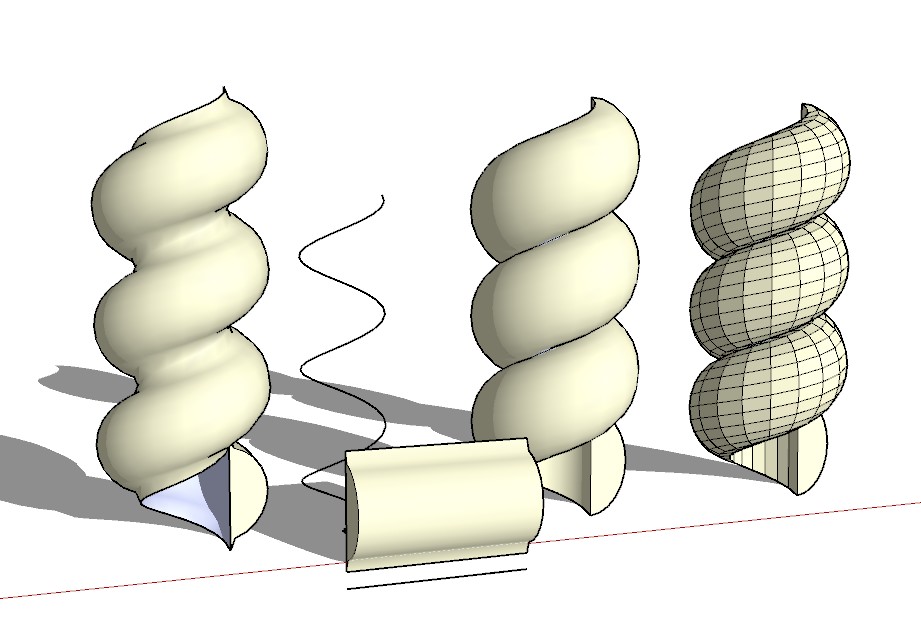
      Here's a couple of baroque spirals with Shapebender.


      baroquespirals.jpg

      posted in Gallery
      B
      bjornkn
    • RE: Swan Song

      @pmolson said:

      Also, the swan seems to be swimming in something other than water.
      paul
      I'm pretty sure that was intentional - hence the title "Swan song", which implies that the swan is dying (at least that's what it means here in Norway)?
      IMO that swan doesn't work very well in this otherwise great model/image. It's hard to see what it is, strange pov and perspective, and not really needed to get the message through? I suppose the idea/title is that the watermill is dead/dying and that there is no more water passing through it?

      posted in Gallery
      B
      bjornkn
    • RE: Theodolite phone apps - has anybody used them?

      Sorry to hear that! I was looking forward to hear your experiences with that project.
      Have you done any tests with your iPhone theodolite and the distance laser too?

      posted in Hardware
      B
      bjornkn
    • RE: Theodolite phone apps - has anybody used them?

      Any news on your petroglyph/theodolite project ?

      posted in Hardware
      B
      bjornkn
    • RE: Match photo

      You have to place/rotate the second building into the model and first photo. Then you can add a second photo and move the origin and axes.
      The reason for this is simple - the builidings need to be in the correct positions relative to each other to be able to "share" photo backgrounds.

      posted in Newbie Forum
      B
      bjornkn
    • RE: Tgi3D SU PhotoScan's new Image Based Surface Modeler

      @roger said:

      @mitcorb I am just guessing:

      In a sense this is somewhat like fingerprint matching. The FBI considers a finger print a match if you can find seven points of correspondence in two samples. So you manually must define a minimum number of matching points in two photos. You must also define for the computer the focal length and optical characteristics of your lenses. With digital cameras this is all listed in the EXIF information. So the computer now has some information how matching points relate to each other in the two photographs. From this it can reverse engineer the relative positions of the two cameras.
      One important thing it does is calculate the distortion amd sensor shift of the lens, and output undistorted images to a skp project. This is very important to get the high precision, as all lenses have some distortion, and no sensors are placed exactly in the middle of the lens center.
      BTW, it can use photos without EXIF, and I have no problems using a 0.7x converter (which is not known by the EXIF writer)as it only uses the EXIF data as a starting point.

      @unknownuser said:

      Then the program has enough confidence to go back into the photos and begin to do pattern matching based on shapes, areas of high contrast, and color information matching and make assumptions that allow the computer to make reasonable point matching decisions on its own. From there it is just trigonometry to create a point cloud as the basis for a mesh.

      The beauty of it is that you do not end up with a huge point cloud mesh (unless that's what you want). You fully control the density of the mesh, and you can have some parts with lots of details and other parts covered by only a few polys. And you can also easily smooth areas or add more details manually and alter the shapes as you like.

      posted in Extensions & Applications Discussions
      B
      bjornkn
    • RE: Well hello....

      Hi and welcome πŸ˜„

      It would be very interesting to see some of your projects, and how you use SU in your profession!

      posted in Newbie Forum
      B
      bjornkn
    • RE: Best Practices - Topology

      Looks like there could be some nice grow/shrink selection tools there? πŸ˜„
      And Select loops etc maybe?

      posted in SketchUp Discussions
      B
      bjornkn
    • RE: Textures resizing themselves

      It's not a funny way really - it's brilliant, and it does so for a very good reason πŸ˜„
      If you have fought with other 3D programs where the textures scale themselves when you move a line or do some other modifications, which is what happens with normal UV mapped faces, you ought to love the way SU does it. The textures keep the same physical size whatever you do to the model (except scale the group/component, in which case the texture is scaled with the rest of the group), unless you tell it to scale, rotate, shear etc by using the Texture tools.
      This is one of the features that makes SU so great for architectural models etc.

      posted in SketchUp Discussions
      B
      bjornkn
    • RE: Tgi3D SU PhotoScan's new Image Based Surface Modeler

      @publied said:

      what level of precision you can get by photoscan? (may be I've already asked...)

      Very high! It depends on your photos though, and the length of your reference measure (the longer the better). You can get at least as good (or better) accuracy as with other photogrammetry tools like Imagemodeler (now only available to Autodesk/Max/Maya users) and Photomodeler, which I've been using for years. Once you have got a good calibration you have all the power of SU available in addition to the powerful tgi3D tools, which is a lot better than Imagemodeler and Photomodeler IMO.
      I'm definitely not going back to Imagemodeler and Photomodeler..

      posted in Extensions & Applications Discussions
      B
      bjornkn
    • RE: Tgi3D SU PhotoScan's new Image Based Surface Modeler

      @gaieus said:

      It's still a magic to me (i.e. I cannot believe).

      Really cool plugin indeed (and yes, I can hardly wait for those archaeology things to try it out!)
      β˜€
      Do you have any good links to tutorials, instructions and methods for doing archeoligical excavations and measurements? And/or some examples of use of surveying equipemtn and photogrammetry in such contexts?
      I would like (maybe) to approach a local archeologists and hear what he thinks about using such tools as PhotoScan, and eventually offer my services πŸ˜‰ He is actually the head of the county conservator office (don't know if that means anything in English...)
      Looking forward to see your work in that area too!
      According to how much time yu spend here answering questions you can't be much out doing field work? πŸ˜‰

      posted in Extensions & Applications Discussions
      B
      bjornkn
    • RE: Gravel Road?

      Looks exactly like the roads I accidentally ended up on in the forests of FInland with my Suzuki 1100 (definitely not an offroad bike!!) a few years ago. Not fun at all to drive on with a heavy tour bike, although afaik it was one of the roads they use for WRC /Rally Finland..

      Making such a road in SU with 3D pebbles and lots of details is not a task I would do voluntarily - no matter how good plugins you'll end up with enormous amounts of faces. Not to mention all the trees. I would probably make the terrain in SU, and a texture map for the road/gravel, and then make all the pebbles and trees as instances in LightWave. Or just leave it as a texture in SU, and eventually add a bumpmap (and/or displacement map) for rendering in Twilight etc? For a closeup maybe it would work in SU too with 3D gravel?

      posted in Organic Modelling
      B
      bjornkn
    • RE: Stuck. Need help with roof.

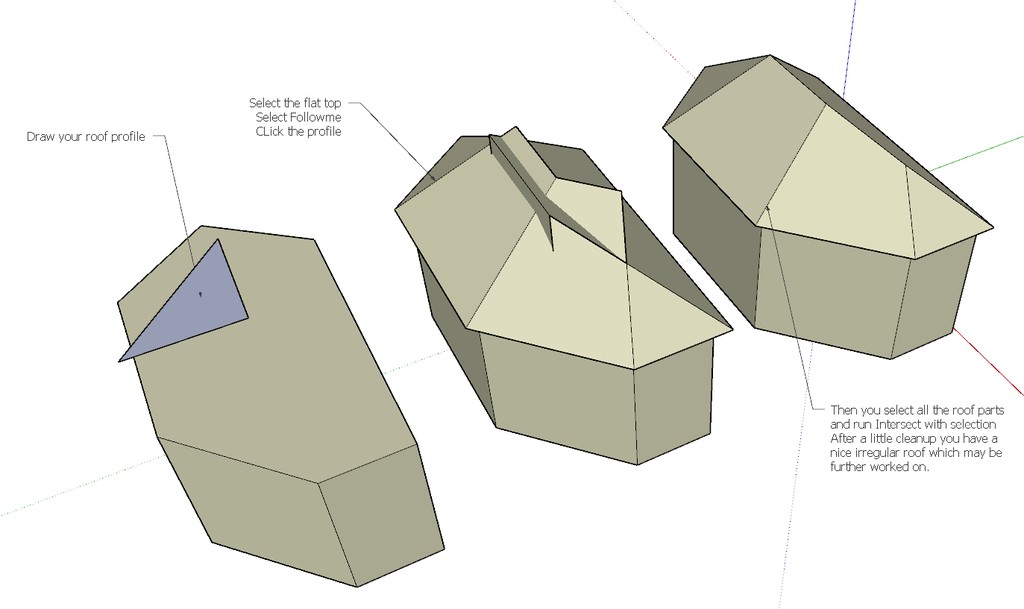
      Your roof is very irregular, but using Followme may still be a good starting point. Then you could draw edges, use PushPull etc.
      Using PhotoMatch will be very difficult here, as it relies heavily on 90 degree corners, of which there are very few here..
      BTW, if you're going for an accurate model you'd need to slant the wall around the lower left entrance..

      posted in Newbie Forum
      B
      bjornkn
    • RE: Stuck. Need help with roof.

      Here's a quick way to get you started, using Followme to make an irregular roof with constant angle/slope.


      Clipboard-12.jpg

      posted in Newbie Forum
      B
      bjornkn
    • RE: Tgi3D SU PhotoScan's new Image Based Surface Modeler

      It is a very powerful program/plugin, and it is also great fun to watch your flat photos being shrink wrapped with 3D forms πŸ˜„
      A tip for shooting good photo sequences:
      Usually you tidy up clutter around the objects you are photographing.
      When shooting for PhotoScan you should do the opposite.
      The more the better, as long as it doesn't occlude your "target".
      On a clean, smooth beach or in an empty white room it isn't easy to find good points to use for calibrating.
      One great thing with this tool is that, unlike the competition, is that once calibrated you don't have to use a single one of the calibration points when modeling inside SU.

      posted in Extensions & Applications Discussions
      B
      bjornkn
    • RE: Modelling a big boat from reality.

      As the boat lies on the water you will have a problem with the parts that are under water.
      Unless you can view the hull from inside too? Or if you have some accurate specifications? Waterline may not necessarily be where the water is ..
      Being a barge it may probably be rather flat-bottomed?

      posted in SketchUp Discussions
      B
      bjornkn
    • RE: Modelling a big boat from reality.

      That's a job for Tgi3D PhotoScan !
      Take a look at the newest CatchUp #3 where it is reviewed.
      If you can shoot some good photos of it (also slightly from above), and you have a good measure reference you should be able to create a very precise model.

      posted in SketchUp Discussions
      B
      bjornkn
    • RE: [Interior] Living Room, Conceptual

      Here's a nice tutorial on using the high-pass filter - here mainly for making repeating evenly lit seamless textures, but it describes the filter pretty good : http://www.gamasutra.com/view/feature/3073/the_power_of_the_high_pass_filter.php
      There are lots of possibilities if you copy the texture to a new layer and do the filter on that layer. Experiment with blend modes and opacity.
      For a bump map you usually want only the high-contrast border to show up, like veins in the wood and cracks/joints. It often works fine to use the texturemap for bump if the wood is very evenly colored. On a floor like yours, with some light and some dark woods it would typically still be pretty even/smooth on top.
      On old, worn floors the darker veins are usually harder than the light wood, and is standing up in relief against the softer light wood.

      posted in Gallery
      B
      bjornkn
    • RE: ISS International Space Station

      @watkins said:

      Could someone convert the files for AURA and CASSINI so that I can import them into SU8 Pro? It would be fun to look at them.
      They are already in 3ds format, which should load just fine into SU.

      posted in Gallery
      B
      bjornkn
    • 1 / 1