sketchucation logo sketchucation
    • Login
    1. Home
    2. bjanzen
    3. Posts
    Oops, your profile's looking a bit empty! To help us tailor your experience, please fill in key details like your SketchUp version, skill level, operating system, and more. Update and save your info on your profile page today!
    πŸ”Œ Easy Offset | Offset selected faces in SketchUp in positive and negative offsets. Download
    B
    Offline
    • Profile
    • Following 0
    • Followers 0
    • Topics 13
    • Posts 367
    • Groups 1

    Posts

    Recent Best Controversial
    • RE: My classroom Project Idea

      Exactly. You can save them and send them to Earth on the machine you're modeling, and save the kmz's and just pass those around for privacy. When you select "Place Model" in SketchUp, it'll send your model to Google Earth, only on that machine, and put it into Temporary Places->SUPreview1. If you do more buildings, they can be SUPreview2, 3... then right click on Temporary Places, and select "Save Place As..." and save the kmz. Now you can share it only with the people you want, buildings and all.

      When you feel OK with it (and you will), you should submit to 3dwarehouse, and give the kids some credit for their efforts... you should check out the Cities in 3D program at http://sketchup.google.com/3dwarehouse/ and there's more, too, if you look around.

      b

      posted in Google Earth
      B
      bjanzen
    • RE: SU run SLOW on MACBOOK PRO VGA 9600M GT with MAC OSX !!!

      One question would be: if you turn off HW Accel on XP and OS X, is it still faster?

      b

      posted in SketchUp Bug Reporting
      B
      bjanzen
    • RE: SU run SLOW on MACBOOK PRO VGA 9600M GT with MAC OSX !!!

      What do you mean " I choose VGA 9600M GT and no result..."? Are you saying you chose that over the 9400 mode?

      Does your model include a Google Earth ground plane?

      b

      posted in SketchUp Bug Reporting
      B
      bjanzen
    • RE: Layout and Snow Leopard

      Yup, note "PopUpMenuSelectCore" in the stack... we're aware of this, are testing a solution and as I said, we couldn't release before Apple shipped. We'll try to get this in the hands of folks as soon as we're sure we're not going to cause other problems with a fix and make your life worse.

      But for now, DON'T CONTEXT (RIGHT) CLICK ON SNOW LEOPARD IN LAYOUT.

      There. Back to lowercase.

      b

      posted in LayOut Bug Reporting
      B
      bjanzen
    • RE: Text in layoyt

      Can you post a simple model or LayOut document and I'll look at it? Thanks.

      b

      posted in LayOut Discussions
      B
      bjanzen
    • RE: Text in layoyt

      .

      posted in LayOut Discussions
      B
      bjanzen
    • RE: Exporting to DXF or DWG

      Are you asking if we look? Sure. No promises, but we're always interested in suggestions.

      b

      posted in LayOut Discussions
      B
      bjanzen
    • RE: Text in layoyt

      Is it there or just grayed out? On a layer that's not being shown? Since text shows up so much better in 2D, what people tend to do is put text from SketchUp on it's own layer, create a style that doesn't show that layer in SketchUp, then render in LayOut with that style and redo the text in LayOut for a better look. I'm not sure if that's what you're asking, but let me know if I'm close.

      b

      posted in LayOut Discussions
      B
      bjanzen
    • RE: Layout and Snow Leopard

      We are working on fixes for about 3 issues, but we had to wait until the final shipping version was out. Here's what doesn't work:

      1. Thumbnails for templates and for styles (in SketchUp Model Inspector) rendor not at all or incorrectly. I've observed a crash from repeatedly selecting one, but could never reproduce it. If you have a crash, could you copy the call stack (or get it from ~/Library/Logs/CrashReporter and file a bug via the Help->Contact Us link in LayOut? Thanks.

      2. Context menus are crashing. Workaround: try (it's hard, but really try) not to right click for a context menu in LayOut. This one crashes every time.

      3. A console warning that's inconsequential.

      We're currently testing fixes internally and will get them to you when we're confident in them. Let me know if any of these workarounds don't work for you, or if you've observed other issues that our Snow Leopard testing did not reveal. Thanks.

      Barry

      posted in LayOut Bug Reporting
      B
      bjanzen
    • RE: SU run SLOW on MACBOOK PRO VGA 9600M GT with MAC OSX !!!

      I tested these - it shouldn't be slow. Are you current with 10.5.8 or 10.6? What PC running what OS with what graphics card are you comparing to? There shouldn't be a huge difference, but I think this laptop has 2 modes: low and high power (integrated 9400 versus 9600), that you can adjust in System Preferences->Energy Saver (at least that's where it was when I tested this model), so check that you're on the 9600.

      b

      posted in SketchUp Bug Reporting
      B
      bjanzen
    • RE: Error saving layout file

      First, try to save to multiple locations - is there something wrong with where you're trying to save the document? Try "Save As" and see if you can rename. If you're saving to a network drive there can be issues. The file is not "Untitled" so you've saved before, and maybe it looks like a file system issue.

      b

      posted in LayOut Bug Reporting
      B
      bjanzen
    • RE: Joint and Split don't work in groups?

      Yup, that's what one of my co-workers came up with. You wouldn't have to do a clipping mask, just arrange one model (or whatever you want to mask) behind another model that's the square with the circle intersected. Not a bad solution at all - I just like circles (and the freehand tool, being able to move points) better in LayOut 2.0.

      There are always options...

      b

      posted in LayOut Discussions
      B
      bjanzen
    • RE: Joint and Split don't work in groups?

      Yea, the only issue with grouping is you can't use a group as a clipping mask. So either method (intersection, use group as clipping mask) I'd take as a feature request to accomplish the same thing. Personally, I want to make those postcards with the name of your state in big stencil block letters, and put nature images in the background clipped by the letters, ya know... πŸ˜‰

      b

      posted in LayOut Discussions
      B
      bjanzen
    • RE: Joint and Split don't work in groups?

      HoleInShape_2.png

      posted in LayOut Discussions
      B
      bjanzen
    • RE: Joint and Split don't work in groups?

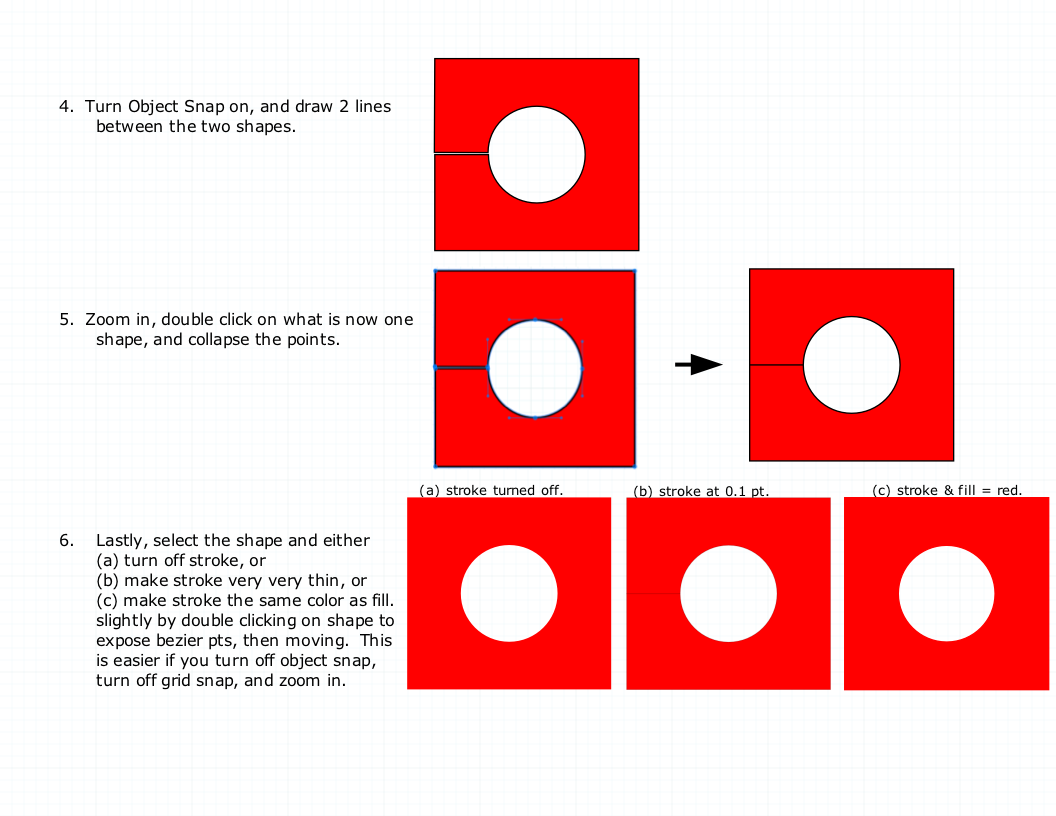
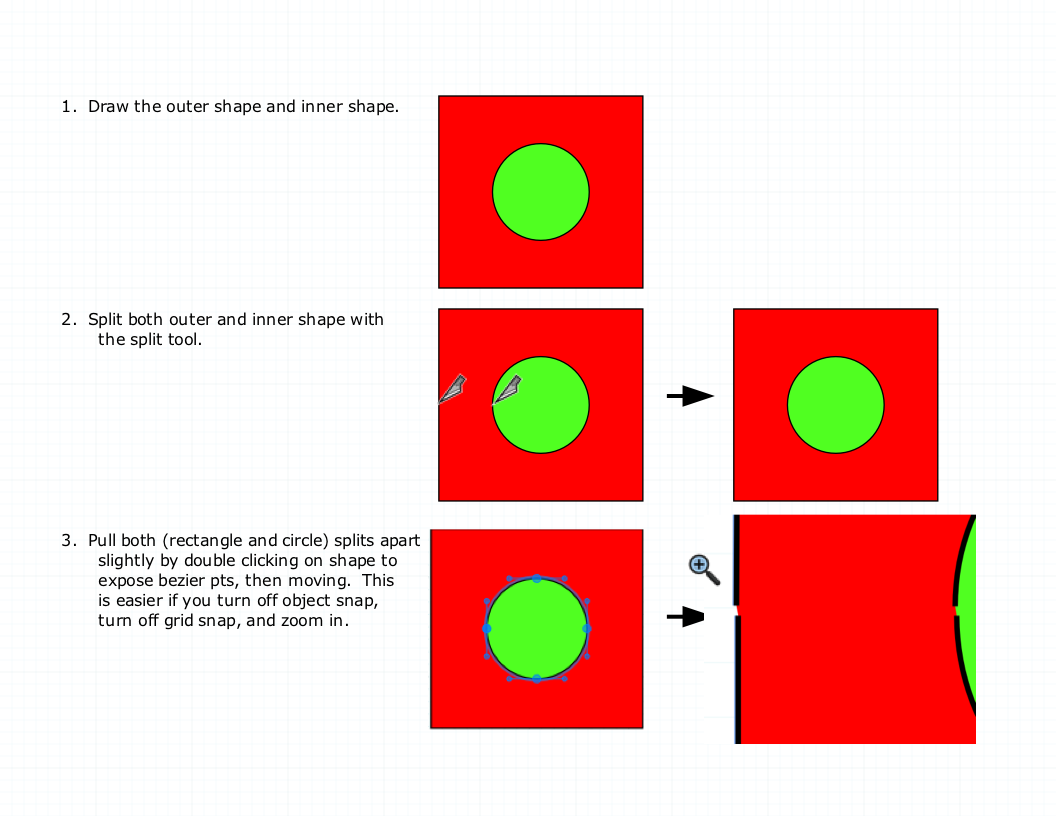
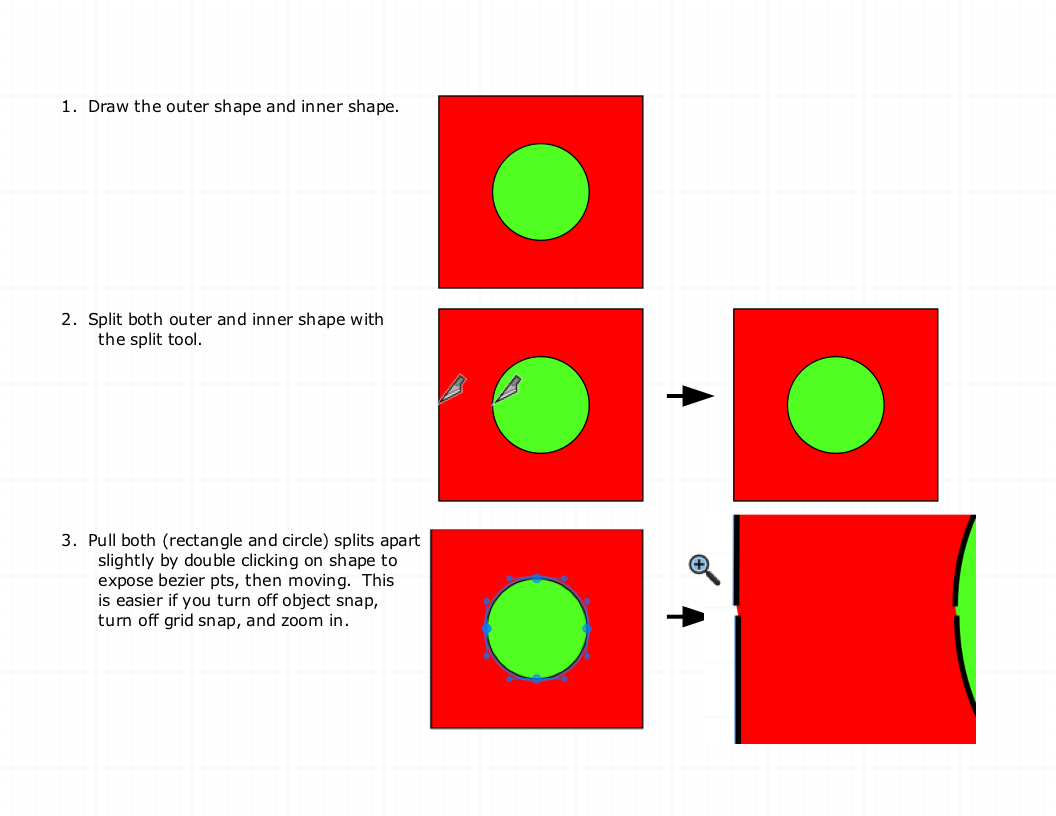
      Try this, and I'll clarify if necessary.


      HoleInShape_1.png


      HoleInShape_1.png

      posted in LayOut Discussions
      B
      bjanzen
    • RE: Joint and Split don't work in groups?

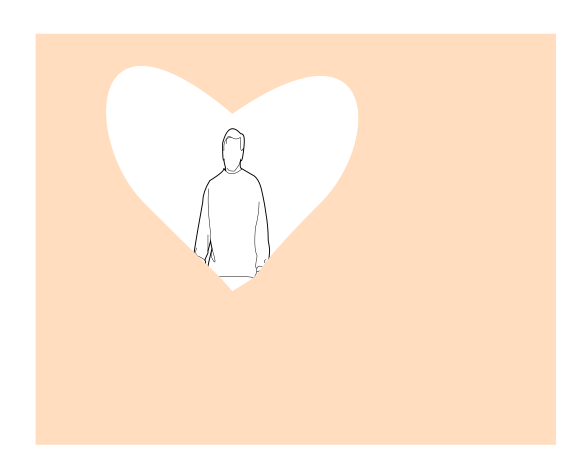
      Here's what the LayOut document contains...

      Yours truly, and with deepest thoughts of gratitude and ever-growing respect and love with a mild dose of humor and sarcasm,

      b


      IheartLayOut.png

      posted in LayOut Discussions
      B
      bjanzen
    • RE: Joint and Split don't work in groups?
      1. Split / Join in groups: yup, known issue. I also filed a bug to request inferencing be turned off, so that you don't get the impression that they should work. Workaround is to ungroup, do your split / join actions, then regroup.

      2. Shape with hole: like this?

      b


      IheartLayOut.layout

      posted in LayOut Discussions
      B
      bjanzen
    • RE: HELP-Bugsplat don t let sketchup run

      If you do crash and you do suspect Netdog, could you please indicate so and send in the crash report? I'm looking at them, and it's not immediately clear how it's crashing. Thanks.

      b

      posted in SketchUp Bug Reporting
      B
      bjanzen
    • RE: My wish List

      Nice list.

      #7 is here in 2.0 already: Curved leaders. Use the label tool to make your leader. Then hit space, or Tools->Select, and double click on the leader line. Hold done the (PC or Mac) control or option key over the middle of the line. You now have another bezier point. Hold down control / option over this point and drag out the curve controls for this point.

      Question on #4: Which styles do you feel don't work in Ortho properly?

      #8: I'd like to comment, but I'm sure some lawyer somewhere just stopped breathing.

      b

      posted in LayOut Feature Requests
      B
      bjanzen
    • RE: Layout

      Do you mean you imported into LayOut? And that's the screen shot from LayOut?

      In SketchUp, try File->Export->2D graphic.. and save as a png, and see if you get the same image.
      In LayOut, try rendering your model as hybrid (the render may take some time, so be patient), and see if it goes away.

      b

      posted in SketchUp Bug Reporting
      B
      bjanzen
    • 1 / 1