sketchucation logo sketchucation
    • Login
    1. Home
    2. baz
    3. Posts
    Oops, your profile's looking a bit empty! To help us tailor your experience, please fill in key details like your SketchUp version, skill level, operating system, and more. Update and save your info on your profile page today!
    πŸ”Œ Smart Spline | Fluid way to handle splines for furniture design and complex structures. Download
    Offline
    • Profile
    • Following 2
    • Followers 1
    • Topics 89
    • Posts 1,202
    • Groups 1

    Posts

    Recent Best Controversial
    • Any USA residents willing to help me out with a bit of mail re-direction?

      I am very keen to get hold of a Shaper Origin. (See link below).
      For some obscure reason they are unwilling to ship to Australia.

      So If ordered one and had it sent to a USA address, would anyone be willing to send it on to me? It would be a simple matter of re-addressing and paying the freight, no re-packing required.
      Of course I would cover all costs.

      And it's a lot of money for me, so ideally it would be a forum member that I have had interactions with over the years. (I started with V5 and joined this forum about 20 years ago!)

      Is this a crazy idea?

      I am pretty much retired but I still spend most of my time in the studio.
      I have always been a tech-head as well as a traditional woodworker, but until the Shaper turned up, CNC has always been out of my reach.

      I would have a lot of fun with this piece of kit. (Currently, I am just beginning a Teardrop camper for a client, with mostly boat building techniques).

      Cheers, Baz.

      PS: I can only afford a refurbished unit, which is only available in the States.
      PPS: I am fully aware of the difference in Voltages, that wont be a problem.

      Link Preview Image
      Shaper Origin | Handheld CNC Routing

      favicon

      Shaper Tools (www.shapertools.com)

      posted in Corner Bar
      bazB
      baz
    • RE: Howdy all! My first post here. Two extensions that would be useful.

      @RICHARD-STIERS Re: time cleaning up the interior, suggest you try 'Solid Inspector' by ThomThom. Works like a charm.

      posted in Newbie Forum
      bazB
      baz
    • RE: A piece from my real job, not really sketchup related.

      Love the glasswork, beautiful.

      posted in Corner Bar
      bazB
      baz
    • RE: Exporting custom aspect ratio's

      [/quote] Yeah. So Eneroth Viewport Resizer2 makes it simple to get the exact aspect ratio desired.[/quote]

      I think I'm getting a bit 'Old School'. I really don't need a plugin to resize a window.
      ( And possibly getting a bit cranky too πŸ˜„

      posted in SketchUp Discussions
      bazB
      baz
    • RE: Exporting custom aspect ratio's

      @dave r said:

      I usually don't worry about the aspect ratio of the exported view. I'll crop and resize it to what I want in my image editor. I find that is easier when combining different images, too..

      Yes, that is what I do too, but he seems to want a native aspect ratio export. Which would be easier and quicker if he doesn't want to stuff around with image editors.

      posted in SketchUp Discussions
      bazB
      baz
    • RE: Exporting custom aspect ratio's

      Pretty simple workaround, resize your window and export.
      If you need an accurate ratio, draw a suitable rectangle in the model and carefully bring the window sides into it. Either hide or delete the ratio rectangle and export.

      posted in SketchUp Discussions
      bazB
      baz
    • RE: I feel ripped off. Lost my Geo-Location.

      Rich me old darling, thank you for the mind bending, over complicated and frankly beyond me workaround.

      You say: 'That contract is no longer in effect'. But that has nothing to do with my contract.
      You say: 'I would expect it to stop eventually'. Nobody told me the software was limited in that way.
      You say: 'Annoying? but expected.' Expected by who? Certainly not me.

      I am no lawyer, but natural justice seems to being abused here.

      C'mon, class action anyone?

      Into this world

      posted in Corner Bar
      bazB
      baz
    • RE: I feel ripped off. Lost my Geo-Location.

      Cheers Box.
      Hopefully there might be a way of getting 'Sandbox' type geo-location into legacy SU, but I won't be holding my breath.
      My extreme workaround, (which I just thought of), could be to import a bitmap image of the contours, trace 'em and work 'em to their elevations. Then Drape the image? PITA but doable, I think.

      posted in Corner Bar
      bazB
      baz
    • RE: I feel ripped off. Lost my Geo-Location.

      Well as Tig suggested I can punch the Lat Long in. But with no imagery/contours as per the 'Geo-Location' that I have had the use of for 10+ years..

      ...I repeat, this was a feature which I paid for that has been removed from my licensed software.

      And although I can set the actual location manually, which is still useful for shadow studies, I can't see anyway to get the actual geometry of the location into the model as I used to.

      I am not expecting any satisfaction here, I think Trimble has some sort of 'get out' in the fine print.

      Doesn't stop me being pissed off 'tho.

      posted in Corner Bar
      bazB
      baz
    • RE: I feel ripped off. Lost my Geo-Location.

      Am a little bit surprised that no one, apart from Tig with a workaround, has responded to this.
      Everyone has moved on I s'pose.
      Getting old is a bugger.

      posted in Corner Bar
      bazB
      baz
    • RE: I feel ripped off. Lost my Geo-Location.

      Thanks Tig. Forgot all about that. Problem solved. Cheers.

      posted in Corner Bar
      bazB
      baz
    • I feel ripped off. Lost my Geo-Location.

      I'm pretty much retired so I decided SU19 was it for me. I can't justify the subscription model.
      However, it seems that a feature of my licence has been removed, specifically, Geo-Location.

      I first started with SU5 with AtLast, cost me a good chunk of change too, AU$800/900 I think.
      And when Geo-Locate came out it was a game changer, I was doing a lot of landscape design and accurate shadow studies were invaluable. And still are.

      So it seems that Geo-Location has been removed from my version of SU. But I paid for it, so how can this be?

      And before Trimble apologists batter me with excuses, I have read several posts on other forums which fully explain the technical/licensing issues.

      I don't feel like these issues are my problem though. My problem is that I have had a function of my licensed software arbitrarily removed.

      Not happy, Class action anyone?

      Notwithstanding the above, does anyone know of a workaround to allow me to Geo-locate my models in SU19?

      Oh boy, awaiting the storm...

      Baz

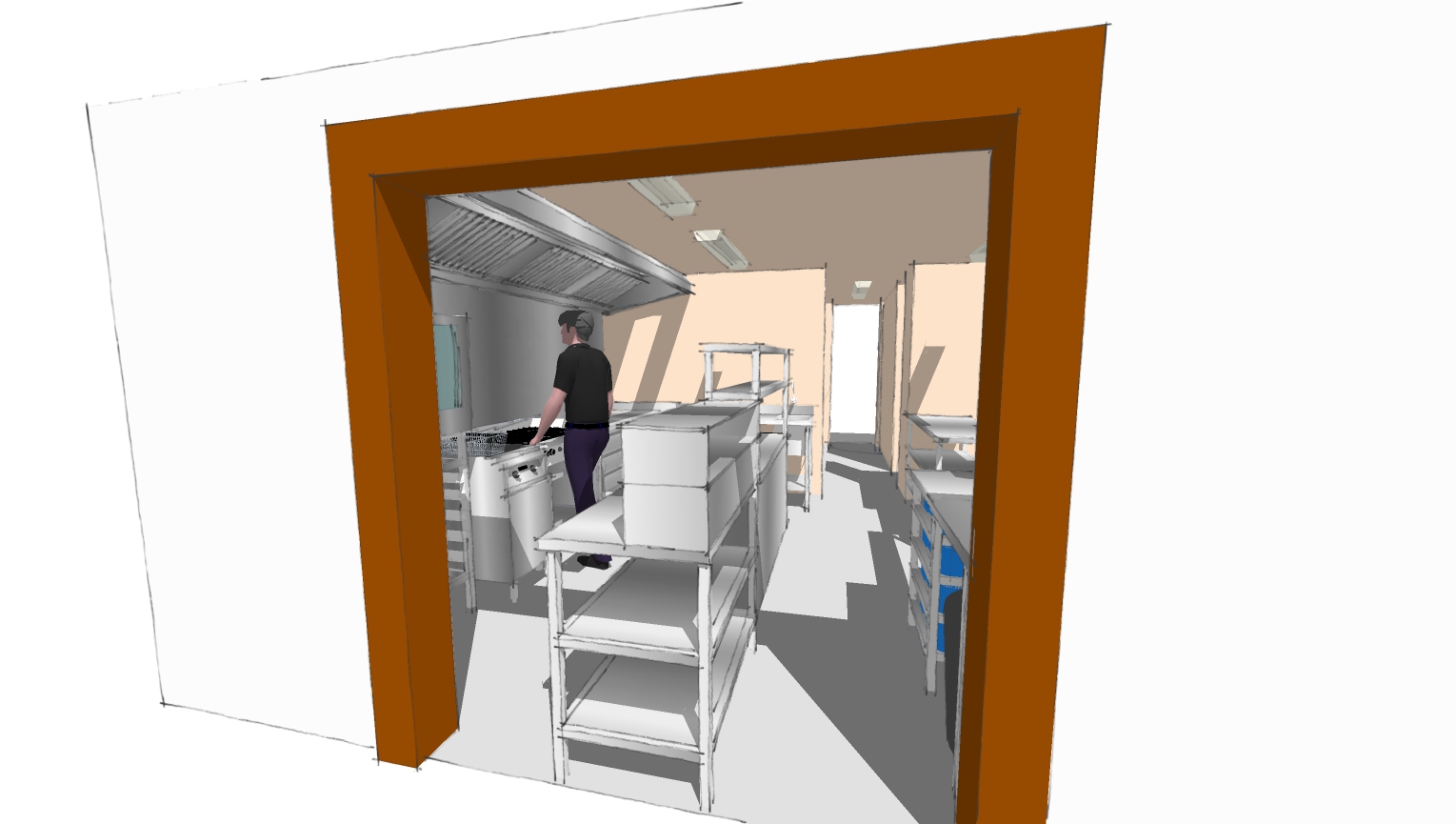
      A recent job, designing a kitchen.

      posted in Corner Bar
      bazB
      baz
    • RE: Help with this Bezier profile drawing.

      Panixia, Can you tell me the name of the Plugin you are using for this? I have always only scaled circles to produce ellipses til now. Thanks.

      posted in Corner Bar
      bazB
      baz
    • RE: Help with this Bezier profile drawing.

      Damn! Something was niggling me about those lines and points... ellipse major minors of course... I have used Ellipses in my work for years. And always with the major/minor stick method.
      Thanks Panixia.

      posted in Corner Bar
      bazB
      baz
    • RE: Help with this Bezier profile drawing.

      Great, I get it. Thanks Box.

      posted in Corner Bar
      bazB
      baz
    • RE: Help with this Bezier profile drawing.

      Thanks Rich. As mentioned, not much knowledge with Beziers. And I cant find 'Edit' on right click...

      posted in Corner Bar
      bazB
      baz
    • RE: Help with this Bezier profile drawing.

      Thanks Rich, I was hoping to get a better understanding of Beziers generally and in this case Bezier curves would allow me to not only tweak the profile, (which I need to do), but also to generate hi-res CNC files. Cheers.

      posted in Corner Bar
      bazB
      baz
    • RE: Drawing Depiction

      I don't mean to be rude, but you have it ass about face. Working drawings are done in SU and taken into layout for annotation/views/sections etc. I cant imagine anyone starting a project with layout, crazy idea!
      Do a search for Sonder to see what you can really do with Layout...

      posted in LayOut Discussions
      bazB
      baz
    • Help with this Bezier profile drawing.

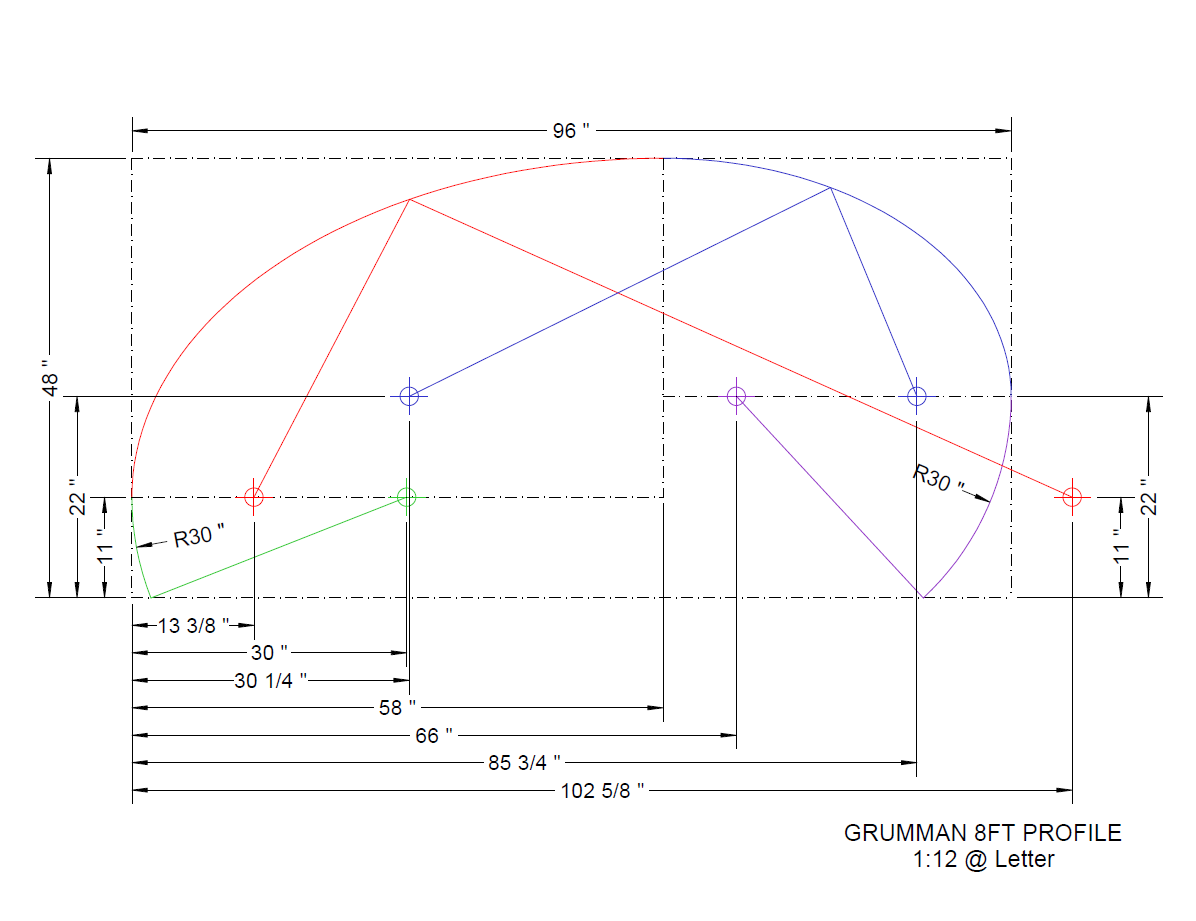
      Hi chaps, I am trying to understand this profile drawing to get the lines into SU.
      The Blue and Red straight lines and endpoints, I suspect, are intended to guide the Bezier curves but my poor brain can't figure it out... any help greatly appreciated.
      Baz
      Grumman 8ft Profile.png

      posted in Corner Bar
      bazB
      baz
    • RE: Match Photo Image Disappears

      Old post I know, but I have had this issue for quite a while. And can find no solution anywhere.
      However I have a work around...
      ... Right click the errant scene and click 'Add scene with matched photo'. This will bring it back for a while as a new scene, (the previous PM scene image will come back as well). You may have to keep doing this, it depends, sometimes I can orbit many times before I lose the photo, (not the scene, just the image), other times I lose it after one orbit sequence.

      Hope this helps someone get out of trouble until a proper fix is found.

      BTW I have experienced this on two PCs with clean installs of SU19 so I very much doubt its anything to do with cards, drivers etc.

      Result of 'Add scene with matched photo' three times

      posted in Newbie Forum
      bazB
      baz
    • 1 / 1