sketchucation logo sketchucation
    • Login
    1. Home
    2. atelierpaar
    3. Posts
    Oops, your profile's looking a bit empty! To help us tailor your experience, please fill in key details like your SketchUp version, skill level, operating system, and more. Update and save your info on your profile page today!
    ๐Ÿ”Œ Easy Offset | Offset selected faces in SketchUp in positive and negative offsets. Download
    Offline
    • Profile
    • Following 0
    • Followers 0
    • Topics 19
    • Posts 92
    • Groups 1

    Posts

    Recent Best Controversial
    • RE: True Geometry

      Hi folks,
      thanks for your helpful suggestions. I was totally submerged into another projects and so, I apologize for my late response.
      I understood - I am inside a box-program.
      Still - it's my favorite - probably for similar reasons as most of you do.
      So, if I have a choice and it does not have to be AutoCAD or Revit,... I go for skechtup.

      Perhaps, I am some what uneducated about programming, but i do not see the point in not further enhancing sketchup. Wouldnt it be an exiting progress to be able to construct with true circles/continues curves??. Concerning 3D printing, I think its a must to have a functional direct STL-file export interface including a possibility to check, if the model is flawless.
      So, how about it? let`s move thinks a bit ....

      posted in SketchUp Feature Requests
      atelierpaarA
      atelierpaar
    • RE: [Plugin] Hatchfaces (v1.8 beta) UPDATED 15-Dec-2012

      great plugin, that`s what we needed !
      While creating the hatching, the tool also creates an surrounding outline.
      Do you think, it would be possible to have a choice to hide or show this outline.
      thanks for the great work ๐Ÿ˜„
      Uli

      posted in Plugins
      atelierpaarA
      atelierpaar
    • RE: True Geometry

      Thanks for your suggestions,
      in response to pilous comment i would like to point out, that a a fantastic CAD program like SU should not be limited to only "box-design"

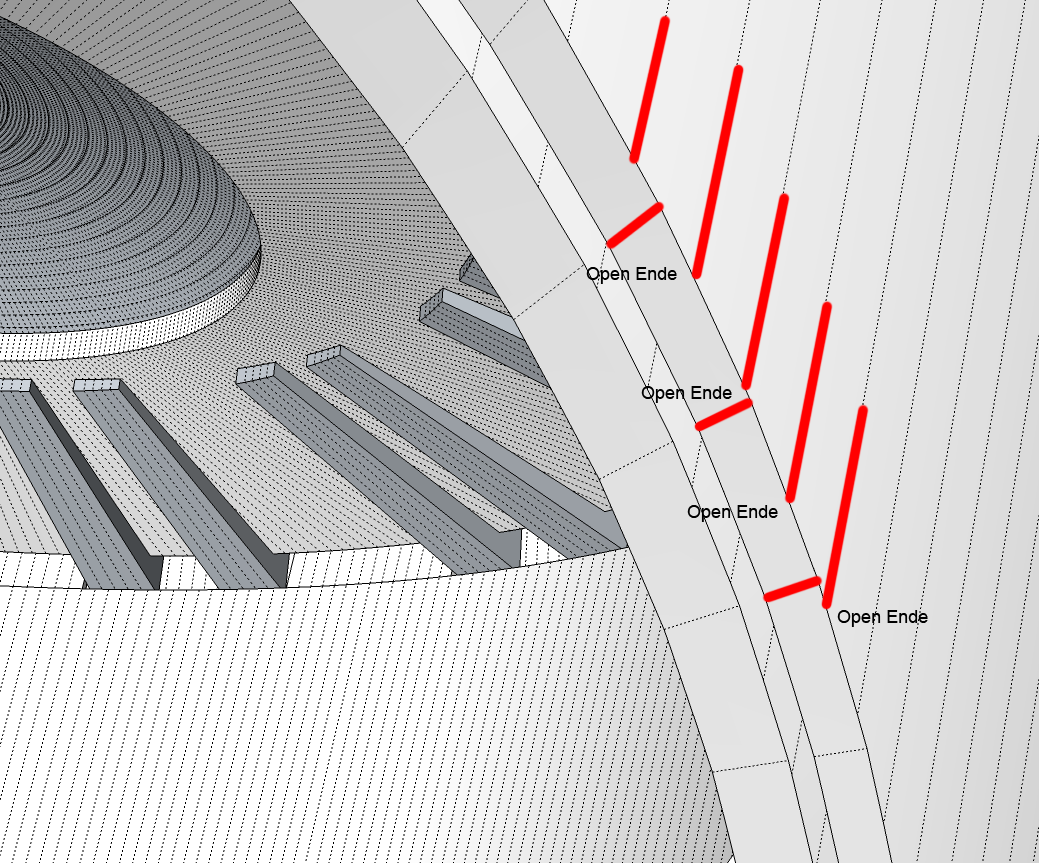
      With respect to the construction of the model, i took a lot of care to create "real" solids. Still it wouldnt work out with 3d printing. I added a pngs showing the model and an enlargement of an intersection.
      I marked "open lines", that SU still considers part of a solid - and here seems to be the problem, that can only be solved with a true Circle-geometry


      Plenary hall modelview 2.png

      posted in SketchUp Feature Requests
      atelierpaarA
      atelierpaar
    • True Geometry

      My biggest SU - wishes are:

      1. true geometry of circles and curves
      2. STL-file export

      The Story behind this is, that I just finish a competition featuring a plenary-hall based upon a circle-geometry.
      After spending countless hours on a flawless SU 8-model, I learned from several 3d printing-shops, that the model could not be printed. ๐Ÿ˜ž
      Apparently SU 8 produces a countless errors at the intersection of curved Volumes. ๐Ÿ˜ก
      If The future really is 3d printing, its absolutely necessary to improve on curve-geometry and file-export โ— โ— .

      Uli

      posted in SketchUp Feature Requests sketchup
      atelierpaarA
      atelierpaar
    • Help ! preferences menue doesn't show up

      hello and help,
      i try to reset my workspace, but the preferences menue doesn't show up
      Instead, SU freezes and i have to pull the emergency-brake
      whats wrong here?
      thanks for your response
      Uli

      posted in SketchUp Bug Reporting sketchup
      atelierpaarA
      atelierpaar
    • RE: Drastic loss of quality after exporting imported jpg images

      Hello Gaieus,
      now i got it - its the the longest edge that counts, right.
      well, how about shrinking and importing the image as a reference, than importing image - pieces of original size and register them on top

      thanks for your help

      posted in SketchUp Discussions
      atelierpaarA
      atelierpaar
    • RE: Drastic loss of quality after exporting imported jpg images

      Hello Gaius,
      thank for your fast response,
      the Export quality increases when cutting the image into pieces.
      Since i rely on the overall correctness of original geometry, I would ruther shrink the complet image.
      How do i have to go about this?
      the original jpg image size is 9480x5972 pixel with a file size of 9470 kb
      if i save the image to a lower quality-standard, i get it down to 2535 kb

      What is the right way to go ?
      Should i shrink the image from its original size of 9480x5972 pixel to - yyyy * zzzz pixel - how ever that would be calculated
      or
      shrink the image and reduce quality-standard
      Uli

      posted in SketchUp Discussions
      atelierpaarA
      atelierpaar
    • Drastic loss of quality after exporting imported jpg images

      hello all together:
      I try to export a drawing that contains a scanned image (plan).
      The image-resolution is very good, all image-details are excellent.
      After exporting, the quality of the image drops drastically, not matter which export resolution was chosen

      I worked with this kind of hybrid-drawing before without runing into such difficulties
      I am lost - who can help ????

      thanks for your comments
      Uli

      posted in SketchUp Discussions sketchup
      atelierpaarA
      atelierpaar
    • RE: Caleidos4D 2 Sketchup

      Hi there,
      that looks great !
      do you have any idea when your the plugin will be availabel
      Uli โ˜€

      posted in Plugins
      atelierpaarA
      atelierpaar
    • RE: Message for Fredo6

      Hi Fredo6
      xrayselection is a big help - it would be great to add your xrayselection-icon to my Toolbar - but how or where can it be downloaded ??
      thanks again for xrayselection
      Uli
      ๐Ÿ˜„

      posted in Developers' Forum
      atelierpaarA
      atelierpaar
    • RE: [Plugin] Simple Catenary Curve

      Hi REmus,
      I just tryed your Tool "Simple Catenary Curve"
      After the Dialog-box it seems that no Element was drawn.
      where is the curve? ๐Ÿ˜ฎ

      Uli

      posted in Plugins
      atelierpaarA
      atelierpaar
    • RE: [Plugin] Shape Bender Beta

      Hi Chris,
      I just came across your shapebender-tool.
      It works great - so I thought i might try If the things would also work on Reverse - Why this ?
      Well, I got a historic church here that has curved Walls with curved Windows.
      In order to renew the Windows frameconstruction, I am planing to take a 3D Laserscan of the exsisting construction, than reconstruct the Windowframing using the point-Cloud. Once that is done, It would be of great help to stretch the curved Geometry onto a Flat plane in order to produce the Frameparts by use of a Lasercutter.

      Do You think that would be possible?
      Uli

      posted in Plugins
      atelierpaarA
      atelierpaar
    • 1 / 1