sketchucation logo sketchucation
    • Login
    1. Home
    2. Anssi
    3. Posts
    Oops, your profile's looking a bit empty! To help us tailor your experience, please fill in key details like your SketchUp version, skill level, operating system, and more. Update and save your info on your profile page today!
    โš ๏ธ Important | Libfredo 15.6b introduces important bugfixes for Fredo's Extensions Update
    Offline
    • Profile
    • Following 0
    • Followers 0
    • Topics 20
    • Posts 1,108
    • Groups 1

    Posts

    Recent Best Controversial
    • RE: Hardware recommendations

      Keea,

      In real life VRAM is mostly relevant if you have a lot of large textures or multiple large screens. I can run SU quite OK with my old laptop that has Nvidia graphics with 64 Mb VRAM, and my other old computer that has an ATI card with 128 Mb, drives a 1080 x 1920 widescreen display quite well too.

      Anssi
      posted in SketchUp Discussions
      AnssiA
      Anssi
    • RE: Crop Circles in SU

      A building like that scaled 1000:1 would be maybe a hundred kilometers long. Quite large for SU, I think. Still, you seem to have found a new interesting way to put SU on its knees. Where in earth do the circles come from...

      Anssi

      posted in SketchUp Bug Reporting
      AnssiA
      Anssi
    • RE: Let's have a Hardware speed test for SU

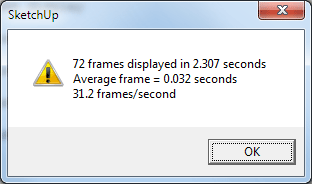
      My results, first test with no shadows
      test-1.png
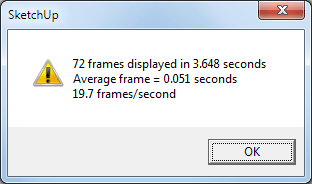
      This one with shadows on
      test-2.png

      • core i7-860, 2.8GHz
      • 8 GB memory
      • Nvidia QuadroFX 1800 graphics card with 768 Mb memory
      • 1080 x 1920 screen, SU maximized
      • Windows 7 Pro 64-bit
      posted in Hardware
      AnssiA
      Anssi
    • RE: Change unit in export option

      The SU dwg/dxf exporter has what I would call a bug - it doesn't record the unit used in the exported file.

      That means that most of the "receiving" applications interpret that the file uses inches. When importing to AutoCad, the application can be taught not to scale the import in any way, but I have found it easier to open it first separately and change the scale settings in the file before inserting it in my drawings.

      For a DXF it would be possible to correct the file in a text editor, but it is still up to the receiving app if it reads the info correctly.

      Anssi

      posted in SketchUp Discussions
      AnssiA
      Anssi
    • RE: VECTORWORKS EXPORTER For Sketchup???

      I don't know about versions, but at least Vectorworks Designer 2010 has SketchUp file support built-in (according to brochure)

      Anssi

      posted in SketchUp Discussions
      AnssiA
      Anssi
    • RE: Problem: Trans BG = Black BG glitch

      To me this looks like what you should see if you are looking at the Alpha channel in Photoshop. If you open the Channels palette, what do you see? Are all channels active? Tiff transparency is implemented so that an alpha channel is added to the file with the transparent areas painted black (or shades of grey). Another thing to look at is the colour of your Background layer - is it set to black or "checkered"? I don't remember if it is a file or program setting.

      We PC users don't have the transparency option so I cannot test this myself

      Anssi

      posted in Newbie Forum
      AnssiA
      Anssi
    • RE: I'm thinking Apple maybe like Murphy's dog!

      What do people do to make their computers crash? I have not seen a bluescreen for years. I knew how to make my old Windows NT PC crash (opening a text file from an external UDF rewritable CD drive did the trick) but since then I have not seen a software-induced crash. Failing hardware can cause crashes, but in that respect PCs and Macs seem to be equal.

      Anssi

      posted in Corner Bar
      AnssiA
      Anssi
    • RE: Render in Artlantis

      It's good and shows the potential of the later Artlantis versions. Maybe a little "overexposed" (or is it my monitor?). As an Artlantis user since the last century, I still have to struggle to get rid of the "Artlantis look"-otherwise I like the program.

      Anssi

      posted in Gallery
      AnssiA
      Anssi
    • RE: Counting Components

      Another way is via Window>Model Info>Statistics. Selecting "Show nested components" will show the correct figure even if you have components nested within groups and other components. The report can even be copied from the window and pasted into Excel, for instance.

      Anssi

      posted in SketchUp Discussions
      AnssiA
      Anssi
    • RE: Nvidia vs. ATI

      @unknownuser said:

      Unfortunately I made a big error on a recent laptop purchase. HP Pavillion with ATI card. SU is very buggy especially when the poly counts grows. Strange display gremlins when using select tool also. Not happy with it one bit.

      My advice is stay clear of ATI

      Turning off "Fast Feedback" in the Window>Preferences>OpenGL pane might help with the tool gremlins - at least they did with my very old ATI card.

      I played it safe with my new computer and bought a Nvidia QuadroFX 1800 card. No problems this far. I don't play games.

      Anssi

      posted in Hardware
      AnssiA
      Anssi
    • RE: Re: Some Funny Pics.

      @marian said:

      http://res.binscorner.com/h/huge-pictures-album/125118962907.jpg

      They should have added "Japanese manufacturing" as the model was made by the European Mitsubishi plant (in the Netherlands, if I remember right) They say that underneath it has a lot in common with the Mitsubishi Colt. A short-lived model. I have had one for five years now. Nice to drive and no problems so far.

      Anssi

      posted in Corner Bar
      AnssiA
      Anssi
    • RE: Section Cuts

      If you are able to export section slices as DXF, you are clearly using the Pro version, so you should also be able to export any view as a DXF or DWG too. If Illustrator is your destination application, you can also export as PDF or EPS. That has the additional benefit of exporting the faces as filled regions also. The same result can be achieved from SU Free by printing to a PDF printer with the "Use high-accuracy HLR" setting enabled. Note that textures and shadows cannot be included in these exports.

      Anssi

      posted in Newbie Forum
      AnssiA
      Anssi
    • RE: Way to Kick Out Ugly Purple/White Default Material

      @tig said:

      Change your Style so that the two sides of a face are colored as you like [along with everything else!].
      It IS a good idea to have them different colors, so in monochrome mode you can see which faces are the 'wrong way round'...
      I have a trouble-shooting Style with distinctive face-colors, edge-styles, end-points, hidden/smoothed 'on', color-lines by axis, monochrome-mode etc - this lets me see which lines AND faces aren't 'right'...
      Having a face reversed so its back is textured looks OK in SUp, BUT will produce unexpected rendering when exported etc..........
      ๐Ÿ˜’

      Whenever I can I use a style with bacfaces set to solid black and front faces to white. I try never to paint back faces. This style setting eliminates for most of the time the need to use the Section Cut Face ruby, as correctly modeled sections are rendered black "inside".

      Anssi

      posted in SketchUp Discussions
      AnssiA
      Anssi
    • RE: Anyone here with a bit of a paunch belly?

      My project of this spring and summer is to lose some weight so that wearing belts becomes unpractical and I can switch to my Wallace&Gromit braces again.

      Anssi

      posted in Corner Bar
      AnssiA
      Anssi
    • RE: Page scale in layout

      What do you mean? LayOut pages are 1:1, and you set the scales of model viewports individually, there may be differently scaled views on the same page.

      Anssi

      posted in LayOut Discussions
      AnssiA
      Anssi
    • RE: Unpaintable borders - how to fix?

      You are right about the showing through. There are also tiny gaps between the cone part and its surround, because the cone is rotated in relation to its surround. Behind there is a cylindrical part that is white. Some face normals are also reversed. It starts to look much better if you change your default colour to a dark one for both front and back faces.

      Anssi

      posted in SketchUp Discussions
      AnssiA
      Anssi
    • RE: Exporting to the scale drawings with shadows from SU Pro 7.1

      By the way, Would it be possible for a Ruby guru to develop a vector shadow outline plugin? SU seems to have that kind of functionality, for instance, in the procedure it follows when baking in the Photo Match textures.

      Anssi

      posted in SketchUp Discussions
      AnssiA
      Anssi
    • RE: ATI device driver failure splats

      I would say that whenever you can, use drivers from the graphics card chipset manufacturer. Computer manufacturers usually lose interest in their products almost as soon as they get them out of the door. Chipmakers seem to provide a longer span of support. The worst thing is that usually laptop graphics card support is limited to what the computer maker wants to offer. For instance, Nvidia supplies up to date drivers for quite old desktop graphics cards, but latest driver for my the GeForce Go card in my ols Acer luggable is from 2004. Only XP. If I ever can afford a good laptop again, I will choose one with a "high-end" graphics solution that is supported by the chip maker.

      Anssi

      posted in SketchUp Discussions
      AnssiA
      Anssi
    • RE: Object Viewer for ABS object

      The problem with Autodesk's AEC objects and the like is that their format is proprietary. So AFAIK, the only thing you can do is to use the "Export to AutoCad" or equivalent command to produce a DWG file that only has standard 3D geometry. Importing into SU often unsmooths round surfaces, but they can be re-smoothed in SU.

      Anssi

      posted in Plugins
      AnssiA
      Anssi
    • RE: ATI device driver failure splats

      I would suggest updating drivers too. Is SU bugsplatting or are you getting black screens?

      Also check that the card is physically working OK, the fans work and aren't full of dust and that the card is not running too hot. I had once a graphics card failure. The card first started to crash intermittently with SU, then with all applications and finally stopped working altogether.

      Anssi

      posted in SketchUp Discussions
      AnssiA
      Anssi
    • 1 / 1