sketchucation logo sketchucation
    • 登入
    Oops, your profile's looking a bit empty! To help us tailor your experience, please fill in key details like your SketchUp version, skill level, operating system, and more. Update and save your info on your profile page today!
    🔌 Smart Spline | Fluid way to handle splines for furniture design and complex structures. Download

    [Plugin] Roof.rb

    已排程 已置頂 已鎖定 已移動 Extensions & Applications Discussions
    extensions
    173 貼文 74 Posters 170.3k 瀏覽 74 Watching
    正在載入更多貼文
    • 從舊到新
    • 從新到舊
    • 最多點贊
    回覆
    • 在新貼文中回覆
    登入後回覆
    此主題已被刪除。只有擁有主題管理權限的使用者可以查看。
    • S 離線
      sketchdown
      最後由 編輯

      @tig said:

      This is v3.0 of my 'Roof' script.

      It now incorporates options for sloping fascias and soffits.
      The help stuff has also been redone.
      This Roof.rb file replaces the older one in the Plugins folder.
      The RoofHelp.doc (zipped) file and some alternative larger 'help' file formats (mht and pdf) in separate threads - they are too big for one go...

      Feedback please...

      Merry Christams to one and all...

      how can I dwnload the plugin?

      1 條回覆 最後回覆 回覆 引用 0
      • thomthomT 離線
        thomthom
        最後由 編輯

        @sketchdown said:

        how can I dwnload the plugin?

        From the link in the box saying "Attachments" right under the text you quoted.

        Thomas Thomassen — SketchUp Monkey & Coding addict
        List of my plugins and link to the CookieWare fund

        1 條回覆 最後回覆 回覆 引用 0
        • utilerU 離線
          utiler
          最後由 編輯

          Hi TIG and others,
          Just a few observations and possibly a feature to add.

          1. The eaves fascia size offer users to set thickness of the roof however the result is a thickness measured vertically. [see attached]. Considering roof systems consist of known thickness, would it be possible to change [or add a feature] to offer the input of actual roof thickness?

          2. Also, as with the gable roof function, is it possible to add a skillion [single pitch] roof option?
            I would expect it to operate similar the the gable function; pick gable side first the single pitch side and execute.....
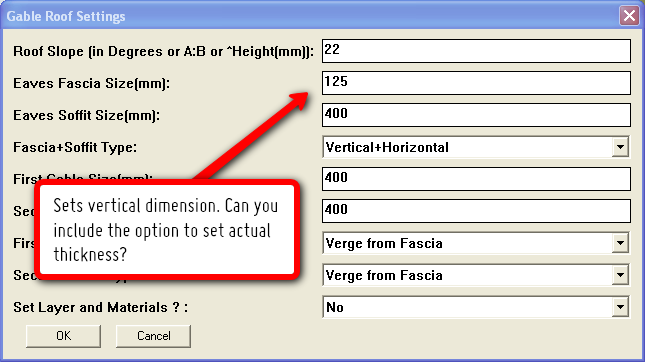
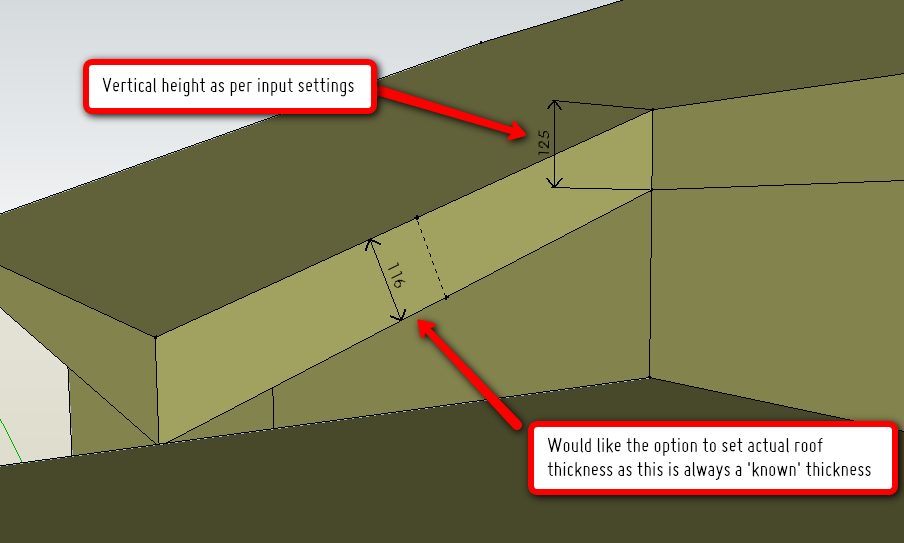
          Roof_Plugin.png


          Roof_Plugin-image.png

          Just Curious...

          1 條回覆 最後回覆 回覆 引用 0
          • A 離線
            ar_max
            最後由 編輯

            thank you 😄

            1 條回覆 最後回覆 回覆 引用 0
            • TIGT 離線
              TIG Moderator
              最後由 編輯

              @utiler said:

              Hi TIG and others,
              Just a few observations and possibly a feature to add.

              1. The eaves fascia size offer users to set thickness of the roof however the result is a thickness measured vertically. [see attached]. Considering roof systems consist of known thickness, would it be possible to change [or add a feature] to offer the input of actual roof thickness?
              2. Also, as with the gable roof function, is it possible to add a skillion [single pitch] roof option?
                I would expect it to operate similar the the gable function; pick gable side first the single pitch side and execute.....

              Sorry to be so tardy in my reply 😒
              Most users will have a fascia height [vertical] in mind - although the roof structure [timbers] are a given thickness [though this will vary if it's been 'regularized' too], the fascia has to 'mask' the soffit material and also take into account the tiling laths and so on to kick up the bottom tile correctly. Also you might use differing depth timbers in differing areas BUT want a constant fascia to be seen.
              If is not that difficult to sit down before jumping in and work out the likely fascia height from a guess of the roof's build up. You are usually using SUp to make a sketch model - if you were making it physically from card or drawing it with a pencil you'd think to yourself 'I want a 200mm deep fascia' and make/draw it at about that - an initial design should be about proportion and scale not real life wood sizes... If later on the detailed design comes up with 175mm timbers and a 65mm roof build up and a 15mm soffit it's not miles off and can be adjusted to suit ???
              If you know the final build-ups then doing a quick bit of trig just the once will give the fascia's vertical height -
              FasciaHeight = TotalRoofThickness **/** cos(RoofAngleInDegrees)
              If you work in A:B pitch format then it's -
              FasciaHeight = TotalRoofThickness ***** (SquareRoot**(**(A*A)+(B*B)**)**) **/** B
              🤓
              A 'mono-pitched' roof is so easy to make in SUp that I didn't add it... use the protractor tool to set pitch, guide-lines to offset, draw the profile and make the form including the top/bottom overhangs, and with pushpull as needed, including any verge overhangs - color to suit ?
              🤓

              I've no plans to do any work on **Roof** for a while as there are many things in front of it in the queue 😢

              TIG

              1 條回覆 最後回覆 回覆 引用 0
              • utilerU 離線
                utiler
                最後由 編輯

                Thanks TIG, can see you have been busy..... 👍

                Trig' is what I currently apply to work-out the roof profile vertically; or just set a fascia depth that is close. I just thought if it was a simple addition [obviously I don't speak the language] it would be a great alternative.....
                No problem, I can live with it. Keep up your great work!

                Just Curious...

                1 條回覆 最後回覆 回覆 引用 0
                • TIGT 離線
                  TIG Moderator
                  最後由 編輯

                  @utiler said:

                  Thanks TIG, can see you have been busy..... 👍
                  Trig' is what I currently apply to work-out the roof profile vertically; or just set a fascia depth that is close. I just thought if it was a simple addition [obviously I don't speak the language] it would be a great alternative.....
                  No problem, I can live with it. Keep up your great work!

                  It might be easy enough to implement once I applied my self to it but it is one of my few encrypted tools too !
                  It might happen... but not one day soon...

                  TIG

                  1 條回覆 最後回覆 回覆 引用 0
                  • utilerU 離線
                    utiler
                    最後由 編輯

                    @tig said:

                    @utiler said:

                    Thanks TIG, can see you have been busy..... 👍
                    Trig' is what I currently apply to work-out the roof profile vertically; or just set a fascia depth that is close. I just thought if it was a simple addition [obviously I don't speak the language] it would be a great alternative.....
                    No problem, I can live with it. Keep up your great work!

                    It might be easy enough to implement once I applied my self to it but it is one of my few encrypted tools too !
                    It might happen... but not one day soon...

                    You're a generous man, TIG.

                    One day I hope to be able to buy all you ruby writers a beer!!!! 🎉 🎉

                    Just Curious...

                    1 條回覆 最後回覆 回覆 引用 0
                    • L 離線
                      Logik
                      最後由 編輯

                      Thanks for this update mate.
                      Has made life a lot easier!!

                      1 條回覆 最後回覆 回覆 引用 0
                      • G 離線
                        guzaotfi
                        最後由 編輯

                        Hi man, i am brazilian, i need to link for download > roof plugin for sketchup plis! Tks!

                        1 條回覆 最後回覆 回覆 引用 0
                        • TIGT 離線
                          TIG Moderator
                          最後由 編輯

                          Look for Roof on the Depot site at crai...
                          Tut and link here... http://vimeo.com/2254304

                          TIG

                          1 條回覆 最後回覆 回覆 引用 0
                          • S 離線
                            SelvinStar
                            最後由 編輯

                            Great work man, I am only a beginner and you have made my life a whole lot easier. Keep up the good work. Thanks Selvin

                            1 條回覆 最後回覆 回覆 引用 0
                            • S 離線
                              SketchUpNoobie
                              最後由 編輯

                              I dropped this in my plugin folder but its not showing up under "Plugins". Am I doing something wrong TIG?

                              --

                              SketchUpNoobie: the complete noob in all things SketchUp.

                              1 條回覆 最後回覆 回覆 引用 0
                              • Gus RG 離線
                                Gus R
                                最後由 編輯

                                TIG,

                                Great plugin which I put through much use.

                                Recently however I went to use the roof plugin and noticed that it was missing from the plugins menu. Checked my plugin directory and it was in the correct location. Downloaded it again, just in case, and again placed it in the plugins directory but it still didn't show up in the plugins menu.

                                It finally showed up after I moved roof.rb into the tools menu which is something I've done in the past.

                                Only thing I've installed since I last used roof.rb has been "SDS2 Artisan". Probably conflict? Otherwise it works in the tools directory.

                                Thanks.

                                ➡ Update

                                I renamed artisan_loader.rb to artisan_loader.rbx and put roof.rb back in the plugins directory and it once again shows up.

                                www.instagram.com/gusrobatto/

                                www.facebook.com/gusrobatto

                                www.flickr.com/photos/gusrobatto

                                1 條回覆 最後回覆 回覆 引用 0
                                • Dave RD 離線
                                  Dave R
                                  最後由 編輯

                                  @unknownuser said:

                                  I dropped this in my plugin folder but its not showing up under "Plugins". Am I doing something wrong TIG?

                                  Did you see the post by Gus R? I did the same thing that he did with the Artisan loader file extension and it shows up. It does appear to be a conflict between the two plugins. I guess moving it to Tools isn't a big deal though.

                                  Etaoin Shrdlu

                                  %

                                  (THERE'S NO PLACE LIKE)

                                  G28 X0.0 Y0.0 Z0.0

                                  M30

                                  %

                                  1 條回覆 最後回覆 回覆 引用 0
                                  • TIGT 離線
                                    TIG Moderator
                                    最後由 編輯

                                    @unknownuser said:

                                    I dropped this in my plugin folder but its not showing up under "Plugins". Am I doing something wrong TIG?

                                    I assume you mean you put the Roof.rb file into the Plugins folder ?
                                    There are also 'help' files available...
                                    Where there any error messages at startup...
                                    There should be no conflicts with the other scripts...
                                    I have artisan AND Roof running together without issues 😕
                                    It would be better if Roof.rb remained in the Plugins folder...
                                    It will work inside the Tools folder but that is really for Google's own scripts...
                                    You could try it in the Plugins but add a # to the start of its name [#Roof.rb] so that it loads before Artisan - then see if Artisan works too...

                                    You can also test if it's loading [even if the menu item isn't there] by typing this into the Ruby Console...
                                    Roof::hip
                                    Working ? Messages ?
                                    Please report back...

                                    TIG

                                    1 條回覆 最後回覆 回覆 引用 0
                                    • Dave RD 離線
                                      Dave R
                                      最後由 編輯

                                      TIG, it does load as the entry into the Console works. I changed the name to #Roof.rb and that works, too. The menu entry shows near the top of the Plugins menu instead of alphabetically.

                                      Etaoin Shrdlu

                                      %

                                      (THERE'S NO PLACE LIKE)

                                      G28 X0.0 Y0.0 Z0.0

                                      M30

                                      %

                                      1 條回覆 最後回覆 回覆 引用 0
                                      • TIGT 離線
                                        TIG Moderator
                                        最後由 編輯

                                        @dave r said:

                                        TIG, it does load as the entry into the Console works. I changed the name to #Roof.rb and that works, too. The menu entry shows near the top of the Plugins menu instead of alphabetically.

                                        BUT does Artisan then work ?
                                        It already works for me either way, so I can't see what Artisan might be doing to screw up 'Roof' loading properly and making its menu?
                                        Here's my [unscrambled] 'current' version - please see if this version of 'Roof.rb' works ?? NOTE: this pre-v.4 one is for 'testing only'...*** EDIT: I have removed the temporary version - please get this one [i.e. the 4 of you who tried it and any v3 users!] http://forums.sketchucation.com/viewtopic.php?p=17156#p17156

                                        TIG

                                        1 條回覆 最後回覆 回覆 引用 0
                                        • Dave RD 離線
                                          Dave R
                                          最後由 編輯

                                          Oops. No, the toolbar for Artisan doesn't show up now nor does it appear in the menu.

                                          The unscrambled version does work and Artisan seems to work with it, too.

                                          Etaoin Shrdlu

                                          %

                                          (THERE'S NO PLACE LIKE)

                                          G28 X0.0 Y0.0 Z0.0

                                          M30

                                          %

                                          1 條回覆 最後回覆 回覆 引用 0
                                          • S 離線
                                            SketchUpNoobie
                                            最後由 編輯

                                            Yep, the latest version works for me too and doesn't mess up Artisan. Thanks.

                                            --

                                            SketchUpNoobie: the complete noob in all things SketchUp.

                                            1 條回覆 最後回覆 回覆 引用 0
                                            • 1
                                            • 2
                                            • 3
                                            • 4
                                            • 5
                                            • 6
                                            • 7
                                            • 8
                                            • 9
                                            • 5 / 9
                                            • 第一個貼文
                                              最後的貼文
                                            Buy SketchPlus
                                            Buy SUbD
                                            Buy WrapR
                                            Buy eBook
                                            Buy Modelur
                                            Buy Vertex Tools
                                            Buy SketchCuisine
                                            Buy FormFonts

                                            Advertisement



