sketchucation logo sketchucation
    • 登入
    Oops, your profile's looking a bit empty! To help us tailor your experience, please fill in key details like your SketchUp version, skill level, operating system, and more. Update and save your info on your profile page today!
    🔌 Smart Spline | Fluid way to handle splines for furniture design and complex structures. Download

    [Plugin] Exporting a texture from a material

    已排程 已置頂 已鎖定 已移動 Plugins
    29 貼文 15 Posters 39.7k 瀏覽 15 Watching
    正在載入更多貼文
    • 從舊到新
    • 從新到舊
    • 最多點贊
    回覆
    • 在新貼文中回覆
    登入後回覆
    此主題已被刪除。只有擁有主題管理權限的使用者可以查看。
    • TIGT 線上
      TIG Moderator
      最後由 編輯

      OR there's Didier's "Very Fast Texture Writer" http://forums.sketchucation.com/viewtopic.php?t=6386

      TIG

      1 條回覆 最後回覆 回覆 引用 0
      • IneshtineI 離線
        Ineshtine
        最後由 編輯

        rps_texturewrite.rb is not part of Raylectron, it's from Renderplus, so you may want to contact them.

        The Raylectron texture exporter is very fast, and, you can select the format you want to save the images as, and where to save them, and, it's easier to use, with a nice GUI.

        What? you haven't tried Raylectron yet?

        1 條回覆 最後回覆 回覆 引用 0
        • Al HartA 離線
          Al Hart
          最後由 編輯

          I got the same errors when trying to use rps_texturewrite.rb.

          I fixed it and uploaded a new version into the first post in this thread.

          Al Hart

          http:wiki.renderplus.comimageseefRender_plus_colored30x30%29.PNG
          IRender nXt from Render Plus

          1 條回覆 最後回覆 回覆 引用 0
          • Al HartA 離線
            Al Hart
            最後由 編輯

            @troyhome said:

            Thank you, Al- this will help tremendously!
            One thing i should note about the script is that when i do run it to export all materials, it appears as though something happens- as though there might be a window hiding that shows a save location or somethings- but then there is nothing. All i mean is- i wonder if the materials are saving to some hidden location?
            Oh well- i like the .skm approach- thanks again!

            In the newest version, I added a display of the file names of all textures saved, which will appear in the Ruby Console. That should help:

            e.g.

            Writing: c:\tmp/texture_test/F0.jpg

            Al Hart

            http:wiki.renderplus.comimageseefRender_plus_colored30x30%29.PNG
            IRender nXt from Render Plus

            1 條回覆 最後回覆 回覆 引用 0
            • eidam655E 離線
              eidam655
              最後由 編輯

              thanks for the fix, but in the meantime i also found the plugin TIG linked, so it's settled...

              i might download the new version of this plugin, just to see the difference in source code; might come handy 😄

              I'm using SketchUp 2017, V-Ray 3.4

              1 條回覆 最後回覆 回覆 引用 0
              • dramachik27D 離線
                dramachik27
                最後由 編輯

                Hello, I am new to sketchup and I am trying to use the program to create 3D models for a game. The issue I am having is when I export the model into Torque. We see all the colors I have applied but as for textures, they are all gone. Is there a way to change this outcome? 😄
                ~G

                1 條回覆 最後回覆 回覆 引用 0
                • thomthomT 離線
                  thomthom
                  最後由 編輯

                  What format are you exporting to?

                  Thomas Thomassen — SketchUp Monkey & Coding addict
                  List of my plugins and link to the CookieWare fund

                  1 條回覆 最後回覆 回覆 引用 0
                  • deaneauD 離線
                    deaneau
                    最後由 編輯

                    hi Al Hart, i would love if you change your plugin by reading the color name and than naming the textures. this would be cool

                    thank you

                    MADE, BORN AND LIVING IN BERLIN
                    Big Thank You to all Programmers
                    Some German words are so long that they have a perspective. M.Twain

                    1 條回覆 最後回覆 回覆 引用 0
                    • Al HartA 離線
                      Al Hart
                      最後由 編輯

                      Would you like to rename color only materials in SketchUp (not materials with textures) so the name matches the color (eg. RGB 255,0,0 becomes red), for common colors and the hex color for non-standard colors (e.g. RGB 100,200,100 becomes #64c864)

                      One "problem" we found recently is that people don't call RGB 0,255,0 green - but rather call it lime- and call 0,128,0 green

                      as in this chart:

                      https://s-media-cache-ak0.pinimg.com/236x/f9/47/82/f94782af2fff3cdb9bef53556d989852.jpg

                      Al Hart

                      http:wiki.renderplus.comimageseefRender_plus_colored30x30%29.PNG
                      IRender nXt from Render Plus

                      1 條回覆 最後回覆 回覆 引用 0
                      • Al HartA 離線
                        Al Hart
                        最後由 編輯

                        or did you mean that you wanted to rename the material itself to match the texture name included in the material?

                        Al Hart

                        http:wiki.renderplus.comimageseefRender_plus_colored30x30%29.PNG
                        IRender nXt from Render Plus

                        1 條回覆 最後回覆 回覆 引用 0
                        • Al HartA 離線
                          Al Hart
                          最後由 編輯

                          or did you want to automatically rename the textures stored in the material to match the name of the material itself.

                          This gets tricky because the SketchUp material can have names like: a'b/c, while a'b/c would not be a legal name for the texture itself.

                          Al Hart

                          http:wiki.renderplus.comimageseefRender_plus_colored30x30%29.PNG
                          IRender nXt from Render Plus

                          1 條回覆 最後回覆 回覆 引用 0
                          • deaneauD 離線
                            deaneau
                            最後由 編輯

                            Al sorry for my very late answer.

                            1. about Lime RGB 0 255 0

                            in the RAL Colorchart you have not a color with this Name and RGB value.

                            look here

                            http://www.ralcolor.com

                            standard colors Like RAL, HKS, PANTONE etc. is based on the subtractive color scheme (body colors) when you have "RGB" (normally additive color scheme) and add al three together you have black as result.

                            additive color scheme https://de.wikipedia.org/wiki/Additive_Farbmischung

                            result is white (light colors)

                            the RGB Value is only an orientation and the name of the color is an orientation ,too. some peoples can memorize names better than digits or numbers and vice versa.

                            1. i would have this:

                            at (1) this name as image name, too in field (2)

                            actually the plugin doesn´t work with the last sketchup make, or i doing anithing wrong.
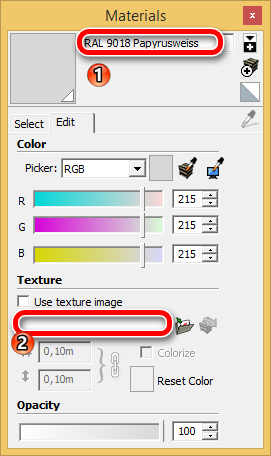
                            Snap_2015.10.13_22h50m47s_001_Materials.png

                            i have attache the skp file.. the object was created with eneroth extract material.

                            the color itself was created with a CSV-import-plugin.

                            sorry again for the late answer.

                            best regards Dean


                            RAL_TEST_Sketchucation.skp

                            MADE, BORN AND LIVING IN BERLIN
                            Big Thank You to all Programmers
                            Some German words are so long that they have a perspective. M.Twain

                            1 條回覆 最後回覆 回覆 引用 0
                            • C 離線
                              ChokDK
                              最後由 編輯

                              Hi writers and devs in this thread.
                              Just 4 years later I found this! 😄

                              I am looking for an exporter that can export (to .png) "whatever" colors or material used in SketchUp into 1 file, and so that it can be used in an OBJ file.

                              In fact, something similar to what Blender can do ( Blender call it "bake" or "baking")
                              is this possible, does something similar already exist, or.. would someone do it? 😄

                              Regards

                              1 條回覆 最後回覆 回覆 引用 0
                              • 1
                              • 2
                              • 1 / 2
                              • 第一個貼文
                                最後的貼文
                              Buy SketchPlus
                              Buy SUbD
                              Buy WrapR
                              Buy eBook
                              Buy Modelur
                              Buy Vertex Tools
                              Buy SketchCuisine
                              Buy FormFonts

                              Advertisement