sketchucation logo sketchucation
    • Login
    Oops, your profile's looking a bit empty! To help us tailor your experience, please fill in key details like your SketchUp version, skill level, operating system, and more. Update and save your info on your profile page today!
    Mac User? | Join the Rayscaper Beta for Mac Learn More

    [Plugin] Exporting a texture from a material

    Scheduled Pinned Locked Moved Plugins
    29 Posts 15 Posters 42.2k Views 15 Watching
    Loading More Posts
    • Oldest to Newest
    • Newest to Oldest
    • Most Votes
    Reply
    • Reply as topic
    Log in to reply
    This topic has been deleted. Only users with topic management privileges can see it.
    • troyhomeT
      troyhome
      last edited by

      I tried the file in this thread- maybe it's not playing nice with some of the other ruby's i've got.
      I'll try looking at the .skm which i assume is somewhere on my computer šŸ˜„
      Thanks!

      IOviz.com
      SU Pro 2024 PC

      1 Reply Last reply
      Reply Quote 0
      • Al HartA
        Al Hart
        last edited by

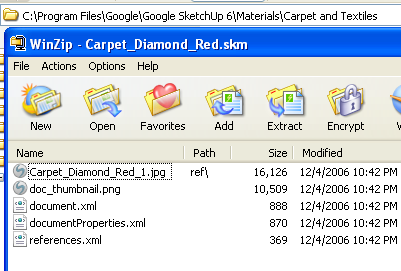
        Here is a carpet.skm file - located in the SketchUp Materials folder.
        carpet-skm.png

        Al Hart

        http://wiki.renderplus.com/images/e/ef/Render_plus_colored30x30).PNG
        IRender nXt from Render Plus

        1 Reply Last reply
        Reply Quote 0
        • troyhomeT
          troyhome
          last edited by

          Thank you, Al- this will help tremendously!
          One thing i should note about the script is that when i do run it to export all materials, it appears as though something happens- as though there might be a window hiding that shows a save location or somethings- but then there is nothing. All i mean is- i wonder if the materials are saving to some hidden location?
          Oh well- i like the .skm approach- thanks again!

          IOviz.com
          SU Pro 2024 PC

          1 Reply Last reply
          Reply Quote 0
          • Chris FullmerC
            Chris Fullmer
            last edited by

            Whats the matter with exportingas a 3ds file to get all the images out? I saw you said you didn't want to do that, but I didn't catch why? What do you mean by manually relinking?

            Chris

            Lately you've been tan, suspicious for the winter.
            All my Plugins I've written

            1 Reply Last reply
            Reply Quote 0
            • troyhomeT
              troyhome
              last edited by

              Hi Chris,
              I just mean having to export the file on which i'm working just so i get the maps... manually relinking? I don't know what i was thinking about when i typed that... I've been linking maps to Maxwell materials for the last couple days- i imagine that made it into my post somehow- how embarrassing.

              IOviz.com
              SU Pro 2024 PC

              1 Reply Last reply
              Reply Quote 0
              • A
                Artz_ab
                last edited by

                thank you, i will try it

                1 Reply Last reply
                Reply Quote 0
                • IneshtineI
                  Ineshtine
                  last edited by

                  I'm a year an a half off on this topic, but if anyone cares, I have written a plugin to export all of the textures from your models. It's very fast and not coded in Ruby. It's freeware and you can get it from http://Raylectron.com

                  Please let me know how it works for you?

                  What? you haven't tried Raylectron yet?

                  1 Reply Last reply
                  Reply Quote 0
                  • eidam655E
                    eidam655
                    last edited by

                    hi, the raylecton exporter looks good, however, i would like to retain the plugin's functionality inside sketchup.

                    so far the mass-export does not work because of this:

                    Error; #<ArgumentError; wrong number of arguments (2 for 3)>
                    C;/PROGRA~1/Google/Google SketchUp 8/Plugins/rps_texturewrite.rb;25;in `export_texture'
                    C;/PROGRA~1/Google/Google SketchUp 8/Plugins/rps_texturewrite.rb;25;in `exportTextures'
                    C;/PROGRA~1/Google/Google SketchUp 8/Plugins/rps_texturewrite.rb;24;in `each'
                    C;/PROGRA~1/Google/Google SketchUp 8/Plugins/rps_texturewrite.rb;24;in `exportTextures'
                    C;/PROGRA~1/Google/Google SketchUp 8/Plugins/rps_texturewrite.rb;216
                    

                    i would love to fix this, but i'm not familiar with Ruby, let alone Ruby inside Sketchup. if anyone could have a look at this issue, i'd be very very glad...

                    I'm using SketchUp 2017, V-Ray 3.4

                    1 Reply Last reply
                    Reply Quote 0
                    • TIGT
                      TIG Moderator
                      last edited by

                      OR there's Didier's "Very Fast Texture Writer" http://forums.sketchucation.com/viewtopic.php?t=6386

                      TIG

                      1 Reply Last reply
                      Reply Quote 0
                      • IneshtineI
                        Ineshtine
                        last edited by

                        rps_texturewrite.rb is not part of Raylectron, it's from Renderplus, so you may want to contact them.

                        The Raylectron texture exporter is very fast, and, you can select the format you want to save the images as, and where to save them, and, it's easier to use, with a nice GUI.

                        What? you haven't tried Raylectron yet?

                        1 Reply Last reply
                        Reply Quote 0
                        • Al HartA
                          Al Hart
                          last edited by

                          I got the same errors when trying to use rps_texturewrite.rb.

                          I fixed it and uploaded a new version into the first post in this thread.

                          Al Hart

                          http://wiki.renderplus.com/images/e/ef/Render_plus_colored30x30).PNG
                          IRender nXt from Render Plus

                          1 Reply Last reply
                          Reply Quote 0
                          • Al HartA
                            Al Hart
                            last edited by

                            @troyhome said:

                            Thank you, Al- this will help tremendously!
                            One thing i should note about the script is that when i do run it to export all materials, it appears as though something happens- as though there might be a window hiding that shows a save location or somethings- but then there is nothing. All i mean is- i wonder if the materials are saving to some hidden location?
                            Oh well- i like the .skm approach- thanks again!

                            In the newest version, I added a display of the file names of all textures saved, which will appear in the Ruby Console. That should help:

                            e.g.

                            Writing: c:\tmp/texture_test/F0.jpg

                            Al Hart

                            http://wiki.renderplus.com/images/e/ef/Render_plus_colored30x30).PNG
                            IRender nXt from Render Plus

                            1 Reply Last reply
                            Reply Quote 0
                            • eidam655E
                              eidam655
                              last edited by

                              thanks for the fix, but in the meantime i also found the plugin TIG linked, so it's settled...

                              i might download the new version of this plugin, just to see the difference in source code; might come handy šŸ˜„

                              I'm using SketchUp 2017, V-Ray 3.4

                              1 Reply Last reply
                              Reply Quote 0
                              • dramachik27D
                                dramachik27
                                last edited by

                                Hello, I am new to sketchup and I am trying to use the program to create 3D models for a game. The issue I am having is when I export the model into Torque. We see all the colors I have applied but as for textures, they are all gone. Is there a way to change this outcome? šŸ˜„
                                ~G

                                1 Reply Last reply
                                Reply Quote 0
                                • thomthomT
                                  thomthom
                                  last edited by

                                  What format are you exporting to?

                                  Thomas Thomassen — SketchUp Monkey & Coding addict
                                  List of my plugins and link to the CookieWare fund

                                  1 Reply Last reply
                                  Reply Quote 0
                                  • deaneauD
                                    deaneau
                                    last edited by

                                    hi Al Hart, i would love if you change your plugin by reading the color name and than naming the textures. this would be cool

                                    thank you

                                    MADE, BORN AND LIVING IN BERLIN
                                    Big Thank You to all Programmers
                                    Some German words are so long that they have a perspective. M.Twain

                                    1 Reply Last reply
                                    Reply Quote 0
                                    • Al HartA
                                      Al Hart
                                      last edited by

                                      Would you like to rename color only materials in SketchUp (not materials with textures) so the name matches the color (eg. RGB 255,0,0 becomes red), for common colors and the hex color for non-standard colors (e.g. RGB 100,200,100 becomes #64c864)

                                      One "problem" we found recently is that people don't call RGB 0,255,0 green - but rather call it lime- and call 0,128,0 green

                                      as in this chart:

                                      https://s-media-cache-ak0.pinimg.com/236x/f9/47/82/f94782af2fff3cdb9bef53556d989852.jpg

                                      Al Hart

                                      http://wiki.renderplus.com/images/e/ef/Render_plus_colored30x30).PNG
                                      IRender nXt from Render Plus

                                      1 Reply Last reply
                                      Reply Quote 0
                                      • Al HartA
                                        Al Hart
                                        last edited by

                                        or did you mean that you wanted to rename the material itself to match the texture name included in the material?

                                        Al Hart

                                        http://wiki.renderplus.com/images/e/ef/Render_plus_colored30x30).PNG
                                        IRender nXt from Render Plus

                                        1 Reply Last reply
                                        Reply Quote 0
                                        • Al HartA
                                          Al Hart
                                          last edited by

                                          or did you want to automatically rename the textures stored in the material to match the name of the material itself.

                                          This gets tricky because the SketchUp material can have names like: a'b/c, while a'b/c would not be a legal name for the texture itself.

                                          Al Hart

                                          http://wiki.renderplus.com/images/e/ef/Render_plus_colored30x30).PNG
                                          IRender nXt from Render Plus

                                          1 Reply Last reply
                                          Reply Quote 0
                                          • deaneauD
                                            deaneau
                                            last edited by

                                            Al sorry for my very late answer.

                                            1. about Lime RGB 0 255 0

                                            in the RAL Colorchart you have not a color with this Name and RGB value.

                                            look here

                                            http://www.ralcolor.com

                                            standard colors Like RAL, HKS, PANTONE etc. is based on the subtractive color scheme (body colors) when you have "RGB" (normally additive color scheme) and add al three together you have black as result.

                                            additive color scheme https://de.wikipedia.org/wiki/Additive_Farbmischung

                                            result is white (light colors)

                                            the RGB Value is only an orientation and the name of the color is an orientation ,too. some peoples can memorize names better than digits or numbers and vice versa.

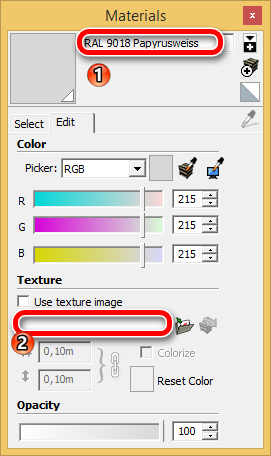
                                            1. i would have this:

                                            at (1) this name as image name, too in field (2)

                                            actually the plugin doesn“t work with the last sketchup make, or i doing anithing wrong.
                                            Snap_2015.10.13_22h50m47s_001_Materials.png

                                            i have attache the skp file.. the object was created with eneroth extract material.

                                            the color itself was created with a CSV-import-plugin.

                                            sorry again for the late answer.

                                            best regards Dean


                                            RAL_TEST_Sketchucation.skp

                                            MADE, BORN AND LIVING IN BERLIN
                                            Big Thank You to all Programmers
                                            Some German words are so long that they have a perspective. M.Twain

                                            1 Reply Last reply
                                            Reply Quote 0

                                            Hello! It looks like you're interested in this conversation, but you don't have an account yet.

                                            Getting fed up of having to scroll through the same posts each visit? When you register for an account, you'll always come back to exactly where you were before, and choose to be notified of new replies (either via email, or push notification). You'll also be able to save bookmarks and upvote posts to show your appreciation to other community members.

                                            With your input, this post could be even better šŸ’—

                                            Register Login
                                            • 1
                                            • 2
                                            • 1 / 2
                                            • First post
                                              Last post
                                            Buy SketchPlus
                                            Buy SUbD
                                            Buy WrapR
                                            Buy eBook
                                            Buy Modelur
                                            Buy Vertex Tools
                                            Buy SketchCuisine
                                            Buy FormFonts

                                            Advertisement