Movie Software Suggestion/Recommendation
-
I need to put together a video that will express my support and appreciation for a group of people. It is going to include several images, text which may or may not be animated and probably at least one (but maybe more) animations that I will create with the Animator plugin. I expect it to have multiple scenes with different goals.
While I know i could do it all with SketchUp and Animator, I would like some inp;ut or suggestions or video software that others might recommend. I have the Windows 11 version of Movie Maker installed (the trial version which will expired in a couple of days) but it does not seem to have the capabilities I would like to see.
Here is a list of the things (I think) i need/want in order to accomplish my goal:
-
The ability to add text and in some cases animate it (or control it visibility)
-
The ability to add Animator generated animations
-
The ability to include multiple images in a scene along with the ability to combine text with the image and the ability to control the size and location of the image(s).
-
Possibly, the ability to add a narrative.
I must also admit that since I am an older/retired SketchUp user and SketchUcation user, cost is also a factor for me. Again, I know that I could accomplish all of this with SketchUp and the Animator plugin, I wanted to see if other members might have suggestions/recommendations for other software for me to look at/consider.
-
-
DaVinci Resolve has a free version that is on par with Adobe After Effects. Its probably overkill for your needs.
Try OpenShot: https://www.openshot.org/
-
Thanks for the feedback, Rich. I think thee Davinci Resolve is a bit of an overkill, but I am going to take a look at OpenShot. I might wind up just using Animator though.
Again, thanks for the feedback.
-
I have been having some problems trying to download and install OpenShot. Any suggestions?
-
Hi
 ️
️
I'm making fast and simple progress with CapCut—it's very simple and straightforward (and there are a lot of help-tuts on Youtube)
It has all the needed features, such as transitions, text, sound, etc., and even keyframe animation...
https://www.capcut.com
never trust a skinny cook
-
@HornOxx I have downloaded it and am trying to learn. Looks like it has a lot of the features I want but I still have a lot of things to learn. In particular, I want to be able to animate some text (like make it slide on to the screen).
Is there a charge for the desktop version? I will keep you posted as I learn.

-
 Prima! (I can´t translate "Is there a charge for the desktop version? into something that makes sense in German"
  ) Aren't you running the program on a computer? Or does that mean “does it cost anything”? Hmmm—my version didn't cost anything.
Animated text: There are various pre-animated text templates available (I never like those things), or you can use a simple standard text, place it, and set a keyframe, then reposition it, even in size or rotation, and set another keyframe. You can do the same with an alpha-channel PNG, for example, an arrow or a red circle...
(before you waste too much time, check YouTube for “CapCut keyframes” or “keyframe animation”).
I look forward to hearing how you're getting along️ -
Prima! (I can´t translate "Is there a charge for the desktop version? into something that makes sense in German" ) Aren't you running the program on a computer? Or does that mean “does it cost anything”? Hmmm—my version didn't cost anything.Yes, I meant does it cost anything.
Animated text: There are various pre-animated text templates available (I never like those things), or you can use a simple standard text, place it, and set a keyframe, then reposition it, even in size or rotation, and set another keyframe.
You can do the same with an alpha-channel PNG, for example, an arrow or a red circle...
(before you waste too much time, check YouTube for “CapCut keyframes” or “keyframe animation”).
I look forward to hearing how you're getting along️Thanks, I will need to learn more about how to use keyframes properly.
As of right now, I am making some interesting progress. As soon as I can, which might be a while, I will share the progress I am making. As of now, this seems to have the features I want/need for the project I want to do.
-
Hi
️
I'm making fast and simple progress with CapCut—it's very simple and straightforward (and there are a lot of help-tuts on Youtube)
It has all the needed features, such as transitions, text, sound, etc., and even keyframe animation...
https://www.capcut.comI am still trying to learn how to use the CapCut software. So far, I am not doing as good as I would like but the software looks very powerful.
For my first video, I would like to video, I wanted to start with multiple images and text. I want to animate some of the text. That all seemed very easy to do but I have one issue I have not been able to resolve. Since page is a mixture of multiple images and some animated text I need to be able to set the background for the page. I would kind of like for it to be a single color. I have not been able to figure out how to set the background color though. Later I plan on adding more pages with more images and eventually an animation that I have created with the Animator plugin in SketchUp.
I have now watched several videos but have not found out how to set the background for my "presentation" though. If you, or others, have any suggestions, I would really like to hear from you.
For others who have looked at this thread (or do look at it) I think CapCut looks like a really cool piece of software.
-
Hi again
️
even though I don't exactly understand what kind of result you're aiming for, maybe these tips will help you:
To create my own custom background, I edit my own HD JPG (1920 x 1080 px). In my example, a simple green JPG created using any image editor. This way, I set my preferred video format for a later export, for example, for a monitor or TV screen. This JPG can be a custom background color or even the family photo from last Christmas. And this background image spans over the entire duration of the video and is located on the lowest video track!
In the video tracks above it, you can play around with your content: You can make text or other image files fly across the screen, or simply fade them in or out at your desired speed, or animate them, or or or... (In my experience, less fiddling around is often better than too much)
Your slideshow in the track editor will probably end up looking something like a staircase that rises diagonally upward to the right
Once you figure out how to create a nice transition or a keyframe animation, capCut is actually pretty simple and straightforward...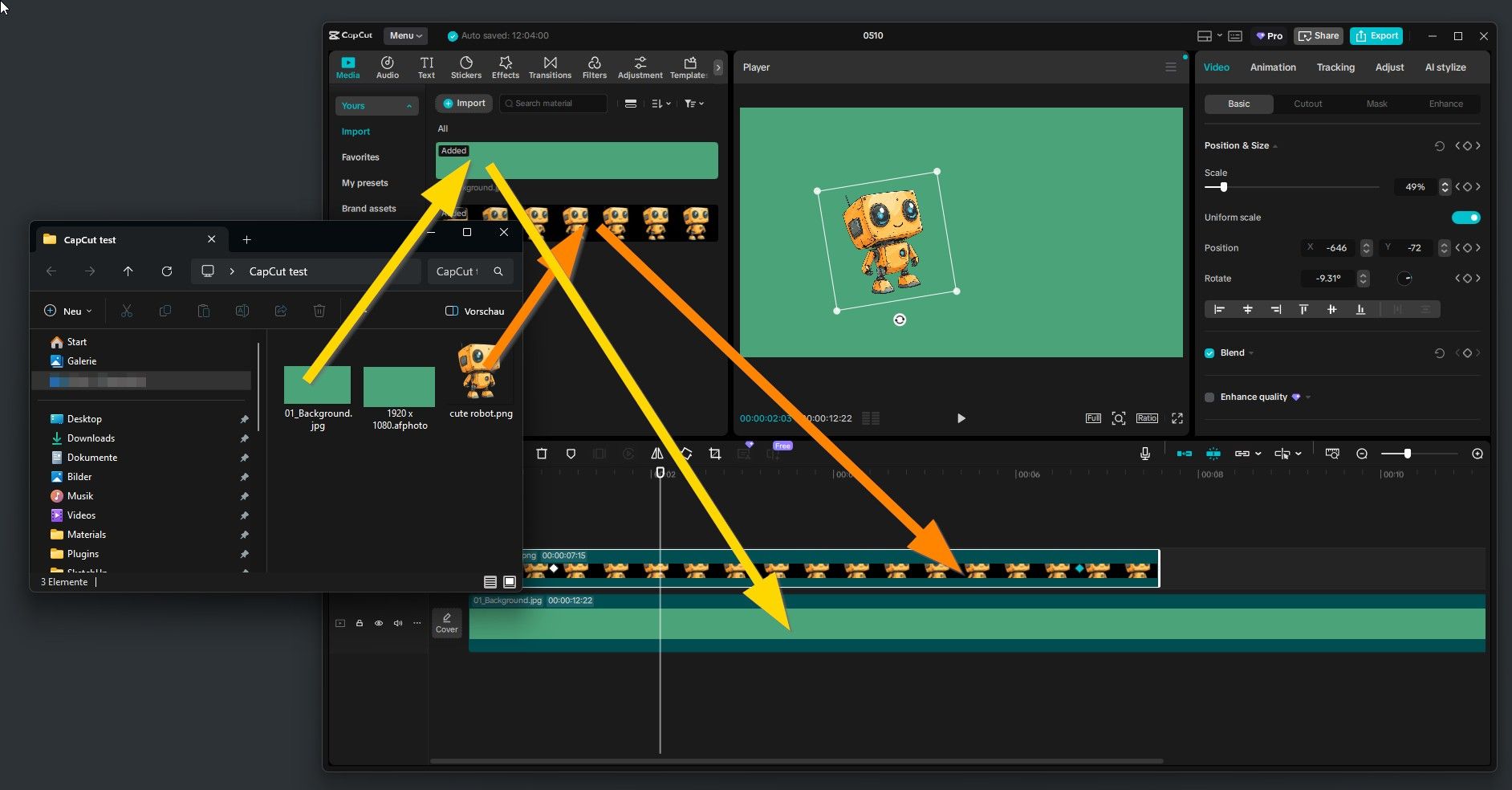
-
I used one of their favorites as a background and it worked, however when I started adding more items or changing the timeline of some items I had already included, I could no increase the background to match the other changes so it does not now appear behind all items. So far, I have not been able to find a solution.
Is there a support site or forum you would recommend?
BTW: from an earlier post, are you from Germany? I was stationed there in the US Army from late 1966 to late 1968.
-
...so I can understand better—you could send me a screenshot similar to mine, even if it doesn't work exactly as you want it to yet. Maybe also a mock-up screenshot of how it should look later in the video.
If you want to add images (JPGs or similar), they’ll be added by default in full-screen mode, so to speak, and would thus cover your background, which obviously needs to remain visible (?). So you’ll need to scale down your image sequence, similar to the “Cute Robot” in my screenshot...
But before I offer any further blabla I’ll better wait for your screenshots.Yes, that’s right—I live in the Frankfurt area
 Where were you stationed back then?
 -
-
️hi!
Hoping this kind of slideshow is what you had in mind.
Within CapCut I placed two photos one after the other on one track (over(or is it above?) my green background-track). This upper photo-track starts with a “pause” where only the background remains visible. Then comes the first photo, which is scaled and positioned randomly. As soon as it ends, there is another short pause. Now image #2 follows. Here, I’ve even added a fade-in and fade-out effect. Image #2 is also scaled and placed somewhat randomly...
(I’m including the YouTube link “How To Fade In and Fade Out” here)
https://www.youtube.com/watch?v=9qUwKCe846E
By the way: when you add your text track, the individual text elements are edited almost exactly the same way as the other video content you've placed.
As I mentioned earlier, I avoid overly flashy effects—the kind that have always annoyed me, even in PowerPoint
Of course, the photos can also fill the entire screen. If you “lock” this state with a keyframe, then enlarge the photo to x times its original size, and set another keyframe a few seconds later, the finished video will give the impression that you're zooming deep into the image....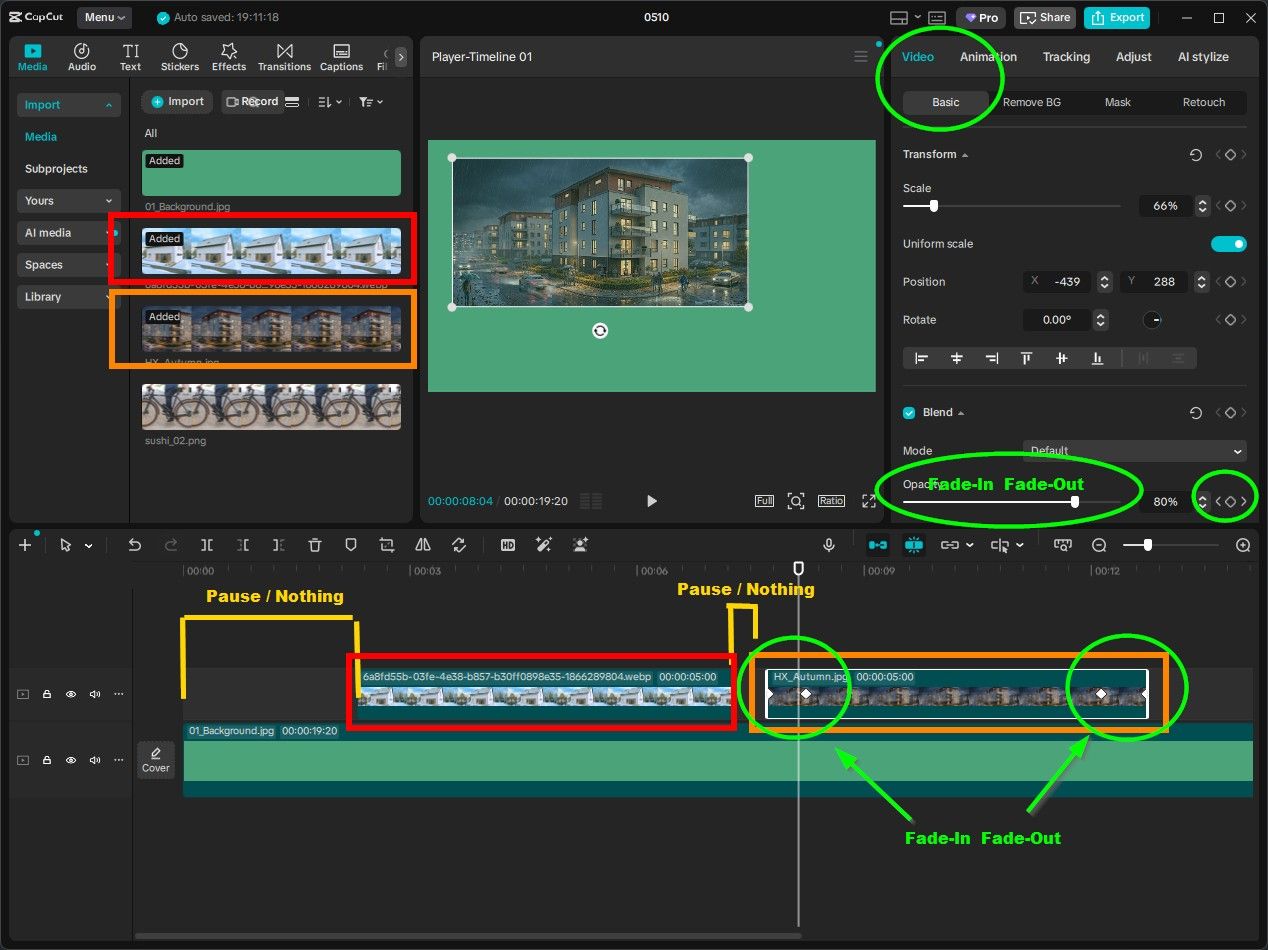
-
Well, I am making some progress. Here is a link to a video I just created and posted on YouTube. BSW Test 1
Yes, I still have a long way to go but at least this is a start. My plan is to expand this video a good bit. I have several more "slide" I want to add but it will take some time. The problem I had with the background seems to be solved (at least so far). I know I also need to add some keyframes and some other features. Let me know what you think of where I currently am.
I do not know where all of those other videos come from and I have not figured out how to all the viewer to replay the video I added.
-
@ntxdave
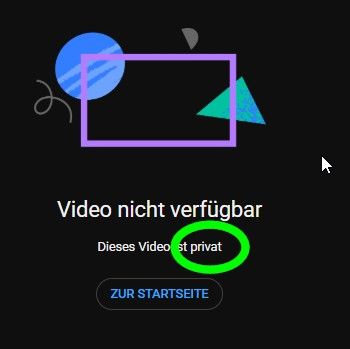
Too bad—your video is private, so I can't view it. But I'm glad to hear you're making progress. -
Too bad—your video is private, so I can't view it. But I'm glad to hear you're making progress.
[link text](Before you publish, check the following:
Do kids appear in this video?
Make sure you follow our policies to protect minors from harm, exploitation, bullying, and violations of labor law. Learn more
Looking for overall content guidance?
Our Community Guidelines can help you avoid trouble and ensure that YouTube remains a safe and vibrant community. Learn moreCan you try it again. I think I made it public but I need for you to give it a try so we can see.
Just in case, here is a new link to it. `lUpdated Link (just in case)``
-
Can someone verify that my link is now public?
-
Download the free D'oh Book for SketchUp 📖
-
Can someone verify that my link is now public?
Its public
Thanks for the verification @rich-o-brien.
I will have to move on with trying to learn more about learning CapCut. It seems like a pretty strong and versatile tool.



Hello! It looks like you're interested in this conversation, but you don't have an account yet.
Getting fed up of having to scroll through the same posts each visit? When you register for an account, you'll always come back to exactly where you were before, and choose to be notified of new replies (either via email, or push notification). You'll also be able to save bookmarks and upvote posts to show your appreciation to other community members.
With your input, this post could be even better 💗
Register Login


Advertisement