[Plugin][$] FredoBend - v1.6a - 21 Oct 26




-
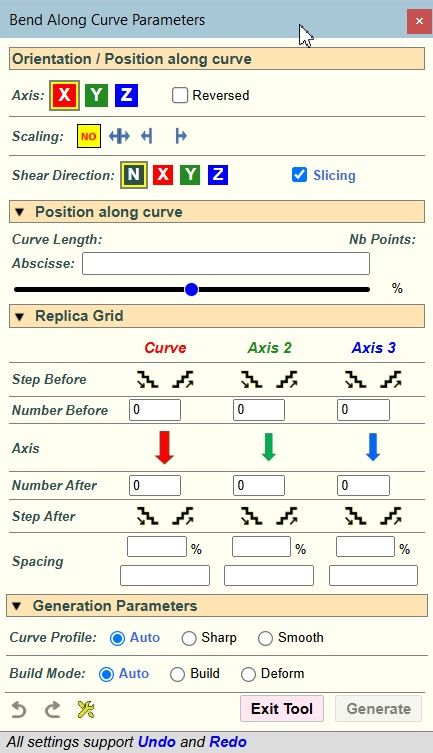
Opjtion 2 sounds good.
-
For information, you CANNOT put 'r' in front of the number. If you type 'r' as first character, then Sketchup will switch to whatever command has a shortcut 'r'.
The distinction between radius, angle and number of segments is based on whether a letter follows the number:
- if no character or 'd', this is an angle
- if 's', this is a number of segments
- if 'r' this is a radius
- if something else that can be interpreted as a unit (', ", m, cm, mm, etc...), then it is also a radius with specified units
- otherwise, it is ignored
Note that in the case of the Dome tool, you can add a digit 1 or 2 after, to specify whether this relates to the first or second curve.
- 33s2 will set 33 segments for the second curve
- 45.3d2 will set the angle to 45.3 degrees for the second curve
- so, 35.6r2 will set the radius to 35.6 model unit for the second curve
- and 35.6m2 will set the radius to 35.6m for the second curve
To finish with the VCB convention, if you type 2 values that are of the same categories, they apply to the curve1 and then the curve2. For instance: '33.4 45.6' will set the angles to 33.4 deg. for curve1 and 45.6 deg. for curve 2.
-
-
Another question on this matter. Are the Bending / rolling done on any K-value/factor rule ?? If so, would it be possible to have a box to edit that value ?? This matter to me in mine line of work. As mentioned, we roll plates, and in various thikness, so that would be a nice feature to have as well

-
Can you tell me what is the K-value/factor again? I don't think FredoBend uses this concept. It is purely geometrical, not physical.
-
Here is a AI sumary of the meaning of K-factor when rolling plates (And for all those out there with a better answer, please dont hate, just add better answer/description to the conversation, thank you):
When you bend or roll a metal plate, the material on the inside of the bend compresses, while the material on the outside stretches. Somewhere between these two surfaces lies a magical line that doesn't change length at all: the neutral axis.
The K-factor is the ratio that determines exactly where this neutral axis sits, and it is absolutely critical for calculating how much a plate will "stretch" during the rolling or bending process.
The K-factor is defined by a simple ratio: K=t/T (t over T, not divided.)
- t = The distance from the inside surface of the bend to the neutral axis.
- T= The total thickness of the plate.
Because it's a ratio of the material's thickness, the K-factor is always a value between 0 and 1. In a perfect, theoretical world where materials don't stretch or compress differently, the neutral axis would be dead center ($K = 0.5$). In reality, because metal compresses less easily than it stretches, the neutral axis shifts toward the inside of the bend, meaning K-factors usually fall between 0.3 and 0.5.
Why It Matters When Rolling Plates
When you roll a flat plate into a cylinder or a curve, you need to know exactly how long the flat sheet needs to be before it hits the rollers. If you don't account for the K-factor, your final part will either be too big or too small.
- Calculating Flat Length (Developments): Engineers use the K-factor to calculate the Bend Allowance—the actual length of the material along the neutral axis.
-Precision Manufacturing: If you are rolling heavy plates for pressure vessels, pipes, or tanks, even a tiny error in the K-factor can result in a cylinder that doesn't close properly or violates strict structural tolerances.
Typical K-Factor Values
The exact K-factor changes depending on the material type, its hardness, the thickness of the plate, and the radius of the bend. However, here are some common industry starting points:
-Soft Copper / Brass 0.35 – 0.40
-Aluminum (Soft/Medium) 0.40 – 0.45
-Medium Carbon Steel 0.40 – 0.45Maybe this is way of what you ment for FredoBend, but it sure would be nice to have. And the features you allready added, like editing the original plate, and then go back to rolled, is great.
-
NEW RELEASE: FredoBend v1.5b - 23 Jul 26
Requirements
- LibFredo6: v15.9a or above
- Sketchup version: SU2017 and above
FredoBend 1.5b is a maintenance release including:
- Adjustment for shear normal
- Future compatibility
Home Page of FredoBend for information and Download.
-
Hi.
Fantastic Plugin and a great addition to my work flow. It's really cool that there is a way to use it and preserve the quad layout for Sub D workflows. It works well when using the main path based bending but unfortunately the Circular and Dome tools don't seem to work as well. They unsoften the triangulated edge. May well be in development for a future release but I though I'd mention it in case you were not aware. -
It would help to see the model.
Note that there are options to prevent auto-smooth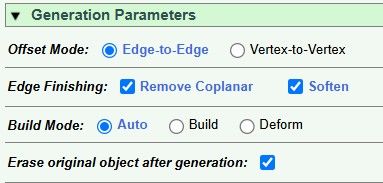
-
NEW RELEASE: FredoBend v1.6a - 21 Oct 26
Requirements
- LibFredo6: v16.3a or above
- Sketchup version: SU2017 and above
FredoBend 1.6a is a maintenance release including:
- Compatibility SU2027
Home Page of FredoBend for information and Download.



Hello! It looks like you're interested in this conversation, but you don't have an account yet.
Getting fed up of having to scroll through the same posts each visit? When you register for an account, you'll always come back to exactly where you were before, and choose to be notified of new replies (either via email, or push notification). You'll also be able to save bookmarks and upvote posts to show your appreciation to other community members.
With your input, this post could be even better 💗
Register Login


Advertisement