Scene animation with Animator
-
Now I am seeing more problems. When I open the model and try to replay the animation in Animator, all of the objects are misplaced.
Here is a copy of the SketchUp model. If you load it you will see it play the correct movements, but all of the objects are now in the wrong place. How do I keep this from happening?
Jesus - Animator Animation.skp
Now to tell you where I want to take this:
-
I want to add some "introductory" text and an image. Part of this will include also animating parts of the text and possibly the image.
-
I want to add some "exit text" that again, might include some animation.
I have had several thoughts about this and with scenes and tags(layers) this is pretty easy but with Animator, it seems like I have more options for the animation sequences.
All of this is really an exercise for me to learn more about controlling things in/with Animator. I have another project if mind that would use a lot of these same things. As I have said before, I have used Animator many times in the past. If you go to YouTube and look under my previous account (ntxdave) you can see several videos. Some of them use some additional features that I am not currently using.
-
-
OK, I was able to go back and save the model with everything in the right position to make the animation work correctly.
Here is an updated copy of the modelJesus - Animator Animation.skp
Now I need for someone to give me advice on how to save/create a camera position so that future developments will allow everything to show up in the right position(s).
I know, this is not a complicated model and all of this should be very easy to accomplish. As I said before, this seems very much different than things I have done in the past because of the collective movement of objects.
Once I have all of this worked out, I want to be able to assign a nice environment and try using Rayscaper to produce a rendered version of the final product.
-
@ntxdave said in Scene animation with Animator:
try using Rayscaper to produce a rendered version of the final product.
Rayscaper does not support Animator.
Download the free D'oh Book for SketchUp 📖
-
@Rich-O-Brien ok, I thought I saw something recently that said they were working on that.
-
Can you copy/paste the error message as text from the Ruby Console. The screenshot does not show the head of the error message.
Also, always use the positioner (4th toolbar icon) to record the initial position of objects, precisely in case there are issues.
-
@fredo6 said in Scene animation with Animator:
Can you copy/paste the error message as text from the Ruby Console. The screenshot does not show the head of the error message.
There was no error message. I now have it working and ffmpeg is installed.

Also, always use the positioner (4th toolbar icon) to record the initial position of objects, precisely in case there are issues.
This is useful for me also. I am going to have several things located in the model so I will capture the camera position for each of the units.
-
Is there a way to adjust the camera position during an animation? As an example, I am going to move an object and I would like to move/change the camera as the movement occurs.
I know I used to have the camera follow a car as it went through a car was but it has been too long ago and I do not remember how I achieved it. DUH!
-
Just create as many camera view as you like and place them along the timeline. Animator will interpolate the camera between them.
-
OK guys I keep going backwards. In the screen short below, I cannot seem to click on the right link to get the timeline back to the left side (like normal).
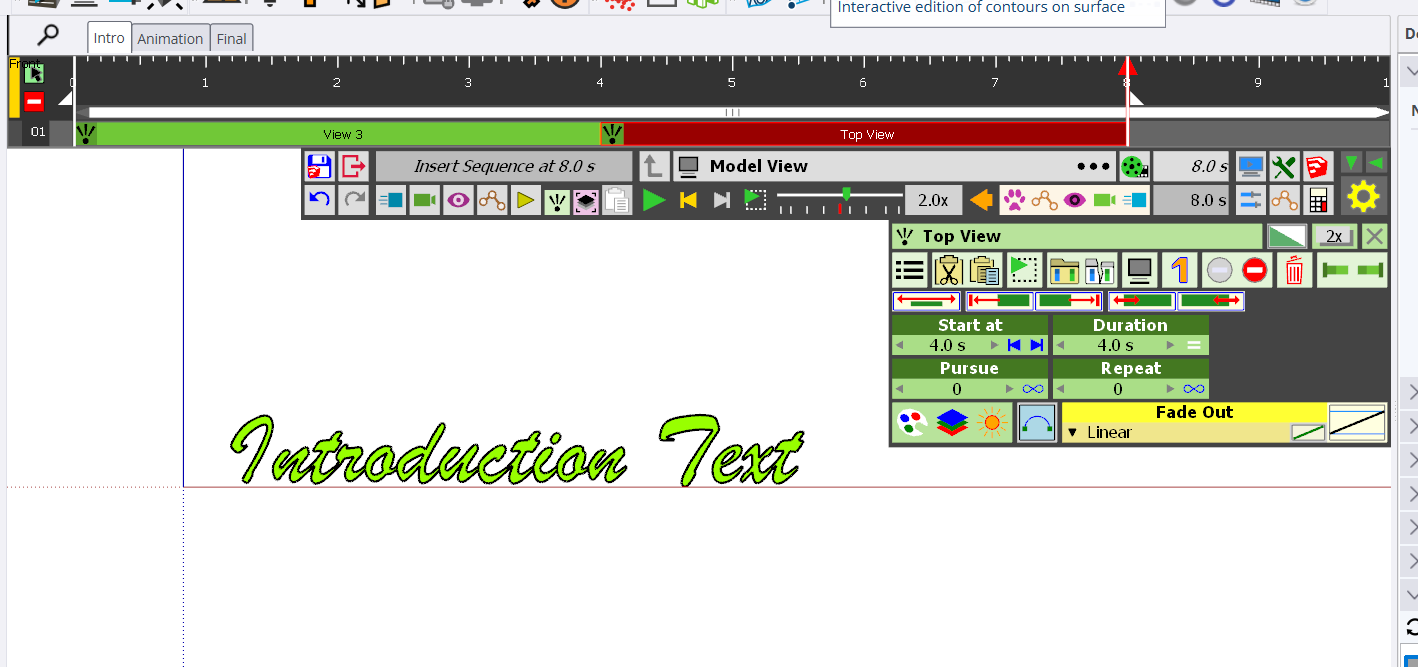
I am also having a problem trying combine things to make a Clip. I thought you could hit the shift key and click on multiple items to create a Clip.
-
 N ntxdave referenced this topic on
-
What are Kinematic objects and how are they used in SketchUp and Animator?

What are Trajections and how are they used in Animator?

What are Visual Effects and how are they used in Animator?

-
@ntxdave said in Scene animation with Animator:
What are Kinematic objects and how are they used in SketchUp and Animator?
@ntxdave said in Scene animation with Animator:
What are Trajections and how are they used in Animator?
The buttons you are pointing at are the include/exclude in animation toggles.
Download the free D'oh Book for SketchUp 📖
-
@Rich-O-Brien Thanks again @rich-o-brien. I can see that I did not look correctly to find these videos.
I am not sure I would ever use these features but then, who knows what is in the future. I will set the link up on my laptop for them so that I will not have a problem find them again.
I know the video I posted before is not very sophisticated but in the process, I now have a very much better understanding of how to use the combinations and layers/tags in SketchUp with Animator. At least I feel like I am moving forward and will be able to generate some videos with Animator to show a couple of models I am/have been working on.
Much of this progress has occurred because of your feedback.

-
Another issue/question. I have not been able to find and instructions/tutorials about how this transition feature works.
Yes, I can click on any of the transition types to see what it produces. However,
-
How would you go back to linear since that is not one of the panels shown?
-
Can you control the start time and duration of the transition?
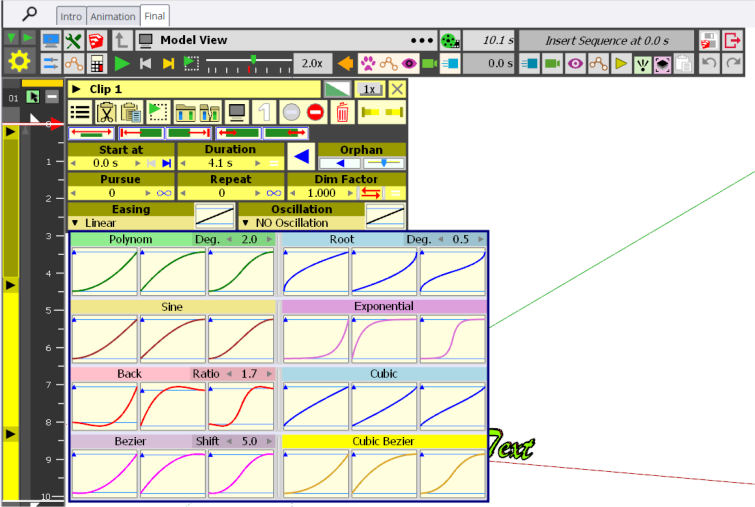
My goal/objective here is to make a smooth transition from one clip to another. I would kind of like having the clip fade out and the next clip fade in. Is there a way to do that?
I have done a little messing around with the camera tools but I also wonder if anyone has any recommendations of which camera options to use. If I add a camera, how do I delete/remove it?
-
-
I am having more problems toady. The image below will show 2 problems I am having that I need some help with. The first problem is that I have something that got added to my animation that I do not know what it is and cannot find a way to delete it. The second problem is that I cannot purge items (like unused clips and segments).
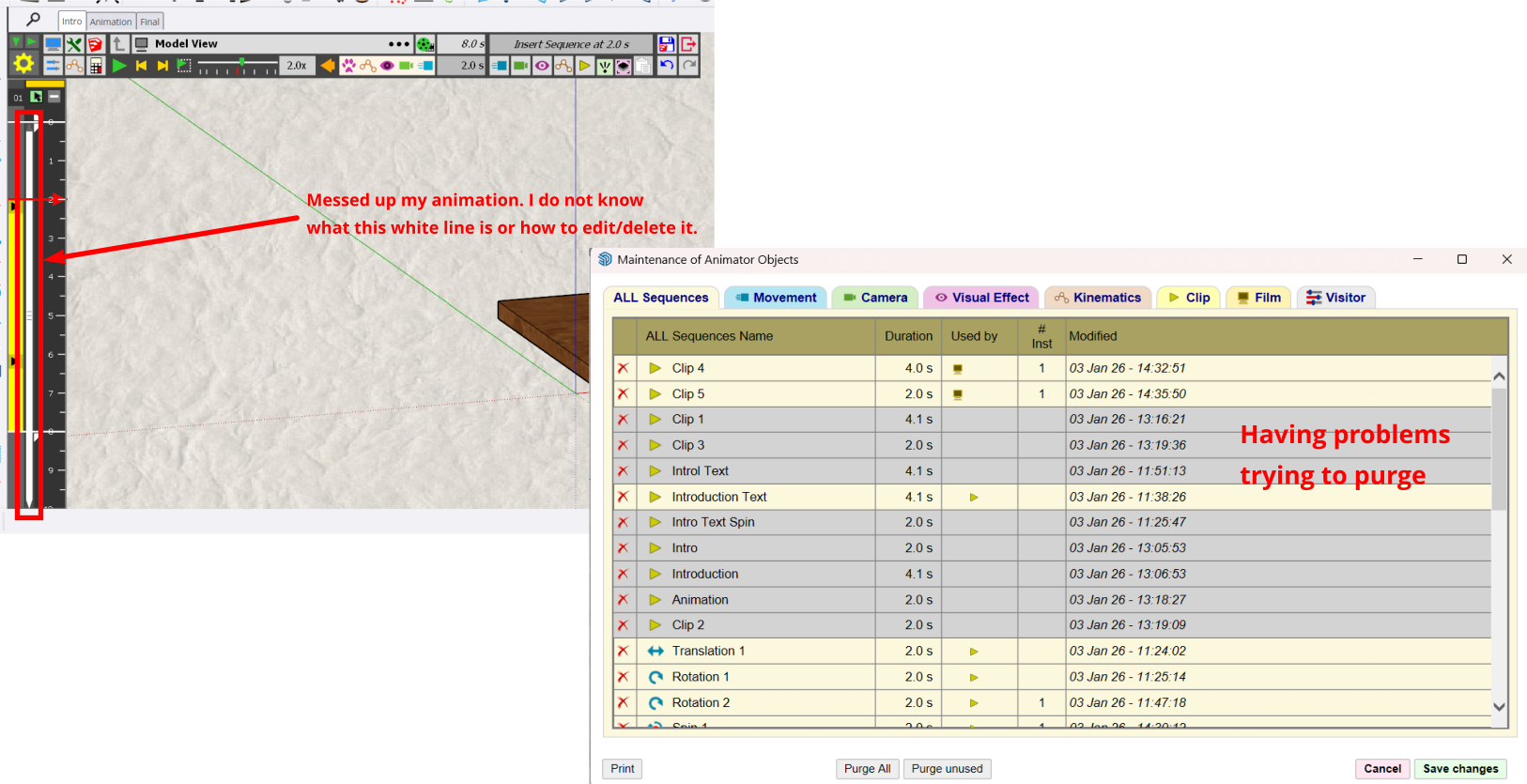
I also am having a problem getting a camera setting that will make everything show up correctly for all 3 of the clips (right now the clip for the introduction text and its animation (which accidentally got deleted)).
Here is a copy of the model so you can look at it and give me some feedback. Animator Learning.skp
BTW: On a positive note, I did figure out how to add an image as the background/watermark. I plan to use this capability on a couple of models/animations I am planning on creating/working on.
-
The plan for my latest animation projects is to have 3 sections/clips for each project:
-
Introduction - this section/clip would be an introduction to the animation. Primarily describing what the viewer is going to see in the animation (second clip) and what the project if for.
-
Animation - This is the main part of the project which is the animation of the SketchUp model. It actually might be made up of a single or multiple clips depending on what the model is all about and what I want the viewer to see.
-
Conclusion - There might be some projects where this section/clip is not included. However, if there, the purpose would be to provide information about what the viewer just saw and/or give credit to others if necessary.
Now, my last question is whether this should all be done in SketchUp using Animator or some other tools or would it be best to just do the animation (with Animator) in SketchUp and use some other tool to create the "full" video. In other words, should the introduction and conclusion be done in SketchUp or are there other tools where you could include the SketchUp animation. For what it is worth, I am using Windows 11.
-
-
If you intend to have some type of text based elements in your video its probably better suited to another software.
You could do it in Animator but I'd offload the non-3D stuff to something else.
Download the free D'oh Book for SketchUp 📖
-
@Rich-O-Brien said in Scene animation with Animator:
If you intend to have some type of text based elements in your video its probably better suited to another software.
You could do it in Animator but I'd offload the non-3D stuff to something else.
Any suggestions as to what? What would you use.
@rich-o-brien I really need some feedback on the other issues I posted. I am having problems managing some of the elements in my model. In particular, if you look at the previous images I posted, I cannot figure out what that white vertical line is in my timeline and how to edit it. I am also having problems trying to manage the elements.. clips, and views. I have tried to delete some of them but cannot get that to work.
You are the only one who has given me any feedback and I am watching videos and looking at other thigs to try to figure this stuff out.
-
Here is a thread where I have been posting problems/issues I am having with Animator https://community.sketchucation.com/topic/164682/scene-animation-with-animator/36
First off, let me say that @rich-o-brien and @fredo05 have been given me some feedback but I still have several issues that I do not seem to be able to resolve.
I feel I have learned a lot about using Animator and am close to being able to accomplish what I would like. However, there are several issues that I have pointed out in the other thread that I need some assistance/feedback on. I have looked at several videos and other posts, but I just cannot resolve some issues. If you look at the thread, one of the latest issues I need to address is how to combine some text with an Animation video and what tool you would recommend (I am using Windows 11).
Let me also say that if this is a strand post that is viewed as a duplicate of the thread I mentioned above. I am sorry, I am just trying to resolve a few final issues so that I can complete a couple of projects I want to do.
-
N ntxdave referenced this topic on
-
I merged that extra thread to here. Creating separate threads pointing to other threads is not helping you.
As you have proven, many times already, that if you persevere when you encounter issues you'll figure it out.
That bar you are pointing is a scrollbar. Not an element related to the animation. You have Clips starting at 24secs in your timeline than go to 33secs.
Regarding your issue Purging. You haven't explained the issue so I can only guess.
If you click Purge Unused then Animator will indicate, in Pink, all the unused elements in your file. Then if you click Save Changes and Exit Tool it will remove the Unused Elements.
It will not remove elements while you still have the tool active.
Lots of these issues you encounter are resolved by A/B testing yourself. If it is not doing what you expect then try a different approach to understand how it is expected to work.
So here's a task for you. Get the clips that are way down the timeline to be at the start.
See if you can find a way to do it without having to drag the elements individual.
HINT: Right click on your timeline.
Download the free D'oh Book for SketchUp 📖
-
@Rich-O-Brien said in Scene animation with Animator:
I merged that extra thread to here. Creating separate threads pointing to other threads is not helping you.
Thanks Rich - I honestly thought it was a mistake to add another thread. I guess it shows that I needed/wanted more feedback.
As you have proven, many times already, that if you persevere when you encounter issues you'll figure it out.
Thanks again. Yes, even though I have gotten kind of frustrated at time, if I do enough research (especially after some of your responses) I have usually found a solution.
That bar you are pointing is a scrollbar. Not an element related to the animation. You have Clips starting at 24secs in your timeline than go to 33secs.
I do not know why I did not see/realize that is what it was. DUH!
Regarding your issue Purging. You haven't explained the issue so I can only guess.
If you click Purge Unused then Animator will indicate, in Pink, all the unused elements in your file. Then if you click Save Changes and Exit Tool it will remove the Unused Elements.
It will not remove elements while you still have the tool active.
Thanks again. I just was not taking the correct steps. I have been able to purge the unwanted stuff and am redoing other items. I had watched one of Fredo6's videos and thought I was taking the right steps. You explanation got the issues resolved for me. I have been able to clean up the info now. It also lead me to going in and changing the names of several segments and clips so now I can look at the list and see what is what.
Lots of these issues you encounter are resolved by A/B testing yourself. If it is not doing what you expect then try a different approach to understand how it is expected to work.
So here's a task for you. Get the clips that are way down the timeline to be at the start.
Done..........another silly error on my part that was partly the result the silly bar that was showing up.
See if you can find a way to do it without having to drag the elements individual.
HINT: Right click on your timeline.
Another DUH! on my part. Another helpful hint.Now for my last 2 issues (at least at this point):
-
I am having problems trying to control the camera so that I get things to show up correctly (at least the way I would like) from one clip to another. I have tried several options but so far have not figured things out the way I would like them. Again, any hints/suggestions would be appreciated. As you have seen, there is a lot of difference between the 2 scenes in my model and I would like for the camera position to change from one of the scenes to the other. I also would like to be able to control the transition from one scenes/clip to another. I haven't figured that one out yet either.
-
Yesterday in one of your replies, you suggested using some other software to put together my Animator video and the introduction and conclusion text. While I might want to add some animation to those two sections (which is why I was trying to do it with Animator), you are probably right. Do you have a suggestion of some other software to use? I would prefer a free package but am open to explore suggestions. BTW: Since I have been using Animator for this, I also did some research and found out how to use an image to set the background for my model/animation. I really am looking forward to that for one (and possibly both) of the models/animations I am planning on doing. Neither of them will be all that sophisticated they are just something that I have an inspiration to do and what has lead to all of this hullaballoo.
Once again, I really appreciate your support/feedback.
-


Hello! It looks like you're interested in this conversation, but you don't have an account yet.
Getting fed up of having to scroll through the same posts each visit? When you register for an account, you'll always come back to exactly where you were before, and choose to be notified of new replies (either via email, or push notification). You'll also be able to save bookmarks and upvote posts to show your appreciation to other community members.
With your input, this post could be even better 💗
Register Login


Advertisement