sketchucation logo sketchucation
    • Login
    Oops, your profile's looking a bit empty! To help us tailor your experience, please fill in key details like your SketchUp version, skill level, operating system, and more. Update and save your info on your profile page today!
    ⚠️ Important | Libfredo 15.6b introduces important bugfixes for Fredo's Extensions Update

    Rayscaper render.

    Scheduled Pinned Locked Moved WIP
    10 Posts 4 Posters 354 Views 4 Watching
    Loading More Posts
    • Oldest to Newest
    • Newest to Oldest
    • Most Votes
    Reply
    • Reply as topic
    Log in to reply
    This topic has been deleted. Only users with topic management privileges can see it.
    • Mike AmosM Offline
      Mike Amos
      last edited by

      Well, the layout is definitely derivative.

      I find that my method of modelling creates a few issues with Rayscaper render so I shall have to look into new mthods with each floor level a group and lights outside of these.

      There are a number of artifacts which come and go to an extent. The tops of the walls and the floor texture have a dark weblike appearance which I suspect has to do with light levels.

      Otherwise a case of moving on a little by little, test and redo.
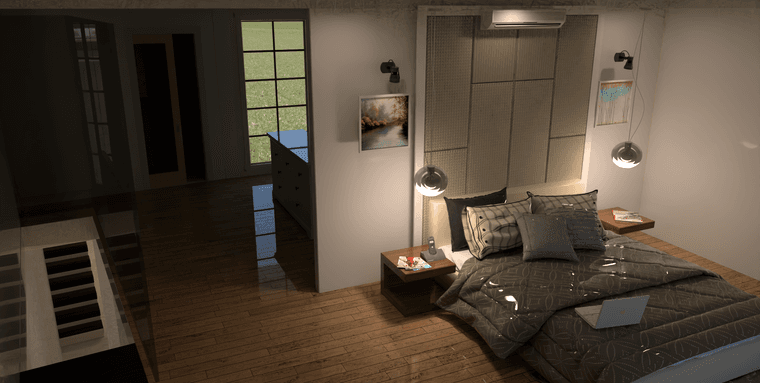
      1 1000s 2184  1102 4m 19s GPU.png

      2 1000s 2184  1102 4m 14s GPU HQ.png

      Absentia mortis praesentiam vitae probat, vita autem est argumentum constantiae.

      1 Reply Last reply Reply Quote 2
      • Rich O BrienR Online
        Rich O Brien Moderator
        last edited by

        I would dial the roughness on the bedding way up and add sheen since its a fabric.

        I'd wait until there's a new build of Rayscaper as the current has gremlins.

        Download the free D'oh Book for SketchUp πŸ“–

        1 Reply Last reply Reply Quote 0
        • Mike AmosM Offline
          Mike Amos
          last edited by

          What? They let the Gremlins get wet?

          Absentia mortis praesentiam vitae probat, vita autem est argumentum constantiae.

          1 Reply Last reply Reply Quote 0
          • P Offline
            pixelcruncher Extension Creator
            last edited by

            Despite the gremlins, nice render. Working on chasing down the gremlins.

            I'm the developer of Rayscaper: https://rayscaper.com/ - Fast and easy rendering for SketchUp.

            Mike AmosM 1 Reply Last reply Reply Quote 1
            • Mike AmosM Offline
              Mike Amos @pixelcruncher
              last edited by

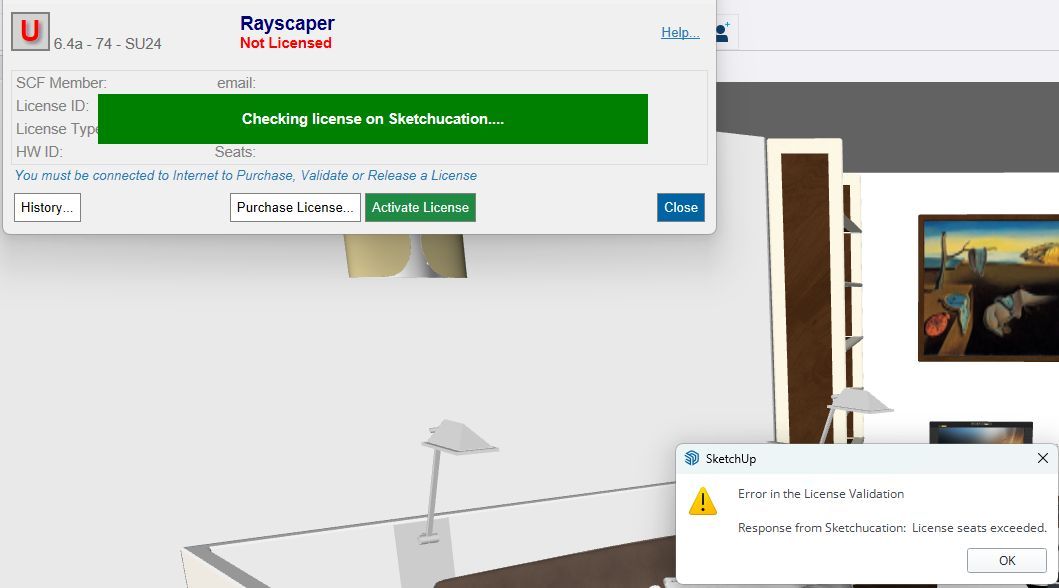
              @pixelcruncher OK, another week another Windoze solution that is not. Not able to activate the Rayscaper license now.
              Rayscaper license dialogue New.jpg

              Absentia mortis praesentiam vitae probat, vita autem est argumentum constantiae.

              1 Reply Last reply Reply Quote 0
              • Rich O BrienR Online
                Rich O Brien Moderator
                last edited by

                Manage your seats at https://sketchucation.com/webshop/my-licences.php

                If you keep activating on different devices you will run into seats exceeded.

                You need to release seats on devices you don't use.

                Download the free D'oh Book for SketchUp πŸ“–

                1 Reply Last reply Reply Quote 0
                • Mike AmosM Offline
                  Mike Amos
                  last edited by

                  Got it Rich, the system not reacting to inputs was a bit of a drain but I got there. I cannot match the sketchup viewport in Rayscaper now but then since reset of windoze, everything has been more than a little off.

                  I cannot say the entertainment level is low tho'.

                  Absentia mortis praesentiam vitae probat, vita autem est argumentum constantiae.

                  1 Reply Last reply Reply Quote 0
                  • ntxdaveN Offline
                    ntxdave
                    last edited by

                    OK guys, this is not a very good one, but I have been doing some fooling around and testing. First, I will share some pictures of something I received from a fried that I then did a 3D model of using SketchUp and then rendered with Rayscaper.

                    Here are some images of what i received: (OK, images too large)

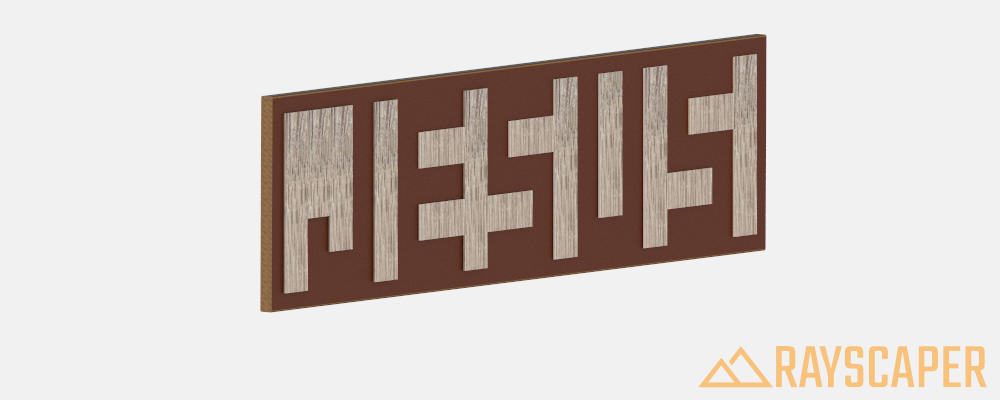
                    Here is my render with Rayscaper:
                    Jesus Rayscaper 1.png

                    I know this is not very fancy. I would like to have some advice as to how it might be made better.

                    1 Reply Last reply Reply Quote 1
                    • Rich O BrienR Online
                      Rich O Brien Moderator
                      last edited by

                      HDR environment light. Search the Studio category and set the Transparent flag on.
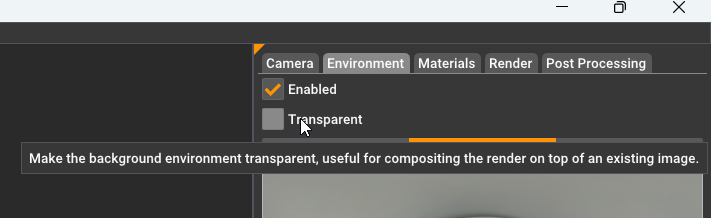
                      Setting HDR to Transparent in Rayscaper

                      With the lighting set you can play with materials to see how they interact with the light.

                      Download the free D'oh Book for SketchUp πŸ“–

                      ntxdaveN 1 Reply Last reply πŸ‘ Reply Quote 1
                      • ntxdaveN Offline
                        ntxdave @Rich O Brien
                        last edited by

                        @Rich-O-Brien Thanks @Rich-O-Brien . I will try this later.

                        I have some images/photos that I took with my iPhone that I would like to share, however, I am having problems opening them. They say that are PNG file but every app I try to open them with says they are not a valid file type.

                        Can someone give me some advice about how to open these files so that I can get them into a format/size that I can share on the forum?

                        One of the things I would like for people to see is that the item that was share with me, and the model I created and shared in the previous post is not really created the way viewers might suspect. The word "Jesus" was created by creating pieces that are attached to a wood block that outline the word. It was not created by adding text to the block. I found this kind of interesting and is what inspired me to create a model using the same technique.


                        1 Reply Last reply Reply Quote 0
                        • 1 / 1
                        • First post
                          Last post
                        Buy SketchPlus
                        Buy SUbD
                        Buy WrapR
                        Buy eBook
                        Buy Modelur
                        Buy Vertex Tools
                        Buy SketchCuisine
                        Buy FormFonts

                        Advertisement