Rayscaper New Releases
-
I'll try to add one, though it probably won't be ready for 1.0.
Take your time. I'm happy with you sticking to your plan. It's been solid so far.
Download the free D'oh Book for SketchUp 📖
-
Just a thought, there is a competition at Evermotion which might be a good test, maybe make a few bob worth in prizes too. Just a thought.....
-
@pixelcruncher i mean
environment sphere sizing , like ball sizeing , and can you add hemispher option ,
you can see some thing like in simlab composser render softwear -
@pixelcruncher
it is usuefull to use sketchup back ground to line up sun direcrion and other propuse , and you can add fore ground and backpalet , fore ground , back ground like kyshot render softwear -
Heads up, friends—be very careful not to delete an Animator "film" when creating a new one. I lost all the settings for my second film, even though I had saved it. Deleting "film 1" wiped out all my material, HDRI, and other settings, leaving "film 2" completely "stripped"—though the animation itself remained intact. I have to admit, this really killed my motivation.
So, I’m giving up on re-rendering the first film...Krass
-
it is usuefull to use sketchup back ground to line up sun direcrion and other propuse , and you can add fore ground and backpalet , fore ground , back ground like kyshot render softwear
By using AI for your backgrounds, you get an image that scales to match your model, aligns with the lighting, and—most importantly—fits the perspective. You can quickly switch between different settings with just a few clicks.
Otherwise, you’re just looking at basic photo manipulation.
-
yes, this is a v-ray and twinmotion feature. Still not available in D5 render. may be some day in Rayscaper
I’m done playing around with Rayscaper and animation for today: the rendering crashes on my most powerful PC, and when I reopen SketchUp, the Animator animation is a complete mess.
-
@Krass, sorry about that. I think this is a bug in Rayscaper. I will investigate and see if we can fix it.
-
@krass That's unfortunate. Doesn't help with what happened but I tend to work on copies of files rather than the source file to prevent data loss. Especially while in Beta.
Download the free D'oh Book for SketchUp 📖
-
Hey, Rayscaper users!
Rayscaper 0.9.105 Beta is available. You can get it via:
- The SketchUcation store.
- Direct download: Rayscaper_Win_0.9.105_Beta.rbz.
I recommend upgrading to the latest version.
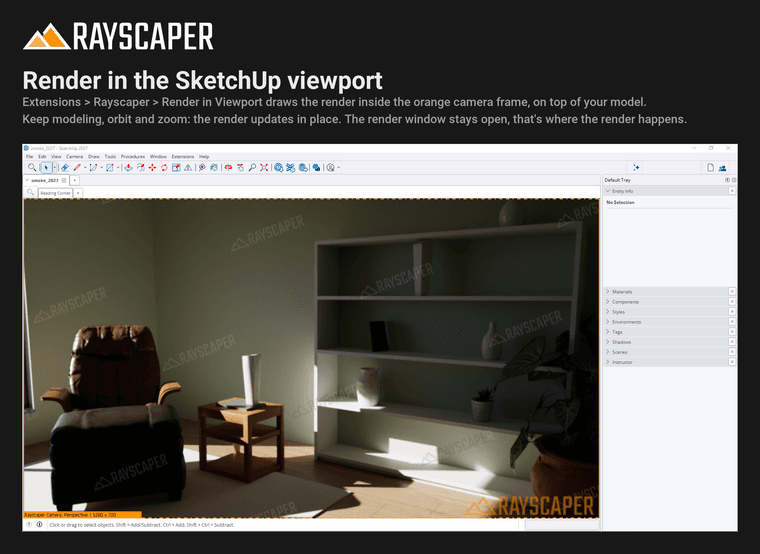
Render in the SketchUp Viewport
Choose Extensions > Rayscaper > Render in Viewport and the render appears inside the orange camera frame, right on top of your model. Keep modeling, orbit and zoom, and the render updates in place. The render window stays open, that's where Rayscaper renders; make it small or move it aside. See Render in Viewport.
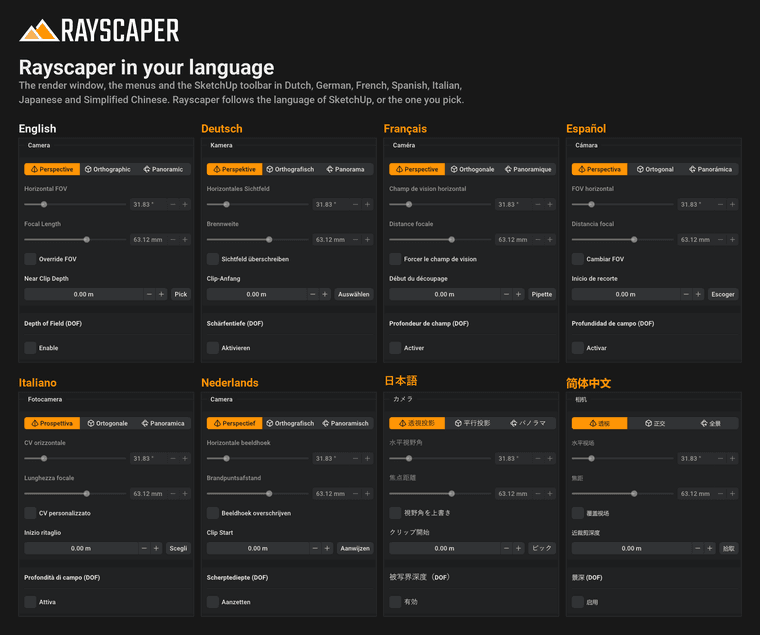
Rayscaper in Your Language
The render window, the menus and the SketchUp toolbar are now available in Dutch, German, French, Spanish, Italian, Japanese and Simplified Chinese. Rayscaper follows the language of SketchUp, or you pick one in File > Settings. SketchUp's menus change the next time SketchUp starts.
A word of warning: the translations were made with AI and checked against the terms SketchUp, Blender and GIMP use, but no native speaker has reviewed them yet. If a label or a message doesn't make sense in your language, please let me know and I'll fix it.
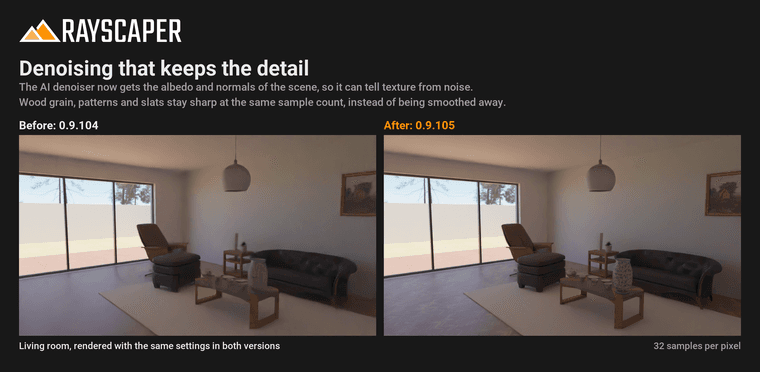
Denoising That Keeps the Detail
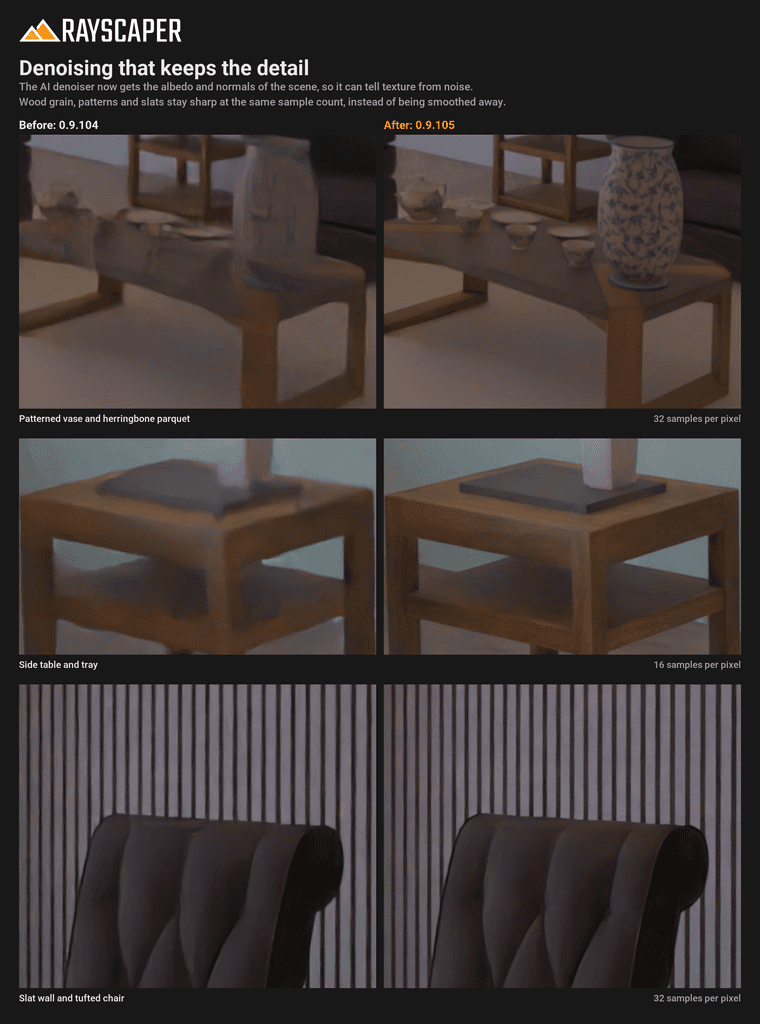
Several of you noticed that the AI denoiser smoothed away fine textures, like dark wood grain in the distance. The denoiser now gets the albedo and normals of the scene, so it can tell texture from noise: parquet, patterns and slats stay sharp at the same sample count. See AI Denoise.
What Changed?
- Render in the SketchUp viewport: Extensions > Rayscaper > Render in Viewport draws the render inside the camera frame of the SketchUp view, so you can model and watch the result in one place.
- Translate the user interface into Dutch, German, French, Spanish, Italian, Japanese and Simplified Chinese. Rayscaper follows the language of SketchUp; pick another one with the Language setting.
- Keep fine, low-contrast textures such as dark wood grain in the distance when denoising, by guiding the denoiser with the albedo and normals of the scene.
- Show lights in reflections: area, spot and point lights with a size now show up in mirrors, glass, chrome and glossy surfaces, which rendered them black.
- Use a new Poly Haven resolution right after changing the setting, without restarting Rayscaper.
- Render the textures of materials painted on groups and components: the faces inside them that keep the default material rendered in one flat color.
- Follow a texture added to or removed from a SketchUp material, and render materials created in the same operation as the geometry painted with them, which rendered without their material until the model was opened again.
- Keep objects in place after moving, rotating or scaling them while a group or component is open: they jumped away in the render.
- Update the render right away when a texture is repositioned with Position Texture, instead of after reopening the model.
- Leave out a normal map whose image is missing instead of darkening the surface and lighting it from the wrong side.
- Fix SketchUp quitting when a 16K HDRI is picked from Poly Haven.
- Fix a crash when closing the render window while the scene changes, e.g. during a Fredo6 Animator clip or while the shadow time moves.
Full release notes: rayscaper.com/manual/release-notes
Help Me Build the Community

If you like Rayscaper, please share your renders (final or work-in-progress, it doesn't matter)! This is motivating and helps me showcase its capabilities to new users.
Follow me on X.
Happy Rendering!
Thomas -
That's unfortunate. Doesn't help with what happened but I tend to work on copies of files rather than the source file to prevent data loss. Especially while in Beta.
yes you are right, I should make a copy
Thomas
Wow! The rendering in the SketchUp viewport is fantastic! -
I’m adding a small extension that lets you switch from standard rendering mode to "render-in-view" mode with a single click.
-
Quick update on 0.9.105: there was a mix-up with the SketchUcation upload. The store lists 0.9.105, but the RBZ it serves is still 0.9.104, so updating through SketchUcation leaves you on 0.9.104.
For now, 0.9.105 is only available as a direct download: Rayscaper_Win_0.9.105_Beta.rbz
Sorry for the confusion! We plan to sort it out tomorrow, and I'll let you know here once the store has the right version.
Thomas
I'm the developer of Rayscaper: https://rayscaper.com/ - Fast and easy rendering for SketchUp.
-
Is there anything new?





Hello! It looks like you're interested in this conversation, but you don't have an account yet.
Getting fed up of having to scroll through the same posts each visit? When you register for an account, you'll always come back to exactly where you were before, and choose to be notified of new replies (either via email, or push notification). You'll also be able to save bookmarks and upvote posts to show your appreciation to other community members.
With your input, this post could be even better 💗
Register Login


Advertisement