[Plugin] Parametric Modeling - v0.0.7 - 03 June 2021
-
Yes, rand (min, max) works for giving random value but the distance between every 2 blocks can't be randomised by it, there must be some other way or something I'm missing completely
-
Have you used the Import Scheme to load some of Sam's sample files to study the workflow?
That's what I did to understand the possibilities of Node Editor.
-
@whiteshadow said:
first problem:
made a box
to copy node, 6 copies
to move node, moved some distance
now, i have something line this:
■ ■ ■ ■ ■ ■
how do i make a solid group of all these copies?Do you mean put many groups in one group? If yes, there's a "Make group" node for that purpose. Then check Outliner panel...
@whiteshadow said:
another problem:
is there a way to randomly move copied opjects between a set range (distance between 2 boxes can be anything from 3 to 10, random distance between every copy)? if yes, how?eg:
instead of getting
{■ ■ ■ ■ ■ ■},how can i get
{■ ■ ■■ ■ ■}There's at least a way. Look at this "Random Gap" parametric schema, attached below to this post:

It's no yet documented but "Move" node accepts formulas to set dynamically X, Y and Z positions.
In formula: x + a + rand(b,c)
x is X position of Box in loop
a is Self Width of every Box
b is Min Gap between Boxes
c is Max Gap between Boxes
-
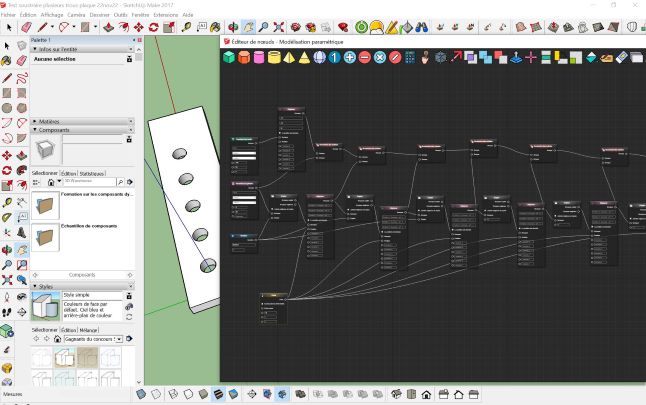
Bonjour Samuel,
J'ai découvert ce plugin et c'est vraiment performant !! Bravo pour le développement et les mises à jours !
Je l'utilise pour un projet personnel.
Par contre, je bloque sur l'opération "Soustraire"...Comme l'exemple, je dois percer une plaque mais je dois répéter l'opération ...
J'ai essayé plusieurs pistes en regroupant ou en concaténant ...sans succès !Je veux bien une aide pour simplifier le processus car j'ai une pièce a fabriquer avec nombreux trous !
Merci,
-
Bonjour Samuel,
Congratulations for your excellent plugin!
Is there an undocumented feature here or do I miss something?
I draw two boxes both with default dimensions, except for the second one with width = 0.5. I connect each output of the DRAW BOX nodes to the inputs of an INTERSECTION node and obtain a 0.5-wide box. I then connect the output of the INTERSECTION node to the input of a MOVE node with 5 in x direction. No problem so far, I get my 0.5-wide box at location (5,0,0).
Now I connect the output of the first DRAW BOX node to the input of a MOVE node with -8 in x-direction without changing anything else in the above setup. Why is my 0.5-wide box now at location (-3,0,0)? It seems that the intersection between the two boxes is first computed, moved by -8 and then moved by 5 by the last MOVE node. BTW, it seems that if I connect the output node of the second DRAW BOX node to the input of a MOVE node nothing changes.
Thanks for your help!
Francois
PS: File in attachment
-
Hello,
Is it possible to select object already built in the model ?




Advertisement