sketchucation logo sketchucation
    • Login
    Oops, your profile's looking a bit empty! To help us tailor your experience, please fill in key details like your SketchUp version, skill level, operating system, and more. Update and save your info on your profile page today!
    Check out Febhouse | New extensions for Shadow Analysis in SketchUp Download

    SCFLicense: Extension Licensing on Sketchucation

    Scheduled Pinned Locked Moved Plugins
    2.3k Posts 514 Posters 1.5m Views 519 Watching
    Loading More Posts
    • Oldest to Newest
    • Newest to Oldest
    • Most Votes
    Reply
    • Reply as topic
    Log in to reply
    This topic has been deleted. Only users with topic management privileges can see it.
    • Rich O BrienR Offline
      Rich O Brien Moderator @alexpacio2013
      last edited by

      @alexpacio2013 said:

      Is there a limit to installing licenses or can I install unlimited licenses?

      You can have 3 seats activated before you see the exceeded message.

      If you visit https://sketchucation.com/webshop/my-licences.php you can release seats or do at the devices.

      Download the free D'oh Book for SketchUp πŸ“–

      alexpacio2013A 1 Reply Last reply Reply Quote 0
      • alexpacio2013A Online
        alexpacio2013 @Rich O Brien
        last edited by

        @Rich-O-Brien I have 1 computer but on one I installed the SketchUp version 2024 2025 2026 and to do the tests I installed the licenses several times. The 2024 version is clean and has no other plugins specifically for testing. I had the same problems so it is not a conflict with other things.

        1 Reply Last reply Reply Quote 0
        • Rich O BrienR Offline
          Rich O Brien Moderator
          last edited by

          That's still a single device.

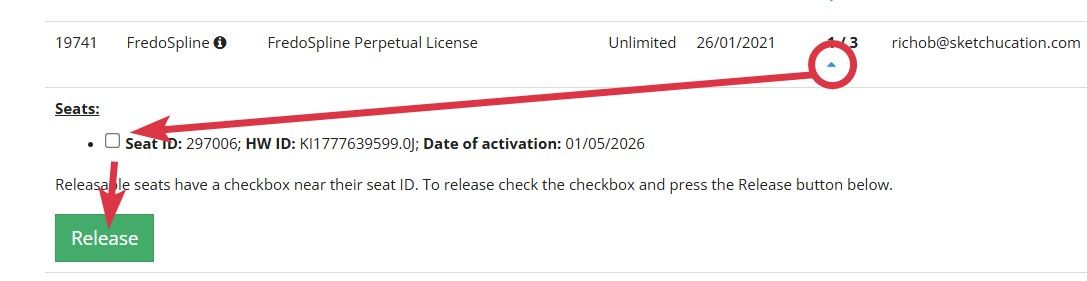
          What do you see at https://sketchucation.com/webshop/my-licences.php ?

          Can you click the blue chevron and see occupied seats with a checkbox to release seats?
          0b1671db-1126-402c-9dca-38e3fbf042c0-image.jpeg

          Download the free D'oh Book for SketchUp πŸ“–

          1 Reply Last reply Reply Quote 0
          • alexpacio2013A Online
            alexpacio2013
            last edited by

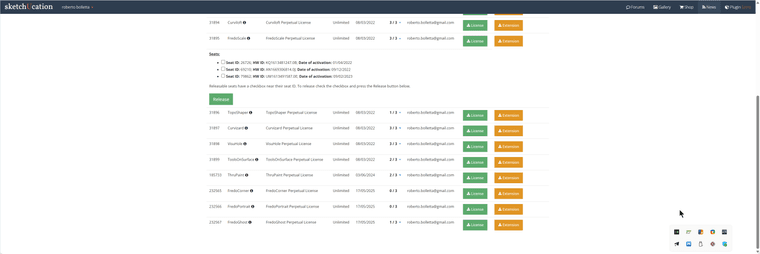
            Can you remove some activations from me?
            comet_2FWr2F1TI6.png

            1 Reply Last reply Reply Quote 0
            • Rich O BrienR Offline
              Rich O Brien Moderator
              last edited by

              You can do it. Click checkbox and then release

              Download the free D'oh Book for SketchUp πŸ“–

              1 Reply Last reply Reply Quote 0
              • Rich O BrienR Offline
                Rich O Brien Moderator
                last edited by

                Unless you others frozen you didn't show?

                Download the free D'oh Book for SketchUp πŸ“–

                1 Reply Last reply Reply Quote 0
                • alexpacio2013A Online
                  alexpacio2013
                  last edited by

                  I have to release all the boxes with the square

                  1 Reply Last reply Reply Quote 0
                  • Rich O BrienR Offline
                    Rich O Brien Moderator
                    last edited by

                    Each is a device you activated on. So yes.

                    I can do it for you. Give me a few mins.

                    Download the free D'oh Book for SketchUp πŸ“–

                    1 Reply Last reply Reply Quote 0
                    • alexpacio2013A Online
                      alexpacio2013
                      last edited by

                      Grazie

                      1 Reply Last reply Reply Quote 0
                      • Rich O BrienR Offline
                        Rich O Brien Moderator
                        last edited by

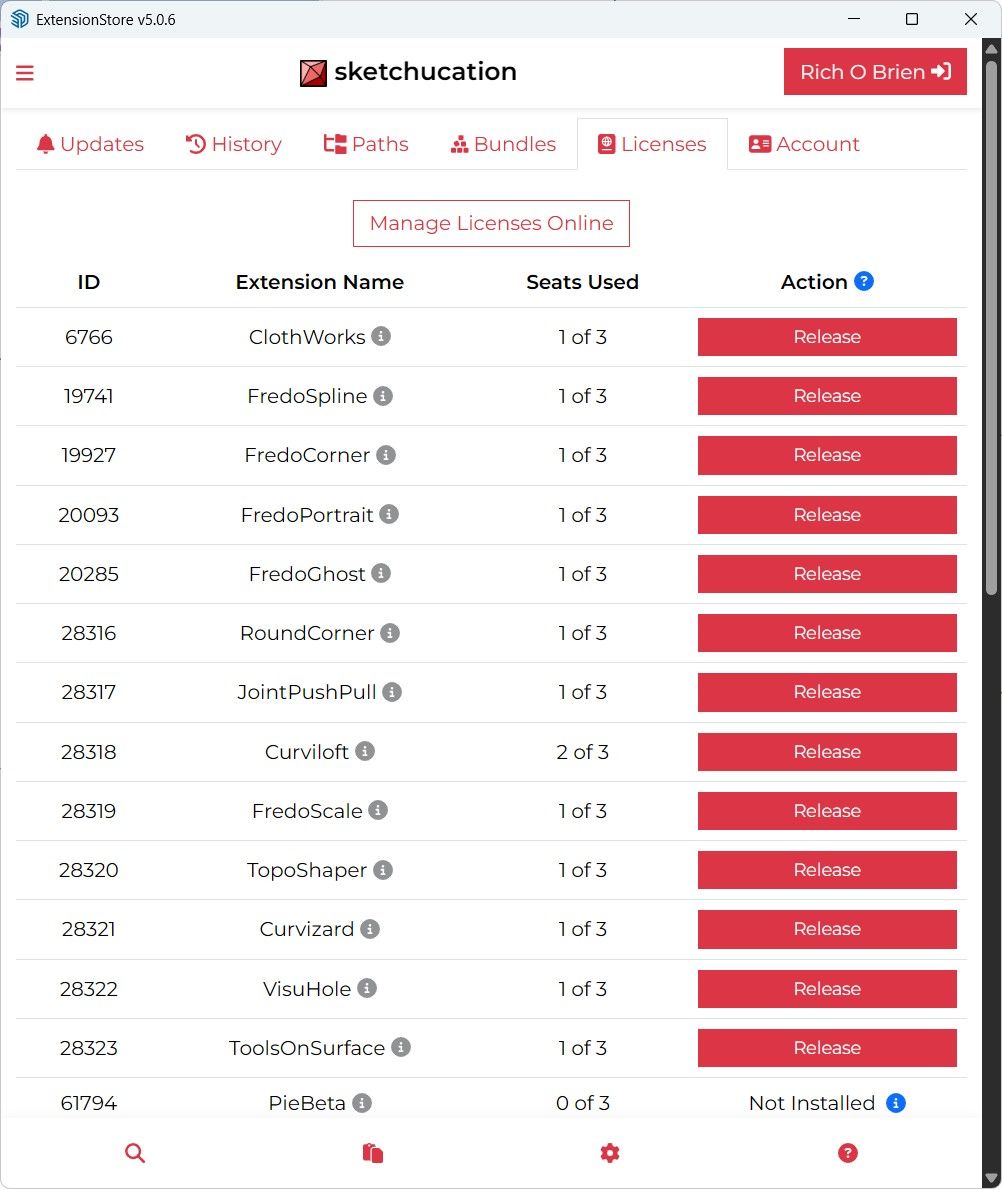
                        https://sketchucation.com/webshop/my-licences.php should be clear now.

                        To activate and release in Sketchucation Tools you can open the Settings > Licenses and activate as needed
                        7a02c236-b6ea-4d99-a84c-37cd22502419-image.jpeg

                        Download the free D'oh Book for SketchUp πŸ“–

                        1 Reply Last reply Reply Quote 0
                        • alexpacio2013A Online
                          alexpacio2013
                          last edited by

                          You're great now everything works Thanks

                          1 Reply Last reply Reply Quote 1
                          • Rich O BrienR Offline
                            Rich O Brien Moderator
                            last edited by

                            Enjoy the weekend Robo πŸ™‚

                            Download the free D'oh Book for SketchUp πŸ“–

                            1 Reply Last reply Reply Quote 0
                            • alexpacio2013A Online
                              alexpacio2013
                              last edited by

                              Thank you too

                              1 Reply Last reply Reply Quote 0
                              • F Offline
                                fakhriaulia
                                last edited by

                                Hello,
                                I've been installing the latest Sketchucation, and install Libfredo6, and FredoCorner. And I've put the license on it. After the installation, the toolbar shows up, but when I click on it, nothing happens. Can somebody help me

                                1 Reply Last reply Reply Quote 0
                                • fredo6F Offline
                                  fredo6
                                  last edited by

                                  Can you open the Ruby Console before launching FredoCorner

                                  1 Reply Last reply Reply Quote 0
                                  • F Offline
                                    fakhriaulia
                                    last edited by

                                    I’ve been open the Ruby Console before launching FredoCorner, when I click the FredoCorner toolbar, this message appear from Ruby Console
                                    "build_config_commands'
                                    c:/users/win10/appdata/roaming/sketchup/sketchup 2026/sketchup/plugins/fredo6_!libfredo6/lib6traductor.rbe:1569:in `block in add_command'

                                    1 Reply Last reply Reply Quote 0
                                    • Rich O BrienR Offline
                                      Rich O Brien Moderator
                                      last edited by Rich O Brien

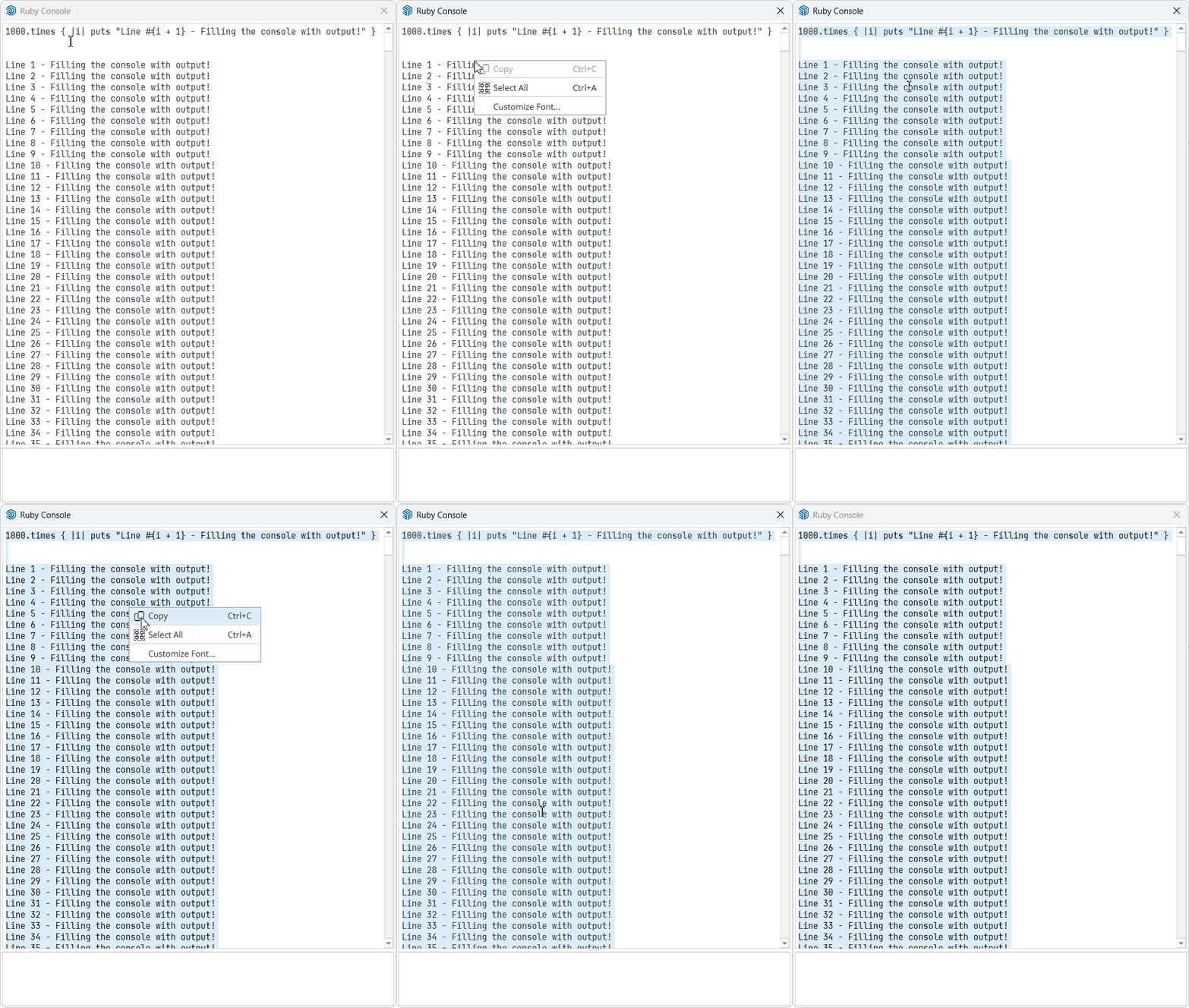
                                      Use this method to select all output in the Ruby Console
                                      How to copy text from SketchUp Ruby Console

                                      Download the free D'oh Book for SketchUp πŸ“–

                                      1 Reply Last reply Reply Quote 0
                                      • F Offline
                                        fmokhtar
                                        last edited by Rich O Brien

                                        Good evening, Fredo.
                                        I have a problem with a lost license of Thrupaint and Visushole. I installed them on my laptop, but after a while, the hard disk failed, so I had to replace it. I lost all the data and configurations. The licenses are still active, even though the installation no longer exists. Is there any way to reactivate them?
                                        Attached is a screenshot of the licenses. They were installed in 2025.
                                        Thank you.

                                        [Uploaded Images Lost to Server Upgrade Issue May 15th]

                                        1 Reply Last reply Reply Quote 0
                                        • fredo6F Offline
                                          fredo6
                                          last edited by

                                          Go to your My Licenses page at https://sketchucation.com/webshop/my-licences.php. You just need to sign in with your Sketchucation credentials.

                                          You'll be able to release the seats corresponding to your old PC configuration and to download the licenses for a new activation on your fresh PC configuration.

                                          F 1 Reply Last reply Reply Quote 0
                                          • L Offline
                                            lcbbueno
                                            last edited by Rich O Brien

                                            Comprei a licenΓ§a mas nΓ£o consigo usar o plugin Fredo Corner, como resolver?

                                            I bought the license but I can't use the Fredo Corner plugin, how to solve it?

                                            1 Reply Last reply Reply Quote 0

                                            Hello! It looks like you're interested in this conversation, but you don't have an account yet.

                                            Getting fed up of having to scroll through the same posts each visit? When you register for an account, you'll always come back to exactly where you were before, and choose to be notified of new replies (either via email, or push notification). You'll also be able to save bookmarks and upvote posts to show your appreciation to other community members.

                                            With your input, this post could be even better πŸ’—

                                            Register Login
                                            • 1
                                            • 2
                                            • 112
                                            • 113
                                            • 114
                                            • 115
                                            • 116
                                            • 115 / 116
                                            • First post
                                              Last post
                                            Buy SketchPlus
                                            Buy SUbD
                                            Buy WrapR
                                            Buy eBook
                                            Buy Modelur
                                            Buy Vertex Tools
                                            Buy SketchCuisine
                                            Buy FormFonts

                                            Advertisement