SCFLicense: Extension Licensing on Sketchucation
-
Hello,
can I ask you (fredo6), if you could release license seats? I don´t know why, but there are seats, which I can´t release. License seats, whitch I use are HW ID: SJ1663681747.0A, other block me free spot to actifvate on another PC. I use latest versions of sketchucation and libfredo6.Thanks for your help!
-
@banyj said:
can I ask you (fredo6), if you could release license seats? I don´t know why, but there are seats, which I can´t release. License seats, whitch I use are HW ID: SJ1663681747.0A, other block me free spot to actifvate on another PC.
I did release all seats, except those assigned to HWID = SJ1663681747.0A
-
@fredo6 said:
Could you indicate which seats (or HWID) would wish to release.
I noticed that you validated licenses on 3 different computers on 14-15 November for RoundCorner and JointPushPull.
[attachment=0:2bm3spg0]<!-- ia0 -->digdaman licenses.png<!-- ia0 -->[/attachment:2bm3spg0]
I want to release these licenses
RoundCorner
Seat ID: 64651; HW ID: FF1668415971.0P; Date of activation: 14/11/2022
Seat ID: 64825; HW ID: GR1668487000.0A; Date of activation: 15/11/2022
Seat ID: 64835; HW ID: RJ1668487704.0Y; Date of activation: 15/11/2022JointPushPull
Seat ID: 64780; HW ID: FF1668415971.0P; Date of activation: 15/11/2022
Seat ID: 64829; HW ID: GR1668487000.0A; Date of activation: 15/11/2022
Seat ID: 64859; HW ID: IK1668491714.0Y; Date of activation: 15/11/2022These licenses became dysfunctional and notrelease when skecthup restarted.
-
@Digdaman
Done -
Bonjour,
Je viens d'acheter la licence pour les différentes extensions de Frédo6 mais aucun plugin ne fonctionnent. J'ai vu qu'il y avait des soucis en ce moment avec les validations de licence mais pour ma part celle-ci s'est installer et validé correctement.
Je précise que la dernière version du jeu d’outils SketchUcation et de LibFredo sont elles aussi bien installés. Je précise aussi que je suis sur la version d'essai de SketchUp pro 2022, mais j'ai le même problème sur SketchUp pro 2018.
Je tourne sous Windows 11 si jamais !Quelqu'un aurait-il des problèmes similaires ??
Merci pour votre aide !
-
@unknownuser said:
Bonjour,
Je viens d'acheter la licence pour les différentes extensions de Frédo6 mais aucun plugin ne fonctionnent. J'ai vu qu'il y avait des soucis en ce moment avec les validations de licence mais pour ma part celle-ci s'est installer et validé correctement.
Je précise que la dernière version du jeu d’outils SketchUcation et de LibFredo sont elles aussi bien installés. Je précise aussi que je suis sur la version d'essai de SketchUp pro 2022, mais j'ai le même problème sur SketchUp pro 2018.
Je tourne sous Windows 11 si jamais !Quelqu'un aurait-il des problèmes similaires ??
Merci pour votre aide !
@unknownuser said:
Hello,
I just bought the license for the different Frédo6 extensions but no plugins work. I saw that there were problems at the moment with the license validations but for my part it was installed and validated correctly.
I would point out that the latest version of the SketchUcation toolset and LibFredo are also installed. I also specify that I am on the trial version of SketchUp pro 2022, but I have the same problem on SketchUp pro 2018.
I'm running Windows 11 if ever!Anyone having similar problems??
Thanks for your help !
Hopefully Fredo/Gábor will respond...
Espérons que Fredo/Gábor répondra... -
@zooz85 said:
Je viens d'acheter la licence pour les différentes extensions de Frédo6 mais aucun plugin ne fonctionnent.
Pouvez-vous préciser ce qui ne fonctionne pas.
Avant de lancer un plugin, pouvez-vous ouvrir la console Ruby pour d'éventuels messages d'erreur.
Merci. -
Les plugins que j'utilise sont : Fredospline, Fredocorner et Curvilof.
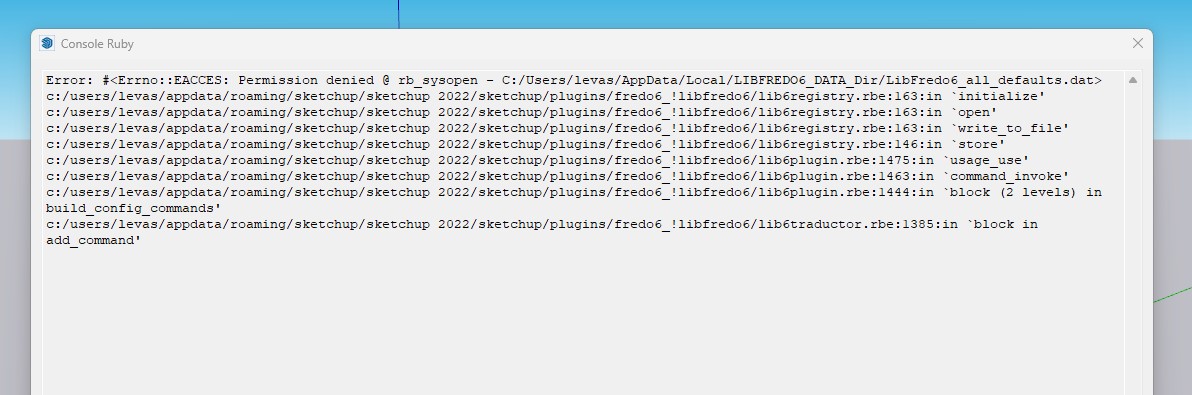
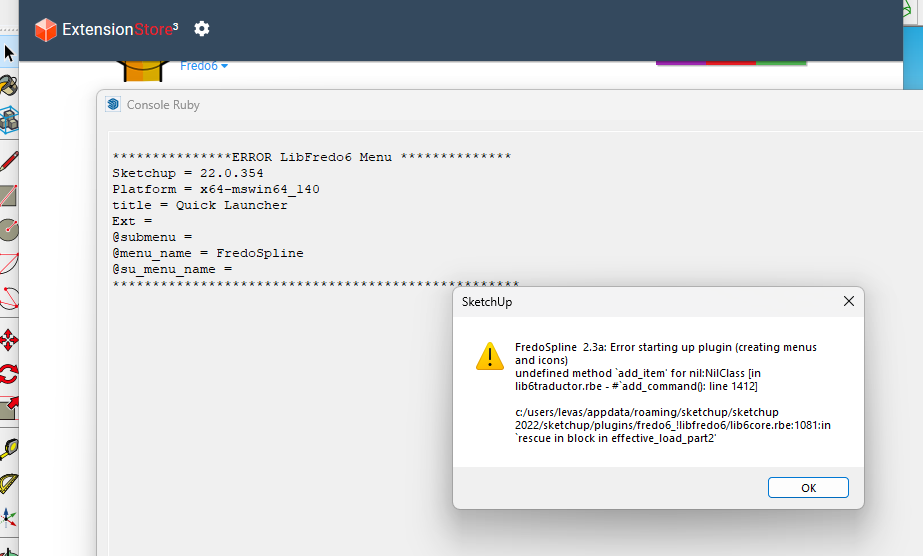
Sinon lorsque je souhaite utiliser l'un de ces trois outils, en cliquant simplement sur l'un d'eux rien ne se passe.
Dites-moi si vous avez besoin de plus de détail
Merci d'avance pour votre aide
-
I'm sure Fredo will reply more authoritatively, but meanwhile...
The problem with the
LIBFREDO6_DATA_Dirfolder error, suggests that it [and its enclosed files] do not have proper permissions to read/write.
This usually results from you not having previously installed SketchUp properly...To try and reverse this do the following...
Close SketchUp.
Find its installer exe file - usually in your Downloads folder.
Select its icon, right-click > context-menu > 'Run as administrator'...
In the resultant dialog choose 'Repair'...
This should fix most of the permission issues with the installation, whilst leaving your Plugins folder unaffected.Unfortunately some folders/files saved outside of the main SketchUp paths might not get fixed when you do this.
So to resolve the issue withC:\Users\levas\AppData\Local\LIBFREDO6_DATA_Dir, find that folder and delete it.
It is hidden by default so you might need to reset some preferences to see it...
When SketchUp restarts the problem folder and files should now be recreated with good permissions...*Je suis sûr que Fredo répondra avec plus d'autorité, mais en attendant...
Le problème avec l'erreur de dossier
LIBFREDO6_DATA_Dir, suggère qu'il [et ses fichiers joints] n'ont pas les autorisations appropriées pour lire/écrire.
Cela résulte généralement du fait que vous n'avez pas installé correctement SketchUp auparavant...Pour essayer d'inverser cela, procédez comme suit...
Fermez SketchUp.
Trouvez son fichier exe d'installation - généralement dans votre dossier Téléchargements.
Sélectionnez son icône, clic droit > menu contextuel > 'Exécuter en tant qu'administrateur'...
Dans la boîte de dialogue résultante, choisissez "Réparer"...
Cela devrait résoudre la plupart des problèmes d'autorisation liés à l'installation, tout en laissant votre dossier Plugins inchangé.Malheureusement, certains dossiers/fichiers enregistrés en dehors des chemins principaux de SketchUp peuvent ne pas être corrigés lorsque vous procédez ainsi.
Donc, pour résoudre le problème avecC:\Users\levas\AppData\Local\LIBFREDO6_DATA_Dir, recherchez ce dossier et supprimez-le.
Il est masqué par défaut, vous devrez donc peut-être réinitialiser certaines préférences pour le voir...
Lorsque SketchUp redémarre, le dossier problématique et les fichiers doivent maintenant être recréés avec de bonnes autorisations...* -
Ça a marché !! J'ai réalisé les deux solution proposées et cela fonctionne correctement maintenant.
Merci vraiment beaucoup pour votre aide !!
-
Hello,
I made a big mess while upgrading the hardware and reconfiguring the network.
In short: I am asking you to release seats - licenses no.: 34491, 34492, 34493, 34494, 34498 (ie 34491 - 34494 and 34498).
Thank you in advance. -
Where can I buy the Sketchuacation License. It's not on this page. Is the Upgrade same as the Extensions License. Can you guy check your page to make this easier.
-
Install the latest version of the desired Extension [and any related Lib - e.g. for LibFredo]
You also need to install the newest version of the SketchUcation toolset...
Restart SketchUp.
With Fredo's tools you can then use the Tools > Fredo6 Collection > "ExtensionName" > License... item to check/obtain[aka 'buy']/validate the appropriate SCF-License... -
@beresniak said:
Hello,
I made a big mess while upgrading the hardware and reconfiguring the network.
In short: I am asking you to release seats - licenses no.: 34491, 34492, 34493, 34494, 34498 (ie 34491 - 34494 and 34498).
Thank you in advance.All seats released.
-
라이센서를 구매했으나, 저장이 되지 앖습니다.
메일을 보내도 응답이 없습니다.
I purchased a license, but it is not saved.
Even if I send an email, there is no response.
-
@yeouldesign said:
라이센서를 구매했으나, 저장이 되지 앖습니다.
메일을 보내도 응답이 없습니다.
I purchased a license, but it is not saved.
Even if I send an email, there is no response.
Who did you send mail to? support@sketchucation.com is our support address
For license files and info visit https://sketchucation.com/webshop/my-licences.php
-
cant find where to buy the license nothing on the shop tab or on the round corner page
-
Or from the License dialog from the particular extension in SketchUp
Extensions > Clothworks > LicenseOr
Tools > Fredo Collection > RoundCorner > LicenseIn the dialog click Obtain License to go straight to the license purchasing page for that Extension
-
Hi,
Perpetual license issue.
Fredo Spline says trial expired.
Validate license but then it comes back with trial issue.
Perpetual license purchased and used.Nick
Great plugin.
-
Have you downloaded and installed the very latest versions of the following [and restarted SketchUp to sync everything] ?
The Extension itself
LibeFredo [for support]
SketchUcation toolset [for licensing]





Advertisement