sketchucation logo sketchucation
    • 登入
    Oops, your profile's looking a bit empty! To help us tailor your experience, please fill in key details like your SketchUp version, skill level, operating system, and more. Update and save your info on your profile page today!
    ⚠️ Important | Libfredo 15.6b introduces important bugfixes for Fredo's Extensions Update

    Clipping Plane Plugin

    已排程 已置頂 已鎖定 已移動 SketchUp Discussions
    sketchup
    21 貼文 9 Posters 4.8k 瀏覽 9 Watching
    正在載入更多貼文
    • 從舊到新
    • 從新到舊
    • 最多點贊
    回覆
    • 在新貼文中回覆
    登入後回覆
    此主題已被刪除。只有擁有主題管理權限的使用者可以查看。
    • jujuJ 離線
      juju
      最後由 編輯

      @gd3design said:

      $50! 😮

      Greedy much..?

      Not cheap/inexpensive no.

      It works (Windows only), it saves time, it saves aggrevation, it is a perpetual licence. From what I understand it makes use of 3rd party software/code which is licenced, nobody else has been able to bring a solution to market since ever.

      Rather say you can't afford it, no shame in that.

      Save the Earth, it's the only planet with chocolate.

      1 條回覆 最後回覆 回覆 引用 0
      • PixeroP 離線
        Pixero
        最後由 編輯

        I've made a plugin that opens the advanced camera settings window on rightclick if you want to adjust clipping plane manually.

        Link Preview Image
        SketchUp Plugins | PluginStore | SketchUcation

        SketchUp Plugin and Extension Store by SketchUcation provides free downloads of hundreds of SketchUp extensions and plugins

        favicon

        (sketchucation.com)

        1 條回覆 最後回覆 回覆 引用 0
        • S 離線
          slbaumgartner
          最後由 編輯

          Not meaning to whine, but this all raises the question of why no such camera parameters dialog has ever been available on Mac - meaning it isn't even possible to create the equivalent of Daniel's plugin!

          1 條回覆 最後回覆 回覆 引用 0
          • Dave RD 離線
            Dave R
            最後由 編輯

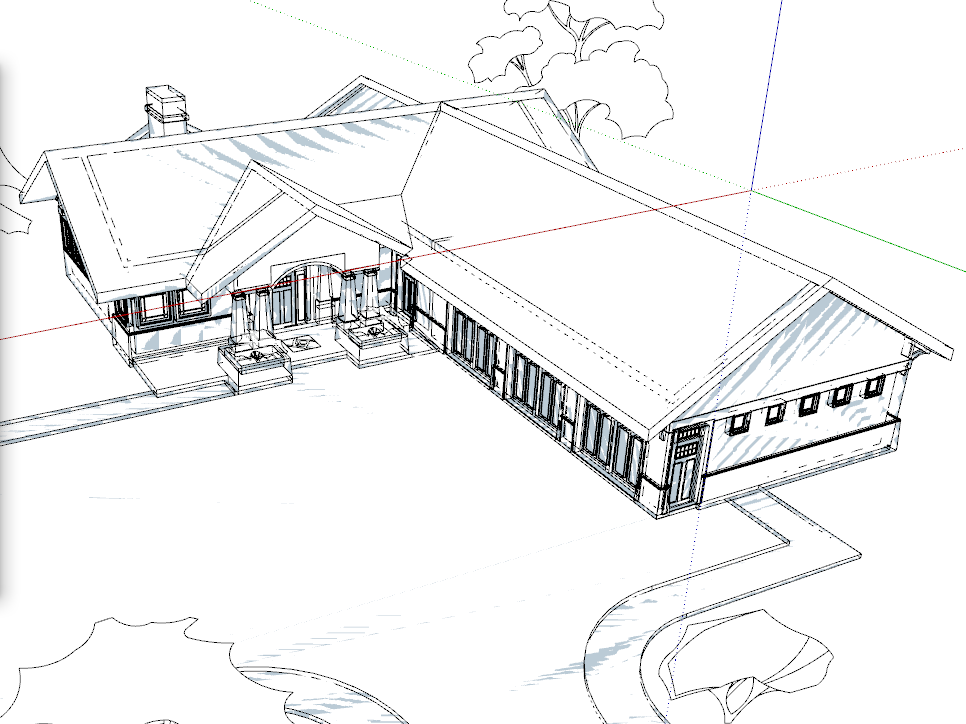
            Be aware that if you set the Near value too low you can create other problems. You might end up with something like this:
            Screenshot - 2_24_2020 , 8_17_37 AM.png

            Instead of this:
            Screenshot - 2_24_2020 , 8_17_54 AM.png

            Etaoin Shrdlu

            %

            (THERE'S NO PLACE LIKE)

            G28 X0.0 Y0.0 Z0.0

            M30

            %

            1 條回覆 最後回覆 回覆 引用 0
            • PixeroP 離線
              Pixero
              最後由 編輯

              @slbaumgartner said:

              Not meaning to whine, but this all raises the question of why no such camera parameters dialog has ever been available on Mac - meaning it isn't even possible to create the equivalent of Daniel's plugin!

              Doesn't this work on Mac?

              Sketchup.send_action 10624
              
              1 條回覆 最後回覆 回覆 引用 0
              • Dave RD 離線
                Dave R
                最後由 編輯

                @pixero said:

                Doesn't this work on Mac?

                Sketchup.send_action 10624
                

                No. It's a PC thing only.

                Etaoin Shrdlu

                %

                (THERE'S NO PLACE LIKE)

                G28 X0.0 Y0.0 Z0.0

                M30

                %

                1 條回覆 最後回覆 回覆 引用 0
                • sfto1S 離線
                  sfto1
                  最後由 編輯

                  @pixero said:

                  I've made a plugin that opens the advanced camera settings window on rightclick if you want to adjust clipping plane manually.

                  Link Preview Image
                  SketchUp Plugins | PluginStore | SketchUcation

                  SketchUp Plugin and Extension Store by SketchUcation provides free downloads of hundreds of SketchUp extensions and plugins

                  favicon

                  (sketchucation.com)

                  Thanks Pixero!

                  1 條回覆 最後回覆 回覆 引用 0
                  • sfto1S 離線
                    sfto1
                    最後由 編輯

                    @dave r said:

                    Be aware that if you set the Near value too low you can create other problems. You might end up with something like this:
                    [attachment=1:2ofksyrr]<!-- ia1 -->Screenshot - 2_24_2020 , 8_17_37 AM.png<!-- ia1 -->[/attachment:2ofksyrr]

                    Instead of this:
                    [attachment=0:2ofksyrr]<!-- ia0 -->Screenshot - 2_24_2020 , 8_17_54 AM.png<!-- ia0 -->[/attachment:2ofksyrr]

                    Using Pixero's solution, if the z fighting effect happens, uncheck the "force" box and zoom out. The camera near distance resets and the z fighting effect should disappear.

                    1 條回覆 最後回覆 回覆 引用 0
                    • Dave RD 離線
                      Dave R
                      最後由 編輯

                      Yes. I found that works. I was just advising that one shouldn't just set a very small Near value and expect it to work for all camera positions.


                      Etaoin Shrdlu

                      %

                      (THERE'S NO PLACE LIKE)

                      G28 X0.0 Y0.0 Z0.0

                      M30

                      %

                      1 條回覆 最後回覆 回覆 引用 0
                      • sfto1S 離線
                        sfto1
                        最後由 編輯

                        @dave r said:

                        Yes. I found that works. I was just advising that one shouldn't just set a very small Near value and expect it to work for all camera positions.

                        👍

                        1 條回覆 最後回覆 回覆 引用 0
                        • 1
                        • 2
                        • 1 / 2
                        • 第一個貼文
                          最後的貼文
                        Buy SketchPlus
                        Buy SUbD
                        Buy WrapR
                        Buy eBook
                        Buy Modelur
                        Buy Vertex Tools
                        Buy SketchCuisine
                        Buy FormFonts

                        Advertisement