sketchucation logo sketchucation
    • 登入
    Oops, your profile's looking a bit empty! To help us tailor your experience, please fill in key details like your SketchUp version, skill level, operating system, and more. Update and save your info on your profile page today!
    🔌 Smart Spline | Fluid way to handle splines for furniture design and complex structures. Download

    [Plugin] Universal Importer - v1.2.6 - 30 July 2024

    已排程 已置頂 已鎖定 已移動 Plugins
    447 貼文 110 Posters 474.8k 瀏覽 110 Watching
    正在載入更多貼文
    • 從舊到新
    • 從新到舊
    • 最多點贊
    回覆
    • 在新貼文中回覆
    登入後回覆
    此主題已被刪除。只有擁有主題管理權限的使用者可以查看。
    • Rich O BrienR 離線
      Rich O Brien Moderator
      最後由 編輯

      FBX file format can be Binary or ASCII. If your file is in a format the importer doesn't support it will throw errors.

      Similar to how an FBX export from SketchUp cannot be opened in Blender.

      Also older FBX versions can throw up some issues as well.

      Many things can lead to an error. It may not be Samuel's lovely extension that is at fault.

      Download the free D'oh Book for SketchUp 📖

      1 條回覆 最後回覆 回覆 引用 0
      • samuel_tS 離線
        samuel_t
        最後由 編輯

        @Moltres Rider

        Obviously, you have NO LUCK 😮 Universal Importer plugin works in most cases with recent versions of FBX format. Try to upgrade model with Autodesk FBX Converter then try again to import model...

        1 條回覆 最後回覆 回覆 引用 0
        • A 離線
          Arakon
          最後由 編輯

          Awesome plugin, but it doesn't seem able to handle decimals on the model sizes.. i.e. I have a model that is 53.69mm tall, when importing and entering that value, I get the following error, both with a comma and a decimal point:
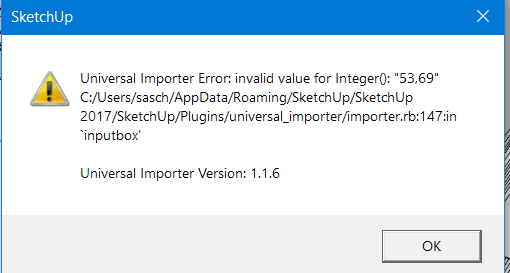
          2022-01-10 00_00_02-Start.png

          1 條回覆 最後回覆 回覆 引用 0
          • TIGT 離線
            TIG Moderator
            最後由 編輯

            Maybe it expects 53.69 but is receiving 53,69 - so does your system use a . or a , as the decimal separator ?
            What do you actually type in the input-box ??
            Also it seems to expect an integer, rather than a float in any case ???

            TIG

            1 條回覆 最後回覆 回覆 引用 0
            • A 離線
              Arakon
              最後由 編輯

              @tig said:

              Maybe it expects 53.69 but is receiving 53,69 - so does your system use a . or a , as the decimal separator ?
              What do you actually type in the input-box ??
              Also it seems to expect an integer, rather than a float in any case ???

              I did type both 53.69 and 53,69 and both cause the error.
              I ended up having to import it at 100x scale and scale it back down.. it's a workaround, but not really ideal.

              1 條回覆 最後回覆 回覆 引用 0
              • TIGT 離線
                TIG Moderator
                最後由 編輯

                I suspect that the default scaling factor is set as an integer, so trying to use a decimal float will cause an error in the input-box.

                The extension's author [samuel_t] should be able to re-code it to suit ??

                TIG

                1 條回覆 最後回覆 回覆 引用 0
                • samuel_tS 離線
                  samuel_t
                  最後由 編輯

                  I locked target height to an Integer. Since scaling is hacky in this plugin, I must test Float carefully 😛

                  1 條回覆 最後回覆 回覆 引用 0
                  • samuel_tS 離線
                    samuel_t
                    最後由 編輯

                    1.1.7 version allows you to import in SketchUp models exported from Blender 2.80 or newer at .blend format.
                    Expect better compatibility for many formats. Thanks again to Assimp's contributors who made this happen!

                    Download latest Universal Importer plugin from SketchUcation PluginStore.

                    1 條回覆 最後回覆 回覆 引用 0
                    • A 離線
                      Arakon
                      最後由 編輯

                      Found an issue with "small" models.
                      Example: I'm importing a functional model that is 95x46x75.45mm in size. The STL is 75.45 tall, however, in order for it to import semi-properly, I have to use the 46mm as height.
                      However, the model, when imported, is actually 99.12x47.99x78.72mm in size, so it's actually 104.3261% of the original size in all directions.
                      If I import it at a factor of 100 (telling it that the STL is 4600mm in height), then downscale it to 0.01 in Sketchup, the size is correct.
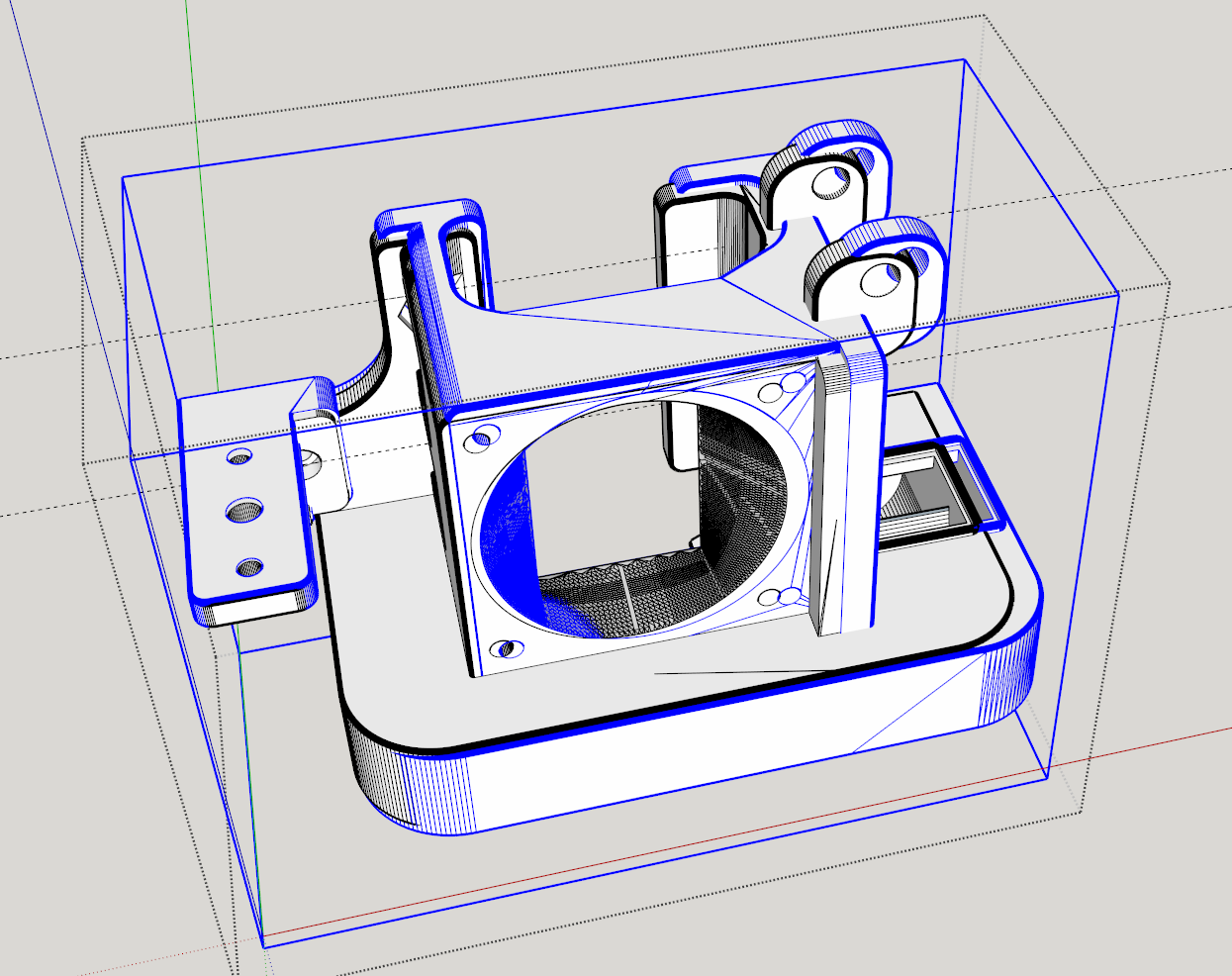
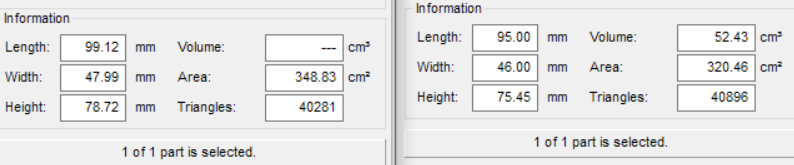
                      Both the original model and imported model overlapped


                      2022-01-19 20_36_35-.png

                      1 條回覆 最後回覆 回覆 引用 0
                      • EarthMoverE 離線
                        EarthMover
                        最後由 編輯

                        Hi Samuel,

                        I'm getting this error in 2017 Make (Pro trial). I've tried with a .DAE and .FBX file and get the same error. The extension is working as expected in my licensed SU 2021 version, but failing with 2017 only. Any suggestions? Thanks for all your hard work on this amazing free tool!
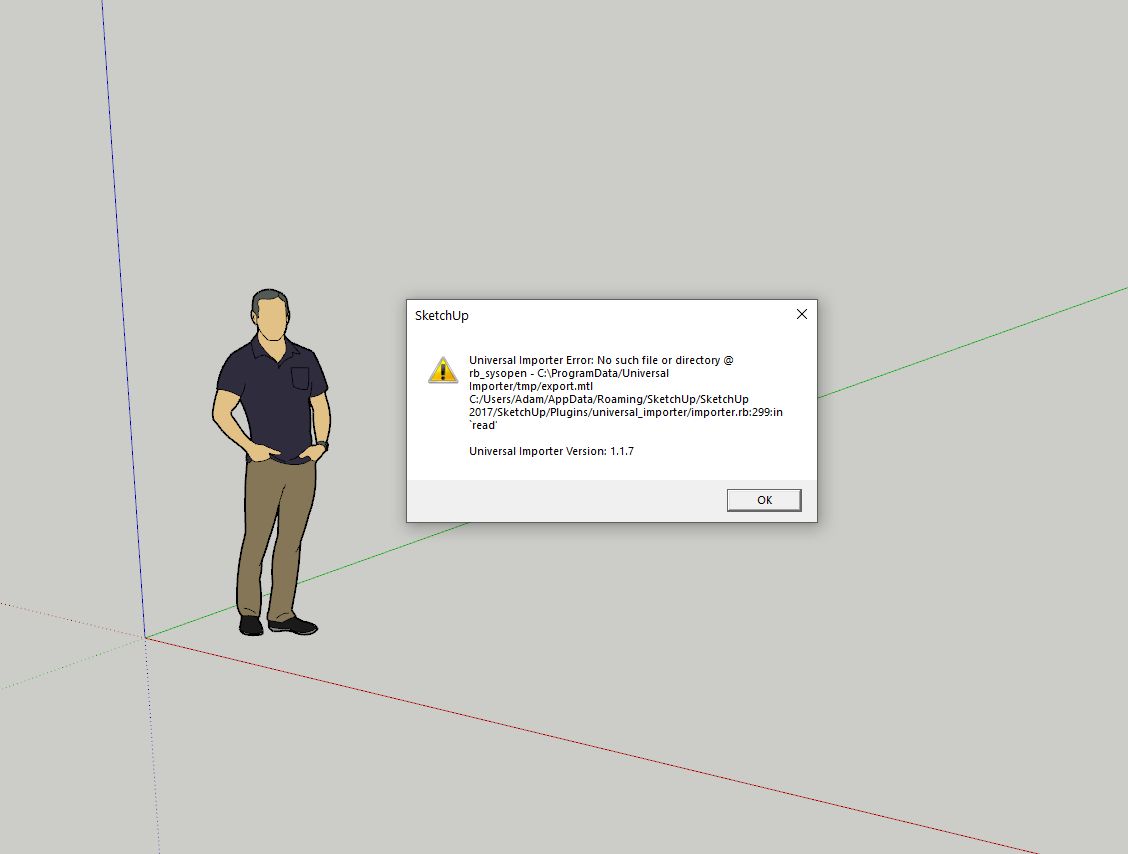

                        Error

                        3D Artist at Clearstory 3D Imaging
                        Guide Tool at Winning With Sketchup
                        Content Creator at Skapeup

                        1 條回覆 最後回覆 回覆 引用 0
                        • TIGT 離線
                          TIG Moderator
                          最後由 編輯

                          I see C:\ versus C:/ in paths in the error message ?
                          Is the path inside '...' or "..." - which will give different result ?
                          Best to force the paths to use all / ??

                          TIG

                          1 條回覆 最後回覆 回覆 引用 0
                          • samuel_tS 離線
                            samuel_t
                            最後由 編輯

                            @tig said:

                            I see C:\ versus C:/ in paths in the error message ?
                            Best to force the paths to use all / ??

                            I agree, it's better to normalize dir separator but I don't think EarthMover's issue come from this...

                            1 條回覆 最後回覆 回覆 引用 0
                            • TIGT 離線
                              TIG Moderator
                              最後由 編輯

                              Does the .mtl file exist in the special tmp folder ?
                              If that tmp file read/writeable ?
                              The error msg says it can't read it ??

                              TIG

                              1 條回覆 最後回覆 回覆 引用 0
                              • samuel_tS 離線
                                samuel_t
                                最後由 編輯

                                @TIG Yes, it seems plugin can't read "export.mtl" file. Normally, plugin reads "export.mtl" after conversion of input model to "export.obj". Maybe this conversion silently fails...

                                @EarthMover Can you follow these steps, please?

                                1. Import a model in SketchUp 2017 with Universal Importer plugin.
                                2. When plugin error message is shown: don't click on "OK" button!
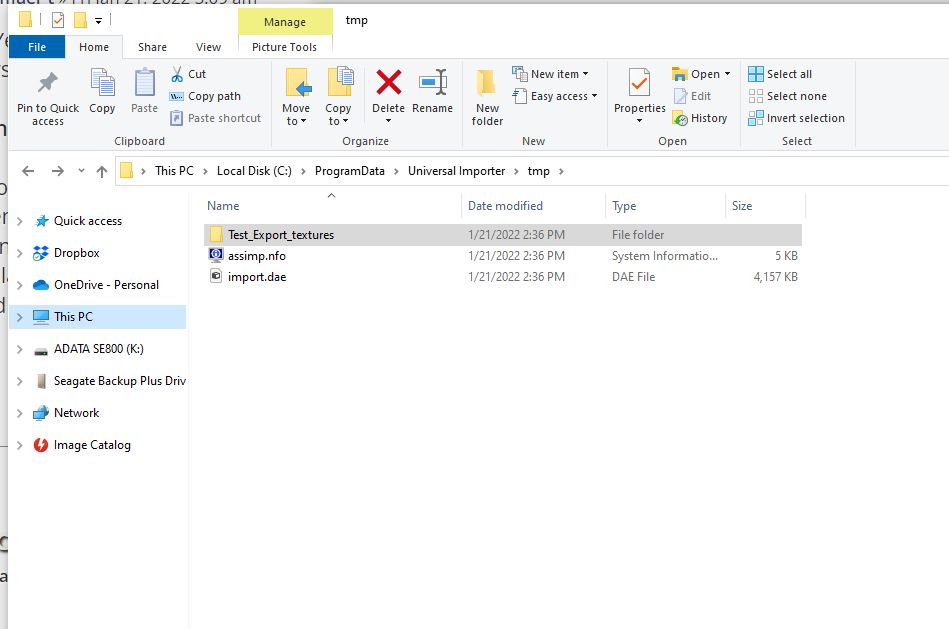
                                3. Open "C:\ProgramData\Universal Importer\tmp" in File Explorer.
                                4. Display files with details so we see each file present and its size...
                                5. Send us a screenshot of File Explorer and "assimp.log" if it exists.
                                1 條回覆 最後回覆 回覆 引用 0
                                • samuel_tS 離線
                                  samuel_t
                                  最後由 編輯

                                  @earthmover said:

                                  The extension is working as expected in my licensed SU 2021 version, but failing with 2017 only.

                                  Hi EarthMover 😉

                                  When you import a model with this extension, are SU 2017 and 2021 running in same time and OS?

                                  1 條回覆 最後回覆 回覆 引用 0
                                  • EarthMoverE 離線
                                    EarthMover
                                    最後由 編輯

                                    @samuel_t I don't get a .log file, I get this assimp.nfo here - https://www.dropbox.com/s/wl0v2chqcap2sdz/assimp.nfo?dl=0

                                    File explorer looks like attached

                                    Also, here is the .dae file I'm trying to import if that is helpful. It's from Home Designer (Chief Architect) Again, I don't have a problem importing the file into 2021, but this is to provide an option for my students who are looking for a free solution.-
                                    Dropbox

                                    favicon

                                    (www.dropbox.com)


                                    Clipboard01.jpg

                                    3D Artist at Clearstory 3D Imaging
                                    Guide Tool at Winning With Sketchup
                                    Content Creator at Skapeup

                                    1 條回覆 最後回覆 回覆 引用 0
                                    • samuel_tS 離線
                                      samuel_t
                                      最後由 編輯

                                      @EarthMover I can import with my plugin your DAE model in SketchUp Make 2017 on Windows 10:
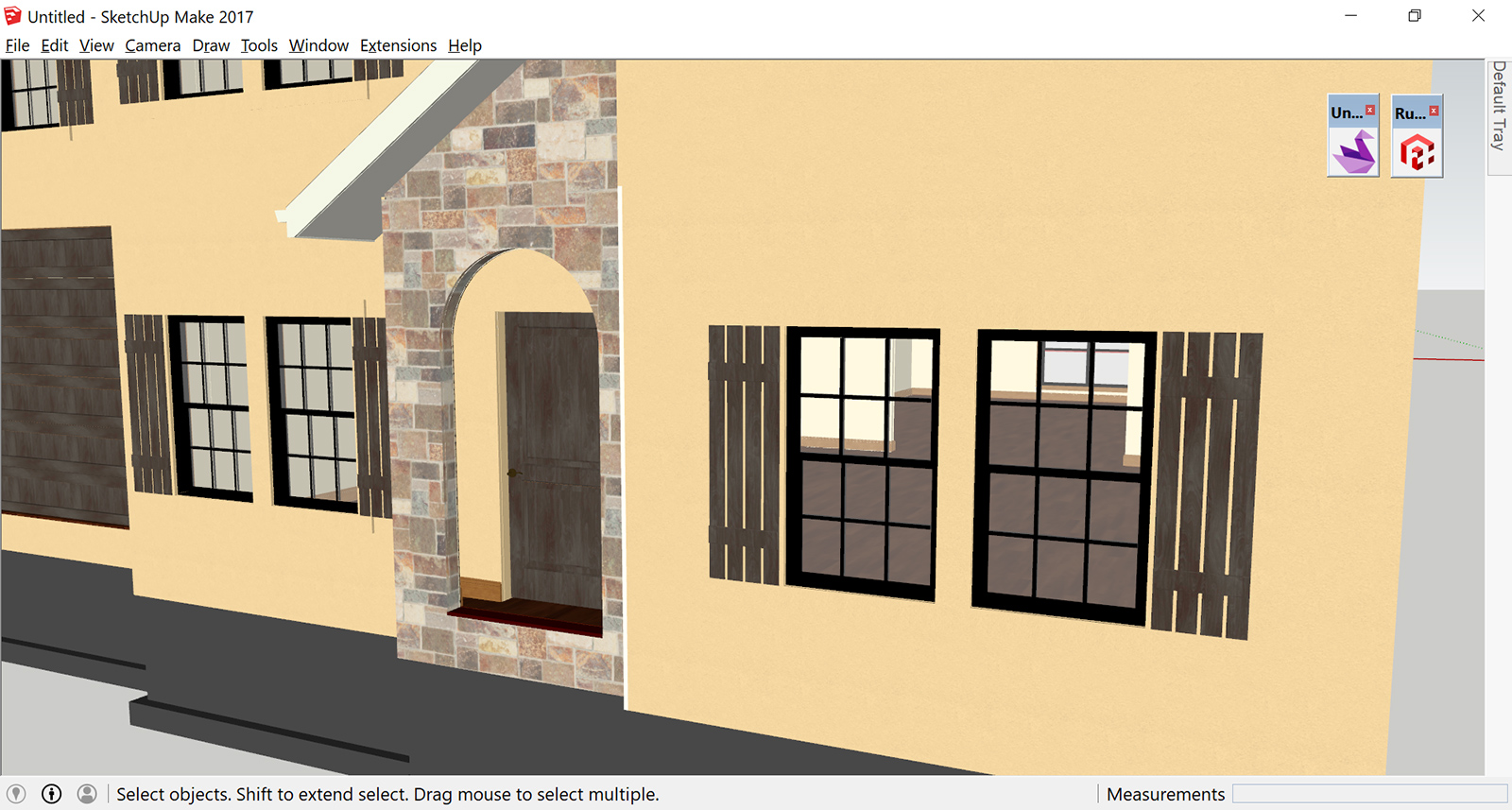
                                      Home Designer.jpg

                                      In your last screenshot, there are some well written files in your "tmp" directory. I don't understand...

                                      1 條回覆 最後回覆 回覆 引用 0
                                      • R 離線
                                        Rick959
                                        最後由 編輯

                                        Hi there,

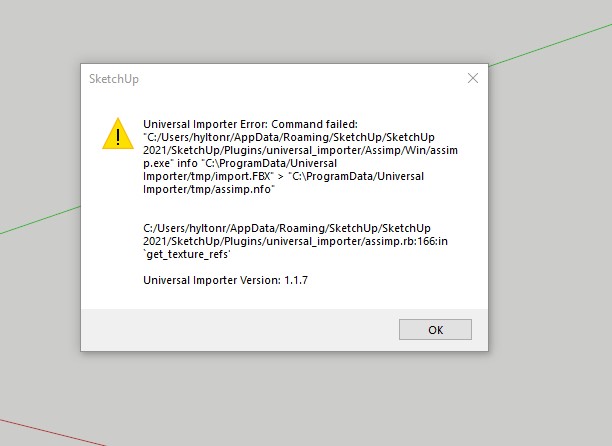
                                        I have installed your plugin and when I try to import a model, I have tried several different models, I get the same error each time.
                                        Please see the image attached.

                                        Thanks in advance


                                        import error.jpg

                                        1 條回覆 最後回覆 回覆 引用 0
                                        • samuel_tS 離線
                                          samuel_t
                                          最後由 編輯

                                          @rick959 said:

                                          Hi there,

                                          I have installed your plugin and when I try to import a model, I have tried several different models, I get the same error each time.
                                          Please see the image attached.

                                          Thanks in advance

                                          Hi Rick,

                                          (Re)install Microsoft Visual C++ library then try again.

                                          1 條回覆 最後回覆 回覆 引用 0
                                          • P 離線
                                            Please dell me
                                            最後由 編輯

                                            I want to try it, you say it FREE, bud if I instal it, I have jsut one icon - DONATE and then open PayPall. So it´s free, but you must pay ?

                                            Realy thanks to waste 10 minutes to download and instal and unistaling again 😞

                                            1 條回覆 最後回覆 回覆 引用 0
                                            • 1
                                            • 2
                                            • 16
                                            • 17
                                            • 18
                                            • 19
                                            • 20
                                            • 21
                                            • 22
                                            • 23
                                            • 18 / 23
                                            • 第一個貼文
                                              最後的貼文
                                            Buy SketchPlus
                                            Buy SUbD
                                            Buy WrapR
                                            Buy eBook
                                            Buy Modelur
                                            Buy Vertex Tools
                                            Buy SketchCuisine
                                            Buy FormFonts

                                            Advertisement