[Plugin][$] FredoCorner - v2.7a - 31 Mar 24



-
Hello Fredo,
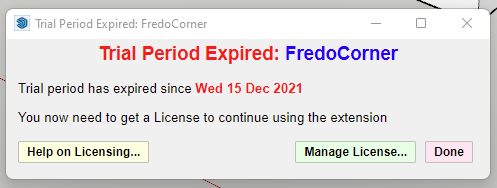
I decided to try out Fredocorner for the first time (I'm quite sure) but I got a message that my tryout periode is already done. I have a round corner license and wanted to checkout the differences and features.
Just to let you know but a little tryout periode would be nice.Kind regards,
Hans Schat
-
Could you first upgrade to LibFredo6 v13.4a.
-
Hi,
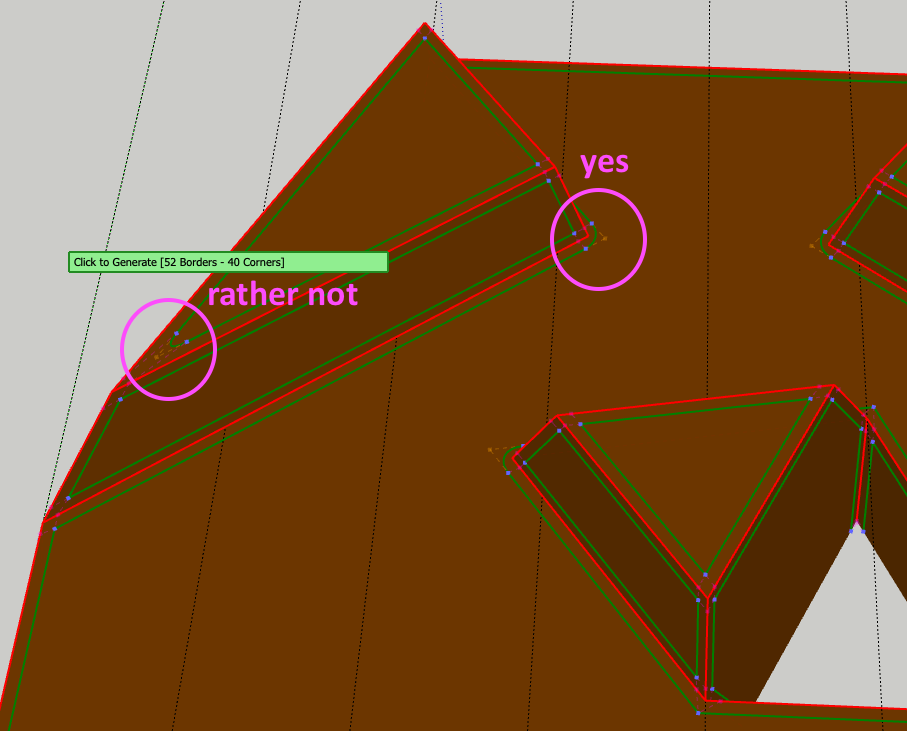
Thank you for FredoCorner, it's a fantastic plugin! One question: i'm presently designing shapes in which it is sometimes necessary to use super rounding, and sometimes the corner would look better without it. Is it possible to apply Super Rounding to selected corners only? The shapes are letters (molds actually), and need to be rounded in one go to get good results, so I can't split up the rounding process into several steps.
If not, it's not big issue, but I thought I'd ask in case I missed something in your tutorial videos.
Thanks!
Raoul
-
Please help. I love this tool and would like to purchase a license. I've downloaded the SU store extension ... but do not see any place to purchase a license. All of the instructions show screens that I do not see. How do I get to the license purchase screen?
Thanks,
Bill W>
-
In SketchUp go to Extensions > Fredo Collection > Fredo Corner > License
In the dialog click Obtain License
Or...
Or...
-
@rich o brien said:
In SketchUp go to Extensions > Fredo Collection > Fredo Corner > License
Or Tools > Fredo Collection...
-
Any chance of a Black Friday sale this year? I missed out on last summers sale and since I only a casual user of Sketchup, I am holding out for a good deal...
-
I'm joining the question:
Is there any chance of a discount with the Black Friday sale?
-
I'm not sure what I did that preceded this, but sometime this morning FredoCorner stopped working for me. When I click on the icons in the toolbar (any of them), nothing at all seems to happen.
Details:
- Paid user for the Fredo6 collection
- SU2022 Pro, Windows 11
- LibFredo6 13.2a installed
- Other Fredo tools seem to work as expected
Process:
- Uninstalled Fredo6 FredoCorner
- Downloaded latest copy from sketchUcation
- Installed via Extension Manager
- Restart SketchUp
- Find new FredoCorner toolbar as expected
- Create rectangle, push/pull to extrude, select top face
- Select FredoCorner icon, nothing happens
- Select Tools > Fredo6Collection > FredoCorner > Round, nothing happens. Same result with any other FredoCorner operations.
- Select Tools > Fredo6Collection > FredoScale > Box Scaling (as an example), I get the selection tool and can use the extension as expected.
- Select Tools > Fredo6Collection > FredoCorner > License, I get the license window with a green "OK", license type "NORMAL", validity "Infinite"
Other observations:
- Select Tools > Fredo6Collection > FredoCorner > About Fredo Corner 2.5a does nothing. Selecting About for another Fredo tool (eg, Curviloft) also does nothing. No way to get an "about" message I guess.
Any suggestions would be great, I'm stuck at an impasse here and not sure how to proceed.
-
LibFredo is at 13.5a

SketchUp Plugins | PluginStore | SketchUcation
SketchUp Plugin and Extension Store by SketchUcation provides free downloads of hundreds of SketchUp extensions and plugins
(sketchucation.com)
Also update Sketchucation Tools to 4.2.9
Sketchucation Tools | SketchUcation
3D SketchUp Community for Design and Engineering Professionals.
(sketchucation.com)
-
@svideo said:
- Paid user for the Fredo6 collection
- SU2022 Pro, Windows 11
- LibFredo6 13.2a installed
- Other Fredo tools seem to work as expected
Please update your forum profile while you are here. That information helps us help you if it's correct.
-
Allright, first thanks for the help, and on a Sunday! It's well appreciated.
OK so I have followed the links, downloaded LibFredo6 13.5a and SketchUcation 4.29, installed, then restarted SU2022.
That seemed to do it! Again, thanks for the guidance and fast response!
-
Hello!
A while ago I purchased a bundle with 8 of your excellent plugins. Thank you!
How ever, I got a licence for what I first believed was FredoCorner. First it worked, then it did not, and some how I got to believe the licence was for RoundCorner and that a trial period for FredoCorner had expired. I was in a hurry and needed fredocorner badly so i paid for another licence more, and then noticed that the two licences i have for fredocorner seem the same, accept for the date.SCF_Purchased_License_FredoCorner_NORMAL_20220309.scflicense
SCF_Purchased_License_FredoCorner_NORMAL_20221128.scflicenseFredoCorner works nicely again, but do I have two licences for the same thing?
/Valter
-
Send an email to support@sketchucation.com and we'll look into it
-
I used and loved the previous RoundCorner but when it stopped working, I found this one. But this one doesn't work either. I install it via the sketchucation interface like everything else, but when I click on the icon to round corners on the toolbar, nothing happens. I wonder if I've done something wrong.
-
Do you have the latest version of LibFredo and the SketchUcation toolset [for licensing checking] ?
When you try clicking to run FredoCorner with the Ruby Console open do you see any error messages ?? -
@tig said:
Do you have the latest version of LibFredo and the SketchUcation toolset [for licensing checking] ?
When you try clicking to run FredoCorner with the Ruby Console open do you see any error messages ??Hi! I have the same problems. Used the extension for a long time, now it's just not opening anymore. reinstalled it already, still same problems. This comes out with the ruby console:
Any suggestions how to fix this?Error: #<NameError: undefined local variable or method
initialize__' for #<Traductor::Marshall:0x0000021ababed1c0> Did you mean? initialize initialize_dup> c:/users/gebruiker/appdata/roaming/sketchup/sketchup 2022/sketchup/plugins/fredo6_!libfredo6/lib6marshall.rbe:33:ininitialize'
eval:1:ininitialize' c:/users/gebruiker/appdata/roaming/sketchup/sketchup 2022/sketchup/plugins/fredo6_fredocorner/fredocornertool.rbe:305:innew'
c:/users/gebruiker/appdata/roaming/sketchup/sketchup 2022/sketchup/plugins/fredo6_fredocorner/fredocornertool.rbe:305:ininitialize' c:/users/gebruiker/appdata/roaming/sketchup/sketchup 2022/sketchup/plugins/fredo6_fredocorner/fredocornertool.rbe:234:ininitialize'
c:/users/gebruiker/appdata/roaming/sketchup/sketchup 2022/sketchup/plugins/fredo6_fredocorner/fredocornertool.rbe:194:innew' c:/users/gebruiker/appdata/roaming/sketchup/sketchup 2022/sketchup/plugins/fredo6_fredocorner/fredocornertool.rbe:194:inlaunch'
c:/users/gebruiker/appdata/roaming/sketchup/sketchup 2022/sketchup/plugins/fredo6_fredocorner/fredocornertool.rbe:176:inaction__mapping' C:/Users/Gebruiker/AppData/Local/Temp/Fredo6_LibFredo6_TemporaryFiles/data6.rb:65:incall'
C:/Users/Gebruiker/AppData/Local/Temp/Fredo6_LibFredo6_TemporaryFiles/data6.rb:65:inlaunch_action' c:/users/gebruiker/appdata/roaming/sketchup/sketchup 2022/sketchup/plugins/fredo6_!libfredo6/lib6plugin.rbe:240:inlaunch_action'
c:/users/gebruiker/appdata/roaming/sketchup/sketchup 2022/sketchup/plugins/fredo6_fredocorner/bootstrap_fredocorner.rbe:103:inlaunch_action' c:/users/gebruiker/appdata/roaming/sketchup/sketchup 2022/sketchup/plugins/fredo6_fredocorner/bootstrap_fredocorner.rbe:118:inblock in startup'
c:/users/gebruiker/appdata/roaming/sketchup/sketchup 2022/sketchup/plugins/fredo6_!libfredo6/lib6plugin.rbe:1464:incommand_invoke' c:/users/gebruiker/appdata/roaming/sketchup/sketchup 2022/sketchup/plugins/fredo6_!libfredo6/lib6plugin.rbe:1444:inblock (2 levels) in build_config_commands'
c:/users/gebruiker/appdata/roaming/sketchup/sketchup 2022/sketchup/plugins/fredo6_!libfredo6/lib6traductor.rbe:1385:in `block in add_command' -
As I said:
Do you have the latest version of LibFredo and the SketchUcation toolset [for licensing checking] ?After installing the latest versions from the PluginStore / ExtensionStore³ you need to restart SketchUp to sync everything...
The error relating to:
C:/Users/Gebruiker/AppData/Local/Temp/Fredo6_LibFredo6_TemporaryFiles/
might indicate an incorrect installation of SketchUp.
This can mess up some folder/file permissions, a Repair to the installation will not usually fix any folders outside of SketchUp's normal paths...So try the following...
Close SketchUp.
Find the SketchUp installer's exe file [usually in your Downloads folder].
Select its icon, right-click > context-menu > "Run as administrator"
In the resulting dialog chose 'Repair'.
When it completes restart SketchUp and see if that helped...
If not, close SketchUp and find the folder:
C:/Users/Gebruiker/AppData/Local/Temp/Fredo6_LibFredo6_TemporaryFiles/
and delete it.
When SketchUp restarts it should remake the folder and any files needed by LibFredo6 etc... -
NEW RELEASE: FredoCorner v2.6a - 25 Dec 22
Requirement: LibFredo6 13.6a
Requirement: Sketchucation ExtensionStore 4.2.9FredoCorner v2.6a is a maintenance release for extension of validity.
Please note that, in the current version of FredoCorner:
- there are issues with some shortcut modifiers (Ctrl, Alt) on Mac)
- there are known issues and bugs here and there. This concerns in particular Collisions, i.e. when the offset is too large.
- Terminal corners (that is ending on a single edge) may present issues and bugs
- No documentation yet, so watch the videos that I will publish.
Please report issues, questions and any feedback in the present thread
Home Page of FredoCorner for information and Download.
-
I can no longer use my licensed version. The menu doesn't appear.
@fredo6 said:
NEW RELEASE: FredoCorner v2.6a - 25 Dec 22
Requirement: LibFredo6 13.6a
Requirement: Sketchucation ExtensionStore 4.2.9FredoCorner v2.6a is a maintenance release for extension of validity.
Please note that, in the current version of FredoCorner:
- there are issues with some shortcut modifiers (Ctrl, Alt) on Mac)
- there are known issues and bugs here and there. This concerns in particular Collisions, i.e. when the offset is too large.
- Terminal corners (that is ending on a single edge) may present issues and bugs
- No documentation yet, so watch the videos that I will publish.
Please report issues, questions and any feedback in the present thread
Home Page of FredoCorner for information and Download.







Advertisement