sketchucation logo sketchucation
    • 登入
    Oops, your profile's looking a bit empty! To help us tailor your experience, please fill in key details like your SketchUp version, skill level, operating system, and more. Update and save your info on your profile page today!
    🔌 Smart Spline | Fluid way to handle splines for furniture design and complex structures. Download

    [Plugin][$] FredoCorner - v2.7a - 31 Mar 24


    已排程 已置頂 已鎖定 已移動 Plugins
    439 貼文 152 Posters 547.4k 瀏覽 150 Watching
    正在載入更多貼文
    • 從舊到新
    • 從新到舊
    • 最多點贊
    回覆
    • 在新貼文中回覆
    登入後回覆
    此主題已被刪除。只有擁有主題管理權限的使用者可以查看。
    • yanrothwellY 離線
      yanrothwell
      最後由 編輯

      I've used the old Round Corner for years and now am using this plugin... Thanks so much for it and all your plugins Fredo

      MY corners are inverted and I can't make them as 'normal' round corners. It's not the reversed faces, and clicking invert doesn't do anything... Any idea?

      Merci in advance

      Ian

      http://www.ianrothwell.co.uk

      1 條回覆 最後回覆 回覆 引用 0
      • fredo6F 離線
        fredo6
        最後由 編輯

        @yanrothwell said:

        MY corners are inverted and I can't make them as 'normal' round corners. It's not the reversed faces, and clicking invert doesn't do anything... Any idea?

        Could you show or post the model please.

        Fredo

        1 條回覆 最後回覆 回覆 引用 0
        • A 離線
          amsalari
          最後由 編輯

          WOW, Thanks For nice and very well work

          1 條回覆 最後回覆 回覆 引用 0
          • fredo6F 離線
            fredo6
            最後由 編輯

            NEW RELEASE: FredoCorner v1.6b - 18 Apr 19

            Requirement: LibFredo6 8.8a

            FredoCorner 1.6b fixes bugs and extend validity.


            Please note that, in the current version of FredoCorner:

            • there are issues with some shortcut modifiers (Ctrl, Alt) on Mac)
            • there are known issues and bugs here and there. This concerns in particular Collisions, i.e. when the offset is too large.
            • Terminal corners (that is ending on a single edge) may present issues and bugs
            • No documentation yet, so watch the videos that I will publish.

            Please report issues, questions and any feedback in the present thread


            Home Page of FredoCorner for information and Download.

            Main post of this FredoCorner thread.

            1 條回覆 最後回覆 回覆 引用 0
            • N 離線
              noldo
              最後由 編輯

              Hi Fredo, the plug-in fail with this geometry type.
              Roundcorner work correctly.


              Untitled.jpg


              Untitled.skp

              1 條回覆 最後回覆 回覆 引用 0
              • fredo6F 離線
                fredo6
                最後由 編輯

                @noldo said:

                Hi Fredo, the plug-in fail with this geometry type.
                Roundcorner work correctly.

                It looks like there is a problem in the model.

                One of the face is actually spreading over 3 blocks
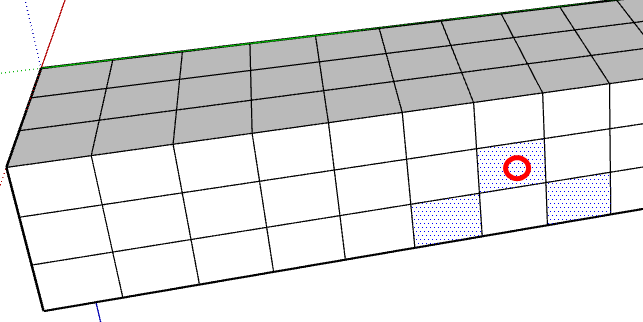
                Multi faces Corner.png

                This creates an issue with FredoCorner, as you can imagine.

                Noldo - Corner - Untitled.skp

                I'll try to detect this type of configuration in a next version.

                Fredo

                1 條回覆 最後回覆 回覆 引用 0
                • N 離線
                  noldo
                  最後由 編輯

                  @fredo6 said:

                  @noldo said:

                  Hi Fredo, the plug-in fail with this geometry type.
                  Roundcorner work correctly.

                  It looks like there is a problem in the model.

                  One of the face is actually spreading over 3 blocks

                  [attachment=1:3klx88xg]<!-- ia1 -->Multi faces Corner.png<!-- ia1 -->[/attachment:3klx88xg]

                  This creates an issue with FredoCorner, as you can imagine.

                  [attachment=0:3klx88xg]<!-- ia0 -->Noldo - Corner - Untitled.skp<!-- ia0 -->[/attachment:3klx88xg]

                  I'll try to detect this type of configuration in a next version.

                  Fredo

                  Thank's for your work Fredo!

                  1 條回覆 最後回覆 回覆 引用 0
                  • C 離線
                    cskovago
                    最後由 編輯

                    Hi,

                    I have just updated to the latest version, because the plugin refused to work as the 1.6 version. Now, it is NON-WORKING order, I can not even copy the bug report (because the cursor turns semi-transparent on the bug-report tab), I can select the faces, edges, I can set the parameters, the plugin calculates the edges, but when I let it done the task, nothing happens, just the bug-report tab is red...

                    Any idea or help, please?

                    Win7, SketchUp 2017 latest

                    1 條回覆 最後回覆 回覆 引用 0
                    • fredo6F 離線
                      fredo6
                      最後由 編輯

                      @cskovago said:

                      Hi,

                      I have just updated to the latest version, because the plugin refused to work as the 1.6 version. Now, it is NON-WORKING order, I can not even copy the bug report (because the cursor turns semi-transparent on the bug-report tab), I can select the faces, edges, I can set the parameters, the plugin calculates the edges, but when I let it done the task, nothing happens, just the bug-report tab is red...

                      Any idea or help, please?

                      Win7, SketchUp 2017 latest

                      In this kind of situation, it would be helpful to attach the model. Otherwise, this is difficult to find out.

                      If you have the red notification, then there is an error. So, open the Ruby console before launching FredoCorner and check if there are errors displayed. That would also help.

                      1 條回覆 最後回覆 回覆 引用 0
                      • R 離線
                        ronagoldberg
                        最後由 編輯

                        Thank you so much for this plugin and the previous version.
                        I was using it today and got this odd geometry, it only happened on this side, the other side of this box laid out correctly. I realize it would run into the hole in the geometry but I was surprised at what it was doing and that it wasn't doing the same thing on both sides.

                        Ron


                        FredoCorner Issue.jpg

                        1 條回覆 最後回覆 回覆 引用 0
                        • fredo6F 離線
                          fredo6
                          最後由 編輯

                          @ronagoldberg said:

                          I was using it today and got this odd geometry, it only happened on this side, the other side of this box laid out correctly. I realize it would run into the hole in the geometry but I was surprised at what it was doing and that it wasn't doing the same thing on both sides.

                          Strange! Could you post the model so that I have a close look.

                          Fredo

                          1 條回覆 最後回覆 回覆 引用 0
                          • fredo6F 離線
                            fredo6
                            最後由 編輯

                            NEW RELEASE: FredoCorner v1.6c - 20 Jun 19

                            Requirement: LibFredo6 8.8a

                            FredoCorner 1.6c extends validity.


                            Please note that, in the current version of FredoCorner:

                            • there are issues with some shortcut modifiers (Ctrl, Alt) on Mac)
                            • there are known issues and bugs here and there. This concerns in particular Collisions, i.e. when the offset is too large.
                            • Terminal corners (that is ending on a single edge) may present issues and bugs
                            • No documentation yet, so watch the videos that I will publish.

                            Please report issues, questions and any feedback in the present thread


                            Home Page of FredoCorner for information and Download.

                            Main post of this FredoCorner thread.

                            1 條回覆 最後回覆 回覆 引用 0
                            • M 離線
                              MWH
                              最後由 編輯

                              Hi, Fredo corner stopped working. It says "no good edges at face"or "NO match of edge properties) even with a new drawing and a simple box.
                              I have reinstalled Fredo Corner v 1.6c and LibFredo6 ver 9.0A and have rebooted my computer. Still same problem.
                              I´m using Sketchup 8 Pro on Mac OSX Mojave (10.14.5).
                              Any tips?

                              Mattias

                              1 條回覆 最後回覆 回覆 引用 0
                              • Dave RD 離線
                                Dave R
                                最後由 編輯

                                @mwh said:

                                I´m using Sketchup 8 Pro on Mac OSX Mojave (10.14.5).

                                Your profile indicates you are using SketchUp 2018. Which one is correct?

                                Etaoin Shrdlu

                                %

                                (THERE'S NO PLACE LIKE)

                                G28 X0.0 Y0.0 Z0.0

                                M30

                                %

                                1 條回覆 最後回覆 回覆 引用 0
                                • fredo6F 離線
                                  fredo6
                                  最後由 編輯

                                  @mwh said:

                                  Hi, Fredo corner stopped working. It says "no good edges at face"or "NO match of edge properties) even with a new drawing and a simple box.
                                  I have reinstalled Fredo Corner v 1.6c and LibFredo6 ver 9.0A and have rebooted my computer. Still same problem.

                                  This may simply be normal. You have a filter to select edges

                                  FredoCorner Filter edges.png

                                  Depending on the filter and what you select, FredoCorner may find that there is no effective edges.

                                  So make sure that the edges you select and the filter do match.

                                  Fredo

                                  1 條回覆 最後回覆 回覆 引用 0
                                  • M 離線
                                    MWH
                                    最後由 編輯

                                    Thanks Fredo:)
                                    It was that simple. Unbelievable that I missed that.
                                    Dave R, you're right. I'm using 2018.

                                    Thanks again!
                                    M

                                    1 條回覆 最後回覆 回覆 引用 0
                                    • deaneauD 離線
                                      deaneau
                                      最後由 編輯

                                      Hi Fredo Round Corner have some errors

                                      this is a corner with 8 segments and 1mm radius

                                      skp 2019
                                      https://1drv.ms/u/s!AoU3tpJxqmvto3skG47ckoAVXMeP?e=nu42nx

                                      skp2013
                                      https://1drv.ms/u/s!AoU3tpJxqmvto3z6vD80Gvsyv0Vc?e=eIjFlT


                                      https://i.ibb.co/KXbNynr/2019-08-19-12h11-28.png

                                      MADE, BORN AND LIVING IN BERLIN
                                      Big Thank You to all Programmers
                                      Some German words are so long that they have a perspective. M.Twain

                                      1 條回覆 最後回覆 回覆 引用 0
                                      • FrederikF 離線
                                        Frederik
                                        最後由 編輯

                                        Looking at the various errors you've posted recently, I assume that it's more a limitation of SU rather than a bug in the various plugins...

                                        What usually helps is if you scale the model up - i.e. 10 times so one millimetre becomes one centimetre...
                                        And once the plugins have made the job for you, you scale it down to the original size...

                                        The detail you seem to want to accomplish is not something SU is good at...

                                        Cheers
                                        Kim Frederik

                                        1 條回覆 最後回覆 回覆 引用 0
                                        • PixeroP 離線
                                          Pixero
                                          最後由 編輯

                                          I usually make it a component then copy the component and scale it up 10-1000 times and make the tiny stuff on that copy. When done I just delete the copy and the original component is done.

                                          1 條回覆 最後回覆 回覆 引用 0
                                          • fredo6F 離線
                                            fredo6
                                            最後由 編輯

                                            NEW RELEASE: FredoCorner v1.7a - 20 Sep 19

                                            Requirement: LibFredo6 9.1b

                                            FredoCorner 1.7a extends validity.


                                            Please note that, in the current version of FredoCorner:

                                            • there are issues with some shortcut modifiers (Ctrl, Alt) on Mac)
                                            • there are known issues and bugs here and there. This concerns in particular Collisions, i.e. when the offset is too large.
                                            • Terminal corners (that is ending on a single edge) may present issues and bugs
                                            • No documentation yet, so watch the videos that I will publish.

                                            Please report issues, questions and any feedback in the present thread


                                            Home Page of FredoCorner for information and Download.

                                            Main post of this FredoCorner thread.

                                            1 條回覆 最後回覆 回覆 引用 0
                                            • 1
                                            • 2
                                            • 3
                                            • 4
                                            • 5
                                            • 6
                                            • 7
                                            • 21
                                            • 22
                                            • 5 / 22
                                            • 第一個貼文
                                              最後的貼文
                                            Buy SketchPlus
                                            Buy SUbD
                                            Buy WrapR
                                            Buy eBook
                                            Buy Modelur
                                            Buy Vertex Tools
                                            Buy SketchCuisine
                                            Buy FormFonts

                                            Advertisement