Site modeling madness
-
Could there be anything more frustrating than trying to create a site in Sketchup? I run into problems every time and waste hours and hours trying to track down the problem and fix it. And I have been doing this and using this program for years. How does everyone else do it? If I dont have a cad file of the site I will usually use the Geo location function and just start tracing over the site imagery. Eventually I will run into an issue where lines must have gone off plane and I cant make faces. I will have to keep creating diagonal lines and make smaller faces. Sometimes when I get to the end I never find what the issue was. I just makes the last face. It is even worse when using cad linework from a site engineer. I have tried multiple plugins like Fredo edge inspector and flatten to plan. There must be a better way. I cant keep wasting time like this. Any help would be so very appreciated.
-
It can be a mess sometimes. Is the inability to close faces the main problem you get? I don't see this much when working with irregular terrain since triangles tend to close OK. I have not imported a TIN directly for a long time, though I don't recall trouble with them. I usually :
- cleanup (simplify--join etc.) contour lines in CAD and import to use Toposhaper in SU. Kudos to Fredo!
- save an untouched copy of the original topo mesh in place on a separate layer.
- Shape a "new work" copy of the mesh using Artisan, sandbox, vertex tools etc.
- Avoid cutting the new mesh as possible, though sometimes you must for buildings, retaining walls etc. Sometimes I might join up flat geometry for excavation cuts to the mesh but not always, letting the mesh stay below hardscape models.
- Create new ares of mesh (driveways etc.) with simplest geometry possible.
- If I use drape or otherwise chop up the mesh for a road or something, I usually do this with a copy of the mesh offset from the main mesh (with side skirts), keeping the main mesh complete below. This helps later shaping of the mesh I think.
- Don't sweat the small stuff. The degree of accuracy is low for contours, and for the model, and for what actually happens to grading in the field.
Look at ValiArchitects tools for some site shaping plugins.
-
Perhaps start with a simple model showing the basics of the issues you are having.
-
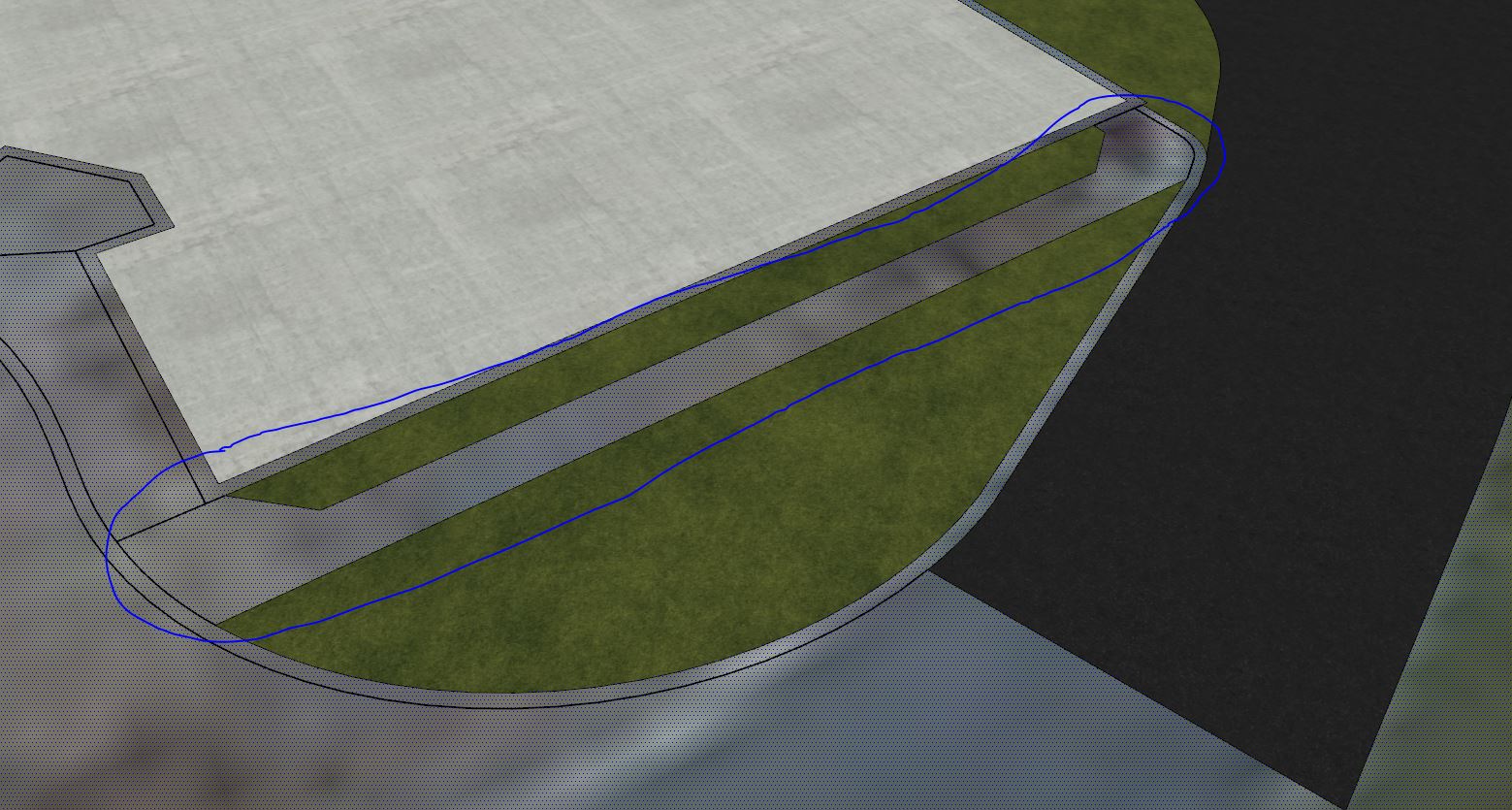
Yes, 9 years is a long time. I am fairly proficient in the software and use it every day. I just always run into an issue with site modeling. Everytime. I usually find a work around but it is so frustrating. I have attached a site model I have been working through and a snip of a small section of sidewalk I would like to be its own face. This line work was from the site engineer and I draped it over the geo location plane. Maybe my workflow is just wrong. Research over the years has always suggested a coplaner issue but as stated, I have used plugins that are supposed to suppress all of the lines to one plane.
-
@pbacot said:
It can be a mess sometimes. Is the inability to close faces the main problem you get? I don't see this much when working with irregular terrain since triangles tend to close OK. I have not imported a TIN directly for a long time, though I don't recall trouble with them. I usually :
- cleanup (simplify--join etc.) contour lines in CAD and import to use Toposhaper in SU. Kudos to Fredo!
- save an untouched copy of the original topo mesh in place on a separate layer.
- Shape a "new work" copy of the mesh using Artisan, sandbox, vertex tools etc.
- Avoid cutting the new mesh as possible, though sometimes you must for buildings, retaining walls etc. Sometimes I might join up flat geometry for excavation cuts to the mesh but not always, letting the mesh stay below hardscape models.
- Create new ares of mesh (driveways etc.) with simplest geometry possible.
- If I use drape or otherwise chop up the mesh for a road or something, I usually do this with a copy of the mesh offset from the main mesh (with side skirts), keeping the main mesh complete below. This helps later shaping of the mesh I think.
- Don't sweat the small stuff. The degree of accuracy is low for contours, and for the model, and for what actually happens to grading in the field.
Look at ValiArchitects tools for some site shaping plugins.
It is an inability to close faces problem. I wish this was a terrain mesh issue, but this is just for flat planes. I find modeling terrain is actually easier. And yes, I love the artisan plugin. I use it all the time. Thank you for the suggestions.
-
Try this file.
I have removed your 'layers'. You should read up on how to use layers in sketchup.
-
Still the same issue. The layers are all from the autocad import from the site engineer.
-
Are you suggesting that my inability to create faces is a layer management issue?
-
Have often the same problem.
I use tt_flatten.rb (thomthom).
You'll get a new group and then have to revert faces, draw lines to generate faces and bring the textures back... (5 min)
-
Awesome! Thank you faust! I was using Eneroth Flatten to plane. Not sure it even did anything.
 I will grab the one that you mentioned
 -
@faust07 said:
Have often the same problem.
I use tt_flatten.rb (thomthom).
You'll get a new group and then have to revert faces, draw lines to generate faces and bring the textures back... (5 min)I have another brain bender for you. Can you think of any reason why this window wouldn't close? I alinged the axis to the surface. Most of the surfaces close. When I draw lines that intersect with each other, I can trim them like they are all on the same plane, but I cannot get this window to work. Any help would be greatly appreciated.
-
@mumbus said:
I have another brain bender for you. Can you think of any reason why this window wouldn't close? I alinged the axis to the surface. Most of the surfaces close. When I draw lines that intersect with each other, I can trim them like they are all on the same plane, but I cannot get this window to work. Any help would be greatly appreciated.
Cant really say......I played with trying to close the window faces, and then decided to copy group & draw anew with guides...and it closed just fine.....one or more of the lines on your window must be askew.....sorry that really doesn't help, but using guides and editing line style to color by axis is one way of alleviating these type of problems.
C
-
After grouping, rotating I used the same plugin - then reverse faces, transfer textures, move back and turn, explode..
-
The easiest drawing exercise imaginable in SketchUp obviously doesn't work anymore since some versions (as I see, fortunately not only for me) - dividing flat and textured surfaces with drawn straight lines.
Another problem when drawing lines on textured surfaces is that SketchUp often creates multiple coplanar faces and also deletes adjacent textures. It's quite a fiddle editing this tangle. Usually it works better not to draw the lines, but to copy adjacent longer lines to the desired place and to delete protruding parts.
Plugins such as 2D Tools (TIG), Edge Tools (Thomthom) or Fredo Tools (Fredo6) are also helpful when drawing or editing lines on flat surfaces. -
My process for terrain:
- Create base/existing from contours with Toposhaper
- Create new forms
- Intersect and delete excess
Honestly the best thing is just to keep it simple. Hell, if it's just a flat slope or something to that effect, you needn't even bother with toposhaper.
-
Thank you all for the input. I means a lot just to know that I am not the only one experiencing the issues. I thought I was going crazy. I dont remember having these same problems years ago. Thanks again!
-
Boy- there is a lot to talk about regarding site development (Civil, Landscape, Architecture) .
I almost think this could be a subforum.I have become very proficient at 2D sitework. Lots of tips and tricks in my head at this point.
3D site development has been an ongoing process and I'm getting fairly OK. (haha)
the Artisan extension has been a big help.
If anyone is familiar with Artisan, maybe you could help me with an issue.
Retaining walls.
The area of site above the wall needs to get graded at a different slope as the area below the wall.
I cut the TIN, using the wall...Intersect with Selection. Remove the overlap zone of the TIN.OK.
Now, in Artisan, the Crease tool will allow you to define edges of points that you can "freeze" or lock, so that they don't get changed by subsequent sculpting operations.
In this case however, I don't want to completely lock the line of the terrain against the wall...I want to restrain the points such that ONLY z-axis movement is possible. I don't want to open up gaps between the wall and the terrain which will occur if nothing that I'm discussing is performed.Can anyone offer help on this issue? There's not much in the way of help on Artisan's website or You Tube videos that deals with topography/landscape/building forms to any great degree.
-
Where we can find your SKp file or a portion of your file with problem ?
in save as V6 of course for no problem of compatibility!
-
@pilou said:
Where we can find your SKp file or a portion of your file with problem ?
in save as V6 of course for no problem of compatibility!I have never uploaded a file here. How do you do it?
-





Advertisement