ComponentFinder
-
@sally said:
Hello,
I too have installed the rbz file, have the toolbar and component browser window but can't load any components or folders. I'm on a Mac running Mojave 10.14.1. No messages on the ruby console.
Thanks, kind regards, Sally
Hi Sally,
-
Was ComponentFinder(CF) working at any point in time, or it wouldn't work when you first opened it?
-
Is the CF screen completely gray, or do you see the interface normally?
-
Please check if purging the model (Window > Model Info > Statistics > 'Purge Unused') helps in any way.
-
-
Hello Yoni (?)
1 it has never worked
2 I see the interface normally
3 purging made no differenceWhen I click on add folder, I can navigate to the folder I want, but all the SKP files within the folder stay greyed out. And nothing loads. I think I will uninstall and re-install the rbz file.
Thanks, Sally
-
@sally said:
Hello Yoni (?)
1 it has never worked
2 I see the interface normally
3 purging made no differenceWhen I click on add folder, I can navigate to the folder I want, but all the SKP files within the folder stay greyed out. And nothing loads. I think I will uninstall and re-install the rbz file.
Thanks, Sally
What versions of Sketchup is it on?
Can you please post a screenshot?Yes, this is Yoni
-
Hi Yoni,
when I looked at the CF screen and clicked on all the icons, (I think it was the eye one) I saw a message saying please re-start SU to rebuild the toolbar. So I restarted and voila, there they all were. I had 6 lots of the same folder, presumably they had loaded each time I had tried but just didn't show. Su version 18.0.16976 by the way.
Happy bunny now, looks like a great tool. Many thanks, best, Sally
-
@sally said:
Hi Yoni,
when I looked at the CF screen and clicked on all the icons, (I think it was the eye one) I saw a message saying please re-start SU to rebuild the toolbar. So I restarted and voila, there they all were. I had 6 lots of the same folder, presumably they had loaded each time I had tried but just didn't show. Su version 18.0.16976 by the way.
Happy bunny now, looks like a great tool. Many thanks, best, Sally
Not sure what caused the folders not to show, but great to hear it's working fine now

-
Glad to announce ComponentFinder was updated to version 0.8.0
The highlights:
-
Folder scanning depth is now increased from 5 levels deep to infinity! (and beyond...)
-
The maximum number of components in an open folder tab is now up to 6000!
-
When opening a new folder tab, the scanning will be going on in the background so you can continue working while it's scanning. Components will be added as they are discovered.
-
You can now cancel the scan anytime.
-
Faster loading of open folder tabs during CF startup.
-
An additional larger zoom level was added.
-
You can click on the folder name and it then shows the full path instead.
-
When hovering over components, a tooltip appears with the full path.
-
The annoying bug where components' thumbnails would suddenly break? Squashed!

To see the full list of release notes => https://flextools.cc/release-notes/
How to update => https://flextools.cc/learn/updates/
-
-
@jkoll66 said:
Hello, Component Finder is a great extension. In a future release could you please allow a way to see the file path somewhere?...
Done!

Check the 2nd and 3rd points before last in the previous post. -
Does this show components in model or only saved libraries?
-
@pbacot said:
Does this show components in model or only saved libraries?
Currently only saved libraries. ‘In model’ is on our list...
-
Here is a new video explaining ComponentFinder by TutorialsUp:
-
Good news!
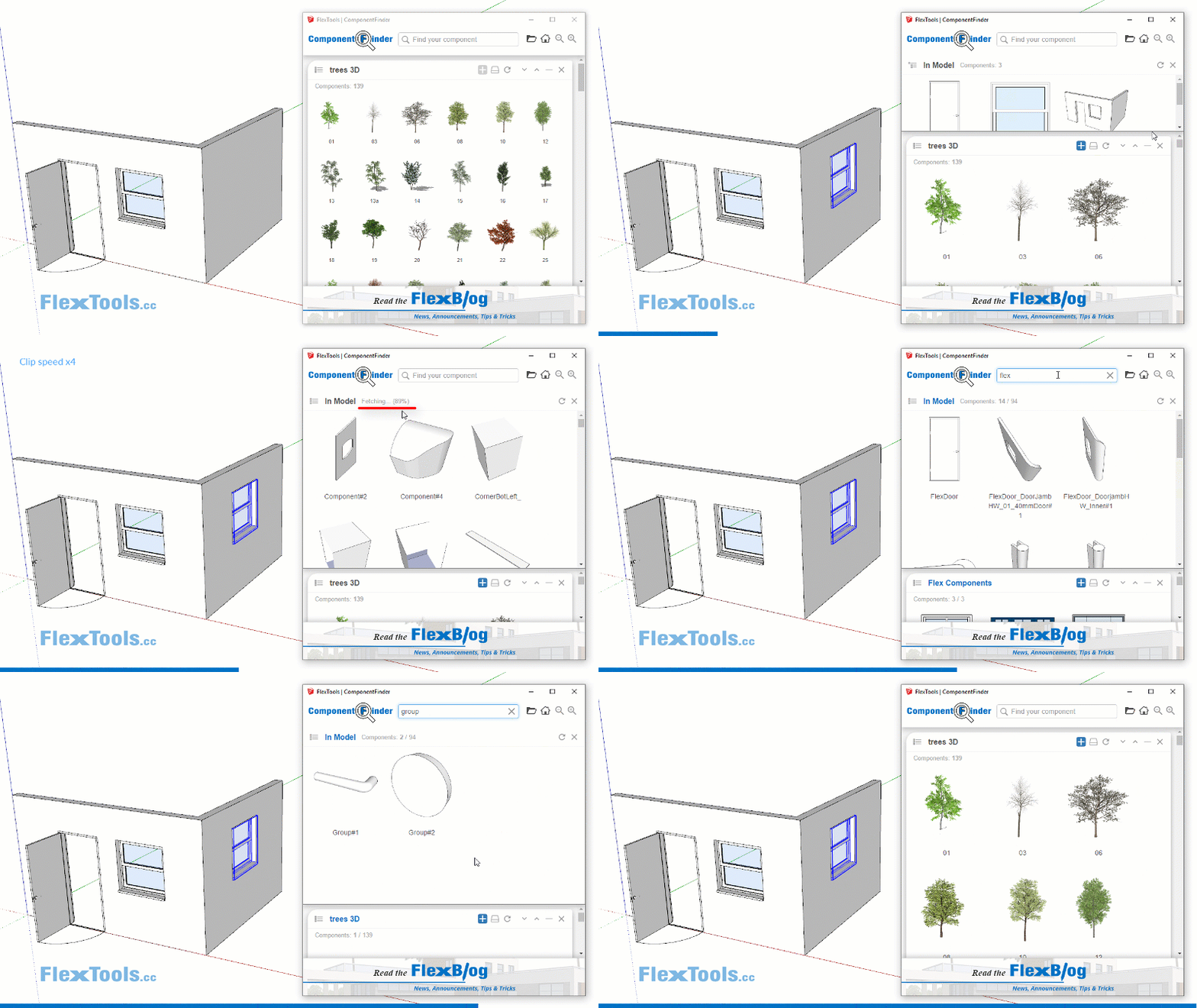
You can now browse and search through your In-Model Components and Groups with ComponentFinder!
Read more details on the FlexBlog.
-
Hi Halroach! Thank you for your wonderful plugin!!! It's extremely useful!!
I have a small issue though: sometimes the "loading you rlibrary" phase doesn't stop, so basically I can't use the plugin. If I restart the pc, everything works fine.I'm rurring on a SU2018...
-
@pibuz said:
Hi Halroach! Thank you for your wonderful plugin!!! It's extremely useful!!
I have a small issue though: sometimes the "loading you library" phase doesn't stop, so basically I can't use the plugin. If I restart the pc, everything works fine.I'm rurring on a SU2018...
Hi Pibuz,
Are you able to pinpoint in what situations this happens? Does it happen if specific folders were open in a previous session? Does the loading phase happen in the middle when you're working or only when Sketchup starts? -
Hi Hal! Thanks for your reply!
I'm actually using the plugin to visualize one single folder (with all its subfolders obviously) and I have about 60 models to report, not so much. I still haven't mapped the cases in which I encounter the issue, but I will in the next days! I'll let you know immediately!Thank you so much!
-
Hi! I'm back with some additional info: this morning I had this issue when opening a new sketchup project, while in the previous file I had the "component finder" window active with an ongoing search word.
-
@halroach said:
Meet ComponentFinder - our new super convenient tool, designed for, not merely browsing your library, but for actually finding the components you need. Easy, fast and all within SketchUp!
-
Enhanced Browsing - Choose the best way to view your components (navigation or flat-files)
-
Powerful Search - Quickly filter through your open tabs and components
-
Zoom In / Zoom Out - See larger or smaller component thumbnails
-
Save Components - Save components into ComponentFinder directly from Sketchup
-
Open multiple tabs at once - Select multiple folders from your local library and add them into ComponentFinder, all at once
ComponentFinder is an evolution of the FlexTools Favorites Library. It will now work with all components, not only with "flex".
Coming Soon!
The current version does not seem to be able to completely remove the component toolbar that has been created, and it cannot be removed from the SU view toolbar.
-
-
@halroach said:
Good news!
You can now browse and search through your In-Model Components and Groups with ComponentFinder!
Read more details on the FlexBlog.
You need the left side to display the tree classification directory, which can only be returned level by level, which is very inconvenient. The tree folder operation is unified on the left side, and it is convenient to display only the model on the right side.
-
@unknownuser said:
The current version does not seem to be able to completely remove the component toolbar that has been created, and it cannot be removed from the SU view toolbar.
Hi Apollo,
Sometimes it can take sketchup 2 restarts to properly update the toolbar interface correctly.
Close the generated toolbar, restart sketchup. Make sure the toolbar is still closed (and was not opened again, or open in another session of sketchup) and restart sketchup again.
Please let me know that it works out ok.
-
@unknownuser said:
You need the left side to display the tree classification directory, which can only be returned level by level, which is very inconvenient. The tree folder operation is unified on the left side, and it is convenient to display only the model on the right side.
I am not totally sure I understand what you mean. What I can say is that when viewing 'In Model' components, it will display them the same way how Sketchup's In Model components are viewed in the Components Tray. You can either view the first level (root) component definitions OR all the sub-components in the model.




Advertisement