[Plugin] ClothWorks v1.8.0 - 28 Apr 2024
-
Hi, I bought Clothworks in Belgium but my lisence doesn’t work in other countries, especially in France where I live half time with Belgium. I sent a request but no answer until now. Thank you for help
-
Licenses are not region restricted. So there's no reason why it can't work in France.
Send an email to support[at]sketchucation.com with your details.
-
Hello everyone,
If you are a Mac OS X user, please update to ClothWorks 1.7.6. For some reason, my xCode developer certificate was revoked. This prevents ClothWorks 1.7.5 from loading on Mac OS X (and throws an error). I have resigned with a new certificate. Hopefully, this one does not get revoked.
I appologize for the inconvenience!
Thanks,
Anton -
Hello everyone,
Announcing version 1.7.7, which fixes a bug with self-collision dramatically slowing down SketchUp. Please update!
Thanks,
Anton -
I've done the 1.7.7 through the Sketchucation Store twice now and each time Windows Defender is killing it as it sees part of it as a trojan.
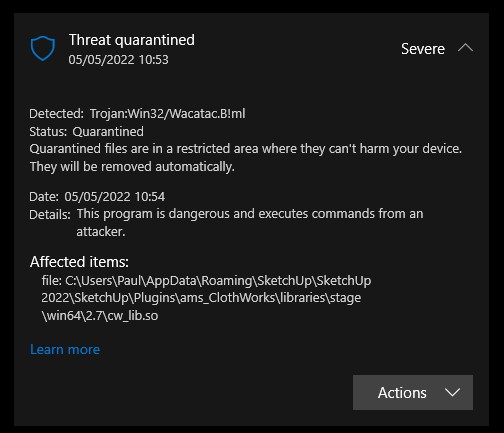
-
Hi, I'm getting a virus detection from windows 11 when I trying to install the latest clothwork plugin.
one time did install but the defender stop it to run and put in quaratine. at that moment I have notice the name was ver. 1.7.7a instead of 1.7.7
What I can do to solve the issue??
-
The current version is indeed v1.7.7a
I have it installed and get no virus/trojan messages.
I've scanned its files in Avast, Malwarebytes and Windows Defender, which all give no messages...Perhaps Anton has ideas ??
-
I am also having this problem. any ideas?
-
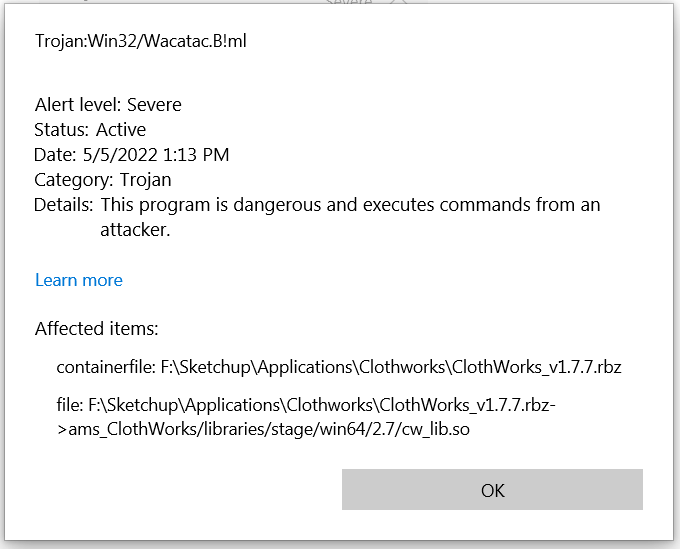
I got one too using Windows Defender. Might be a "false positive" bug. I don't know.
That's from a direct Defender scan of the rbz. Was also giving the warning when installing from SU extension manager.
-
Similar result

-
Anton is aware of the issue. So expect some type of fix.
For now I would recommend a full scan of your system to ensure Windows Defenders quarantines the suspicious file.
-
This is weird, because I have just completed scans using three different apps on that same RBZ [and also my whole PC]... and there were no problems reported at all !
-
It’s an odd one for sure.
It seems Windows Defender keeps a local history of its scans/results and for some reason it can (in my words) add 2 or more past results and produce a false positive. I think this is why some of us are seeing the results above whilst others aren’t. I’m 99% sure it’s a false positive. -
Hi, is this still an issue? Windows Defender for some reason stopped finding threats in my software after I tried scanning the binary multiple times and reporting it (assuming I reported it correctly). Let me know if Windows defender is still blocking this.
-
it worked. No more issue.

-
All clear on my end now. Was showing a trojan from Windows Defender from 2 days ago but after clearing my Defender history it stopped showing that. Must have been Gremlins!

-
It is working fine now, thanks.
-
Me too, all good now.
Thanks Anton -
Glad to hear it's resolved! Thanks everyone!
-
My license shows all seats taken, but I am only using one. The other two must be from previous installations on my old machine. Any way to have them released? I contacted clothworks@sketchucation.com , but no response so far.
Thanks.




Hello! It looks like you're interested in this conversation, but you don't have an account yet.
Getting fed up of having to scroll through the same posts each visit? When you register for an account, you'll always come back to exactly where you were before, and choose to be notified of new replies (either via email, or push notification). You'll also be able to save bookmarks and upvote posts to show your appreciation to other community members.
With your input, this post could be even better 💗
Register Login


Advertisement