sketchucation logo sketchucation
    • 登入
    Oops, your profile's looking a bit empty! To help us tailor your experience, please fill in key details like your SketchUp version, skill level, operating system, and more. Update and save your info on your profile page today!
    🔌 Smart Spline | Fluid way to handle splines for furniture design and complex structures. Download

    [Plugin] ClothWorks v1.8.0 - 28 Apr 2024

    已排程 已置頂 已鎖定 已移動 Plugins
    699 貼文 161 Posters 669.7k 瀏覽 161 Watching
    正在載入更多貼文
    • 從舊到新
    • 從新到舊
    • 最多點贊
    回覆
    • 在新貼文中回覆
    登入後回覆
    此主題已被刪除。只有擁有主題管理權限的使用者可以查看。
    • A 離線
      a4jp.com @Anton_S
      最後由 編輯

      @Anton_S Any updates for SketchUp 2024?

      1 條回覆 最後回覆 回覆 引用 0
      • D 離線
        dbrazina
        最後由 編輯

        I have just upgraded to Sketchup 2024 and Clothworks plugin will not load. I get the following error messages. I have uninstalled and reinstalled the plugin.

        Extension Errors Report
        SketchUp: 24.0.484
        OS: Windows 11
        Ruby: 3.2.2

        Extension: ClothWorks (1.7.7a)
        Error: NoMethodError (undefined method exists?' for File:Class) c:/users/dave/appdata/roaming/sketchup/sketchup 2024/sketchup/plugins/ams_clothworks/extension_manager.rbe:71:in block in require_all'
        c:/users/dave/appdata/roaming/sketchup/sketchup 2024/sketchup/plugins/ams_clothworks/extension_manager.rbe:69:in each' c:/users/dave/appdata/roaming/sketchup/sketchup 2024/sketchup/plugins/ams_clothworks/extension_manager.rbe:69:in require_all'
        c:/users/dave/appdata/roaming/sketchup/sketchup 2024/sketchup/plugins/ams_clothworks/main.rbe:746:in <main>' C:/Program Files/SketchUp/SketchUp 2024/Tools/extensions.rb:197:in eval'
        C:/Program Files/SketchUp/SketchUp 2024/Tools/extensions.rb:197:in require' C:/Program Files/SketchUp/SketchUp 2024/Tools/extensions.rb:197:in load'
        C:/Users/Dave/AppData/Roaming/SketchUp/SketchUp 2024/SketchUp/Plugins/ams_ClothWorks.rb:38:in register_extension' C:/Users/Dave/AppData/Roaming/SketchUp/SketchUp 2024/SketchUp/Plugins/ams_ClothWorks.rb:38:in module:ClothWorks'
        C:/Users/Dave/AppData/Roaming/SketchUp/SketchUp 2024/SketchUp/Plugins/ams_ClothWorks.rb:7:in <module:AMS>' C:/Users/Dave/AppData/Roaming/SketchUp/SketchUp 2024/SketchUp/Plugins/ams_ClothWorks.rb:6:in <top (required)>'

        Rich O BrienR TIGT 2 條回覆 最後回覆 回覆 引用 0
        • Rich O BrienR 線上
          Rich O Brien Moderator @dbrazina
          最後由 編輯

          @dbrazina said in [Plugin] ClothWorks v1.7.7 - 2 May 2022:

          I have just upgraded to Sketchup 2024 and Clothworks plugin will not load. I get the following error messages. I have uninstalled and reinstalled the plugin.

          Its not yet compatible with SketchUp 2024. The developer is aware and plans a release ASAP

          Download the free D'oh Book for SketchUp 📖

          1 條回覆 最後回覆 回覆 引用 0
          • TIGT 離線
            TIG Moderator @dbrazina
            最後由 TIG 編輯

            @dbrazina

            The error relates to

            File.exists?()
            

            this method was deprecated long ago and replaced with

            File.exist?()
            

            which is grammatically incorrect in English, but hey Ruby is international !
            The older version had worked for many years 'in tandem', but it's now been removed from the newest Ruby version which ships with v2024.
            So this now breaks older scripts that still include it...

            It's relatively easy to fix - I found 2 instances that needed fixing in the various SketchUcation tools scripts when I was preparing them for this current version !

            Another issue that the ClothWorks developer faces is that his code relies on some functions within some .so/.bundle files for different OSs, so he will need to compile new versions of these for compatibility with v2024's Ruby version...

            TIG

            1 條回覆 最後回覆 回覆 引用 0
            • jo-keJ 離線
              jo-ke
              最後由 編輯

              I hope, it will be updated.

              http://www.zz7.de

              1 條回覆 最後回覆 回覆 引用 0
              • A 離線
                Anton_S
                最後由 編輯

                Hi all, the ClothWorks is now updated for SU2024. Thank you for your patience!

                F X 2 條回覆 最後回覆 回覆 引用 5
                • F 離線
                  FlawinneF
                  最後由 編輯

                  Hi,
                  I receive an error message when importing a license.

                  18-Apr-24 19:13:56 validate_response_error Error in the License Validation--Response from Sketchucation: License seats exceeded.
                  18-Apr-24 19:00:51 validate_response_error Error in the License Validation--Response from Sketchucation: License seats exceeded.
                  18-Apr-24 18:59:02 validate_response_error Error in the License Validation--Response from Sketchucation: License seats exceeded.
                  18-Apr-24 18:58:45 validate_response_error Error in the License Validation--Response from Sketchucation: License seats exceeded.

                  TIGT 1 條回覆 最後回覆 回覆 引用 0
                  • TIGT 離線
                    TIG Moderator @FlawinneF
                    最後由 編輯

                    @FlawinneF
                    Have you got the newest version of the SketchUcation Tools installed ?
                    It handles the licensing system.
                    You can also login to you own licenses on this site using the link in the Extensions > SketchUcation submenu... My Licenses at SketchUcation...
                    https://sketchucation.com/webshop/my-licences.php
                    There you can manage all of your licenses...

                    TIG

                    F 1 條回覆 最後回覆 回覆 引用 0
                    • F 離線
                      FlawinneF @TIG
                      最後由 編輯

                      @TIG thank you, it's activated

                      1 條回覆 最後回覆 回覆 引用 0
                      • F 離線
                        FlawinneF @Anton_S
                        最後由 TIG 編輯

                        @Anton_S Why not fix the problem of the bar remaining active on Mac !!!

                        if tb.get_last_state == TB_NEVER_SHOWN
                          tb.show
                        else
                          tb.restore
                        end
                        
                        A 1 條回覆 最後回覆 回覆 引用 0
                        • A 離線
                          Anton_S @FlawinneF
                          最後由 編輯

                          @FlawinneF Thanks for that tip. I never knew about the get_last_state or restore. Will utilize in next release

                          TIGT 1 條回覆 最後回覆 回覆 引用 0
                          • TIGT 離線
                            TIG Moderator @Anton_S
                            最後由 編輯

                            @Anton_S
                            I use this usually

                            tb.show if tb.get_last_state.abs == 1 # TB_VISIBLE/NEVER
                            

                            Has the same result...

                            TIG

                            A 1 條回覆 最後回覆 回覆 引用 1
                            • A 離線
                              Anton_S @TIG
                              最後由 編輯

                              Version 1.8.0 released.

                              • Fix adaptive grid not working properly for some models on Mac OS X
                              • Show toolbar properly on Mac OS X. Thanks @FlawinneF and @TIG
                              F 1 條回覆 最後回覆 回覆 引用 1
                              • F 離線
                                FlawinneF @Anton_S
                                最後由 編輯

                                @Anton_S

                                Sorry I didn't, say thank you sooner, thank you for everything 🙂

                                1 條回覆 最後回覆 回覆 引用 1
                                • X 離線
                                  xinige @Anton_S
                                  最後由 編輯

                                  @Anton_S Hello, Mr. Anton. I don't know when you will initiate the redevelopment of MSPhysics. As far as I know, countless people are looking forward to this project. Alternatively, you can develop a plugin that can partially implement certain functions.
                                  For example, a simulation tool that can implement simulation functions similar to fusion360 and SolidWorks may not require embedding a physics engine (I'm not sure), but only adding axes and motors, as well as collision detection. Used for designing machinery, mechanical gif diagrams, and checking the rationality of mechanical design in sketchup. I hope to receive your reply.

                                  A 1 條回覆 最後回覆 回覆 引用 0
                                  • R 離線
                                    rick149
                                    最後由 編輯

                                    Anton
                                    ClothWorks is amazing
                                    I still use MSPhysics because nothing else is as good at what it does
                                    Can you supply me with code to

                                    1. turn layers on and off
                                    2. hide/unhide objects
                                      for me to use with my variables, keydown,, ontouch and ontick events in my MSPhysics scripts
                                      old msphysics video example here...
                                      https://www.youtube.com/watch?v=MTfpvgY1HBk
                                    1 條回覆 最後回覆 回覆 引用 0
                                    • N 離線
                                      Nicole_M_W Newcomers
                                      最後由 編輯

                                      Hello

                                      i am a huge fan of the plug-in, however i ran into troubel. Recently when i try to use it, the UI Window its not visible - not sure if its opening, but the app runs and i can play the cloths. I allready try to reinstallations and restarts. Any idea whre can i find back my UI Window?
                                      I am using multiple screens - also unpluging and classical Windows 11 windows search didnt help.

                                      Rich O BrienR 1 條回覆 最後回覆 回覆 引用 1
                                      • Rich O BrienR 線上
                                        Rich O Brien Moderator @Nicole_M_W
                                        最後由 編輯

                                        @Nicole_M_W If click the toolbar icon fails to display the dialog then open the ruby console and click the icon and see it there are errors.

                                        But since we don't know what version of SketchUp or Clothworks you are running its hard to say more really.

                                        The also an extension by Dan Rathbun that resets dialog positions if they are off screen. Its call Dialog Cascader. Search for cascade and you'll find it in our Sketchucation Tools in SketchUp
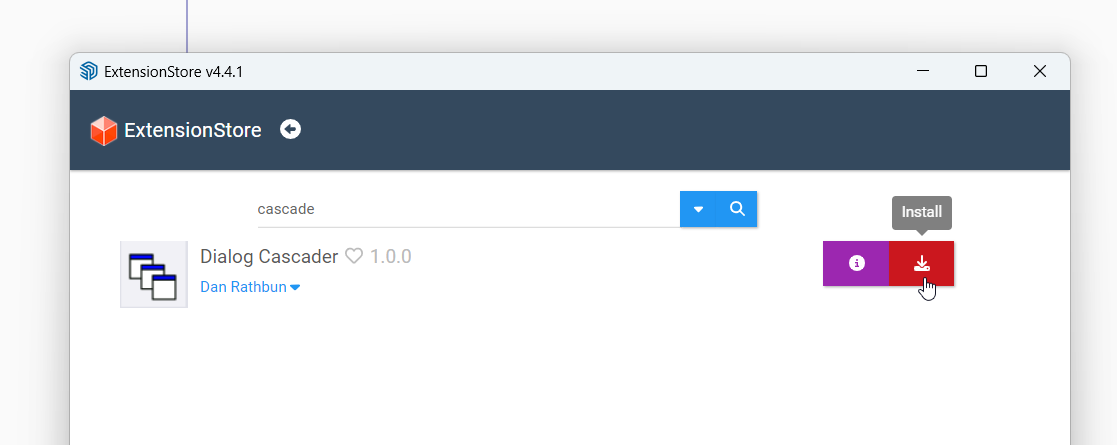
                                        36dcecf8-5d81-44c0-a259-132922a11d43-image.png

                                        Download the free D'oh Book for SketchUp 📖

                                        N 1 條回覆 最後回覆 回覆 引用 1
                                        • N 離線
                                          Nicole_M_W Newcomers @Rich O Brien
                                          最後由 編輯

                                          @Rich-O-Brien

                                          thank you! Excellent the Dialog Cascader solved my Problem right away. UI is back.

                                          I am on
                                          Clothworks 1.8.0a
                                          Skechup Pro ໿SketchUp Model૿{24.0.553

                                          just downloaded and installed the 24.0.0594 but i already applied your cascade solution so i can't tell if it was because of the missing update.

                                          thank you for your fast help!

                                          Rich O BrienR 1 條回覆 最後回覆 回覆 引用 0
                                          • Rich O BrienR 線上
                                            Rich O Brien Moderator @Nicole_M_W
                                            最後由 編輯

                                            @Nicole_M_W no probs. Dialogs playing hide and seek is common. Dan’s tool is a lifesaver

                                            Download the free D'oh Book for SketchUp 📖

                                            1 條回覆 最後回覆 回覆 引用 0
                                            • 1
                                            • 2
                                            • 13
                                            • 14
                                            • 15
                                            • 16
                                            • 17
                                            • 34
                                            • 35
                                            • 15 / 35
                                            • 第一個貼文
                                              最後的貼文
                                            Buy SketchPlus
                                            Buy SUbD
                                            Buy WrapR
                                            Buy eBook
                                            Buy Modelur
                                            Buy Vertex Tools
                                            Buy SketchCuisine
                                            Buy FormFonts

                                            Advertisement

